Desertcart purchases this item on your behalf and handles shipping, customs, and support to Argentina.
๐ Power up your productivity with smart, seamless backup
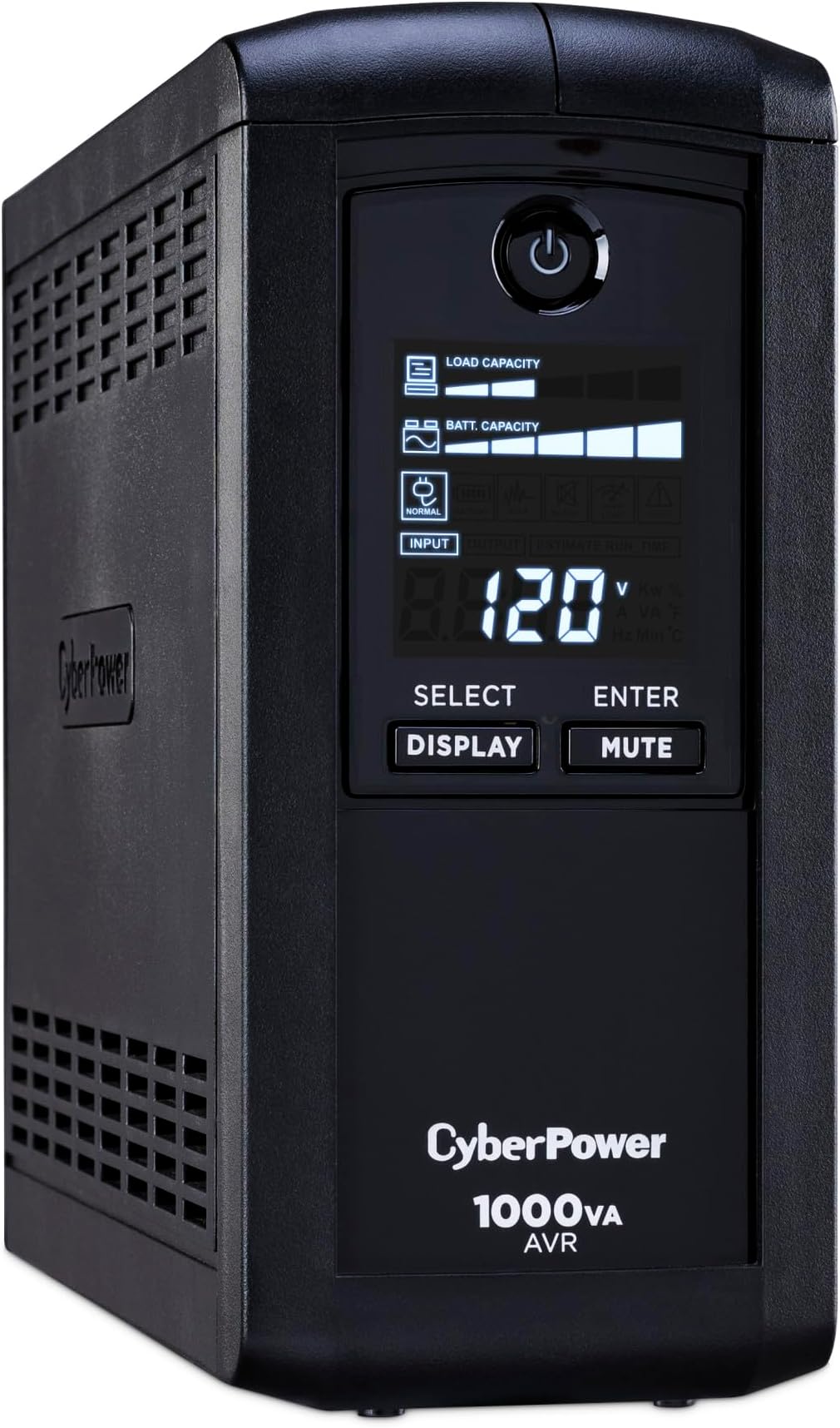
The CyberPower CP1000AVRLCD is a mini-tower UPS delivering 1000VA/600W of reliable power with intelligent LCD monitoring and Automatic Voltage Regulation. It features 9 outlets (5 battery-backed), surge protection rated at 1080 Joules, and a 3-year warranty including battery coverage plus a $350,000 connected equipment guarantee. Designed for professionals who demand uninterrupted performance and real-time power insights.


| ASIN | B000QZ3UG0 |
| Amperage | 15 A |
| Battery Average Life | 3 years |
| Battery Cell Composition | Lead Acid |
| Battery Cell Type | Lead Acid |
| Best Sellers Rank | #6 in Computer Uninterruptible Power Supply Units |
| Brand | CyberPower |
| Built-In Media | CP1000AVRLCD |
| Color | Black |
| Connector Type | NEMA 5-15P |
| Customer Reviews | 4.5 out of 5 stars 4,591 Reviews |
| EU Spare Part Availability Duration | 3 years |
| Enclosure Material | Plastic |
| Form Factor | Mini-Tower |
| Frequency Range | 57 Hz โ 63 Hz |
| Global Trade Identification Number | 00649532010004 |
| Input Voltage | 120 volts |
| Item Dimensions | 10.2 x 3.9 x 9 inches |
| Item Dimensions D x W x H | 14"D x 3.9"W x 11"H |
| Item Type Name | UPS Systems |
| Item Weight | 6.8 kg |
| Lower Temperature Rating | 32 ยฐF |
| Manufacturer | CyberPower Systems |
| Material | Plastic |
| Maximum Power | 600 watts |
| Mfr Part Number | CP1000AVRLCD |
| Model Number | CP1000AVRLCD |
| Number of Items | 1 |
| Number of Outlets | 9 |
| Number of Packs | 1 |
| Output Current | 15 A |
| Output Voltage | 120 volts_of_alternating_current |
| Output Wattage | 600 watts |
| Power Plug Type | Type B - 3 pin (North American) |
| Product Dimensions | 14"D x 3.9"W x 11"H |
| Runtime | 2 minutes |
| Specification Met | ENERGY STAR, RoHS |
| Surge Protection Rating | 1080 Joules |
| UPC | 649532010004 |
| Unit Count | 1 Count |
| Upper Temperature Rating | 104 ยฐF |
| Voltage | 120 volts |
| Warranty Description | 3 Year & $350000 CEG |
| Wattage | 600 watts |
C**O
Best option available considering price.
I spent far too much time researching UPS devices, so I thought I'd share why I chose this this CP1000. I already have a Tripp Lite 1000 on my older desktop, however once I converted to Windows 7 64bit, I could not get their software to install and yes it was the most recent version from their website, which says it is Windows 7 compatible. I have read that some UPS devices are apparently auto-detected by Win 7 and Win 7 can control them without additional software, but apparently not mine. So I have been living without the ability to auto-shut down that computer for a while now and rather than going thru a probably very long process of dealing with Tripp Lite's tech support to get a 4 year old UPS working, I just decided that my next UPS was not going to be a Tripp Lite, since they all use the same software and my battery will probably need replaced soon anyway. I ruled out APC because every time I compared them side by side, feature for feature, the CyberPower units were just as well reviewed and had better features for the $ (mostly surge protection and ethernet cable filtering because lighting has a straight shot into my computer via ethernet cable from the outside antenna via SiliconDust HDHomeRun HDHR-US Dual Networked High Definition Digital Television (White) ). I have a 2009 Alienware computer and I have already lost 1 hard drive in it due to a power outage in the middle of the night, so I did my research to find the perfect UPS for my situation. Not to mention that I have noticed some odd behaviour that could be attributed to inconsistancies in input power. After spending the time to understand sine wave vs. stepped square wave output (simulated sine wave), I was worried that my new computer may just turn off without shutting down properly once battery power kicks in because many computer power supplies (and flat panel TV sets) are Active PFC and they sometimes require sine wave AC power or else they just turn off. For those who do not know about this, the hardware required to make a DC battery output simulate the sine wave of the AC power coming from your electricity provider is very expensive and most devices work just fine with a stepped square wave output from the much cheaper devices such as this CP1000. This only comes into play after you lost power, but if you need your computer to stay on long enough to shut down, you need to address this. However I tested it on my cheap TrippLite1000 and it stayed on just fine and plenty long enough to shut down properly (thus the CP1000). Sine wave UPS units cost over 4 times the price for the same battery power and options. I had strongly considered the OR line or the OP line to make sure I was getting a narrower range of output voltage, however they were easily double the price after I realized I was going to need the RMCARD100 to enable shutdown. The one missing thought is isolation from outlet to outlet within the UPS. I do not believe this provides that level of isolation. Monster's PowerCenters do provide that but their UPS version is far more expensive than it should be. I just plugged the entertainment system into my old Tripp UPS and the computer into this new UPS and problem solved. I never used the disk that came with the unit, I just downloaded the most recent version from their website and it installed without any problems on my Win7 64bit computer. I unplugged it and my pc properly hybernated after the designated 1 minute wait. I did not have to set it to hybernate and I saw no way to change it, but hybernation is best because if there is a new document open and unsaved, a shutdown process would have halted. After I plugged everything in I found that my max load was about 350 watts and my normal load was 250 watts and it said I had 11 min of battery power.
T**T
Required if you have a NAS
So with Google now about to charge for photos, it's timely that I created my own NAS RAID server - network storage that is backed up by a 2nd backup drive. It's been a long journey not only finding but configuring the technology and migrating the data/including 2TB of mainly photos. I love Synology and the RAID NAS that I got. However, as a newbie I accidentally unplugged it and bricked one of the drives. After much heartache, I was forced to buy a new replacement hard drive and finally got it working. However, the experience taught me to prepare for a real power outage which happens a bit too often in my area. So I decided to get this, primarily because Synology said that it was a model directly supported. One benefit is that you can connect it to the NAS and the battery backup can send a signal for the NAS to shutdown which is awesome. Murphy's law I haven't had an actual power outage since I got it but it's great to know that my photos and data are protected. It's a large device and I like the display. Pretty high quality construction. I'll report back once I actually have an outage and see what happens. Easy to setup and the Synology shutdown part was also easy in that it autodetected the compatible battery backup and just had to enable it. *Update* Yesterday had our first big snow storm of the year and had a power outage. Worked perfectly and my NAS reported the power going out. It also reported that the battery backup would shutdown the NAS if the battery started to deplete. The outage was a slight outage for only a few seconds so it didn't have to run that much but it assured that the NAS didn't crash. As I stated earlier, the NAS always needs consistent power or there is a chance to fatally damage the disks. Worth it!
J**0
More useful than I thought
I purchased the CyberPower CP100AVRLCD as a business purchase and an extra security measure for my computer. I have to admit a little buyer's remorse when the package came in. I debated whether it was really that necessary or just a techie extravagance. My concerns were immediately alleviated when I printed to my laser printer. That printer is a little old and a power sucker. My lights dim whenever I use it, but I thought I had each item on a separate circuit. Apparently not. Immediately the UPS kicked in and modulated the electricity within a safe range for my computer. I have essentially been creating brown-outs whenever I print, putting extra strain on my computer and external hard-drive. The display is nice. It lets you know when the unit is active and turns off when it is not. The blue-lighted power button stays on as long as the unit is on. The size is very compact, but it is heavy as bricks. The setup is super easy. I have it set to my Mac Pro. There aren't many extended options for the Mac. You basically hook it to the compute via a USB cable and set your Energy Saver system preferences for the UPS. That control panel will allow you to determine how the computer responds when it is relying solely on the UPS and gives the battery level of the UPS. Other reviewers are correct in that the plugs are closely spaced, which can reduce the amount of equipment you can plug in depending on the plugs. Only some of the plugs are protected by the battery. The others have only surge protection. But you really just need the computer, monitor, and possibly extra hard drives on battery power. The less power drain on the battery will allow it to last longer. One thing I would be curious to know is whether the UPS computer shutdown will override requests by applications to save files and such. Normally the shut-down command times out if applications hold it up too long. I haven't tested this yet. UPDATE: About a year later and the UPS is still working great. I've been doing extensive electrical work on my house, and it saved me a couple of times when I forgot I left the computer on and shut of the main power. It will beep when the power is off but items are pulling electricity from it. The more electricity you are using from the battery the faster the beeping, which is a very nice attribute. It really helped me out when I had the power completely shut off to my house. Long story but I needed to get a hold of the permit inspector so I could set up a follow-up inspection. His number was on my email, so I hauled the UPS to my living room, hooked up the wireless router and cable modem, and was able to connect to the internet with my laptop. Update: about 2.5 years later and it is still working well. Update: It is about 4.5 years after purchase. The battery has some issues. I do not know if it is because of age or if it is inherent to the product but unnoticed until the situation arose. Issue#1 The power went out while I was walking the dogs. I returned to my computer shut down from power failure. Our walks take about 20minutes, and the power probably did not go out right at the beginning. I am assuming it was out about 10minutes. I would think it should allow for power that long with just one inactive computer and monitor. Most likely the battery is just old now. Issue #2. There was a brown-out. I now have 2 computers plugged in. An old mac pro and a new one. The old one was fine but the new one shut down immediately. The brown-out lasted a few second and the battery kicked in right away. I am wondering if the system let through a power fluctuation that the new mac pro is more sensitive to. This one I would be more concerned about if buying new.
S**H
Reliable Power Backup with Useful Features, Just a Bit Pricey
This UPS does exactly what itโs supposed to do and does it well. Setup is simple, and the LCD screen gives clear, useful information about load, battery status, and runtime. The AVR (automatic voltage regulation) is a huge plus, it keeps things stable without constantly switching to battery power. Itโs been reliable during outages and gives enough time to safely shut everything down. It has 5 battery outlets and 4 standard surge outlets, for a total of 9 outlets. It is very heavy for its size which is a good indicator of high quality battery cells. The pure sine wave output definitely gives peace of mind while running expensive equipment. The only downside is the price, it feels a bit high for the capacity. That said, youโre paying for reliability and peace of mind, and it delivers on both.
J**N
All the features I need
I purchased this CyberPower UPS to replace the smaller capacity battery UPS unit(APC 450VA Back-UPS (BE450G)) for my main PC (I have 2 of these smaller APC brand UPS units. 1 for the other PC and 1 for my home theater system where they work as intended with much smaller power load needs). The APC unit would only run for about 2 minutes on the main computer, during which time you get a warning siren, then they just stop as the battery runs low. This is OK to just shut down the system if you are sitting at the computer when the power fails. My main computer runs about 10-14 hours a day so this unit gets a real workout. This CyberPower UPS unit has a USB cable that runs to the PC so you can see the current UPS system status(battery charge level etc) as well as review any current/past power interruptions from your PC monitor. The screen show a history of 3 past power conditions: 1-Power outages, 2-Under voltage, 3-Over voltage conditions in 1 of 4 time frames: Last week, 4 weeks, 12 weeks and 24 weeks. From this screen you can set the UPS to put your computer into either 'turn off' or 'hibernate' mode(your choice) when the battery gets low. There is also a functional front panel display. On my system I have a 'custom built' computer with 600w PSU, dual core AMD 7850 CPU, 4 GByte Memory, 2 CD/DVD burners and 4 Hitachi 1Tbyte HDDs, a Samsung SyncMaster 2494 24" widescreen 1080p monitor and eVGA GeForce GT 240 GPU on the Battery UPS side. With this power load I get about 18 minutes of run time. I put my printer, 10 external HD drives and other external products on the non-battery side of the CyberPower which are Surge-only protection outlets. This saves battery power during power failures on devices I don't need to keep running. I also love the real time on-screen capability. I live over 1 mile back in the woods off of a gravel and dirt road in the NE Georgia mountains and we get power problems quite often here mostly from tree limbs falling on the power lines. This unit is great for me because I can usually finish what I'm working on and then close my apps before system shutdown. I will definitely purchase other CyberPower units in the future. 05/11/2011 I have purchased another of these units for my Home Theater system about a week ago. I don't know the standby running time since I haven't had a power failure yet. The main reason for this unit was to protect the electronics.
C**O
My second CyberPower UPS - still satisfied
UPDATE 12 DEC 2020: I bought a third one to work from home during COVID19 pandemic. At first I thought it was a oddity but each time there was a power outage or transient event this UPS would just shut off. I noticed my return period was over so I decided to open the case and check it out. I suspected the battery was not connected and sure enough, the positive cable wasn't hooked up. The UPS LCD display shows 100% battery even though the battery wasn't connected. Now that it is connected, it was at 71% which is odd for never having been charged for almost 3+ months. In any case, it works as expected now. if there is no line voltage, the UPS goes into battery mode. Original reviews: CyberPower CP1000AVRLCD 9-Outlet UPS (1000VA/600W) This is my second CyberPower UPS, and I bought this for my home theater system. The other unit I purchased was a much larger UPS for my gaming systems and other electronics. I overestimated the capacity of those systems so I opted for a smaller UPS. In retrospect, I should have gone with the larger unit because the flat screen LCD TV I have consumed quite a bit of power. With a capacity of 600W, the 40" LCD consumes over 100W. The home theater PC takes over 100W as well, so I am already at 50% capacity. This does not allow for much reserve time in case of a power outage, but I mainly wanted extra protection for the sensitive electronics and enough time to shut down the PC to prevent data loss or damage to the components due to brown outs. The 9-outlets are not all connected to the battery backup. I opted to use a surge protector in conjunction with the CyberPower UPS. As with the previous UPS, I did not hook up the USB connection and I did not install the drivers. Don't test the UPS by pulling the cord, but instead you can test it by shutting off the circuit breaker for that outlet. Overall: 5/5 stars, affordable and gets the job done. Highly recommended due to battery backup, automatic voltage regulation/conditioning, and protection from brownouts as well as surges.
T**W
Small flaws, but overall great UPS
I live in an area where having a UPS is essential. Frequent power outages and power sags due to very tall trees literally right next to the power lines. This is my 2nd UPS (the first one is a Tripp Lite 1000VA that was over 4 years old and died recently). The things I need battery backup for are less than 150 watts. You might be wondering why I went with this UPS when I have such low power requirements. The reason why I didn't go with a smaller and cheaper UPS is because most UPS devices under $90 do not have Automatic Voltage Regulation (AVR). I didn't realize this until I looked very closely at the spec sheets on APC, CyberPower and Tripp Lite's web sites. The good news is that not everyone needs AVR. I need it in my area though, because of how easy it is for us to have power sags in low wind. Many years ago before I bought my first UPS, a sudden drop in power (not a complete power failure) during a wind storm ruined one of my computers that was turned on, so I don't take the risk anymore. Anyway, when I received this UPS, I was pleased with the appearance. Maybe it's just me, but in the photos the plastic looks cheap. In person, the quality looks and feels good. My old UPS didn't have an LCD screen so this is a nice change. I just wish the power button wasn't so big. How many times are you going to press it? I don't plan to press it very often. Also, in the photos, it gives the impression that the power button is grey with a blue outline. However, my power button is completely clear so it's like having a large and bright blue light on the front. It lights up a lot of my bedroom and can be distracting when I'm trying to sleep. I just try and put my computer chair in front of it to block the light before bed time. The 2nd and only other design complaint I have is that the power outlets aren't quite spaced out enough. On the CyberPower web site for this product it says, "Transformer-Spaced Outlets - Widely-spaced outlets accommodate large transformer-based plugs without compromising the utility of other outlets." I have not found this to be true. I plugged in a large transformer-based plug into one of the outlets on the edge and there isn't enough room to insert a normal size plug next to it. Oh well. To be fair, I guess they can't space it out anymore without making the unit bigger. What I have plugged into the battery backup outlets on my UPS: *HP EX495 MediaSmart Server *2TB Western Digital Elements external hard drive *Linksys Wireless Router Runtime is 70 to 80 minutes for what I have connected. I wish I could plug in my cable modem as well (it only uses 10 watts), but like I mentioned above, it won't fit since the bigger plugs on the wireless router and external hard drive take up two slots. Nonetheless, I'm still very pleased with my purchase. Pro -Completely silent on utility power. Very quiet on battery power -It has AVR (cheap UPS units don't have it) -LCD Screen -Long runtime (for me) -3 year warranty -Includes software for automatic shutdown when you're away Cons -Large bright blue power button on the front -I wish the outlets were spaced out more.
L**H
Don't do it .. simple.. don't -- 2 yr later review
I bought this in 2022, so here's an almost 2 yr later review(I'm writing the review in 2024) When I initially bought this, I connected it to a Cisco switch, a modem, and a router. I was getting a solid 120 mins(just like it said on the screen). I even debated ordering a second one. 2 yrs later, it shows 70 mins but it gets about 20 minutes. Thankfully, I ran regularly ups battery tests, not through the app but I just cut power to the ups and wait till it's almost dead, then restore power. This was how I noticed that it shows 70 mins of battery time on the load it sense but in almost... if not less than 20 mins, it just DIES! Now here's the thing... if you're buying this ups to have enough time to power off your equipment great! But if you're like me and you're buying it to have about 30 mins to an hour of wifi when the lights go out, you'll be fine for a yr or two, then be ready to buy a replacement. Software: They have a cyber power software called PowerPanel, you get it for free but if you want to be able to set up the mobile app so you can control your ups on your phone, then you'll have to pay $11.99 per year for one ups, about $35 for 3 ups' , etc etc. So why would you want the mobile app?.... so you can get alerts on your phone when things go offline... or when the battery is being discharged, or the ups is almost out of power. Although, you can get around the app by setting up a smtp(mail) and receiving emails instead. Noise: It's pretty quiet when not discharging. However, when it's discharging.... loud beeping(just like any other ups) and what i think is a fan noise. I don't mind. It's alright in the noise sector. Compatibility: you can plug anything into it. It has a regular us outlet. Oh by the way, you cannot plug one ups into another. Recommendation: Personally no. I don't think I'll trust cyberpower ups' again. The fact that it shows 70 mins expected time and only does 20 is insane to me. Cannot be trusted. Here's what I'll say though: 1. If you're someone who just wants 10 mins so you can power everything off and you know enough to setup the smtp alerts, sure, go for it. But if you're not sure how to set up smtp and you're not willing to learn from a YouTube video or sth... then be prepared for the 12 dollar cost. 2. If you want something to actually provide you with battery backup... maybe you're working from home so you want your wifi to last an hour in case of a power outage, DON'T DO IT! DO NOT.... you'll be in for a not so fun surprise. 1 star that it was good in the beginning. Another star for... idk... let me leave it at one
P**O
Parece ser un buen no break.
Es un buen producto, claro hay que saber comprar estos aparatos, este CyberPower CP1000AVRLCD por ejemplo es de onda simulada, es decir en un osciloscopio verรญas la onda escalonada, esto no es recomendable para algunas computadoras con fuentes de poder especializadas que requieren onda sinusoidal suave (ondas, con valles y crestas totalmente suaves y degradados, como las que salen de un generador por inducciรณn). Lo comprรฉ para proteger un televisor 55" de 135W y un home teather HK de 150W (con unos perifรฉricos que no suman mรกs de 50W en total), por lo que mi consumo mรกximo serรก de 335W y quizรก agregue un pequeรฑo subwoofer para home teather de 100W (este no break soporta hasta 600W), asรญ que estoy sobrado y quizรก me dรฉ unos 20 minutos de respaldo. Esporรกdicamente conectarรฉ tambiรฉn una notebook de 35W de consumo, que no es demasiado. Es fรกcil de configurar y para la mayorรญa de los casos es suficiente con los arreglos que trae de default, la opciรณn de proteger el cable (o la HDTV-TDT) es un gran plus, y tambiรฉn la protecciรณn de red es otro buen plus (recomiendo usar sรณlo cables de red STP de clase 6 a 8, para la mayorรญa de los casos es suficiente un STP 6A de cobre puro OFC ~AWG 26 a 23~, que sin problemas maneja redes GB ~hasta 10 si la memoria no me falla~, y frecuencias de hasta 550MHz), no recomiendo loa cables UTP pues pueden recibir algo de interferencia y mรกs en estos tiempos donde estamos invadidos por tantas ondas electromagnรฉticas que pueden generar interferencias o micro corrientes parรกsitas. El problema que le veo es el software, no es muy difรญcil pero no es para usuarios principiantes, en mi caso no lo usarรฉ pues la notebook no estarรก conectada permanentemente, pero es un punto a considerar para quienes usarรกn esto por ejemplo en un servidor personal que piensen montar por su cuenta. Espero sea duradero y mรกs por su garantรญa de 3 aรฑos, ojalรก no tenga problemas al registrarlo pues el recibo de Amazon no es factura, pero no creo que haya problemas, pues desde la pรกgina de cyberpower te redirige a Amazon como una de las opciones de compra en lรญnea. Es de notar que los contactos que dicen que sรณlo dan protecciรณn contra picos (estรก dividido en contactos con protecciรณn y baterรญa y sรณlo con protecciรณn de picos), mantienen la alimentaciรณn de corriente aunque el no break estรฉ apagado, ahรญ pueden conectarse por ejemplo aparatos como el echo dot, Roku, Fire, smart hub y algunos perifรฉricos que no requieran suministro continuo de energรญa durante los apagones y fallos de red elรฉctrica, pero sรญ requieran energรญa de la red elรฉctrica 24/7. En cuanto a estรฉtica es muy austero, no parece de calidad pero funciona perfectamente y sรณlo tiene 3 botones al frente, el LCD se lee claramente y es blanco; sin dudas en un tiempo comprarรฉ uno de estos para cada televisor de casa.
F**0
Nice unit, good extras, works nicely with my NAS
I'm running a small file server and have been experiencing power glitches during the recent heat waves. The Cyberpower CP1000AVRLCD was on the compatibility list for my Synology NAS, so I went for it. It's a compact but hefty unit, as one would expect considering the built-in lead-acid battery. What surprised me a bit was the solid construction, the number of little extra bonus features, and particularly the usefulness of the front LCD display. Among other information, this gave me an estimate of uptime I could expect under my current load - much longer than I'd hoped for. More good news: compatibility proved to be no problem - when I plugged in the USB connection, my Synology DS920+ immediately recognized the UPS by name. I do think plugging most PCs into a UPS is a bit silly. I only run software that's smart enough not to lose my data in the event of a crash (for example, Scrivener for word processing, instead of Word). But the possibility of a server being interrupted in the middle of a write operation is a worry I can do without. Problem solved.
H**R
Recomendable
Funciona muy bien En mi ciudad cuando sube la temperatura hay muchos cortes de luz los cuales a soportado muy bien y me da 20 min en una computadora gamer con 2 monitores
A**H
Works with Active PFC Power Supplies.
TLDR: Works with my Active PFC PSU (Corsair HX650, SeaSonic X-650W and XFX 650W XXX, it also functions perfectly with the SeaSonic X650), provides roughly 35m of idle battery time, under load this drops to about 10m or less depending on what I am doing (OCCT & FurMark). I purchased this product after looking for a UPS to protect my $2000 PC, at first I spent the first few days researching brands and features, I came to the conclusion that APC was the best but was also much more expensive as a result, Cyberpower was equally good in terms of quality but due to being lesser known they didn't have the premium APC carried but offered near identical product offerings. After I figured out which brand I was settling on I spent a few hours searching up information on Active PFC power supplies and UPS's, most people said they wouldn't work or that I needed to get a pure sinewave UPS offering which would have made the unit cost 50% more. I have an Active PFC (APFC) power supply in my PC, the Corsair HX650, this unit functions correctly with the Cyberpower UPS I purchased, the only people that seem to have issues are those which have power supplies made by Antec (Lower-end models) or Enermax. Upon researching this I found an interesting article on JonnyGuru (http://www.jonnyguru.com/forums/showthread.php?t=3964) which based on the first supply was more than enough proof to make me confident in my purchase. I tested this unit with OCCT and Prime95 running and both were causing my PC to shoot up to 150w of usage, I unplugged my PC during these stress tests and nothing shut down, I also tried doing this with FurMark running which causes my usage to go up to around 225w and I still had an estimated run time of 10 minutes with a total charge of 65% on the battery. I am impressed by this to say the least as the battery backup was a secondary feature I wanted and the main feature I purchased this for was it's AVR which is causing my voltage to be stable and not rapidly change from 113v - 123v every minute or so. I have the following PC specifications Intel Core i5 4690k (4.5GHz) Gigabyte GTX 760 OC Corsair HX650 Western Digital Blue 1TB Hard Drive (7.2k RPM) Crucial MX100 128GB SSD BenQ GL2450 24" LED Monitor BenQ GL2460 24" LED Monitor - This PSU has Active PFC - This UPS is not a Pure Sine Wave model - The estimated run time with 225w is between 10 - 14 minutes - The UPS smells like new plastic - The UPS is dead silent except when it is using it's battery which causes a noticeable hum for both the PSU and UPS - The AVR functions correctly and is quiet while doing so! - There is a self test function with the included software download for PowerPlan Personal Edition
D**T
Me ha servido bastante bien
Me ha evitado dolores de cabeza, lo recomiendo bastante
Trustpilot
2 weeks ago
4 days ago