Buy anything from 5,000+ international stores. One checkout price. No surprise fees. Join 2M+ shoppers on Desertcart.
Desertcart purchases this item on your behalf and handles shipping, customs, and support to Argentina.
🖐️ Elevate your workflow, not your wrist!
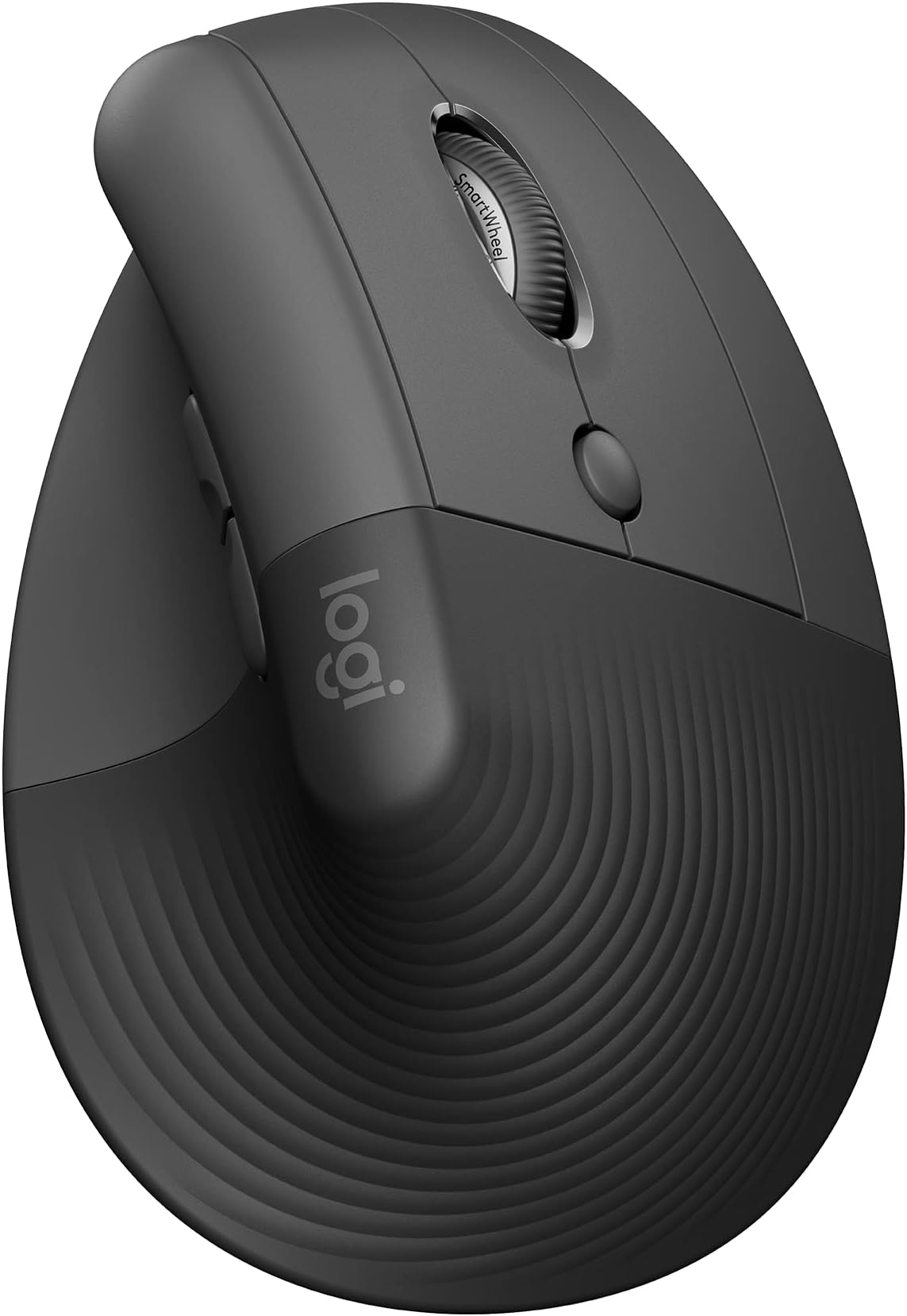
The Logitech Lift Vertical Ergonomic Mouse is a right-handed wireless mouse designed for small to medium hands, featuring a 57-degree vertical angle to reduce wrist strain. It offers multi-OS compatibility (Windows, macOS, iPadOS, Chrome OS, Linux) and connects via Bluetooth or Logi Bolt USB receiver. With 6 customizable buttons, whisper-quiet clicks, and a SmartWheel for precision scrolling, it supports up to 3 devices with Easy-Switch. Made with up to 70% recycled plastic, it boasts a 2-year battery life from a single AA battery, making it a sustainable, comfortable, and efficient choice for professionals seeking ergonomic relief and productivity.


| ASIN | B09J1TB35S |
| Additional Features | Ergonomic Design, Touch Scroll, Wireless |
| Antenna Location | Laptop, Office |
| Are Batteries Included | Yes |
| Are Batteries Required | Yes |
| Battery Average Life | 24 months |
| Best Sellers Rank | #7 in Computer Mice |
| Brand | Logitech |
| Built-In Media | 1 x AA Battery, Lift Vertical Ergonomic Mouse, Logi Bolt USB Receiver, Quick Start Guide |
| Button Quantity | 6 |
| Color | Graphite |
| Compatible Devices | Laptop, Personal Computer, Tablet |
| Connectivity Technology | Bluetooth |
| Customer Reviews | 4.4 out of 5 stars 14,612 Reviews |
| EU Spare Part Availability Duration | 2 Years |
| Embellishment Feature | LED |
| Enclosure Material | Graphite,Plastic |
| Global Trade Identification Number | 00097855170927 |
| Hand Orientation | Right |
| Hardware Platform | Mac, PC |
| Item Dimensions L x W | 4.3"L x 2.7"W |
| Item Type Name | Mouse |
| Item Weight | 125 Grams |
| Manufacturer | Logitech |
| Mfr Part Number | 910-006466 |
| Minimum Required Operating System Version | Windows 10 |
| Model Name | Lift Ergo |
| Model Number | 910-006466 |
| Mouse Maximum Sensitivity | 4000 Dots per Inch |
| Movement Detection | Optical |
| Movement Detection Technology | Optical |
| Number of Batteries | 1 Lithium Polymer batteries required. (included) |
| Number of Buttons | 6 |
| Operating System | Chrome OS, Windows 10, Windows 11, iPadOS 14, macOS 10.15 |
| Pattern | Mouse |
| Power Source | Battery Powered |
| Range | 10.0 meters |
| Special Feature | Ergonomic Design, Touch Scroll, Wireless |
| Style Name | Right-Handed |
| UPC | 097855170927 |
| Unit Count | 1.0 Count |
| Warranty Description | 2 year Manufacturer |
S**N
Best mouse ever!
I am right handed but have used a mouse on the left side for years. I was using an Apple trackpad and I noticed wrist pain from the side to side motion so decided to look for an ergonomic left hand mouse. This Lift is AMAZING! I love it. Can be on the computer all day and I have no wrist, arm or hand discomfort. And the battery life is insane. I am going on 7 months and the original AA battery in the mouse is presently at 90%. The size options are super helpful as well to customize your experience. Don't hesitate - just get it - you'll love it!
J**J
Good scroll wheel, coming from g305, 18cm hand
For reference my hand 18 cm measured from the first crease after your palm to the end of my middle finger. I flexed my wrist and the first crease I used as my end point for my palm. My arms are at a 90 degree angle, and my wrist is neutral (not flexed up or down) due to my wrist rest keeping my wrist straight. Most of my arm weight is on my memory foam wrist rest. My review is based on my personal hand size 1 month update: I have not noticed any staining on my white lift. But I am also a pretty hygienic person and I never touch my mouse if I touched food. 1 year update: Still have not noticed any staining. I do wipe it with a baby wipe maybe once every 1-2 weeks though. One thing to note is that in order to use shortcuts you need to have the Logitech Options+ software installed. The shortcuts/settings you program to you buttons aren't saved on the mouse. Also annoying since the software takes a substantial amount of CPU usage (why????). Wrist pain: This might be because I don't have arm rests so the weight of my arm is resting on the wrist wrest, but I had some minor wrist pains within an hour or so. It didn't really feel like a muscle or bone kind of pain, but a nerve/soft tissue pain. When I didn't use a wrist rest, the weight was mostly the side of my hand, in particular the bony part near the wrist. That part rubbed when moving the mouse around if you don't lift your arm. Edit: After some adjustment I no longer get any wrist pain, even when gaming. Palm grip: I think palm grip would be unusable for this mouse. My fingers extend 0.5-1 cm after the end of the mouse (where the left and right buttons start curving). When clicking the mouse it almost feels like im clicking with my finger joint instead of my fingertip. With a relaxed thumb (thumb slightly curved and only fingertip touching mouse) it is pretty easy to click the side buttons. Side of thumb can press upper button, thumb joint can press lower button. With the entire thumb fully in contact with the mouse, the upper button is a bit awkward to press but possible, and the lower button is the same as relaxed thumb position. Awkward to use the scroll wheel since you have to curve your fingers quite a bit to get your finger tip on the scroll wheel but still usable. Also because of the hand angle, I found it much more comfortable using my middle finger to use the scroll wheel instead of my pointer finger that I use normally. Fingertip grip: Personally I found it feeling different, but perfect. My finger length is perfect so my fingers land around or slightly below where the left and right mouse button start to curve. When I click, the direction of the force from my finger is more diagonally down and to the left. If my fingers were a bit shorter, it the force would be to the left. I found this diagonally force feels more natural, kind of like squeezing a trigger (kinda) instead of just squeezing a mouse. It is hard to describe. In this grip, the only part of my fingers (including my thumb) that are touching the mouse are my fingertips. My palm is resting on the mouse. Thumb characteristics is same as palm grip. Scroll wheel characteristics same as palm grim. Claw grip: Works fine, only problem is pushing lower thumb button is a bit awkward since you kind have to shift your entire thumb back but it is still possible. Easy to use scroll wheel since your fingertips end right next to it Compared to g305: The Lift is much more comfortable and natural. I got used to the Lift very quickly. In comparison, the g305 felt like a petite mouse. The g305 felt hollow, like there was nothing supporting my palm. I didn't have any issues with the mouse shifting when clicking it on my mouse pad. Even on a smooth surface with no mouse pad it would happen rarely. Scroll wheel: Excellent combination of a normal scroll wheel and a free one. I can scroll down all the way to the end of reddit threads and spotify playlists in one scroll. Going back up takes a few scrolls however since I apply less force. Smooth scroll supplied by Logitech Options+ is also nice. Makes it feel like scrolling has inertia. There a lot of very nice features in Logitech Options+ like Logitech Flow
A**N
Bad auto driver install. Great mouse. Few of the left hand mfgs.
Really crappy auto driver install. Locked up my USB ports for my usb keyboard, usb mouse, all usb ports in fact. Had to reboot multiple times with an old style 5pin keyboard since the software screwed up my usb ports. All of them. Lucky I have a motherboard with an old style keyboard port. A reboot of W11 in safe mode, ripped out auto-installed software, registry keys and rebooted to regain control of my USB ports. I do not know what went wrong. Alls I know is Logitech loaded something, it locked up my USB ports and I had to rip everything Logitech out to get control again. I downloaded the software, installed it and it worked fine. I've had no problems since. I'm an old lefty and as such am ambidextrous in most areas, since there just was not left handed oriented items readily available. You had to have left handed stuff made so you learned to do things right handed. I've developed carpal tunnel in both elbows and had purchased a couple of vertical mice, one left and one right. I took the left into work and was looking for a replacement. My other two were around $30 ea. I liked the right handed vertical mouse (Anker). They do not make a left handed version. The left handed mouse is ok, not as good as the Anker. I decided to go above my spend tolerance and get the Logi after reading many reviews. It has not disappointed me. The auto-install sucked. Never letting that happen again. It is a nice smooth mouse. Fine movements that are easily adjustable. The hand position is excellent. I can use this all day without switching to the right because of elbow pain. If you have the pain, you know what I am talking about when it flares. It takes some getting used to the subtlety of the clicks when coming from lower cost mice. Soft and gently like a newborn's .... One of my big criteria for a vertical mouse is a landing area for the outer two fingers (pinky and next to pinky for finger orientation challenged). When you go to a vertical mouse, it takes some adjustment to moving the mouse since you can't really press down with your palm and inside two fingers (the ones next to the outside two fingers). It is helpful to be able to use the two outer fingers and thumb to aid in moving the mouse. You have to experience a vertical mouse to understand. The right handed only Anker goes from an inch to a half inch in the length of my pinky below the buttons on the side. This is a really nice landing area for the outside fingers to assist moving the mouse around. You can squeeze a little and the mouse glides. The Logi mouse is a wee shorter than the Anker and the area below the buttons in a mostly straight 3/4". Both mice curve quickly down to the inside below this area. I was used to a vertical mouse by the time I purchased the Logi and I have no issues with the pinky dragging the table and the finger next to pinky resting on the landing. I move the mouse with no problems. It is the subtlety of how one interacts with these style of mice. The big plus, takes a long time before mouse use causes pain flareups. And this isn't just a pain and done. Depending on how one ignores the pain, often determines how many days life sucks. The Logi mouse minimizes the flare ups. I'm thinking of taking the Anker in and getting a right handed Logi for home. I like the Anker, I'm frugal and highly recommend it for getting your feet wet. I love the Logi (auto-install sucks) and will probably ignore my frugal tendencies and get a right handed one since I don't switch hands as frequently with the Logi in the mix. Don't have to suffer auto-install either.
B**Y
Saved me from big injury ! Provides relief for carpal tunnel
Very comfortable to use, good quality, easy to switch between devices. Durable, compatible with multiple devices I have
P**O
Handle type mouse.
This may seem a bit too biased since I already like logitech products but there is a bit cool and not so hot on this mice... so build quality as always will be top quality and top of the line.. thats what you get with logitech and the somewhat premium price. scrolls good but gets a bit of getting used to due to the handle type hold for the mouse and what kinda reminds me of the trackball days. this is a bit of that with a regular mouse movement tied in. track is good as long as you set it your speed and resolution matches hand coordination. This is practically compatable with a phone if you ask it to. and is very capable.
F**I
Great product!
It took me a while to get used to it, and it’s a little cumbersome to move sometimes, but overall I am glad that I made the switch. This has helped me a lot with my carpal tunnel. I have really small hands and this works really well.
A**M
Excellent ergonomic mouse for long work hours
The mouse is comfortable, lightweight, and the quiet-click buttons are a great feature in an office environment. The Bluetooth connectivity was simple to set up, and I appreciate the option to use the Logi Bolt USB receiver as well. Battery life has been excellent so far. The customizable buttons and smooth scrolling improve productivity, especially when working across multiple applications. The only thing to note is that users with very large hands may want to verify the sizing before purchasing.
D**.
Initial thoughts
Updated review, 1 year later: This is still my favorite mouse. I only thought to come and update the review because I wanted to see when I'd purchased it since my battery just died. My original battery. I use this mouse every single day, generally for several hours every night, but up to like 12 hours on the weekends sometimes (*sigh* gaming). For one AA battery to have lasted through that for almost a year is absolutely bonkers. Also, for one mouse to be so comfortable for such extended periods of use is incredible. I will say that keeping the grippy part clean is kind of a chore. I haven't figured out the best way to clean that off, and it's strange that it gets so dirty because I mostly do not touch anything on my desk unless my hands are clean. I'm a keyboard fanatic and don't want to potentially dirty or discolor my keyboard keys, so I'm meticulous about this, but I guess there's just no getting around that skin oils and just...skin will eventually get on everything you touch, if you touch it long enough. Minor cleaning issues aside, if I could use one mouse for the rest of my life, it would probably be this one. ------------------------------------------------------- I've only had this mouse for a few days, but I'm shocked at how quickly it's become my favorite. Previously, I was using a vintage Logitech MX518, which, along with the MX510, had been my favorite mouse for 20 years. I was devastated when they discontinued it because it meant that I would have to find a new mouse. I tried several and couldn't find one that fit my hand quite the same way. I have tiny hands, so most mice feel too big in my hand, and I'm extremely particular about having a forward and back thumb button for browser navigation. I'd tried ergo vertical mice before and found that the slick material of most of them made the mice feel like they were going to slip out of my hands, so I had to grip extra hard to keep them from shooting out of my grip and I was getting hand cramps, so I figured maybe they just weren't for me. I settled on a standard, lightweight keychron mouse for work, but it's most certainly not my favorite, and for the price paid, feels extraordinarily cheap and poorly made. It gets the job done, but there's no finesse, and it's so lightweight that I needed to add grip tape to it in order to not have it slide out of my hand. On a whim, I decided to try this mouse because I had seen a review that said it was good for smaller hands, and I've been struggling with wrist pain after becoming hopelessly addicted to Stardew Valley, so I needed to give an ergonomic mouse another try. Well color me surprised! This is one of the most comfortable mice I've ever used. After an initial adjustment period of about a day of light to moderate use, I was completely sold. It's heavy and small enough to not feel like it's going to slide away from me, and offers built in grip at the back end of the mouse where your palm and proximal fingers sit. The thumb navigation buttons are in the PERFECT place for my short, puny little thumb and I can easily use the scroll wheel with either my index or middle fingers equally as well. The left and right click buttons are almost silent, which is a feature I don't care much about since I use fairly poppy, marbly, "thocky" mechanical keyboards both at home and at work, but it's a nice touch for anyone with sound sensitivities. The thumb navigation buttons are both fairly loud though, so I feel like that sort of negates any quietness from the left and right buttons. Overall, I just can't say enough good things about this mouse. People have mentioned that the scroll wheel button is difficult to press, and although that's not a function I use all that frequently, I haven't noticed that it's any tougher to depress than any of the other buttons. I like this one so much that I'm already contemplating replacing the brand new keychron at work! If you have small hands, hate mice that are too light, have buttons that are too far away from your fingers to easily press, and enjoy the feel of a little bit of grippiness to your mouse, this is absolutely the best.
D**C
Relief for tennis elbow
As someone who spends a significant amount of time working and gaming on a computer, I started experiencing elbow strain. Switching to this mouse provided relatively quick relief, making it a worthwhile purchase. I also found the hand position to be much more natural. While I haven't explored all the additional features, the mouse has proven to be very beneficial. I particularly appreciate the convenience of the single AA battery and the genuinely silent clicks. The scroll wheel is also very responsive. The only downside is the price, which is higher than some alternatives, but the comfortable ergonomic design makes it a minor concern. Pros: ☺ Ergonomics ☺ 1 Single AA battery ☺ Silent click confirmed. ☺ Bluetooth & Wifi compatible. ☺ 3 Different devices Cons: ☹ Price Overall: Quality ergonomic mouse..... Highly Recommended
M**F
TOP
Comfortable mouse, very customizable, I have tested it on different surfaces, and still works very well & smoothly on all surfaces including "plastic & glossy surfaces" :D.
M**N
10/10
Nunca pensei que fosse amar tanto um mero mouse. Eu sentia muitas dores nas costas pela quantidade de horas que passo em frente ao computador. Essa, sem dúvida, foi uma compra BEM necessária! Achei o mouse grande, no começo, mas era tão somente a falta de hábito pela mudança de posição da mão. Ele é muito confortável. A velocidade é excelente, não há qualquer delay, por ser sem fio; o clique silencioso é outra maravilha! Recomendo demais.
Y**A
Yes but depends
I really love it! Works great but for me it hurts my hand more than the horizontal one.
S**G
The best left handed mouse ever
The only and best left handed mouse made by logitech. Quality quality quality product. I would buy this again and again forever if I need to. It surely has made my wrist pain disappear.
Trustpilot
2 weeks ago
2 months ago