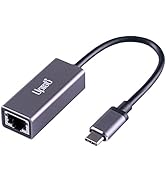
Desertcart purchases this item on your behalf and handles shipping, customs, and support to Argentina.
๐ Elevate your display game with 4K clarity and power on the go!
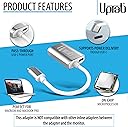
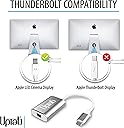
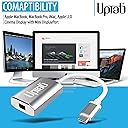
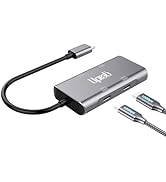
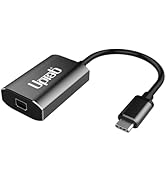
The uptab USB-C to Mini DisplayPort Adapter delivers seamless 4K 60Hz video output with 24-bit color, supports USB-C Power Delivery pass-through charging, and features an integrated microprocessor for reliable performance. Compatible with a wide range of USB-C devices supporting DisplayPort Alt Mode, it offers plug-and-play convenience without the need for drivers or external power.


| ASIN | B01N4FQNYW |
| Best Sellers Rank | #24 in USB-to-VGA Adapters #3,745 in Computer Cables & Interconnects |
| Brand | uptab |
| Color | Silver |
| Compatible Devices | All Mini DisplayPort Monitors, Apple Cinema Display Mini DisplayPort Version, Laptop, Monitor, Smartphone Compatible Devices All Mini DisplayPort Monitors, Apple Cinema Display Mini DisplayPort Version, Laptop, Monitor, Smartphone See more |
| Connector Type | Mini DisplayPort, USB Type C |
| Customer Reviews | 4.5 out of 5 stars 1,190 Reviews |
| Finish | Silver |
| Item Dimensions | 6 x 1.25 x 0.25 inches |
| Item Weight | 0.05 kg |
| Item dimensions L x W x H | 6 x 1.25 x 0.25 inches |
| Manufacturer | UPTab |
| Mfr Part Number | UP-USBC1009-SL |
| Model Number | UP-USBC1009 |
| Number of Items | 1 |
| Number of Ports | 3 |
| Package Quantity | 1 |
| Power Plug Type | Type C |
| Specific Uses For Product | Monitor |
| UPC | 616320248376 |
| Unit Count | 1 Count |
| Warranty Description | 1 Year Limited Warranty |
| Warranty Type | 1 Year Warranty |
R**7
Worked great to connect MDP Apple cinema display!
After purchasing, I used this item to connect a 2010 Apple Cinema display with a Mini Displayport connector to a Thunderbolt-4 connector on a 2024 Mac mini M4. It worked perfectly, without a glitch. The monitor appears to have full capabilities, after also connecting the monitorโs USB type-A connector to an ancillary dock on the same Mac. That last action enables the camera and the ability to have adjustable audio output from the monitorโs speakers.
B**Y
Plug and play
This little thing works as advertised. Iโm using it to connect a newer MacBook Pro to an Apple Cinema Display. After many tries of different products that did not work, this one does. Some are noting that the dongle heats up? Iโm not experiencing this, mine does not seem to rise above room temperature, even if on all day. But Iโm also not using the power pass-thru, which I know will cause resistance issues and waste heat. Overall, works as advertised.
L**.
Works for using older LED Cinema Display in new MacBooks with USB-C Connections
After upgrading to a new 2018 MacBook Pro with only USB-C connections, was heartbroken when couldnโt use my old LED Cinema Display, even with apples own video to USB-C adapter... Apple told me old Cinema Display not compatible and was researching on buying a new external display when came across this mini display adapter. WORKS FANTASTIC!!! Granted only been a few days but have no issues! Display works without a hitch with only using adapter. Sound is also able to be adjusted through Bluetooth keyboard and without extra USB cable connected to MacBook (my LED Cinema Display has 3 cables: power, video display and USB). I have no flickering or other issues, and works seamlessly with even True Tone Display enabled. Great product and a lifesaver if you have a classic monitor thatโs in great condition. Saved me tons of $$$!!!
R**S
Works wonderfully
Works wonderfully with my 2018 MacBook Pro, partnered with a seasoned Apple 27" LED Cinema Display.
T**M
Works to connect M1 MacAir to Apple LED Cinema Display
This adapter worked for me to connect a November 2020 M1 MacBook Air to a 2009 Apple LED Cinema Display 24-inch (1920 ร 1200) Model number: A1267. This display has a 3-part cable with Mini-Display, USB, and power. In order to fully function, both the Mini-Display Port and USB both need to be plugged into to the Macbook, and yet this adapter only has the Mini-Display port. That means you also have to have another adaptor to connect the USB. Without that USB, brightness control, the USB ports on the back of the display, and perhaps other functions won't work. To solve this problem I also purchased an adapter (Aukey 6-in-1) having a USB port. However, this means that with this external display working I have no other ports available since since the M1 Macbook Air only has 2 USB C ports. That means that I can't, for example, plug an external hard drive into that port. It's true that this adapter also has a USB C port, but I tried plugging the second adapter into this port and it did not work. That's because the USB C port on the adapter is only for power pass through. Other than that limitation, I'm happy with the purchase because it looks nice, appears to be a quality product, and allows me to keep using this perfectly functioning 12 year old monitor.
C**S
Used to connect Dell laptop to Mac Cinema Display from 2008!
Hi everyone! So I have a DELL Latitude 5401 laptop from work, and I wanted to connect it to this giant 24" Apple display monitor (from 2008, its called a cinema display, looks like they don't make them anymore). Multiple problems included the Apple monitor having an old mini display port (which is pretty much obsolete tech) as well as having a hard time finding adapters that would connect properly to both systems. Also, I have a USB-C port charger for my dell, and it only has the one port.......Thankfully this adapter worked for me, I was able to simultaneously hook up the monitor AND charge my laptop :) PROS: - connects to a mini display port with no quality issues - the additional USB-C port allows me to charge my laptop AND connect to the monitor - worked on 2008 Apple Cinema Display monitor - worked on Dell Latitude PC laptop CONS: - although it is charging my laptop, I recently saw a pop up on my laptop that said it was charging at a low speed. No biggie since I leave it connected the entire time it is in use - the USB-C port on the adapter (which I am using to plug in my charges) is on the same side as the USB-C connector, so it makes it kind of awkward to plug in my charger as it twists the cords up a bit. - the length is fairly short for my use (I think extra length would make it less awkward to plug in to the USB-C port) and it would have been nice to have a couple more inches on the adapter to make it more "flexible" for my setup...this is totally a FIRST WORLD problem as not many adapters out there on Amazon even have this capability
N**S
Clear High Res Video
This adapter works as expected when directly connected to my M3 MBA. It might work with certain hubs or docks, but I didn't have success with the StarTech DKM31C3HVCPD which features a USB-C port with Alt Mode. I used this adapter in conjunction with the Apple mDP to DL-DVI adapter to connect my ACD 30" display. You'll need a separate USB to USB-C adapter since the Apple adapter is active and requires power.
J**L
Ships Fast, Works Great with 2019 Macbook Air + Apple LED Cinema Display
I was in quite the unfortunate situation where I upgrade my computer (hooray), but my trusty old laptop no longer worked with the new ports on the computer. At first I tried a Thunder 2 to Thunder 3 converter, but that didn't work as my (2004) Apple LED Cinema Display actually has a Mini Display input. I hopped on the phone with Apple support and they were able to confirm that was the case, they even looked at this web page with me and said that it was worth a shot. I ordered, and this USBC to Mini Display works GREAT and I'm back up and running. Hooray! Since it doesn't make use of the old USB input on the display (wow, butchered that in terms of technicality, sorry) it means I can't use the video camera on my monitor, but I knew that going in. Would've got a more expensive hub if that was in issue for me. All in all, this shipped fast, works a charm, and spending under $50 bucks on this converter was a way better deal than buying a new monitorโespecially since I love the one I already have! Thanks for a great product that keeps my battle station in business.
H**A
Adapteur fonctionnel et de finition de qualitรฉ
Aprรจs avoir tester plusieurs adapteurs, celui-ci est le seul qui fonctionne pour moi pour relier mon vieux moniteur apple avec un macbook pro nouvelle gรฉnรฉration (2024). Pas de scintillement ou de saut d'images. On verra ร l'usage.
M**M
This worked - straight out of the box!
I went through four different adapters before I settled on this. And it worked straight away, at full resolution without me having to do anything. I have a Mac mini 2018 and an Apple 30" Cinema Display - the hardest thing was getting the two to connect together. I first went for the cheapest which failed, sent it back, ordered something more expensive which also failed and so on until this - this just worked. I didn't even have to connect an extra cable to the spare USB-C slot on the adapter. I highly recommend this.
D**L
Works great with Apple Cinema Display 30โ
Was able to use my 30โ Apple Cinema Display with this adapter together with Apple Mini DisplayPort to Dual-Link DVI Adapter. Get full 2560x1600 resolution
D**Z
iMac 2019
Funciona perfecto para conectar un Apple Cinema de 23 pulgadas a un iMac 2019. Compre un par de marcas distintas y no funcionaron. Este funciona perfecto.
T**V
Works with Apple M1
It worked ot of the box, interfacing mini display port flying lead to a USB-C port on my 2020 Apple Mini M1 running under Ventura 13.4. I use for video only display on the the Apple LED Cinema Display and output sound elsewhere. There are no visible artifacts using the default 2560x1440 resolution and the computer's Displays setting automatically defaulted 'Colour Profile' to 'LED Cinema Display'.
Trustpilot
3 weeks ago
2 weeks ago