Desertcart purchases this item on your behalf and handles shipping, customs, and support to Argentina.
💼 Elevate your storage game—because your data deserves a pro-grade home.
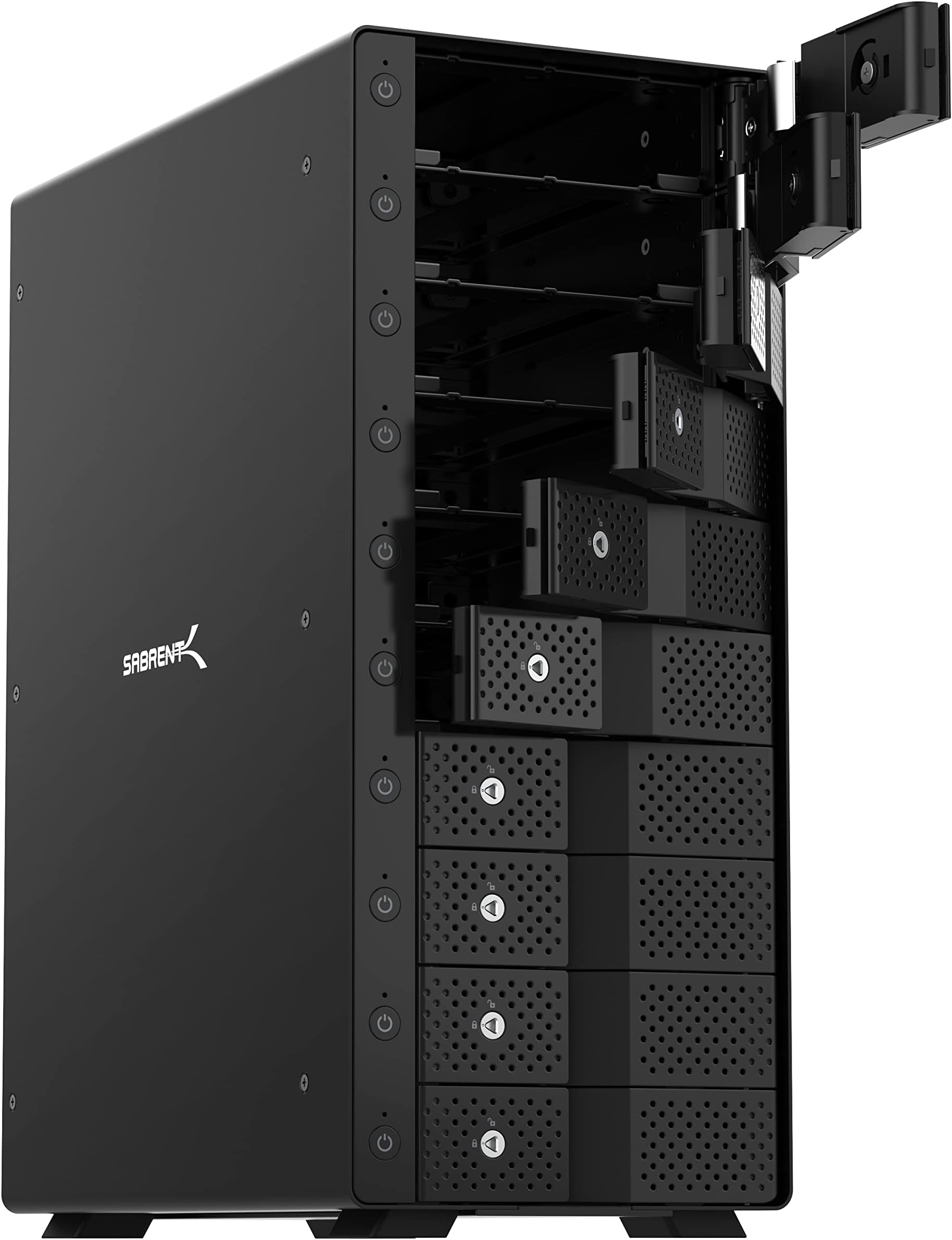
The SABRENT 10-Bay USB-C Hard Drive Dock (DS-UCTB) is a professional-grade direct-attached storage solution that supports up to ten 3.5" SATA drives with a combined capacity of 200TB. Featuring a robust aluminum enclosure, dual 120mm cooling fans, and individual power switches per bay, it delivers stable, tool-free hot-swapping and blazing 10Gbps USB 3.2 Gen 2 connectivity. Ideal for media professionals, IT workflows, and backup enthusiasts seeking scalable, fast, and reliable storage without RAID complexity.


| ASIN | B09TV1XPDD |
| Best Sellers Rank | #11 in Hard Drive Docking Stations #72 in Enclosures |
| Brand | SABRENT |
| Built-In Media | DS-UCTB |
| Color | Black |
| Compatible Devices | Laptop, Linux, Mac, PC |
| Connectivity Technology | USB |
| Customer Reviews | 4.1 out of 5 stars 3,278 Reviews |
| Data Transfer Rate | 10 gigabits_per_second |
| Enclosure Material | Aluminum |
| Global Trade Identification Number | 00840025252943 |
| Hard Disk Form Factor | 3.5 inches |
| Hardware Interface | USB |
| Hardware Platform | Windows |
| Item Dimensions L x W x H | 13.4"L x 10.5"W x 5.7"H |
| Item Type Name | Hard disk docking stations |
| Item Weight | 5 kg |
| Manufacturer | SABRENT |
| Material | Aluminum |
| Memory Storage Capacity | 200 TB |
| Mfr Part Number | DS-UCTB |
| Model Number | DS-UCTB |
| Number of Items | 1 |
| Product Dimensions | 13.4"L x 10.5"W x 5.7"H |
| Supported Devices Quantity | 10 |
| UPC | 840025252943 |
| Warranty Description | 1 Year limited |
A**R
This does exactly what I wanted - simple, drives stay cool, easy power down option
I recently upgraded my Linux workstation to the latest Devuan. I have three large media drives (14TB) which I use for my home cinema (ripped dvd, bd etc via Kodi). The thing about those hard drives is, they are loud when running, and I am sensitive to hum, and the workstation is right next to me all day long. So I generally like to keep the drives asleep (spun down) using hdparm. That worked previously on Debian Stretch, but it no longer works on the latest stable, if I want to have utilities like k3b and rhythmbox then they also pull in udisks2, which wakes my internal hard drives up every few minutes. So aside from removing udisks2 and doing without k3b, the only way to fix this was to move the drives to an external enclosure. Most of the enclosures out there seem to either be really cheap and simple, and they literally toast your hard drive due to lack of adequate cooling; or else they are high-end NAS with their own Operating System and networking. Which you obviously pay for, and I really don't need all that. I just want an enclosure, connecting via USB 3, with good cooling. I tried a different brand unit initially by Orico, which worked fine but the drives ran very hot. So I sent that back and looked further, and found these ones by Sabrent. Encouragingly, when I searched for "cool" and "hot" in the reviews, most people seemed to say that it does have adequate cooling. And it also just "gets out of the way". Now I have used it for a couple of days, I can confirm this is probably the best drive enclosure I have ever used. It is made of metal, very solid, which is refreshing (the Orico, for example, had plastic trays). Insertion of the drives is simple, if you're careful (I read one review that talked about breaking the door latch mechanism because they pushed the drive in too much before closing the door, apparently you leave 1/4" and then let the door closing do the rest). I found that the doors have to be pressed a bit more to get that final "click", otherwise the latch is kind of loose. But once the click happens, just a little one, it's solid. I really like the power button for the individual drives. I agree with others that perhaps it would be better if the default upon powering up would be to power on all occupied bays, but this doesn't really affect me much. I usually keep the drives off anyway, except when in use. The power buttons allow me to power down the drives after I am done watching TV. I unmount all the drives (single script does that quickly) and then manually go through the buttons. You have to press for three seconds each one, but that is a minor hassle. My only minor niggle is that the power buttons are black on black, so it can be hard to find them in a dimly lit room. Basically this thing seems to work, and it's fast, relatively quiet (I am sensitive to noise, and I don't really hear the fan at all - much more noticeable is the hum from the drives themselves, which can't be helped). And it works with Linux. It just... works. Does what I want, nothing more, and looks good on the desk, and feels solid. Very happy! I hope they keep making this one and don't mess it up with some stupid redesign down the line, as many companies seem to do these days. I can't speak to any issues with using more than one drive at a time, as some others talk about. However for my use case, I am generally only using one at a time anyway. I also use one of the bays for a backup drive, but even then, it's the only one being used when I do that. So all seems well, very satisfied.
I**Y
Solid, stable, and fast.
The Sabrent 10-bay USB enclosure is the single best addition to my PC system in years. It's about the size of a medium-sized desktop tower pc. It is solidly built of metal, and is quite heavy. Drives simply slide in to the ten bays, each of which has its own door and it's own power switch. The controller in the enclosure handles handles access and governs traffic, requiring only a single USB-C connection to your laptop or desktop. The internal power supply is fed by a single standard three-prong grounded AC cable. I've found this to be a solid, reliable, and very fast platform for my various SATA drives, and a huge improvement over the tangled bedlam of external single drives, RAID enclosures, power supplies, extension cables, data cables, hubs, power supplies for hubs etc., etc., that had become a plague to my computer system. I see in some reviews that folks have expressed trouble with the drives disconnecting. My experience had been the exact opposite. I think the disconnection troubles I had in the past were due to running through one or more powered USB hubs just to accommodate all the external drives; I think various firmware-based power timeouts were involved. In this case, I've got the entire stack of ten connected to the OC by a single USB cable, going directly into the computer: no hubs. The drives go to sleep, certainly, but awake immediately upon demand. I've had zero trouble with disconnections. This is a big part of why I've characterized this unit as "solid, stable, and fast." This could not be more welcome. A long time pc user, I kind of moved sideways from desktops to laptops as a primary platform, gaining flexibility, portability, and convenience - in many ways. But. In other ways, the laptop form factor imposes strict limitations, most especially, in storage expansion. As a multi-decade serious photographer and at-home video and music producer, the move from analog to digital has introduced serious, grown-up, storage, archive and preservation issues, not to mention capacity issues. So what began for me as a couple of USB external expansion drives grew over time into a glutted city of USB drives and USB RAID enclosures, accompanied by an increasingly unmanageable tangle of cables, power supplies, and hubs. I was plagued with disconnects, time-outs, and other issues, intermittent, yet never ending. This enclosures has alleviated all of that. The drives simply work, and work well. I broke up the RAID-1 enclosures, and over a period of several weeks, sequentially copied all the material on them onto individual drives installed in this enclosure: a kind of extended bucket brigade process. The drives originated mostly as bare drives I already had in use as RAID pairs. As a pair of RAID drives would become empty and available, I split them up, reformatted them, and moved them into the 10-bay enclosure. What about RAID? Well, Windows does a decent job of handling RAID in software. If you think about it, all RAID is actually in software, just some of that software is installed as firmware in hardware. So far, I haven't rebuilt any of the four RAID-1 groups I had before, opting, for now, to manage mirroring and backup manually across the drives in the enclosure. If and when that becomes too unwieldy, I'll move back to RAID-1 pairs, but software-based, on drives in the enclosure. To sum up moving my drives into this enclosure has been a rigorous but welcome project. It has resulted in fewer duplicate management issues, hugely increased efficiency, and much improved reliability. I am delighted with the Sabrent 10-bay enclosure.
A**A
works about as well as any multi-drive station i've ever used
i bought this to replace a different brand's 4-bay USB drive station. that one was falling apart and close to 4 years old, so i was keen to see what little quality of life improvements could be brought to a product category that's otherwise pretty stagnant. the good parts are all the parts you see in the specs: - 10gbps - USB-C - 4 bay SATA ports - rocker power switch in the rear - seems to cool the drives competently enough that i didn't get worried about them the only major issue i had was that the enclosure seemed to briefly lose power overnight, and when it got back on power, it didn't return the HDDs to the state they were in before - it left them all unpowered. a lot of reviews are calling this a nice power-saving feature, and to each their own, but HDDs use like 10w at idle, so i don't consider these to be especially large targets for power saving (at least, not in my home). it's not clear to me yet whether the enclosure lost power on its own (eg some fault in the electronics that forced it to power cycle?) or if electricity was just... inconsistent overnight. everything else in the room seems to be in the state it was left in the previous evening, so i'm leaning towards assuming that the device was faulty. which would be a minor (but totally acceptable) annoyance if the drives went back to the states they were originally in. but that wasn't the situation here. i might be tempted to open the enclosure and see if there's a way to make the enclosure automatically give power to the drives, basically rendering the power switches always activated, but my hunch is that would absolutely wreck the enclosure, and it would be a better use of my time to just buy a different enclosure if it bothers me that much. but this seemed to be the best-reviewed 4-drive enclosure that isn't shockingly expensive. so given those constraints, this is probably the best option there is. and, to be honest, if the enclosure only lost power because of a storm overnight or something like that, then it's not even really the enclosure's fault that it lost power, so i'm willing to cut it some slack. i'll need more time to narrow down what caused it to lose power, and whether i can avoid that in the future.
P**I
Perfect External Solution to once Internal 3.5" High-Capacity Performance Hard-Drives
[Overall:] If you are looking to get mechanical drives out of your system but want still use them due to their high-capacity and/or performance (in the case of my WD Black drives), this was the best quality solution. As I stated in my original review in 2020, if anything changes with my experience with this, I'll be sure to update (as long as I'm still alive for it). My experience didn't change 5 years later, my love for the drive just increased. I honestly do not expect any issues going into Year 6 (2026). [Initial/Updated Thoughts after 5 full years:] I bought the Sabrent USB 3.2 5-Bay in Jan 2020 and all bays have been in DAILY use for a full 5 years (Dec 2025). Surprised the enclousure or the drives haven't failed (especially the drives, they are well past their intended lifespan--still...don't forget to backup your drives). I dislike that all the reviews for each bay type is consolidated into one listing, but that's an Amazon problem. When I bought this in 2020, the packaging for the 5-bay stated USB 3.1 GEN 2 but the listing was for USB 3.2, which was confusing because of the USB naming schema provided by the "USB Implementers Forum". At the time, USB 3.1 GEN 2 was renamed to USB 3.2, and provided 10Gbps (which USB 3.2 [GEN 2] is and such was the case under the former name [USB 3.1 GEN 2]). Most SATA III cables are 6 Gbps, so this item was perfect for what I intended to do. Not sure what the packaging says 5 full years later, but I didn't have any major issues to warrant buying a new one (although I did think about the 10-bay several times). [Usage:] In 2020, I upgraded my PC with. I did not want to cable manage SATA cables in a smaller case and didn't want to move/copy everything to the smaller capacity NVME or SSD drives offered at the time. On the PC before it, I had many media files, documents, and games on multiple WD Black HDDs. I wanted a bay that can give me the same performance of having a SATA cable--and 5 years later, it still does so. While I don't play games off it anymore, technology as evolved, it does still store a backlog of games, media, documents, backups, etc. For 5 years, I was able to use the drives exactly how I wanted to and am getting the same performance as SATA III (especially without the internal wiring). I can seamlessly use the drives between PCs with the caveat of making sure the drive lettering is set up consistently with each machine (i.e. to avoid having to reinstall games, rewrite any hard-coding, file path shortcuts, etc.). [Quality:] This 5-bay has solid construction and is very well designed. Cool to the touch and manages power based on drive usage--but is always in the ready. The locks for each bay and the clear labeling was a very easy plug-and-play situation. While it does accumulate dust within the enclosure, a quick blow of an air compressor gets it back into looking "new". After 5 years, the only issue I had with the enclosure was that the board/circuit of the unit started making an indiscernible noise. It's not the fans or the drives, but something else. I honestly could not pinpoint it, but there hasn't been any performance issues at all. It just works. [Additional Thoughts:] 1. If you have more than 5 3.5" HDDs to use but don't want buy more bays? You can hot-swap. 2. The provided USB cables (USB-C to USB-A and USB-C to USB-C) did it's job, but were too short and thus I needed longer cables. Finding USB 3.2 cables for 10 Gbps for over 3ft wasn't the smoothest shopping experience because longer lengths have a bit uncertainty (due to how they are listed), but they are there and have worked to expectations. 3. Pretty much your own external drive solution...just have to have your own drives. :)
D**D
Sabrent EC-DSK2 Dual-Dock is Severly Flawed! Poor design or Poor Quality Control -
Please note this review is for SABRENT "EC-DSK2" USB 3.0 to SATA Dual Bay External Hard Drive Docking Station and not the newer EC-HD2B version. Please also note that Sabrent has withdrawn the EC-DSK2 from the market and is no longer available. I would have given "0" stars if I could. This is a long review! My intended use for the dual SATA HDD EC-DSK2 dual-dock is to simply transfer selected data between two 4TB data backup 3.5" HDD's, but not clone disks. I purchased two of the EC-DSK2 docks and neither of them work with any SATA drive more than 1TB capacity. I have two Windows PC's and two Mac machines in my home network. When connecting and powering 'ON' the EC-DSK2, the Red power LED lights up and the side HDD1 and HDD2 LED's light up for a few moments and then go dark. 4TB drives never show up in Windows or Mac Finder. Windows and Mac OS both want to "reformat the drives" when the EC-DSK2 is connected. Both Windows and Mac show the drives as either raw drives or as unallocated partitions in their respective disk utilities. I contacted Sabrent Customer Support via eMail and eventually received a reply from a Sabrent Tech Support technician. To paraphrase Sabrent Tech Support response: "The EC-DSK2 utilizes a different chipset from other USB docks, which can lead to compatibility issues if the drives were previously formatted using a different chipset. The EC-DSK2 is operating within specifications, as it correctly detects the connected drives and reports their full storage capacity. However, drives formatted on other USB docks may not be immediately recognized by the EC-DSK2 without reformatting. To resolve this, we recommend backing up your data using the USB docks that work, then formatting the drives using the EC-DSK2. Afterwards, test the newly formatted drive on one of the single-bay docks to confirm whether the compatibility issue persists. If the drive is no longer recognized by the single dock after formatting it with the EC-DSK2, this confirms that the behavior is due to chipset discrepancies between the docking stations." Well folks, all I can say is Sabrent factory response is an example of Gaslighting at its finest. Total nonsense. The international USB standard requires that all USB devices are supposed to play nice with each other. That's it. End of my story is I didn't check out the Sabrent docks within the 30 day return period so I could not return them. I kept the power supplys and trash binned the docks. The EC-DSK2 is no longer available so if you ever get the chance - Don't Buy It!! YMMV
B**G
Works great under Linux
I am updating my review of this 5-bay enclosure a couple of months after buying it: So far my experience with this unit has been excellent. I was using a different "10G SuperSpeed+" enclosure and that had all kinds of problems. This Sabrent is a whole lot better, addressing the issues with the previous unit. Some things to list out that are good about this Sabrent / improvements over the unit it replaces: 1. Drives are very easy to add and remove. This is a true hot swap drive enclosure. 2. Spring loading mechanism to hold drives in place. Had drift issues in previous enclosure where drives would randomly drop out of the configuration. I have also have had buzzing issues with other enclosures, but not this one as the springs will hold it in the right position. 3. Reasonably quiet while at the same time keeping the drives a good temp. All of the 12 TB helium filled drives are sitting in the mid 30's C, which is a good place. The previous enclosure needed modification to have proper cooling of the drives. At this the previous enclosure was much louder while getting far less done with its fan. 4. Performance is good and more in line with what I expected with a 10G connection. I am using an active cable to get 10 ft (3m) of reach from the computer to enclosure while achieving this performance. I am doing a 4 drive array, so the aggregate performance gets noticed. I see up to 3 drives at full speed and then it caps off apparently, which is all I was really expecting to see. This is with no tuning I am seeing an aggregate read of ~600 MB/s and an aggregate write of ~512 MB/s. The previous enclosure was much slower, in some places less than 1/2 the aggregate performance and this is with just simply unplugging the old enclosure, moving the drives over to this Sabrent, and then plugging it in the same place with the same data cable. All that I changed between these two "10G" enclosures was the actual enclosure. 5. The previous enclosure was glitchy with reading the identification with the drives. This is bad, especially when you are running an array and the OS can't figure out which drives are supposed to be in the array. (Running ZFS RAIDZ as this is the best RAID you can do.) With this enclosure it just read and read correctly, so no issue. Managed to get ZFS to update the internal labels for the drive by having it rescan the /dev/disk/by-id directory and now things are happy and consistent. 6. While this enclosure is kind of big, which makes it harder to stuff in certain secure areas with limited space, it is very easy to add and remove bare drives, which when combined with protective cases and labels, makes it easy enough to use a secure storage location for backups. At this you only need one of these units as it is so easy to add and remove drives from the unit so you can leave it with the computer setup. Overall this is a quality unit with a quality build and quality performance. Much better than what I have seen from other outfits.
G**S
Easy to Set Up - Replaced a Different Enclosure
Amazon made me re-write my review as they said it didn't meet community standards. However, none of the things on their complaint list were in my original review and they never explained what didn't meet their standards. So, here is my new ultra-sanitized review for Amazon. I hope it is still informative enough for you. The box was very easy to set up. From the time Amazon delivered it to my porch to the time it was up and running with drives was less than 15 minutes. This is replacing a Mediasonic 8 bay box I've had for 12 years that was starting to die. I absolutely got my money out of the Mediasonic unit as I run a media server for myself and my system is basically up 24/7. The Sabrent box appears to be even sturdier than the old box and the trayless slots are nice and work fine. Currently the box is housing 6 drives. Will probably be 7 shortly. Cooling isnt an issue even with all of the drives in. Using Crystal Disk, the drives generally ran in the high 30's in the Mediasonic. In the Sabrent they are running in the mid to low 30's so the cooling is more than adequate. Drives hot-swap fine without resetting the entire box which is very nice. Things are running faster too as the Sabrent has about double the transfer speed of the old box but, hey, it was 12 years old. Technology improves. The old box only took drives up to 12tb. The Sabrent will take drives up to 20tb. Again, an improvement for my media server. I've only had the box about a week but I am very satisfied and just hope I get the longevity from the Sabrent I got from the Mediasonic. My only complaint is that if you lose power, when the box comes back up, it comes up without any drives on,. You have to manually push the power buttons to start the drives. We don't lose power often though so that will just be a minor aggravation.
M**H
Mixed feelings - but generally good
I didn't rate the 'storage capacity' because that's a non-sequitur. Since YOU supply the drives the storage capacity is determined by YOU. So is it adequate? That depends on whether YOU have large enough drives to meet YOUR needs. Right now I have 17TB worth of hard drives installed in my unit. Continuing on ... I am using this enclosure on my 2019, 27" iMac running OSX 10.14.6. I love that you can turn the power off or on to any single drive whenever you need to. I have not found any other enclosure that lets you do that. Very handy! The drives I insert are always properly recognized every time. I have drives that range from 1TB to 4TB and never a problem. I have been in touch with Sabrent Tech Support because there is ONE quirk that is annoying. When I have "put drives to sleep when possible" selected (in the 'Energy Saver' system preference pane) the drives go to sleep as expected. But here is where things get fuzzy, because if the computer is actively accessing ANY drive everything runs as normal. But when the computer is idle, and the drives go to sleep, every ten to fifteen minutes the the computer reports "(drive name here) was not properly ejected". Since this is happening when the drive is already asleep it has never jeopardized the data on the drive. And which drive it complains about changes using rules i have not been able to figure out. Generally the drive it complains about tends to the last drive that had a significant group of files written to it last. I have no proof of this but, I suspect that it has something with MacOS trying to update the index file for the drive and it wakes the drive up to do the indexing and then puts it back to sleep. So when the drive goes to sleep the computer thinks you turned it off. When I wake up the computer in the morning (I leave the computer running all night while it performs various encodes, etc.) I am greeted with a list of "Drive 3 was not ejected properly ... Drive 3 was not ejected properly ... Drive 3 was not ejected properly ... Drive 3 was not ejected properly ... Drive 3 was not ejected properly ... Drive 3 was not ejected properly ... Drive 3 was not ejected properly ... Drive 3 was not ejected properly ... " repeated about 20 or 30 times. It's easy enough to just click "Close ... Close ... Close ... Close ... Close ... Close ... Close ... Close ... .... " until they are all gone. But it's mildly annoying. I call this a quirk because when those same drives were housed in individual Sabrent brand external enclosures they NEVER did that. Sabrent tech support has been racking their brains but so far the only cure is to uncheck "Put Hard Disks to Sleep When Possible and let the drives spin 24/7. Which, of course makes them run hot and shortens their life. At this point Sabrent Tech Support has put this problem on the back burner (with my consent) because we have tried everything they and I can think of to solve it. I suspect that it's a case of the drive enclosure reporting status to MacOS that the older enclosures did not. So I'm waiting for Sabrent Tech Support to come up with a solution or Apple to update the OS to ignore the false drive messages. If not for this quirk I would gladly buy another of these enclosures (which I hope to do soon) because, except for this quirk, the enclosure works great. UPDATE: It has been three months since I wrote the previous .... And I am still having trouble with any drive in bay 1 and bay 3 being unexpectedly "ejected' as if the power to the drive is being interrupted. It doesn't matter which drive I put in those bays, and when I mov e a problematic drive to a different bay it no longer presents a problem. So I KNOW it is a hardware problem with the hardware associated with that particular bay. So if you don't mind coming to your computer in the morning to have 30 notices that "Drive Mac 9 was improperly ejected" waiting for you to dismiss ... then there's no problem. Everything else works perfectly. ————————— UPDATE: the ‘(drive name here) was not properly ejected’ has been solved. I isolated the problem to two of the five slots in the enclosure. Since I am a trained electronics technician I took it upon myself to open the enclosure and remove the backplane that holds the hard drive connectors. I then retouched all of the solder joints on all of the drive connectors. After reassembling everything all worked well. It has now been two weeks since touching up those solder joints and the ‘drive improperly ejected’ problem is gone. Not a single drive has unceremoniously been ejected. This tells me that all along the problem was low quality control by the manufacturer was the issue. So I will leave my rating as is because whether you get a reliable unit is a crapshoot. Maybe you will, maybe you won’t.
S**O
Risolve
L risoluzione ai problemi di chi deve avere molti dischi. Si installa in un secondo a parte l'inserimento dei dischi che per gli SSD meriterebbero dell pinzette, ma non ci importa molto. Risolve i problemi dei molti dischi.
X**X
Increíble diseño y calidad
Sin duda es un gran producto y el precio está ajustado ya que los componentes son de gran calidad.
J**H
Just hope it lasts.
Everything looks awesome just that they use stupid china fan which is totally crap. So I swapped in the famous and very expensive Noctua fan.
P**I
Solidna obudowa
Ciężka, solidna i działa bez problemu. Wentylator trochę słyszalny, ale nie przeszkadza. Łatwa i szybka instalacja dysków.
M**4
Excellent 5-bay docking station with great cooling and convenience
I purchased the SABRENT 5-Bay Hard Drive Docking Station after the warranties on several of my external Seagate drives had expired. Rather than keeping them in their original enclosures, I decided to shuck the drives and use them in a multi-bay docking station. Since I did not need RAID functionality, this model was exactly what I was looking for. The docking station has been working flawlessly with five Seagate hard drives. Drive detection is quick and reliable, and I have not experienced any connection or stability issues. One of the biggest advantages is the cooling. Unlike some external enclosures I have used in the past, drive temperatures have remained well under control, thanks in part to the built-in cooling fan. Another feature I really appreciate is the individual power button for each drive. It makes managing multiple drives much more convenient and allows me to power on only the drives I need. The overall build quality feels excellent, and the USB 10Gbps interface provides more than enough bandwidth for my storage needs. Overall, I am very satisfied with this purchase and would gladly recommend this docking station to anyone looking for a reliable multi-drive solution. My only "complaint" has nothing to do with the product itself—I realized that if I had waited just one more week, I could have bought it at a lower price during an Amazon sale! 😄
Trustpilot
1 month ago
1 month ago