Buy anything from 5,000+ international stores. One checkout price. No surprise fees. Join 2M+ shoppers on Desertcart.
Desertcart purchases this item on your behalf and handles shipping, customs, and support to Argentina.
✨ Upgrade your laptop’s vibe with touch magic! 🖱️➡️🖐️
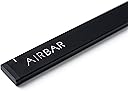
AirBar by Neonode is a sleek, lightweight sensor bar that magnetically attaches to 13.3" Windows 10 laptops, instantly adding touchscreen capabilities. It works out-of-the-box via USB with no driver installation required, supporting multi-touch gestures and touch input from any object. Perfect for professionals seeking to boost productivity and revive their existing laptops with modern, intuitive touch controls.
| ASIN | B06WWQ3FRK |
| Additional Features | Touchscreen |
| Age Range Description | Adult |
| Best Sellers Rank | #57,120 in Computers & Accessories ( See Top 100 in Computers & Accessories ) #2,399 in Laptop Replacement Screens |
| Brand | AirBar by Neonode |
| Brand Name | AirBar by Neonode |
| Color | Matt Black |
| Customer Reviews | 3.8 out of 5 stars 1,043 Reviews |
| Global Trade Identification Number | 07350000980028 |
| Included Components | AirBar Touchscreen Sensor, Instructions and legal folder |
| Indoor Outdoor Usage | Indoor |
| Item Dimensions | 325 x 5 x 17 inches |
| Item Form | Bar |
| Item Type Name | Neonode 13.3" Windows 10 Laptops, Matt Black (NNABC2950XU01) |
| Item Weight | 51 Grams |
| Item dimensions L x W x H | 325 x 5 x 17 inches |
| Manufacturer | Neonode |
| Manufacturer Part Number | NNABC2950XU01 |
| Manufacturer Warranty Description | 1 year warranty against manufacturer defects. |
| Material | Neonode |
| Material Type | Neonode |
| Model Number | NNABC2950XU01 |
| Number of Items | 1 |
| Number of Pieces | 1 |
| Pattern | Solid |
| Product Style | Win |
| Recommended Uses For Product | Laptop |
| Reusability | Single Use |
| Set Name | AirBar for 13.3" Windows 10 Notebooks |
| Shape | Irregular |
| Size | 13.3" |
| Subject Character | American |
| Surface Recommendation | Window |
| Target Audience | Adults |
| UPC | 853661007020 |
| Unit Count | 1.0 Count |
| Water Resistance Level | Not Water Resistant |
M**.
Brings new life to an old computer!
AMAZING!! Turns an old Toshiba laptop into a touch screen computer. So far I have tried the product on a laptop with Win-7 and Win-10 OS. The Win-10 version loaded appropriate drivers instantly and I was up and running. Win-10 is designed for devices such as this, Win-7 is not and may not work (did not work for me). The sensor bar sticks to the bottom of your display screen via a magnet (on the sensor bar) and a metal plate (affixed with double sided tape). You might have to replace the tape so the sensor stays in place. PRO - Works great, I love it! You can use your finger or fingers to draw or use as a mouse. You can even use a feather, if you had one. Accuracy depends on your screen size in reference to the size bar sensor your have. Win-10 has a calibration option to try to fine toon the accuracy. If you reach outside the screen area but within the sensor, you will hear a loud beep alert. CON - The USB cable is on the right side only, and it is short. If you do NOT have a USB port on the right side of your monitor and that port is close to the monitor, you may have difficulty plugging in the device. The manufacturer recommends you get a USB extension cable; these are sold by the foot from most suppliers. I have found shorter USB extension cables, but they are too short. You CANNOT just flip the device around in order to use the USB ports on the other side of your computer. The max screen size is 15.6", no currently known plans to manufacture larger screen versions; though may I suggest 20.1" and 17".
W**P
Works as described
I bought the MacBook Air version of the AirBar about a month ago. Overall it works as described. As others have said depending on what you are trying to click on it can be hard to determine where the mouse cursor is and get clicks exactly where you want them if the target is too small. Mounting was very easy and no real problem with the magnets. I run a very small dock bar at bottom of screen and it is hard to click the icons accurately with the AirBar not getting in the way. Out of the box the single click with one finger access worked without any driver installs. I do have to plug it in to a USB port before booting for it to be recognized. I did have problems with the multi-touch driver install. I run macOS 10.13 beta and the driver install is not fully compatible. The install says it finished successfully but then the driver fails to load properly, but I was able to move a few files around and get multitouch working. Airbar preference pane does not work though. I'm sure once 10.13 is released they will release a more compatible driver. So overall it is working but will have to use it longer to see how much I use it. It is nice to be able to interact with the screen since I am used to my iPad.
B**E
Instructions recommend 3mm. Test then adjust as needed BEFORE sticking on the magnets.
Works good. May need some adjustment for each laptop. For example, the instructions say to mount the airbar 3 millimeters below the bottom edge of the screen, this is equal to the thickness of the cord attached to the airbar. When I did this, it works except for the top edge was off calibration, meaning I could not close windows that were full size because I could not reliably click the red X on the top right corner of the screen. Following the instructions got 95% of my screen accurate, but you should check the accuracy around all edges BEFORE mounting because the sticky magnets are difficult to remove after mounting. What worked for my laptop was mounting it very close to the bottom edge.....instead of 3 mm, it was more like a half a millimeter(see picture). Now calibration was spot on over 100% of the screen. Down side is when I touch any icons near the bottom edge, I'll end up touching the airbar. Not a big deal for me. Over all, I'm happy with the product.
B**A
poor resolution, no "mouse up" and "mouse down" implementation
I could see this being useful for a small minority of people, who for some reason cannot use a mouse. For my purposes it is almost useless, because the pointing accuracy is so poor. IN fact, the accuracy is so bad that using e.g. the OS menus poses some risks: if you wanted to "sleep" the computer instead of "shut down" you are taking your chances. On my Mac OS those two commands in a pull down menu are right next to each other, and with using this AirBar, you might get one or the other command issued depending on how slowly and carefully you make your selection. I would estimate the pointing accuracy on screen is not much better than 10mm square. Plus, if you move your finger around, say to drag an object in the OS, or painting in artistic software, the TIME RESOLUTION is also not very good: your drag is registered in perhaps quarter second jumps. I installed the driver/extension for the airbar to get multi-finger gestures functionality. So I could use two finger gestures to e.g. scroll up and down or sideways to read a document easily. That seemed to work reasonably well. However, the resolution is so bad that you can't even use the AirBar to do online browsing, because all other actions - selecting URL links - are so unreliable. Unless you had the screen/browser set to show everything HUGE, which you might do if you had very bad eyesight. Maybe the AirBar could be useful to people with poor eyesight? Aside the poor resolution, another problem affected potential use of the AirBar for artistic work. For example, using it with my photoshop software, photoshop would not detect (or the AirBar would not send) a "mouse up" or "mouse down" signal, making it impossible to draw anything naturally. Every time you lifted up your finger off the screen, and then put it down again in another part of the screen, photoshop would simply connect those two points with your drawing/painted line, as if you had never lifted your drawing tool (i.e. finger) off the artboard (i.e. screen). I suppose one could lift up the finger, and then go to some other command in the interface, but this would seriously slow down any drawing or sketching process. The AirBar was an interesting but expensive experiment, and now it is gathering dust.
J**A
Pardon me. It's very rare to see...real magic.
This review is for the Neonode Airbar for 15.6" Display . TL;DR │ What kind of sorcery is this?! It just works. It's also TRUE plug-and-play. - - - - - I do not understand why this is not yet popular. It's not every day that I am left speechless, but there is nothing more to say. WHAT I LIKE │ + │ + Adds touch. It amazed me, trully. + True plug-and-play and idiot-friendly. + Detachable with magnets. + Well designed. WHAT I DON'T LIKE │ × │ × A little expensive. × Non-removable/replaceable cable. PACKAGE │ ✓ │ ✓ Simple box packaging. ✓ Magic bar. ✓ Printed materials. ✓ Air. It kind of works similar to a Kinect. It's an innovative application of motion sensor technology. - - - - - HOW TO INSTALL - Just make sure to align the top of the airbar to the bottom of the screen (not more than 3mm from the bottom), and also align the left and right screen to the left and right white marker line on the airbar. - - - - - VERDICT: I highly recommend this product. It's a must. ★★★★★ | 5 stars out of 5. Very well designed product. Questions? Hit the comments! This review is for the Neonode Airbar for 15.6" Display .
A**H
Works, but not quite as the vid would lead you to believe. Great technology, but needs refinement.
The width of the airbar is too large to fit under the bottom edge of my laptop screen, and I think that will be the case for many smaller laptops. If you look closely at the video, you will see that the margin under the bottom edge of the screen on the laptop they use is quite large. So when I place the airbar at the bottom of my screen, it cuts off more than 1/4 inch of the bottom of the viewing area of the display. However, you don't really need to use the magnets. I leave the airbar off the laptop and just put it in place when I need to have a touch screen, which fortunately is not that often. There's no real magic to putting it in place--you just place it there, lean it against the screen, and it works fine. Then take it away when you're done. It is a bit of a hassle using it that way, because you have to unplug it from the computer when you set it aside, or you will get interference with the display. An on/off switch would sure be nice to eliminate that little irritant.
E**Y
truly plug-n-play, more accurate than expected, works on windows and linux mint
i love this. i knew that i shouldn't expect the accuracy of a real touch screen, but it's far more accurate than i expected, and it truly is plug-and-play. it worked for me on windows 7 enterprise, linux mint 17 and 18, and linux peppermint. highly recommend. added 2/13/17: i don't like touching my screen, so i've been experimenting with different styli and paintbrushes. i've found something like this kids' stylus works best (https://smile.amazon.com/ELEGANI-Digital-Android-writing-drawing/dp/B00P4DV9HQ/ref=sr_1_15?ie=UTF8&qid=1487030758&sr=8-15&keywords=kids+crayon+stylus), i think because it's wider than a normal stylus, but it's still a little tougher than i want to be poking my screen with. paintbrushes do work, but wider is better. also reflective things don't seem to work well at all. i'm going to try a screen protector, does anyone recommend anything for a 15.6" screen? also, i found my airbar very slightly bent in my backpack :-0 i bent it back, and it seems no harm done. i recommend putting it in some bend-proof container. i still haven't figured out what to use that's not super clunky in my bag. *still loving the airbar*
M**N
Bad product
I tried to get it to work but it never would do what it says it will do on explanation on website.
M**G
Neuware Top auch der Versandt,
Die Airbar erfüllt voll und ganz die von mir in diese gesetzten Erwartungen. Sie ersetzt wohl nicht ganz einen 10 Punkte Touch da hier aufgrund nur einen einzigen Leiste (also nicht um den ganzen Screen) der Touch nur über zwei Punkte Funktioniert jedoch ist dies für die Anwender welche keine Technischen Zeichnungen oder drgl. machen müssen ein voll adäquater Ersatz. Klasse ist natürlich wenn das Mac Book offen auf dem Schreibtisch stehen bleiben kann denn dann bemerkt man die Airbar gar nicht. Nur wer seinen Mac immer mitnehmen und immer nur kurz zum Einsatz bringt für den ist die Airbar doch sehr umständlich weil diese dann immer abgenommen werden muss (der Screen läßt sich sonst nicht schließen), und auch immer wieder an die Usb Buchse angeschlossen werden muss. Für alle anderen ist es aber ein geiles Gimmik wenn auch nicht Lebensnotwendig aber schick und Einfach zu Bedienen. Also Daumen hoch und 5 Sterne ***** !!!!
C**N
Increíble producto
Increíble producto, 100% recomendado, funciona perfectamente en computadoras con Windows, excelente respuesta al tacto y fácil instalación, uno de los mejores gadgets
P**.
Airbar écran 15,6"
Très bon matériel et fonctionne super bien sur mon "Gamer Erazer ", l'effet est immédiat et ce sur n'importe quelle prise Usb 2 ou 3 de votre ordi et avec absolument Windows 10 (cindition requise). La sensibilité de l'écran est énorme au touché, vraiment magique et chouette comme matériel. Seul petit bémol, le aimants fournis avec sont trop léger pour le poids de l'airbar, donc pour ma part j'ai mis un ptit morceau de papier collant 3M par dessus et tout est ok depuis. à chacun sa méthode lol... A conseiller... De plus le fournisseur est super sympa, et vous offre son aide en cas de problème avec la commande. Encore un grand merci pour tout. ;-)
A**T
the Air Bar is truly amazing. It is so simple to use
This product, the Air Bar is truly amazing. It is so simple to use , just plug in and it works immediately turning my Acer laptop into a touch screen. For a customer that is not a technically fluent ,it has transformed my laptop into a much more useful computer. As a photographer images are extremely important, and with this Air Bar am able to move, expand with ease. Additionally it really is light as air, and so easy to transport. Excellent piece of kit. I am using Windows 10 and it seems to be completely compatible. I was met with lot of negative views prior to buying,when i enquired in well known retail shops ,who either said it didn't exist and even if it did, could not possibly work. I cannot rate this product highly enough from design, ease of use, quality, converting my current laptop into a much immediate touchscreen.
B**.
Worthy
The accuracy is not good as a touch screen mobile phone
Trustpilot
1 week ago
1 month ago