Buy anything from 5,000+ international stores. One checkout price. No surprise fees. Join 2M+ shoppers on Desertcart.
Desertcart purchases this item on your behalf and handles shipping, customs, and support to Argentina.
⚡ Elevate your workspace: Power, speed, and stunning visuals in one sleek hub!
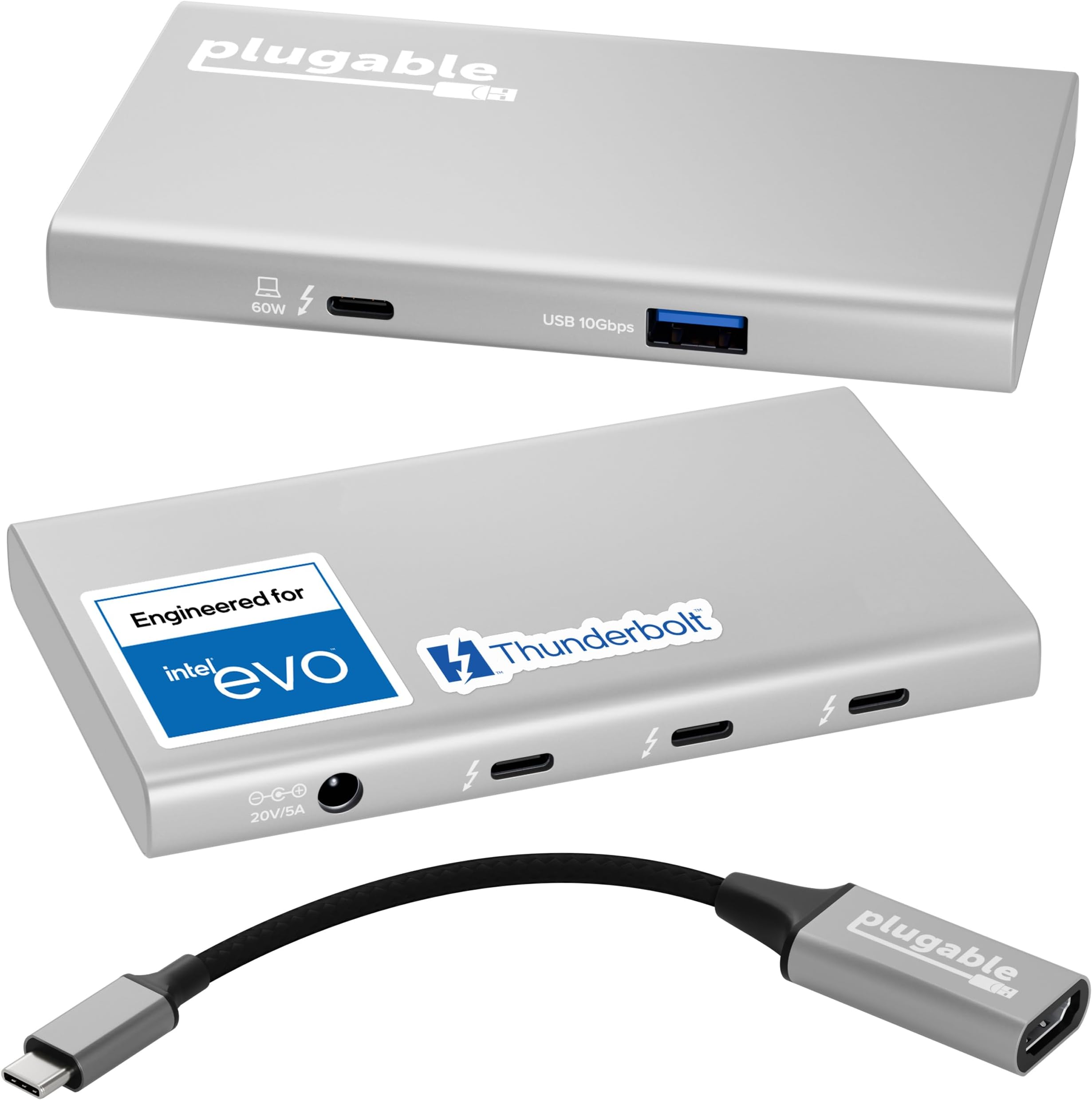
The Plugable 5-in-1 Thunderbolt 4 Hub is a compact, driverless expansion device engineered for EVO by Intel, delivering 40Gbps data transfer, 15W charging, and support for single 8K or dual 4K displays. Compatible with modern Mac (M1-M5) and Windows systems, it features 3 Thunderbolt 4 ports and a 10Gbps USB-A port, making it ideal for professionals seeking versatile, high-performance connectivity with plug-and-play ease and robust lifetime support.


| ASIN | B09NQPVZF3 |
| Additional Features | Fast Data Transfer, Pass Through Charge, Plug and Play |
| Best Sellers Rank | #430 in USB Hubs |
| Brand | Plugable |
| Color | Grey |
| Compatible Devices | Windows (10+) with Thunderbolt 4 / USB4, macOS (11+), and Thunderbolt 3 or USB4 Macs (M1 Macs are limited to one display) Compatible Devices Windows (10+) with Thunderbolt 4 / USB4, macOS (11+), and Thunderbolt 3 or USB4 Macs (M1 Macs are limited to one display) See more |
| Customer Reviews | 4.4 out of 5 stars 385 Reviews |
| Data Transfer Rate | 40 Gigabits Per Second |
| Enclosure Material | Aluminum |
| Hardware Interface | Thunderbolt |
| Item Dimensions L x W x H | 8.35"L x 5.59"W x 2.17"H |
| Item Weight | 0.87 Kilograms |
| Manufacturer | Plugable |
| Mfr Part Number | USB4-HUB3A |
| Minimum Required Operating System Version | Windows 10 |
| Model Number | USB4-HUB3A |
| Number of Ports | 4 |
| Operating System | macOS |
| Special Feature | Fast Data Transfer, Pass Through Charge, Plug and Play |
| Total USB Ports | 4 |
| Total Usb Ports | 4 |
| UPC | 819927012597 |
| Unit Count | 1.0 Count |
| Warranty Description | 2-Year Limited Parts and Labor |
I**A
I am delighted with this great product - it just works.
TL;dr it works great, no setup, plug and go. Just buy one and be happy. First and Foremost; do NOT even think about using ANY TB4 device without a genuine Intel Certified TB4 cable. In this case Cables Matter and Plugable supplies the correct one (plus the correct TB4 to HDMI as well) Like me, you are probably reading all the TB4 Hub reviews before purchasing and this is my experience. I looked long and hard at the Caldigit Element and the Plugable hub. I debated the cost, the size, the power cube, over thought and considered every little detail over and over again because, well because. I concluded that whichever I bought I’d regret not buying the other, so I ended up with the pluggable. Take it out of the box, it comes with a high quality TB4 cable and a big power cube. So lets talk about the elephant in the room, or on the floor. I somehow doubt that pluggable (or Caldigit since their power cube is the same size) are into power supply manufacture so they OEM’ed someone else’s. Given a choice between this power cube that lives on the floor with all the other *)*@%(& power cubes or paying more for a smaller one that will still be on the floor with the others, I’d pay less every time. So it sits on the floor with the others, it doesn’t even get warm. The actual hub on the other hand *does* get warm during use but then my laptop does too. Does it work? Yup, just plug it in and as advertised it just … works. I have a USB 3.0 (plugable) hub hanging off the USB 3.2 port and that’s where all my angst kicked in. Is it better to get the Caldigit Element with it’s FOUR builtin USB 3.2 ports or this one with one USB 3.2. Wait, what? Exactly how many 1050Mbps devices do we actually have? Like, seriously. TB4 can only(?!!!) support 40Gpbs which is a mere FORTY 1Gbps (1050Mbps) devices. There aren't enough ports for all of those so….. ok, ok, you want to daisy chain but guess what! You’re still limited to the 40Gpbs from the laptop to the Plugable or Caldigit. But wait you say, not all devices will max out at the same time so you can attach more devices. Well that’s what I’ve done via the USB 3.2 Gen-2 (10Gbps) port to the daisy-chained hub and: Attached to the Plugable: Samsung T7-1TB SSD (1050Mbps ) USB C Samsung T7-2TB SSD (1050Mbps ) USB C Samsung T5-1TB SSD (500Mbps) USB C USB 3.0 Hub (via the USB 3.2 Gen-2 port) Attached to the USB 3.0 Hub WD 5TB drive WD 5TB drive and a couple of other things that don’t make a difference. All this is attached via the TB4 cable to a Surface Pro 8 with 2 monitors running of the MS Dock. OK, ok, I know I need more storage and am looking at another monitor but here we are. Results? I can’t shovel disk data from the SP8 to keep up with the capacity of the USB-C drives and the USB 3.0 drives. I just can't max out the 40Gbps TB4 port so everything else is just moot. All that *would* change if I ran the monitors off the Plugable (but then ALL TB4 hubs have that problem). The T7’s are slightly faster than the T5 and the T5 is slightly faster than the WD HD’s. Now when it comes to data processing the T7’s win every time but in terms of overloading the Plugable, I’m nowhere close to being able to do that in normal use. I’m going to plug another T7-2TB into the plugable and move the T5 to the hub (since they are 500Mbps bandwidth matched) and see how I can overload things. Conclusion? I love the plugable, it just does it’s job without fuss and doesn’t occupy a ton of space; it’s about as small as it can be. Do I regret the decision? Actually, no. I can’t think of a reason why I’d need 4 USB 3.1 ports and 3 TB4’s in the same box. Other people will though and the Caldigit will be worth the extra $50 or so. Will I buy another Plugable? Actually yes, I might get that 3rd monitor going :-D :-) :-D (The Surface Pro 8 has two TB4 ports)
B**D
Solid thunderbolt dock for your M1 Macbook Pro
The tough problem I see with most thunderbolt docks is they try to balance all the potential ports you might need, trying to find the right mix of everything. And I just couldn't find something that suited my needs without costing 2-3 times what this dock costs. This dock allows you to get what you need out of it in whatever way you need it. It's not going to fast charge your M1 MBP, but it'll run it without a problem. I can, then, decide what the Type-C/Thunderbolt ports do for me. Yeah, there's not a lot of ports to work with, but I really didn't need a ton to begin with. This thing keeps it simple. As a result, it's small and easy to stash away. If you need more, thanks to Thunderbolt, you can daisy chain them, or plug a second dock directly into the MBP's second Thunderbolt port. If you don't need more Type-C ports, you can get a basic hub to plug in to the Type-A port that's available. I ended up not using the included HDMI adapter. I've not been able to find a USB-C to HDMI dongle that works correctly with my ultrawide monitor. This one included. It might do 4K or 8K in a more common display format. I couldn't tell you, though. For me: Mouse/keyboard in the Type-A port, DisplayPort to Type-C cable in another of the Type-C ports, external storage for Time Machine in another Type-C port, Anker conference bar in the last Type-C port. All ports are occupied, and I have a single cable going into the MBP providing all of this and power. It's light enough and small enough that I ended up mounting it under my desk with some 3M Dual-Lock.
J**N
Versitility, Includes USB-C to HDMI adapter, toght connections, daisychaining, TOUGH AND DURABLE
This is one of the best thunderbolt hubs a thunderbolt 4 and USB4 hub. It is compact extremely versitile in that I can daisy chain it to my caldigit element hub and it works incredibly and gives many extra usb 4 or thunderbolt 4 hubs. I connect through a thunderbolt cable male to male into one of the ports on the element hub and it is perfect everythime I can use it the way I described or by itself. I love it 💗 worth every penny. It like most thunderbolt 4 anything is downcompatable so will work with anything previously thunderbolt 3, etc any usb-c works of course host if thunderbolt 4 will benefit by all speed capabilities but its fast just the same. I use it daisychained or by itself between my Samsung note 20 5g ultra phone and thunderbolt 4 laptop i use a usb4 extension cable by LEIRUI 2.62 ft. All I do is swith from phone to laptop if I want and all 7 drives always appear in a good file manager like solid explorer, xplore, etc. Great to use your phone to access all your hard drives I use westernn digital my passport ultra usb-c, sundisk usb-c, Adata etc the drives offer usb adapters too. GREAT GREAT PRODUCT and never gets hot. Each offers 40Gbps bandwidth and 15W charging power. These ports are very flexible, and you can use them for all sorts of devices. You can attach external displays using this hub without needing an adapter if the monitors have a USB-C connection. If your display instead has HDMI or DisplayPort connections, you’ll need the relevant USB-C adapter to attach via the dock. Plugable includes a USB-C-to-HDMI 2.0 adapter with the hub, which is a nice.
M**.
Works great with M1 (Pro) MacBooks Pro and Thunderbolt 3 AIC
I've tested this device alongside a CalDigit USB-C SOHO hub for a barebones docking station with DP1.4 output, and the combo works great with both my 16-inch MacBook Pro w/ M1 Pro and my wife's 13-inch MacBook Pro w/ M1. My chief complaint is that the power brick is quite large relative to the hub's paltry 60W charging capacity. I also have an older PC in my office with an ASUS ThunderboltEX 3 add-in card (AIC) based on Intel's Alpine Ridge (TB3) host controller. This PC runs Linux and hosts a variety of virtual machines/appliances and other niche use-cases that require certain kernel command-line options. Unfortunately, these requirements don't play well with the AIC; in particular, it breaks hot-plugging on the TB3 port, even with simple USB devices. I was interested in answering the following questions: * Can I use a Goshen Ridge (TB4) device controller downstream from a Alpine Ridge (TB3) host controller? * Will the Alpine Ridge host controller delegate some duties to the Goshen Ridge device controller such that it fixes hot-swapping for USB devices? for TB devices? * Can I get everything working in Linux?? I'm happy to report that—in my case, for the most part—the answers to the above questions are YES. After enrolling the Plugable 5-in-1 hub via boltctl I was able to hot-swap USB devices on the Type-A port as well as the Type-C ports, and hot-plug a TB device. I was actually able to hot-plug a TB3-to-TB2 adapter with a downstream TB1 device, and that got me nerding out a bit. I'm running Ubuntu Desktop 22.10 (kinetic) and there's even a GUI for authorizing devices these days. Unfortunately, the long-standing issue(s) with hot-UNplugging TB devices in Linux are still present. I was able to use the suspend-to-RAM trick to clear out disconnected devices. It's an imperfect solution but that has absolutely nothing to do with the Plugable 5-in-1 hub; I only mention it for the sake of completeness. One other note: I ordered two of these in new condition and one of them came in open-box condition (very clearly so). Even though this appears to be a fulfillment issue on Amazon's side, Plugable support has been responsive and helpful, which is great to see. Again, nothing to do with Plugable other than to highlight their excellent customer service team.
K**S
Mostly good, works with most, but not all devices.
Seems to mostly work very well. I plugged a few different external hard drives into it including an external NVME drive in a USB 4 40Gbps enclosure and did some speed tests and achieved the same speeds (about 3800 MB/s) that I got when I plugged that same drive directly into my computers USB 4 40Gbps port, which is good. I tried various other devices including DVD writer, etc. and most worked fine. However, for some reason, it didn't seem to like my USB 5 Gbe ethernet adapter plugged into any of the USB-C 4.0 ports on the back of it. It wouldn't even power it on. Yet that same USB ethernet adapter, using it's USB-C to USB-A cable instead of it's USB-C to USB-C cable, worked fine plugged into the front USB-A port. For the record, my USB ethernet adapter does work totally fine plugged directly into my computer's USB 4 port directly. Obviously, this is not a huge deal as I will just leave my ethernet adapter plugged into the front USB-A port but I was trying to keep everything looking neat by having everything plugged into just the USB-C ports on the back. All in all, I'd still recommend it. Just keep in mind that it might not work as expected with ALL of your USB devices.
B**K
It works, but be sure your Laptop MFGers port labeling is correct
So I'm up to 3 Docks I tried, and until this morning, none of them worked correctly. My the laptop maker tech support said, yup need to use the TB4 port for it to work. If not working, call the makers of the dock. I sent back the first one (from another company), factory tech support said, either not compatible, or broken, we aren't sure. only 1 monitor, ethernet would constantly disconnect. No charging. So back it went. Others had the same complaints, so figure, get a refund and move on. So bought this one from Plugable. My laptop "maker" sent me the graphics of where the TB4 port was/which one, and no it didn't work correctly. Only 1 monitor, but ethernet did, charging didn't. Updating drivers, new cable, nothing worked. After sitting back, I finally tried the USB-C 3.2 port that is not s/b to work (according to my laptop "maker"). But it did. Called my Laptop "maker", and finally the one tech support worker sent me the motherboard manual, and my laptop "maker's" info of what port is which and what did what was WRONG! What they called TB4 port, was really the USB-C 3.2 for power and for 1 display.port. Which did gave me ethernet and 1 monitor via the dock. What they called the USB-C 3.2 for data use, no power... gave me the 2 displays the dock promised, ethernet and power.. I was happy about the 2 displays and ethernet... charging too was a bonus. (I was originally told by my maker, ok, so it's not, to be expected with powerful laptops.) In the middle of banging my head against the desk, I bought a lower model from plugable from amazon, it now works too. Plugable tried to help me, no one questioned the port, I shared the laptop companies port designation. So not their fault. Plugable tried a few things, one reason I bought the lower cost dock of there, get another one of their OEM TB4 cables which was suspect. So lesson is, if its not working, really have to dive deep into the ports and what they do, and which one is which.
B**N
DOES NOT WORK
TERRIBLE. I have a top end laptop. the connection from the plugable to the laptop is terrible. It doesn't consistently send signal for monitors or my ethernet adapter. I have to unplug these MULTIPLE TIMES A DAY to get them to work. Unfortunately I didn't realize how problematic this was until after the return period or I would have returned. DO NOT BUY
R**H
Great portable dock for multiple monitors extended on Mac. Power brick big, need USB-C adapter.
Really small, about the size of an iPhone Max. I am able to easily take it with me, run 2 17" 4k portable monitors via USB-C and then 2 DisplayLink adapters via USB running 4 1080P 15" portable monitors powered separately (HDMI for video). Great for traveling, being able to set up a mobile office to dock to. I got rid of the huge power adapter in favor of a USB-C 100W PD adapter for $8 (as of 11/25). The size of the DC connector is a 5.5 X 2.5mm. This adapter lets you use any 100-watt USC-C adapter instead (so you can just take 1 laptop charger with you and leave the large brick from the dock behind). https://www.amazon.com/gp/product/B0FD7K4TXD/ref=ox_sc_act_title_1?smid=A3Q3CSFAJ7362S&th=1
C**.
Lo que buscaba
Estoy contento con su rendimiento hasta ahora.
A**R
Works with my 2 external displays from my MacBook
This accomplishes exactly what I needed it to. At work, I use a MacBook and had 2 displays that connected over USB-C. I didn’t have enough ports for everything, and would have to swap between devices if I wanted to have both monitors connected. It sounded like standard USB-C hubs don’t support sending video (or at least not multiple video streams) through them. This allowed me to connect both my monitors through a single USB-C on my MacBook, with extra slots to spare. If this wasn’t for work, and I had to pay for this myself, then I might have spent more time researching to try to find a cheaper option. But this was a no hassle way that ensured it just worked for my needs.
J**.
The best
I think this might be the best USB4 docking/hub. Great quality and small.
R**H
Solid as a rock
A simple, elegant solution to the "lack of ports" need. Stuck three NVMe SSD (in external chassis) on this hub and it worked flawlessly. Buyers have to note the technical specs and requirements and everything will work as intended. Wished it had a tiny light to indicate when it is active.
S**A
Great Quality, works perfectly.
This works amazing, i use it both for my Surface Book 3 and my ROG ally as it is thunderbolt 4 compatible and since it can also charge the device its connected to it saves a lot of extra cabling and BS things, With the Ally supporting this TB4 device it means with its 1 USBC TB4 port you can connect 2-3 screens plus all your gaming gear, i have my Razer headset, mouse, OrbWeaver 2 monitors, Stream deck, Dolby 5.1 Optical out converter and more all managed by this TB4 hub and one mini USBC3 hub. One great thing this can do is run a 4K projector and charge it and the Ally. I love this and am planning to buy another to take with me in my ROG Ally gaming bag. Wish it was a little cheaper but I am sure the price will drop a little and I will grab one on the next sale. LOVE IT. Highly recommended to anyone.
Trustpilot
1 month ago
2 months ago