⌨️ Split, Tent, and Conquer Your Workday with Effortless Comfort!
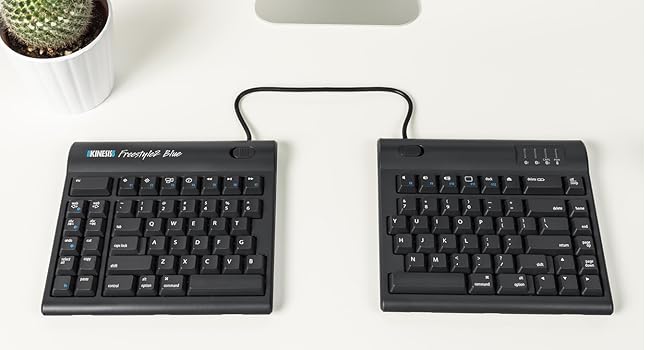
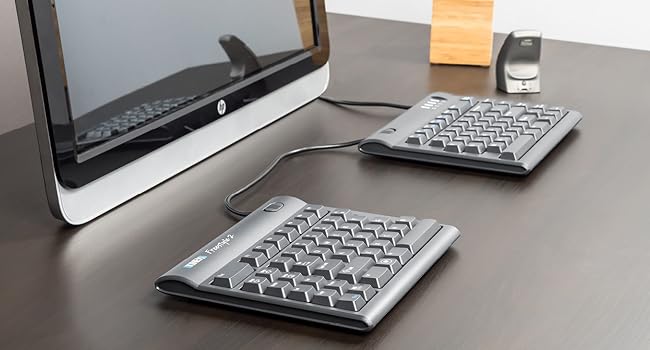
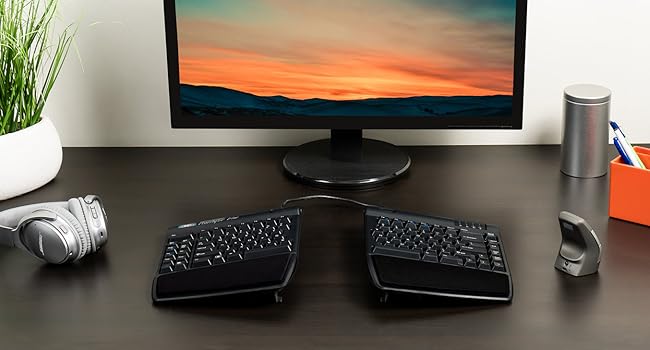
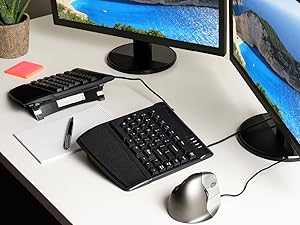
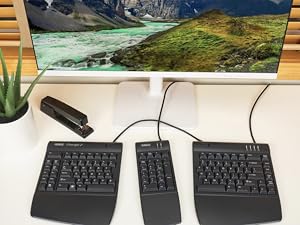
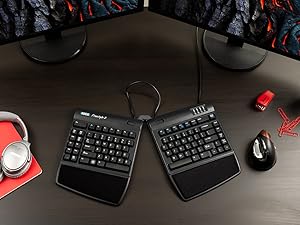
The KINESIS Freestyle2 USB-A Ergonomic Keyboard features an award-winning split design with up to 9" separation and adjustable VIP3 tenting lifters (5°, 10°, 15°) for personalized ergonomic positioning. Equipped with low-force tactile membrane keys and a standard Windows layout including dedicated hotkeys, it enhances productivity while reducing strain. Pre-assembled with palm supports and adjustable accessories, it’s a plug-and-play solution designed to keep professionals comfortable during extended typing sessions.


| ASIN | B0089ZLENA |
| Best Sellers Rank | #204 in Computer Keyboards |
| Customer Reviews | 4.2 4.2 out of 5 stars (877) |
| Date First Available | June 8, 2012 |
| Is Discontinued By Manufacturer | No |
| Item Weight | 2 pounds |
| Item model number | KB820PB-US |
| Manufacturer | Kinesis Corporation |
| Product Dimensions | 19 x 12.5 x 3.5 inches |
A**N
A great ergonomic keyboard
It took a little bit of time to get used to this layout, but this is a very good keyboard for those looking for ergonomic equipment. It takes a bit of time to get used to the design, but practice and regular use will make it easy to adjust. The keys feel great and my fingers have never ached after prolonged use. Changing width and tenting angles are both great for adjusting the keyboard for optimizing comfort. I also really like that this keyboard has separate keys for Cut, Copy, Paste, and Undo. They make those actions much easier. I haven't used the web home, back, or forward keys very much since my mouse already has back and forward buttons. My main disagreement about the design is that the B key is on the left section. I strongly think it should be on the right. The Fn key can be confusing because it stays active after pressing it. I'm used to Fn only being active while the key is held down. The Delete key can also take some getting used to because it's the same size as the Backspace key and the keys are very close to each other. I've had a few experiences where I've tried to use Backspace but ended up hitting the Delete key instead. These issues haven't been enough to hinder my experience, and overall I'm very satisfied with this keyboard.
R**V
Great Split Keyboard. Keys could've been more clickey.
Works as described. Simple usage. Three level support is great. Wished the keys were more clickey/tactile than how mushy they are. Wish the letter 'b' and 't' were provided on both halves of the keyboard.
L**.
It's not perfect, but it's probably the best ergonomic keyboard that costs a reasonable price
I've been using this keyboard for the past week, and it has its pros and cons. Overall, I think it's a good product and it's a lot more comfortable than the Microsoft Natural Ergonomic Keyboard 4000, that I had used for many years before switching to this model. Pros: -I ordered the keyboard with all the extra extensions – feet, wrist pads, etc. – and it came with all the parts already assembled, which I liked very much. It saved me the pain of handling all the parts and trying to figure out what goes where. -The 9inch gap between the two parts is wide enough for my arms (though I'm a pretty skinny person so perhaps bigger people will need the 20inch) and definitely minimizes the movement of the hands. -The option for three different angles is nice. -It took me about a day and a half to get used to the separation, and now I can already type on it in three different languages. Typing is very smooth and the keys feels nice under my fingers. However, I'm used to split-up keyboards, so if it's your first keyboard of that kind, it might take you a little longer to learn how to type smoothly and without mistakes. My wrist-pain-free coworkers who'd never used ergonomic keyboards in their lives sure struggled with it when I let them try… Cons: -It's pretty unstable. If I move the keyboard just slightly to adjust the position of my hand, the feet slide down and I have to lift them back up. I'm sure Kinesis could go with a little more stable design. Adjusting the height each time is really annoying and affects the flow of my work. -There are some shortcuts on the left side of the keyboard (copy, paste, delete), but not the arrows or the page-down/page-up buttons. These are only on the right. Which means that if I want to scroll down a page using the keyboard and not the mouse, I can use only my right fingers, and it puts a lot of stress on my right hand. I wish I had the option to scroll up and down with my left hand without moving it all the way to the right side of the keyboard. Considering most people are using a right-handed mouse, I think Kinesis should have taken that into account and put all the shortcuts on the left side, or on both sides so we can choose which hand to use.
R**K
An Outstanding Keyboard!!!
An outstanding keyboard!!! I recently broke my wrist but needed to continue working so went looking for a keyboard that would accommodate not being able to rotate, tilt or flex my left wrist. This keyboard was exactly what I was looking for! The construction is as good as the best out there, except maybe the old IBM Model M mechanical keyboards. Mine arrived with the wrist rest and left-right tilt accessory kit installed. I wouldn't buy this keyboard without it. I tilted the left section full (15 degrees) and fiddled with it's rotation until they home keys were under my fingers without having to tilt, rotate or twist my wrist. After a few minutes getting used to the slight variation in the location of some of the lesser used keys I was able to work as quickly as if I hadn't had a titanium T plate and half a dozen screws recently installed in my distal radius bone. I definitely recommend this keyboard to anyone needing a keyboard to adjust to your hand(s) position. I also found it more comfortable for my uninjured hand versus the typical square layout or even the Microsoft Natural keyboard I normally use. After a week's use I can find only two things that might improve it. The first is if there was a way to adjust the tilt of each half from front to back. I did this by stacking 3x5 cards under it but a front to back tilt adjustment would be well worth it to go along with the left to right tilt that is built into the accessory kit. The other improvement might not be enjoyed by all, but I really like the tactile feel of the old IBM Model M mechanical keyboards. If Kinesis offered this keyboard with front to back tilt (in addition to the current left to right tilt) and mechanical keys I'd have to rate it a 10 out of 5!!! But even with these potential improvements left off, this is an excellent keyboard for the wrist movement challenged at a fair price. I'd buy it again and recommend it highly.
V**P
I've been using this keyboard at work (software testing) since 2014. It pretty much cured severe forearm and wrist pains. During the pandemic lock-down brought it home and used it since for work and personal computers. Now that I'm spending more and more time at the office again, started noticing discomfort while using a conventional keyboard there. So, bought a second one to keep there. In 11 years that I'm using the first one, gave it a couple of complete clean-ups, removing all keys, and putting them back. No noticeable wear on key labels. Easy to change keyboard inclination and rotation, if someone else needs to use it. Very pleased with this product.
N**N
I've had a Kinesis Freestyle Pro split keyboard for years but managed to spill half a cup of tea over it and it completely failed, which was disappointing. To save a bit of money I went for the Freestyle2, it's great, I actually prefer it to the Pro, it has a really great feel, is quieter though still has good feedback and the build in raisers are great.
M**C
Fantastic! have high sensitivity in my tendons from past carpal tunnel and bilateral tendonitis injuries.
H**R
No tiene límites para usarlo a la medida de nuestras manos
N**O
The product is really good. Took some some days to get fully adapted to the new configuration, but now i can see how uncomfortable was the previous setup. The positioning lemme adjust my shoulders position, I’m no longer feeling them tired in the end of the day.
Trustpilot
2 months ago
4 days ago