๐ถ Elevate your studio and stage game with the ultimate compact MIDI controller!
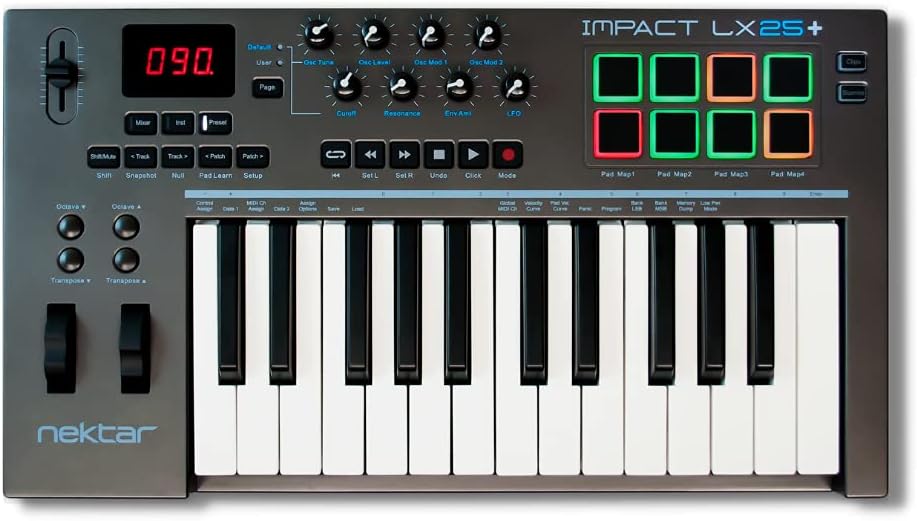
The Nektar Impact LX25+ is a 25-key USB MIDI controller featuring velocity-sensitive synth-action keys, 8 backlit drum pads, and comprehensive DAW integration for 11 major software platforms. Designed for portability and professional control, it offers seamless plug-and-play compatibility across Mac, PC, iOS, and Android, bundled with Bigwig Studio DAW software to jumpstart your music production.


| ASIN | B01M0KBF9F |
| Additional Features | Backlit |
| Best Sellers Rank | #64,244 in Musical Instruments ( See Top 100 in Musical Instruments ) #234 in Computer Recording MIDI Controllers |
| Brand | Nektar |
| Brand Name | Nektar |
| Color | Dark Grey |
| Compatible Devices | Computer (desktop/laptop), Tablet |
| Connectivity Technology | USB |
| Connector Type | USB |
| Control Method | Touch |
| Control Type | Keyboard Controller |
| Customer Reviews | 4.6 out of 5 stars 1,571 Reviews |
| Global Trade Identification Number | 00859383002329 |
| Hardware Interface | USB |
| Hardware Platform | Apple ARM, Apple silicon |
| Human Interface Input | Keyboard |
| Included Components | 5 Cherry Audio plugins, Nektar registration required to receive claim email, Bitwig Studio 8-Track Licence card, Impact LX25+ Keyboard, USB Cable, User Manual |
| Instrument | Keyboard |
| Instrument Key | Any |
| Item Dimensions D x W x H | 10.5"D x 18.75"W x 2.75"H |
| Item Type Name | MIDI Controller |
| Item Weight | 4 Pounds |
| Keyboard Description | MIDI music keyboard |
| Manufacturer | Nektar Technology Inc. |
| Manufacturer Part Number | LX25+ |
| Material Type | Plastic |
| Mixer Channel Quantity | 16 |
| Model Name | Impact LX+ |
| Model Number | Impact LX25+ |
| Model Year | 2016 |
| Noise Control | None |
| Number of Keys | 25 |
| Platform | Mac, iOS |
| Product Dimensions | 10.5"D x 18.75"W x 2.75"H |
| Product Style | Full Size Keys |
| Size | 25 Keys |
| Special Feature | Backlit |
| Supported Software | Bitwig, Cakewalk, Cubase, Digital Performer, FL Studio, GarageBand, Logic, Nuendo, Reaper, Reason, Studio One |
| UPC | 859383002329 |
| Unit Count | 1.0 Count |
| Warranty Description | 2 year manufacturer. |
L**E
Fits my bill
I play in a performance band and was looking for a portable full size Midi Keyboard for playing solo parts with various instrument settings. The Nektar IMPACT LX25+ fits the bill with its price point and functionality. As opposed to some negative reviews on the stiffness of the keyboard (I am a piano player), I found that the keys of the LX25+ are more resembling those from a good quality electronic keyboard (except for the lack of weighted action). We can also easily set the velocity curve with a wide range of sensitivity too fit our playing style. I would highly recommend setting this up as a first step., It would make the usage experience a lot more pleasant. The layout of the controls are better than my other Midi controllers / keyboard. We can easily change the octave, transpose to other keys, and changing the Midi channel with a press of a button (once it is properly configured) . Integration with my existing DAWs are smooth as silk. The keyboard is immediately recognized as soon as I plug it in my desktop PC and laptop with the DAWs launched. The Nektar website also has scripts available for integrating with Ableton (to a certain extend). This keyboard also works seamlessly with my Samsung Android App (I use Sound Camp) and external Midi sound module. The unit is a bit large than I expected but it still fits inside my backpack which is important for me to carry around. The 25 keys work fine for me as I am using it mainly for playing solos passages in the band without accompaniment. Overall , a great unit for performing solos live and arranging music with my DAWs.
A**A
Great 25 KB Integrates great with FL Studio 11 only on 64Bit
In my opinion this is the best 25 key keyboard controller on the market . The build quality is great, has decent weight to it which I like. THIS IS NOT a cheap tiny 25 key designed to fit anywhere, They have the Nectar SE25 for that. People typically say the keys are not sensitive at all, and very loud Keys when played. Those are not as important to me honestly and Who wouldnโt love a soft weighted keyboard for the price right? Well sadly they donโt exist , M-audioโs controllers feel great, quiet and soft but the reliability is the big part. Their controllers Ive heard had the ghost key issues where the black keys playing even tho itโs not being pushed down. The Nectar Impact works reliable, midi functions are a breeze, keys are semi weighted, and the drum pads are good enough to work with Iโm not much of a fan of them. The keys and build quality really do the job for me tho. However the icing on the cake is the DAW integration. After registering your product you can choose which DAW youโll use it with then you could download the files to have the knobs and pads already mapped out accordingly. Most keyboards could do this however you have to map it out one by one, for each DAW you use. The whole package all in one really helps your productivity. I strongly recommend the impact line, I bought the 49 keys impact after this which I would so recommend.
M**S
Love it! Love it! Love it!
Great little keyboard, but with full-sized keys. I have two other controller keyboards. Both M-Audio, one is 49 keys, one is 61 keys. They're good, but this is great. Actually also might make one a better keyboard player, by forcing you to concentrate on just two octaves, rather than noodling around the length of a longer keyboard. With just two octaves, you can "see" patterns and chords easier. Though you can go up and down to full 88 keys with buttons. But two octaves at once is a good teaching exercise. And since it's smaller, it leaves room for a cat on my keyboard stand. And there's pretty much always a cat there now. (Stand is a board on a towel on a keyboard stand). PROS: --Solid build. Keys are good. Pads have an amazing feel. --Can control your DAW - almost makes a soft synth into a hardware synth. --You can sit across the room and play it, without being a slave to sitting at a computer. Once auto-mapped, you can change pre-set patches on a softsynth. And on some, you can control some of the parameters. Plus, play keys and drum pads. (M-audio is the other keyboard that can do that, but not nearly as easily and elegantly as this one does.) --Easy to map your DAW (download software from manufacturer's site after registering) --Pretty lights that change color on the pad when you play them! Looks trippy in the dark. CONS: --Keys are kinda stiff. Some people might hate it. Probably not good if you have hand pain issues. On the other hand, playing it may actually strengthen your hands. --Keys are physically kinda loud when you press them. Make a dull thud sound. EDIT AFTER 2 WEEKS OF PLAYING IT A LOT: The keyboard dull thud got much less after a little while. And I think the keys are still stiff, but my hands actually got stronger playing it (!), so it's not an issue now. I dig the feel. Someone else here said it takes two buttons to remotely change synth patches but that's not true on Cubase. Just takes one at a time, going up or down the list in your DAW from this keyboard. All in all I'm very happy with it. It's a heck of a lot of controller for 100 bucks.
R**S
Lots of features for a great price
Review is for LX25+ Hardware: Iโm not an experienced pianist. This is my first keyboard. When researching midi keyboards to add to my beginner DAW setup this keyboard was one of the few with full-size velocity sensitive keys and velocity sensitive drum pads. Most midi keyboards in this price range have one or the other, often using mini-keys to make room for drum pads (or are plagued with horrible reviews about quality). The drum pads are nice. The pads backlights are plenty bright. Knobs feel appropriate for the price range, they arenโt luxurious but donโt feel cheap either. All the rubber buttons feel solid with a satisfying physical click. The single fader feels the cheapest out of everything, but has decent resistance when moving it. On board software: Easy to understand how to reprogram drum pads using pad learn and once you get a feel for the setup feature itโs easy to adjust the keyboards innate settings. I adjusted the key sensitivity to focus on the highest velocity and it works great for my preference. It definitely takes work to reach max note velocity, but it should take some serious effort to max out an instrument. I was able to easily adjust the velocity curve on the pads to my liking by following the steps in the manual. For those inclined to get more intense with their midi mapping, the manual includes lots of details for midi channels and settings. DAW integration (Ableton only): Ableton is my preferred DAW and is probably the most popular DAW. Iโm not going to install bitwig and other reviews already cover the included software. There is a mapping file for Ableton available from Nektar after registering the product. The mapping is definitely an afterthought and does not include full functionality. Loop/REW/FF/Play/Stop/Record all function and control the global transport controls. The knobs are automatically assigned to โblue handโ control of the active device parameters in most situations. However the track and patch buttons as well as clips and scenes are non-functional as far as I can tell. Transpose wheel works well, modulate wheel is somewhat inconsistently mapped. The single fader seems to control master volume by default, but works inconsistently. I havenโt been able to find use for the track or patch navigation buttons. Fortunately, I have a launchpad s and launch control XL so the areas of the control surface mapping that are lacking do not impact me much/if at all. If youโre primarily an Ableton user, or want to be, this would not be a good primary control surface. You probably want the launchkey. But if you have other non-keyboard controllers to handle your clips and session view tasks, this keyboard is a great way to add keys and velocity sensitive pads. I have an older launchpad so my launchpad is not velocity sensitive. Only reason itโs not 5 stars is that the Ableton mapping file is pretty weak. Ableton is the most popular DAW and offering a more robust control script would bring this to five stars for sure. If youโre going to use the included software or a DAW with a more extensive mapping, you can buy this hardware with confidence.
J**S
great MIDI controller for the beginner and enthusiast alike
I am not a professional musician, though I do gig a bit, nor am I a pianist, so consider this review within that context. That said, I really love this MIDI controller. I was originally going to go with the AKAI MPK mini, which is quite a bit more transportable, but this won me over for a couple of reasons: - it has full-sized keys - it integrates rather seamlessly with most DAWs (I mainly use GarageBand--told you, I'm not a professional--but have toyed around with Cubase and Bitwig) - it can be powered by an iPad with the appropriate Lightning to USB adapter I also considered the Novation Launchkey 25, but it was bigger and more expensive. I mainly bought it around to "doodle" on, but also to do note entry in Finale. It works well for all of these, and due to it's relatively small size, I can pretty much bring it anywhere. It easily connects to both my iPad and my Mac, with little to no configuration required. The only cons I have experienced are minor: - it would be nice if the keys were piano weighted, but that would make it heaver, obviously - the keys themselves are a bit wiggly, but operate well Overall all, though, this is a great controller, and great bang for the buck.
D**N
This is the best midi controller you can buy at this price point
So I have an Akai MPK mini mk2, but I find that the keys are too small. I have football players hands, and hitting those little keys on the mini mk2 proved to be difficult at times, especially when under the pressure of "hitting record" and making sure I get my keys pressed properly. Anyway I was looking for a different midi controller that would motivate me to spend more time in Reason 11 which I paid for and hardly used. I DJ also and that has been taking up a lot of my time. I landed on this Nektar controller and after looking at reviews of it decided to give it a whirl. It's an amazing controller. The keys are nice and big, the drum pads feel great, and the controls are easy to learn and intuitively laid out. The integration with Reason is great and it makes it so I rarely have to use my keyboard and mouse. I'm very happy with my purchase and I'm probably going to return this 25 key version and get the 49 key version. I want to be able to do a bit more pianoing and only having 25 key is a bit limiting. I should probably go for the 61 key version, but space is limited. Anyway, pick this up and I promise you won't be disappointed. Peace!
K**R
Worth it!
Works awesome for a smaller desktop setup for my DAW on my computer! Velocity, pads, knobs, all easy to program and assign. Relatively speaking, your results may vary based on your setup of course. But to me well worth the $ and worked out of the box.
H**D
Fantastic build quality and documentation. Feels good to play on.
I got this as an upgrade from an Akai MPK mini MK2. Everything about this controller is superior. I still plan to use the Akai as well, but I'm still trying to find it's niche in my setup. Right out of the box I could tell this controller was more my speed. It comes with a manual that breaks down all of the default settings and provides tons of detail about the midi functionality of the device. The included software didn't require any addition DRM software (like iLok). Just register the device and use the included license code to download the provided DAW. The full size keys have a very pleasant action for a keyboard novice like myself. The difference is night and day. I don't miss notes when pressing lightly any more like I did on my other controller. This controller is geared more towards production than performance, with lots of built in controls for your DAW. I haven't delved deeply into the included software, but I can say that I was hoping there would be at least 1 VST instrument included. Overall, I am extremely happy with this device and can't wait to master it.
T**M
Works fine
I had an old Studio One version 3 which isn't fully supported. Not a problem in my case since I was about to upgrade to version 7 anyway. Once upgraded, the integration worked fine. Other than that the keyboard feels solid and the full size keys are good.
M**K
solid
Solid piece of gear that connected easily with my Cubase DAW. Layout is well done and buttons and knobs are responsive. The pads are good quality but are not as responsive as I would like. I checked out a few midi controllers in this price range but this is the one I went to in the end. Very good value for the price.
S**M
Fabulous MIDI / Controller. Just what I needed.
I have two old hardware synths and Reaper. Although my synths are great at making incredible noises, they can also be used as MIDI keyboards. But it's clunky; I can't get a five octave keyboard on the desk (so they're not conveniently sited), and these keyboards can't control the play back or mixers, and they don't have drum pads. Functional, but not ideal. What should I do? I know; why not buy a modern two octave controller? Doing some research, this one seemed like the Reaper community's control keyboard of choice. With manufacturer supplied DAW support, it's excellent. A few quick setup steps gets you where you need to be -- register the device with Nektar, they'll link you to a zip file with an executable and some Reaper-specific doc. Run the executable, follow the simple steps you need to make in Reaper's config, and you're off. Easy -- takes less than ten mins. As for the device itself -- brilliant. USB powered (so no power cables to add your under-desk spaghetti). But with no need for a driver install. Works out of the box. Feels solid, with professional quality resistance on the faders and pots. Nice keyboard for the price; not weighted, but springy rather than flabby. I'm using the default sensitivity curve since I unboxed in and it's good and subtle, but if you want to change the velocity sensitivity, there are five choices of curve. And you can load user or default instrument maps (default drum pads worked straight away with the Manda Audio MT Power Drumkit VST, for example). So no more config required except for advanced tweaks. You can save five user preset maps in the keyboard itself -- but Reaper's "learn" functions and the ability to save unlimited instrument or device maps via Reaper dialogues essentially means you can set up anything with a bit of patience. Nice navigation too -- you quickly learn some easy shortcuts, like changing the octave of the keyboard, or speedily navigating to the mixer. You can control the mixer's volume or pan using the pots for eight tracks, and jump to the next eight using a quick shortcut. You can display a VST instrument GUI and hide it with button combos, and manage the playback. Very configurable, very functional, productive straight away. What an excellent device. I recommend, especially for Reaper users although I've heard good reports for Ableton and Pro Tools users, too. I can't imagine what I would have got for less than ยฃ100 that would have been better. Good work Nektar. EDIT: Just updated slightly to correct some atrocious typo's. EDIT, JUNE 2022: I just was talking about controller keyboards to a studio pal and wondered if my review was still here -- and here we are! I would like to report that my Nektar is still working perfectly. I use it nigh on every day. Some of the negative reviews I see near here may be worth commenting on. I can tell some were by people who are new to Music Production or who didn't read the manual. There are three things that I've spotted a few times: - One or two seem to have been broken on arrival. (My response -- that could happen with basically anything in the world. Return it for a refund and order another one. Stuff happens -- why moan about something like that?!) - Some people have reported that they feel like the have to hit the keys hard. What you need to do in this case is change to one of the alternative "velocity curves". Nektar have thought about this and implemented velocity curves to suit different playing styles. - Some people have reported about a delay. Well, yes. There are a variety of things to consider; most professional DAWs (I use Reaper, but there are many others) allow you to manage latency. You might need to adjust the latency in your setup -- it doesn't really mean there's an issue with the Nektar. It's more likely to be your USB connectors, bluntly. Anyway, pro music producers understand this and set up latency compensation accordingly. Also, if you're using a software synth (commonly a VSTi or similar), beware you're not using a patch with a slow attack time. If you don't know what that means then you need to look at some YouTube videos on Synth Theory, not blame the Nektar. As I say, as an experienced producer, I can tell some of the newbie comments. My advice is to beware not to confuse people's inexperience with actual problems with the Nektar. Now, all that said, I wouldn't want to discourage Newbies ever. Music production is an amazing, incredible journey. there is much to learn. The Nektar is a great tool in your armoury, honestly. Good luck. (PS. I promise I don't work for Nektar or anything! Ha ha! I just know ยฃ77 well spent when I see it!)
K**E
Ottima tastiera.
Perfetta per lo scopo e anche di piรน se si vuole usare come Sinth a parte con il software proprietario. Inoltre la cosa davvero bella รจ la tastiera, tasti standard e ottimo touch.
Y**D
Respectful Seller "Audio Company"
Nice and unopened package still testing it for any malfunctions keys of Nektar Impact midi keyboard are very stiff, i didn't expect that but in common it is good for the price.
Trustpilot
1 week ago
2 months ago