Desertcart purchases this item on your behalf and handles shipping, customs, and support to Argentina.
๐ก Own your Wi-Fi domain with pro-grade clarity and speed!
The NetAlly AirCheck G2 is a rugged, handheld Wi-Fi tester designed for network pros and savvy managers who demand fast, accurate wireless diagnostics. Featuring a one-button AutoTest, support for the latest Wi-Fi standards including 802.11ax, and cloud-enabled reporting, it transforms complex site surveys and troubleshooting into a streamlined, collaborative process. Perfect for validating deployments, resolving issues quickly, and ensuring top-tier network performance.


| ASIN | B01MPZFKAV |
| Best Sellers Rank | #578,420 in Industrial & Scientific ( See Top 100 in Industrial & Scientific ) #1,093 in Network & Cable Testers |
| Brand | NETALLY |
| Brand Name | NETALLY |
| Color | Green/Black |
| Customer Reviews | 5.0 out of 5 stars 3 Reviews |
| Global Trade Identification Number | 00754082133926 |
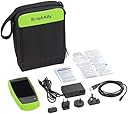
| Included Components | AirCheck G2 WLAN Wireless Tester; Power charger with 4 international adapters; Soft carrying case; USB cable to connect to a PC |
| Item Dimensions | 5.6 x 10.3 x 12.2 inches |
| Item Weight | 510 Grams |
| Item dimensions L x W x H | 5.6 x 10.3 x 12.2 inches |
| Lower Temperature Rating | 32 Degrees Fahrenheit |
| Manufacturer | NetAlly |
| Maximum Operating Voltage | 264 Volts (AC) |
| Minimum Operating Voltage | 15 Volts (DC) |
| Model | AIRCHECK-G2 |
| Part Number | AIRCHECK-G2 |
| Power Source | Battery Powered |
| Specification Met | CE, FCC, RoHS, UL |
| Style | AIRCHECK-G2 |
| Style Name | AIRCHECK-G2 |
| UPC | 754082133926 779184000051 754082136385 |
| Unit Count | 1.0 Count |
| Upper Temperature Rating | 113 Degrees Fahrenheit |
| Warranty Description | 1 Year Manufacturer |
D**R
Expensive but *so good* for getting a clear picture of the wifi situation.
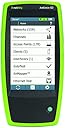
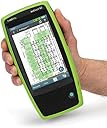
If you're even thinking of spending this much on a wifi tester, you're either a pro, or (like me) just mighty pissed off at some wifi coverage/interference/performance issues you can't quite solve no matter what you try. There are those phone apps that give you a channel view, they call themselves "wifi analyzers" but they really don't tell the whole story -- they just show the signal strength & channel usage of access points in view. They don't show actual traffic utilization, sources of interference, or background noise. This tool not only shows all that, it's got a super clean, usable touchscreen interface that shows at a glance exactly what's going on, organized by channel, by access point, or by network. Spend five minutes with it and you'll get a bunch of insights that would have taken you hours with other techniques, or maybe never been clear. After playing around with just a little while I had several immediately actionable observations for my setup (in terms of channel/band usage, placement, etc).
Trustpilot
1 day ago
4 days ago