⚡ Plug into the future of ultra-fast, reliable internet—where speed meets style.
The Anker USB-C to Ethernet Adapter delivers ultra-fast wired internet speeds up to 2.5 Gbps with effortless plug-and-play connectivity. Its compact, lightweight aluminum design complements premium devices like MacBook Pro, Dell XPS, and iPad Pro, ensuring seamless compatibility across Windows, macOS, and Chrome OS. Backed by Anker’s trusted 18-month warranty and customer support, this adapter is the perfect upgrade for professionals demanding reliable, high-speed network access on the go.


| ASIN | B097N5WJY9 |
| Best Sellers Rank | #322 in USB Computer Network Adapters |
| Brand | Anker |
| Color | Gray |
| Compatible Devices | Laptop |
| Compatible Operating System Family | ChromeOS, MacOS, Windows |
| Customer Reviews | 4.3 out of 5 stars 1,276 Reviews |
| Data Link Protocol | Ethernet , Gigabit Ethernet , USB |
| Data Transfer Rate | 2.5 gigabits_per_second |
| Hardware Interface | Ethernet, USB |
| Item Dimensions L x W x H | 2.3"L x 0.9"W x 0.5"H |
| Item Weight | 27.22 g |
| Manufacturer | Anker |
| Mfr Part Number | A83160A1 |
| Model Number | A83160A1 |
| Number of Items | 1 |
| Product Dimensions | 2.3"L x 0.9"W x 0.5"H |
| UPC | 194644075699 |
| Warranty Description | 18 month warranty |
J**.
Blazing-fast 2.5Gbps speeds and a premium aluminum build—works perfectly!
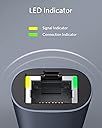
I picked up this Anker USB-C to 2.5 Gbps Ethernet Adapter to bridge my laptop and portable work systems into my upgraded multi-gig workshop network backbone. Standard 1G Gigabit adapters completely bottleneck modern high-speed local data transfers. This compact aluminum adapter operates flawlessly, unleashing the full speed of my local server and high-speed internet tier without any connection stability issues. Why this 2.5G adapter is a top-tier networking tool: Legitimate 2.5Gbps Network Throughput: The performance jump over standard gigabit hardware is immediate and massive. Plugged into my 2.5G unmanaged switch, local file transfers between my laptop and Network Attached Storage (NAS) anchored perfectly at 280+ MB/s. It copies multi-gigabyte files and G-code folders in just seconds. Premium Aluminum Heat Dissipation: Pushing multi-gigabit data streams can cause cheap plastic network adapters to overheat, throttle speeds, or drop connections entirely. This Anker unit features a rugged aluminum shell that acts as a highly efficient heatsink, staying cool to the touch even during massive, multi-hour backup runs. True Plug-and-Play Driver Stability: On modern laptops and OS environments, this adapter requires zero manual driver installations or finicky software updates. The network handshake is instantaneous, and the built-in link lights give clear visual feedback of a successful multi-gig connection. Network Setup & Deployment Tips: Check Your Link Path: To successfully hit full 2.5Gbps speeds, remember that every link in your chain must support it. Ensure your router or switch has a dedicated 2.5G port, and use at least a Cat5e or Cat6 copper cable. If you use a legacy 1G port or an old Cat5 cable, the adapter will automatically throttle down to legacy speeds. Secure Storage: The thick, braided cable design is highly flexible but incredibly rugged. It resists fraying and kinking when tossed into a laptop travel bag, making it a highly dependable asset for mobile workspaces. The big takeaway: Anker has delivered a flawless, pocket-sized hardware solution for anyone needing to maximize their network connectivity. It cuts out file transfer bottlenecks, offers premium metallic build quality, and runs cool under continuous loads. It is a fantastic value buy that completely modernizes a local workflow.
G**N
Excellent when used as designed with a USB-C connector
I bought this adapter because I am a performance nut. I have been converting my home to 2.5 Gbps ethernet. Very few people need that speed in the home, and I am no exception. Computer performance is my passion, now that I am too old for the dragstrip. Most modern thin-and-light laptops do not have an ethernet adapter. If you want to connect to Ethernet, you need a docking station, a monitor with Ethernet, or a USB-to-Ethernet adapter like this one. Those other solutions are often expensive. This one is cheap. On both Windows 10, Windows 11 and Linux, no driver installation is required. Plug it in and it works. This 2.5 Gbps USB-C to Ethernet adapter is attractive, appears well built, and looks like it will last for years to come. If there is a problem, Anker has an excellent support team. My experience is that their people answer the phone, listen carefully, and try hard to help. In one case they immediately shipped me a replacement unit. I tested this adapter extensively on my new 2.5 Gbps ethernet network. When connected to USB-C it transferred full speed at 2.5 Gbps in both directions at once, with only a few errors. TCP/IP is designed to crank up the speed until it gets errors, so a low error rate is normal under most conditions. The only way I know to avoid all errors is to turn on Ethernet flow control, which this device does not support. In any case, Ethernet flow control often causes more problems than it corrects. Guessing I might be able crank up the speed on an older laptop, I tried using a USB-A to USB-C adapter with this unit. It connected and talked fine on the network, but it was running only about 600 Mbps. You could use it this way in a pinch, but the adapter is not designed for this service. I'm just pleased that it worked at all. I tried hard to find a flaw in this unit, and could not find one. It operates perfectly when used as directed with a USB-C connection. I highly recommend it for use with any laptop that supports USB-C. There are better solutions for laptops that have only USB-A connectors, and for desktop & tower computers.
M**E
Works Perfectly Right Out Of The Package, Top Results, Apparently Not Currently Android Compatible
As once would expect with an Anker product it worked right out of the package with my Windows 11 laptop and I was able to do proper full speed tests for my new internet connection that would otherwise be constrained by the 1 Gbps port on my laptop. The adapter is based on a current and well supported RealTek chipset. I would recommend this to anyone running a Windows laptop that needs a 2.5 Gbps ethernet adapter and has a free USB-C interface. One caveat for this adapter, while is works perfectly with Windows 10 and 11, it was absolutely not recognized by my recent, high-end Samsung Galaxy Android phone. The older Anker 1Gbps adapter that this is replacing is recognized and automatically configured by the latest, updated version of Android on my phone, but this 2.5 Gbps adapter is not. My Galaxy just stared at me like I hadn't plugged anything into it. Apparently this Realtek chipset isn't useable in current Android. Hopefully this will change as I'd like to have the ability to be able to use this with my Android phone when WiFi isn't available but a wired connection is.
E**Z
Excellent network adapter for MacBook Air M4
I simply plugged it in and configured it. In my case, I used a static IP address. MacOS Sequoia recognized the adapter without any additional requirements, and once configured, it worked as expected, providing efficient and fast connectivity. I am very satisfied with this device and must add that its construction is solid, and the cable is also very good quality.
M**O
Does NOT reliably connect at speeds faster than 100 Mbps; Not supported on newer MacBooks
(Updated from previous versions after working with Anker support and ultimately returning this for a refund.) I know this adapter gets some good reviews (which is exactly why I purchased it), but two different units I tried both had the same faulty issues so BUYER BEWARE. I experienced the same faulty behavior with connection speed with the original unit I purchased and the replacement unit Anker sent me. In the end I returned it for a full refund. This hardware should not be sold as compatible with Apple MacBooks since Anker provides no technical support on newer MacBooks running Apple silicon (e.g. M1 and newer CPUs). Anker support told me they can only provide support for the older Intel based Macs. I wish I knew this before I purchased it. This USB Ethernet adaptor will not reliably connect at speeds faster than 100 Mbps (100BASE-T) when used with a 1 GbE switch (1000BASE-T). I tried multiple known working Ethernet CAT-6 cables with multiple known working network switches, that all work without issues using other network adapters. I saw the same poor results with MacBook Air and Pro models (M1 and M2 CPUs) running macOS Sonoma (14.5) and Ventura (13.6) and a Dell Precision 5540 running Windows 11 and Linux 6.8.x (Ubuntu 22.04). Again, using other network adapters these systems all connect and operate successfully at 1 Gbps (1000BASE-T). I worked with Anker support on troubleshooting for just over a week before they agreed to send a replacement unit, which gratefully arrived in less than 24 hours. However, the replacement unit arrived and sadly it behaved as faulty as the original unit. Anker support was helpful in that they were able to get me a replacement quickly and ultimately a refund without issues. On the plus side, when used with a 10 GbE port, the adapter successfully and reliably establishes a 2.5 Gbps connection (2.5GBASE-T) and gets good throughput (2.35 Gbps measured via iperf3). I was taken aback that Anker support was unable to offer any troubleshooting or explanation and twice instructed me to download and install updated Windows drivers, even though I purchased this primarily for use with my M1 MacBook Pro.
J**N
Solid performer
A picture is worth a thousand words. My setup: MacBook Pro 16-inch, Nov 2024 MacOS 26.5 (25F71) (Tahoe 26.5) Why 4 and not 5 stars? I plug this into my MacBook Pro, iPad Pro M5, iPhone 17 Pro Max and perform a speed test. The first test gets the results below. All subsequent speed tests achieve under 100Mbps download, but the full 2000+ Mbps upload. Right now I can't narrow it down to either my Ethernet port on my TP-Link router (may very be poor Chinese Ethernet chips in the router, but doubtful since it's their top router as of this writing, the BE900), but it seems to follow the adapter. I have all CAT8 cabling in my house. Forums point to a driver for the MacOS, but it's dated from 2012, and being a Mac user since 1994, I'm not putting any 3rd party drivers on my MacOS. Apple doesn't seem to have issues with these things. My next step is to try this with a TP-Link adapter and see where it goes. Ultimately I will test it with the OWC Thunderbolt 10GbE adapter, as I know that will eliminate the issue if it's an adapter issue. I have not tried the adapter on Windows 11, so maybe I'll update this review at another time. For now, this adapter is nice for the price.
A**.
Good, but confusing.
it refuses to work beyond 350Mbps over an ANKER USB 3.0 hub... but if connected directly without a hub or Type-A adapter... the latency beats even the packet dropping 5Gbps WisdPi. If your goal was one cable to do everything, you need a dock with Type-C passthrough or a built in 2.5Gbps port.
L**H
High quality, well designed product using a great chipset.
High quality, well designed, great chipset. I have not had the opportunity to test it yet in a 2.5GB network, but it works flawlessly with my 1GB LAN at home. My M4 MacBook Pro running macOS Sequoia recognized it and indicated all its capabilities right away on plugging it in to a USB-C port. No additional installation of drivers was necessary. Having had excellent experiences with ANKER products (my go-to brand for these kind of accessories) in the past, I am pretty confident that it will work well in a 2.5GB network as well, but I cannot verify this at present. At some future point (next router upgrade), I will be able to use its full capability.
S**Y
True 2.5 Gig Symmetrical Ethernet Speeds!
Fantastic Results! Really lives up to the 2.5 Gig branding!!! Performance is amazing and blows my mind!! I used it with my iPhone 15 Pro 10Gig USB-C Port I have from Apple for testing this NIC!! I am so happy with it! Love it! Highly Recommend this to anyone who wants full 2.5 gig speeds all the time and makes the most sense when buying from a reputable brand like Anker! Gotta be ANKER!! Superb Quality and Well-Designed NIC!
P**O
Óptimo Produto
Corresponde às expectativas.
N**O
Fonctionne parfaitement
Adaptateur usb c vers ethernet 2,5 Gbps pour un MacBook Air M1 connecté à la fibre optique 2 Gbps. Débit constaté de 1,8 Gbps constant/stable, en plug and play sans installation logicielle préalable. Bonne qualité d’assemblage et des matériaux. Je recommande
H**C
最初からこれにしとけば良かったかも
有線接続なのにWI-FI接続について評価せいとは此如何に?(WI-FI接続は未評価) 他社の3K未満なRealtek系2.5Gbpsはインストールに四苦八苦した挙げ句、2ヶ月ちょっとで相次いで御臨終を迎えました。 これはWindows10がさっくりと認識してくれたので、残るは耐久性ですね…。(暫定的に★3) Ankerの他製品(モバイルバッテリーとかケーブルとか)は問題無く使用出来ているのと、今のところ通信速度も2Gbps近く安定して出ているので評価も★5で良いと思います。(安定性★5)
G**G
Connessione veloce e stabile in un formato compatto
L’Anker PowerExpand USB-C a Gigabit Ethernet 2.5 Gbps è un adattatore che fa esattamente quello che promette, e lo fa bene. Lo sto utilizzando su un NAS homemade e fa differenza rispetto alla connessione originale di 1 Gbps: la velocità è stabile e le latenze sono minime, perfetto per chi ha bisogno di prestazioni elevate per lavoro o gaming. Il design in alluminio è elegante e si abbina perfettamente ai dispositivi. È molto compatto e leggero, ideale da portare sempre con sé in borsa senza occupare spazio. Il cavo USB-C è di ottima qualità e il collegamento è immediato, senza bisogno di installare driver su Windows (sul mio NAS invece si). Dopo diversi test, la velocità di trasferimento si mantiene elevata e senza cali, sfruttando al meglio le reti da 2.5 Gbps. Un accessorio essenziale per chi lavora con file di grandi dimensioni, streaming ad alta qualità o semplicemente vuole la sicurezza di una connessione cablata veloce e affidabile.
Trustpilot
2 weeks ago
1 month ago