📸 Capture. Print. Impress. Instantly.
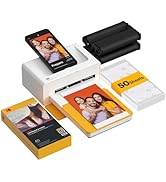
The KODAK Dock Plus 4PASS Instant Photo Printer is a compact, smartphone-compatible dye sublimation printer delivering high-quality 4x6 photos with advanced 4Pass technology. Featuring instant phone docking, stable Bluetooth connectivity, and customizable border options, it produces durable, fingerprint-proof, and water-resistant prints. Enhanced by a dedicated AR app, it offers creative filters and frames, making it the perfect portable printer for millennials who want to preserve and share memories with style and ease.


| ASIN | B08FDCNBTF |
| Additional Printer Functions | Print Only |
| B&W Pages per Minute | 1 ppm |
| Best Sellers Rank | 3,544 in Computers & Accessories ( See Top 100 in Computers & Accessories ) 1 in Desktop Photo Printers |
| Box Contents | 1 x Kodak Dock Plus, 1 x Power Adapter, 1 x Power Cable, Quick Start Guide, Paper Box, 10 x Photo Sheets and Cartridge for 10 Photos |
| Brand | KODAK |
| Brand Name | KODAK |
| Color Depth | 1 bpp |
| Color Pages per Minute | 1 ppm |
| Colour | Black |
| Compatible Cartridge | [Proprietary] |
| Compatible Devices | Smartphones |
| Connectivity technology | wired, wireless |
| Control Method | App |
| Controller Type | Android |
| Country of Origin | Korea, Republic of |
| Customer Reviews | 4.1 out of 5 stars 18,840 Reviews |
| Display Type | LCD |
| Dual-sided printing | No |
| Duplex | Simplex |
| Hardware Interface | Bluetooth |
| Ink Colour | color |
| Item Dimensions D x W x H | 10.2D x 17.8W x 7.6H centimetres |
| Item Weight | 3.33 Pounds |
| Item height | 7.62 centimetres |
| Manufacturer | KODAK |
| Maximum Copies Per Run | 50 |
| Maximum Copy Resolution Black and White | 300 dots_per_inch |
| Maximum Copy Resolution Color | [High] |
| Maximum Copy Speed Black and White | 1 ppm |
| Maximum Print Resolution Black and White | 300 dots_per_inch |
| Maximum Sheet Capacity | 10 |
| Maximum print Resolution Color | [High] |
| Media Size Maximum | 4x6 inches |
| Model Name | Dock Plus |
| Model Number | PD460 |
| Model Series | PD460 |
| Model name | Dock Plus |
| Network Connectivity Technology | wired, wireless |
| Number of Trays | 1 |
| Other Special Features of the Product | Borderless Printing |
| Output sheet capacity | 10 |
| Paper Size | 4x6 inches |
| Print media | Glossy photo paper |
| Printer Output Type | Colour |
| Printer Type | Dye Sublimation |
| Printing technology | Dye Sublimation |
| Processor Count | 1 |
| Product Warranty | 1 Year |
| Resolution | [High] |
| Scanner Type | Photo |
| Series Number | 460 |
| Special feature | Borderless Printing |
| Specific Uses For Product | Home decoration, gifts, holiday gifts, photo printing, sharing with friends and family |
| UPC | 192143003328 |
| Unit Count | 1.0 count |
| Warranty Type | Limited |
S**S
Brilliant little printer
This little printer is brilliant, it prints lovely photos from my phone, sharp bright colours. Really pleased with it. 4”by 6” sized images too with the option of changing the brightness and adding a border. Easy to set up as long as you know how to use a smart phone.
S**S
Quality prints
I am pleased with the quality of the prints produced by this neat photo printer. It's very easy to use and works well.
J**K
Total Garbage!
GARBAGE! Purchased this as a prezzie for my wife as she loves taking pics on her phone and thought it be a easier than having to set up a printer and configure each photo plus being able to do it direct from her phone. This has to be the worse piece of tech i've ever purchased over the years! Out of the box the printer looks nice although made from plastic it's not tacky. Instructions are clear but i needed a magnifying glass to read them but yeah easy to follow not that it's rocket science. Might not be the same for everyone but the software had to do a few firmware updates could be to do with the model and make of my device (I was using a Android phone). Even with the update it wouldn't Bluetooth so I plugged in to the top of the device and that worked, straight forward software recognizes the printer then asks to select a photo which you are given the option to edit. Did keep getting a message saying image was low res even though they were not of low res. You then click the print button which has like a little circle timer countdown. When you put the paper in the cartridge draw make sure the shiny side is pointing upward then insert the draw into the printer. For me after this procedure everything goes bad. The printer won't grab the paper at all, I've tried putting different amounts in had to give it a helping hand to get it to grab a sheet and then it sits saying aligning paper for a period of time before saying needs more paper or ink cartridge needs replacing. I'd gone from trying 1 sheet to the max you can put in but it will NOT grab the paper. I'd purchased a bundle version so I had extra ink cartridges, so replaced the cartridge and same thing. Then as I was about to give up it grabbed a sheet made some weird noise and dropped a error light and a message saying remove paper and just when I thought it couldn't get any worse the paper was jammed inside and not just jammed the damn thing wouldn't let go and i couldn't see a way to reverse the paper so I kept pulling on it and eventually it gave me the thing back. Just when I thought it couldn't get any worse than that some of the paper tore off and is now stuck inside with no way to remove, if you look closely at the photo paper you can see a tear line so when I managed to pull the paper out the tear part broke off. I don't even know if I can get a refund for this piece of garbage as I'd seen it on offer before Christmas and my wife's bday was this year and I've only just gotten round to testing it so fingers crossed and see if Amazon will be nice to me :) I can only say buy at your peril and I hope others have better luck than I have.
M**D
Great little printer
Great little printer - easy to assemble and setup and using the app iPhone to printed photo in seconds - very pleased so far.
C**.
Really good fun and great quality prints in under a minute!
It arrived in less than 24 hours and it took about 2 minutes to set it up and start printing. The machine itself isn't much bigger than a paperback book, it comes with an ink cartridge inside and the pack with 90 sheets comes with extra 2 cartridges. I read somewhere that each cartridge lasts for about 10 prints but after 12 prints we still haven't run out of ink. Slightly noisy but nothing deafening, It takes just under a minute per photo and you can select up to 5 photos each time. It first prints the yellow hues, then the red ones and then the blues and finally the photo gets a sealant layer so you can touch your prints immediately. The app warns you if your photo is of low quality but the prints still came out ok. It comes with a long cable to plug the machine to the mains and an adaptor to plug different kinds of phones in. There's not much to the app in the way of editing but any smart phone would have some features for that. It was really easy to get the job done, both with the phone plugged onto the machine and over Bluetooth. With Bluetooth I had to turn the printer off and on a couple of times because the app couldn't find the printer. Despite this small issue we loved our new family toy, the quality of the prints is great and very easy to set up and use, my boys 10 and 13 did it themselves and printed some memories to give to friends and family. Would absolutely recommend it.
D**H
Very Happy with Printer
Easy to set up and use, Print quality as good as most services
A**R
Good
Excellent, easy to use and good quality.
S**E
Great gift
My daughter is made up with it great photos and easy to use really recommend it
Trustpilot
3 weeks ago
3 days ago