Buy anything from 5,000+ international stores. One checkout price. No surprise fees. Join 2M+ shoppers on Desertcart.
Desertcart purchases this item on your behalf and handles shipping, customs, and support to Argentina.
โจ Revamp Your MacBook, One Key at a Time! โจ
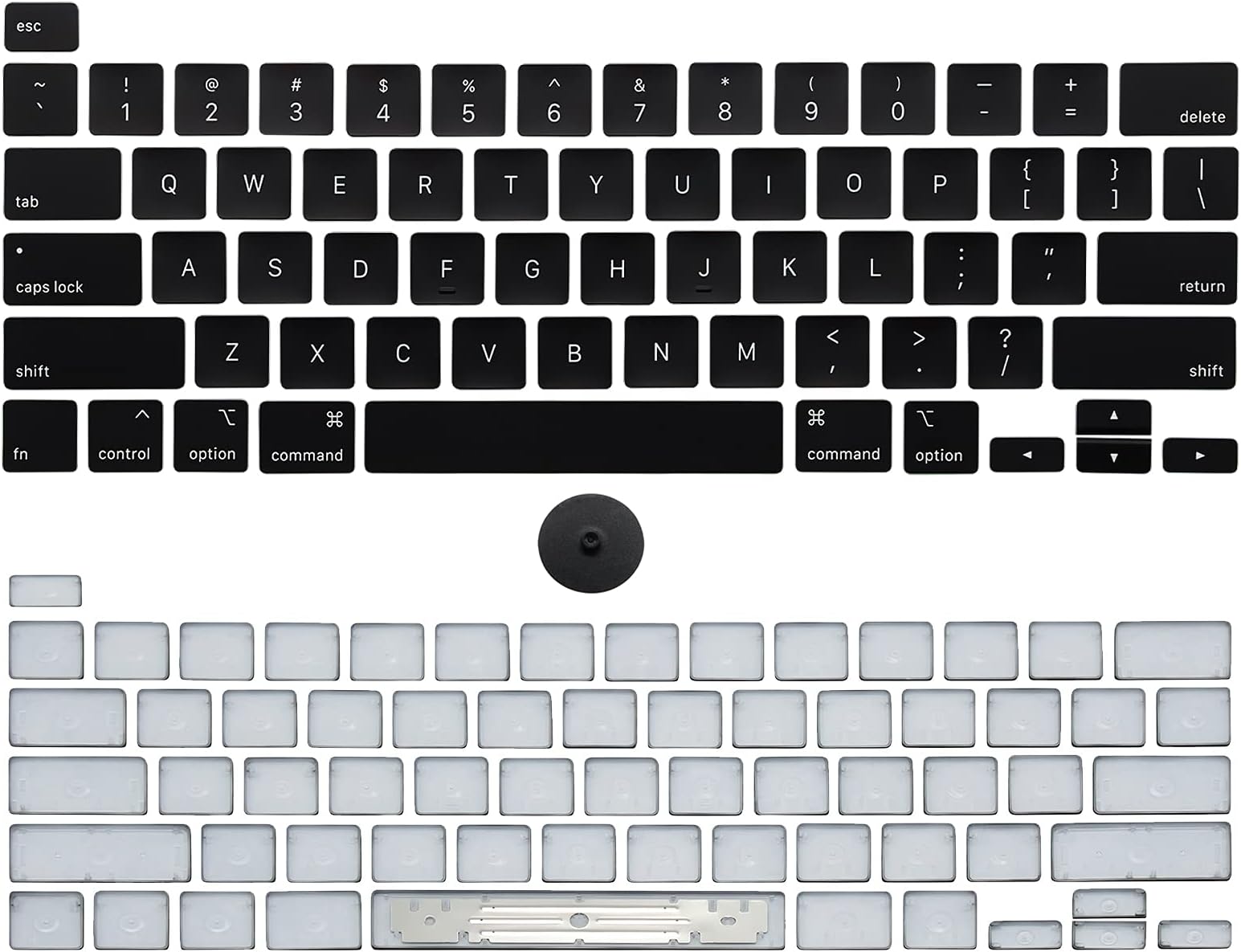
This Keyboard Keycaps Replacement Set is designed for MacBook Pro models A2251, A2289, and A2141 from 2019 and 2020. Made from durable PBT and ABS materials, it includes a full set of keycaps and a removal tool for easy installation. Transform your typing experience while enhancing your device's aesthetics.
| ASIN | B096PQRNZX |
| Best Sellers Rank | #1,053 in Computer Keyboards |
| Brand | NUOLAISUN |
| Color | gray |
| Compatible Devices | MacBook Pro 13'' / 16'', models A2251, A2289, A2141, 2019 and 2020 versions |
| Customer Reviews | 3.9 3.9 out of 5 stars (211) |
| Enclosure Material | Acrylonitrile Butadiene Styrene (ABS), Polybutylene Terephthalate (PBT) |
| Manufacturer | NUOLAISUN |
| Mfr Part Number | NLS-2251-2289-2141-KEYCAPS |
| Model Number | NLS-2251-2289-2141-KEYCAPS |
A**R
Perfect for macbook a1989
Not going to lie. I was nervous to start that i was going to break something on my mac and be deep in the whole. After you get the first two or three keys done itโs super easy! Each key fit with ease, look the exact same, and work right away. Made my mac look brand new. I recommend watching videos first as i did and know that the arrow keys pop off from the side rather than the too but overall it was a great purchase.
A**R
Easy way to refurbish the look of your keyboard
The replacement keyboard key caps were very easy to install. I was able to replace all of my key caps in less than 15 minutes. The key caps came with a small tool that made it easy to remove the old ones and the new ones just snap into place. I recommend reviewing the product video or find one online as I found it helpful. The replacement keyboard key caps look great on my keyboard. They are the same color and style as the original keys caps. I cannot even tell that they are replacements. I am very happy with my purchase of the replacement keyboard keys caps. They were easy to install, look great, and are a good value for the price. I would definitely recommend this product to anyone who wants to replace broken, worn or discolored keyboard keys. I feel like I have revitalized my computer now and can continue to use it knowing it looks and functions great.
G**.
Keys are good but get them replaced by Apple.
These good but I damaged my keyboard installing them myself. According to Apple, they have a specific way of pulling the keys so you don't damage their connection, especially the rectangular up/down arrows. Now I have to really push hard on those keys to get them to work. Apple wants $700 to repair my keyboard.
D**.
Incompleto, no llegaron todas las teclas ni la herramienta para remover las teclas usadas, no recomendable
F**K
Fit and seem to work
I have a 2017 MacBook Pro that works fine, but the keys are wearing out. I had been replacing them one at a time as they broke, but I felt sellers were charging way too much for individual keys, so I bought this set. I have replaced about 4 and they seem to work fine. Pretty easy to install but you do need to be delicate. Also note that this is only the keys themselves and nothing else that goes under them.
D**I
quality was just ok
The item arrived on time and was packaged well. It works as expected and matches the description. Overall, Iโm satisfied with the purchase and had no issues with the seller. Would buy from them again.
M**B
Setting the key hinge properly and re-snapping the key cover properly
Arrived as promised. Packaged well: piece of cardboard with each hinge clip for each key laid out and attached as they would be installed on a keyboard (i.e., the "A" key adhered to the cardboard "keyboard" where it would be located on an actual keyboard (i.e. between "caps lock" key and "S" key). Note: the package does not come with any instructions on installing the key hinges, but I did not expect that. I used a video on Youtube to walk me through installation - which is very important because, at first glance of existing, broken hinges, you often cannot determine what part of the original hinge is broken (lots of little hinge pins on each key hinge part). Please find and study one of those videos online before beginning (please watch it all the way to the end!). Installation of a hinge involves popping off the existing key cover. It is relatively easy with provided tool BUT it must be done per those videos I mentioned - it is not just a pop off/pop on installation of a key cover. It requires SNAPPING the key cover off from the top of the key and then lifting off the key cover by pulling toward the top of the keyboard - not lifting straight up vertically. Again, not too hard but be aware you will be, in effect, "peeling back/popping off" the key cap from the key hinge from top-to-bottom. Also, (based on my failed first attempt) be aware of how you set the new key hinge back onto the underlying key area. A key cap attaches to the hinge by placing the "hooks" on the bottom of the key cap onto the larger, flatter pins at the bottom of a key hinge and then snapping the top of the key cap onto the smaller, round bars at the top of the key hinge. When arranged properly, the key cap will simply snap in and you're good to go.
I**S
Buy it
Really happy the keys fit perfectly and made my computer look brand new again. Great buy!
Trustpilot
3 weeks ago
3 weeks ago