Desertcart purchases this item on your behalf and handles shipping, customs, and support to Argentina.
๐ฅ Elevate your viewing game with LG C1 OLED โ where cinema meets next-gen gaming!
The LG OLED C1 Series 48โ Smart TV combines a stunning 4K OLED display with 120Hz refresh rate and AI-driven picture and sound optimization. Featuring Dolby Vision IQ and Atmos, plus advanced gaming tech like G-SYNC and FreeSync Premium, it delivers flawless visuals and ultra-responsive gameplay. With built-in Alexa and Google Assistant, plus a sleek ultra-thin design, itโs the ultimate centerpiece for any modern living space.


| ASIN | B08WFK81RH |
| Additional Features | Screen Mirroring |
| Annual Energy Consumption | 167 kwh |
| Antenna Location | Home Viewing |
| Aspect Ratio | 16:9 |
| Audio Input | HDMI |
| Audio Output Mode | Surround |
| Best Sellers Rank | #299,016 in Electronics ( See Top 100 in Electronics ) #139 in OLED TVs |
| Bluetooth Version | 5 |
| Brand | LG |
| Built-In Media | Stand |
| Color | Black |
| Compatible Devices | Laptops, Desktops, Tablets, Television, Gaming Consoles, Cellphones, Car Audio Systems |
| Connectivity Technology | Wi-Fi |
| Content Sharing Direction | Mobile to TV |
| Contrast Ratio | Infinite |
| Control Method | Remote, Voice |
| Controller Type | Google Assistant,Amazon Alexa,Apple HomeKit |
| Customer Reviews | 4.7 out of 5 stars 1,285 Reviews |
| Display Backlight Technology | Self-Luminous |
| Display Language Options | English, Spanish, French |
| Display Refresh Rate in Hertz | 120 |
| Display Size Class | 48 inches |
| Display Technology | OLED |
| HDR Format Supported | Dolby Vision, HDR10, HLG |
| Hardware Interface | HDMI |
| Integrated Surround Sound Format | Dolby Atmos |
| Internet Applications | HBO Max, Netflix, Prime Video, Disney+, Apple TV+, Hulu, Paramount+, Peacock, YouTube TV, Spotify, iHeartRadio |
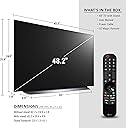
| Item Dimensions D x W x H | 9.9"D x 42.2"W x 25.6"H |
| Item Width | 42.2 inches |
| Line Voltage | 110 VAC 60 Hz |
| Manufacturer | LG |
| Mfr Part Number | OLED48C1PUB |
| Model Name | OLED48C1PUB |
| Model Number | OLED48C1PUB |
| Model Series | C1 Series |
| Model Year | 2021 |
| Motion Enhancement Technology | OLED Motion Pro |
| Mounting Type | Wall Mount, Table Mount |
| Number of Audio Channels | Dolby Atmos compatible |
| Number of Items | 1 |
| Number of Packs | 1 |
| Operating System | webOS |
| Parental Control Technology | Built-in device controls |
| Picture Quality Enhancement Technology | Cinema HDR |
| Power Consumption | 90 watts |
| Refresh Rate | 120 hertz |
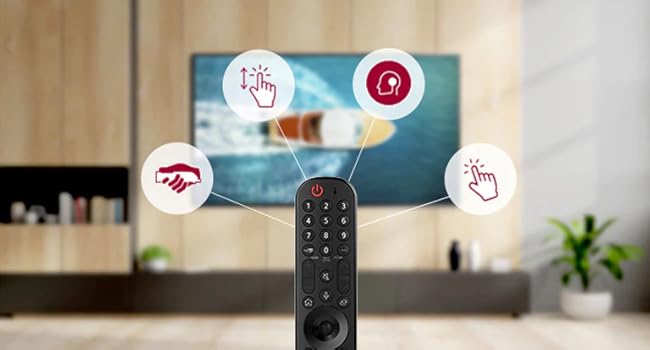
| Remote Control Technology | Magic, Voice control |
| Remote Required Battery Quantity | 2 |
| Remote Required Battery Size | AA |
| Resolution | 4K |
| Screen Finish | Glossy |
| Screen Mirroring Technology | Apple AirPlay |
| Screen Size | 48 inches |
| Signal Format | digital |
| Size | 48 inch |
| Software Update Supported to Date | unknown |
| Speaker Description | LG OLED TV with 40W Dolby Atmos speakers |
| Speaker Maximum Output Power | 40 watts |
| Special Feature | Screen Mirroring |
| Specific Uses For Product | Home Viewing |
| Total Number of HDMI Ports | 4 |
| Total USB 2.0 Ports | 3 |
| Total Usb Ports | 3 |
| Tuner Type | Digital (ATSC, Clear QAM) |
| UPC | 195174006115 |
| Unit Count | 1 Count |
| VESA Mount Standard | 300 x 200 mm |
| Video Encoding | HEVC Main 10 |
| Warranty Type | Limited |
| Wattage | 196 kwh |
| Wireless Technology | Wi-Fi |
C**Y
This is it. It's more than just better; It's having your eyeballs cleaned
At 48", this looks sharper than the 43" 4K it replaced. I think it has something to do with the subpixels being individually lit making it appear even sharper than 4k to my eyes. I feel like it's bright enough in a darker room - Actually bright enough to make your eyes hurt sometimes. In a brightly lit room, I can see it being dim. Overall, it's really the contrast that makes this thing shine so as long as you can control the lighting in the room, you'll be amazed. Gaming is perfect. I've got a 3080ti hooked up, and it's good for perfect video with G-Sync (*compatible - it does not have a hardware board... It's really using AMD's FreeSync, but it's been pretty seamless). Everything feels faster, maybe that's just moving from 60hz to 120hz or the faster response of the display, but it feels awesome. Windows HDR actually works with this display - That was a huge surprise. And it works really well! Especially 'autoHDR', which is a XBox feature I believe, which basically 'fakes' HDR on games without it. Using it as a display to do Excel or Word or anything like that is a BAD IDEA. I use it mostly to consume content and play games - what it's made for. Now, don't get me wrong, it works for that. But the auto-dimming features will annoy you & you risk burn in. If that's your primary use case, buy yourself a decent $150-200 27" IPS display to use as a second monitor for that. I've set it to my liking, but it turns out there's built in hardware to help calibrate the display! You do need a $160 calibrator and some software, but it's totally automated by connecting right to the TV over it's IP address. And another welcome treat is software called ColorControl that's available on GitHub ( I believe it's open source ) that controls the TV so it'll turn off when the screensaver kicks in as well as sync turning it on and off to your PC's power state. It's really helpful when using this as a monitor. It seems like C1's made later in the manufacturing cycle seem to be all WBE panels. I got one, there's a few websites that show how to check a number on the box to tell which panel is installed. I'm not sure what difference it really makes, I just know it looks great. The Amazon setup service was a welcome surprise option too; they were professional, clean, and did their job quickly. Very nice folks.
A**D
Good value for price
I have my gaming PC and PS5 attached to this TV. (**I don't do any competitive gaming, just casual**). I mostly play first person shooters, and Simulators like DCS. Every game I have played has looked great on this TV. Picture quality is awesome. OLED is totally worth it in my opinion. Response times and refresh rates are great. Gsync and Variable refresh rates are nice to have. I never see any screen tearing when frame rates dip. HDR quality is good to. Watching full UHD + HDR movies on this TV is GREAT. The picture quality is better then any other TV I have owned. Better then my Samsung UHD 65 inch. I don't really use the smart apps, but I don't have anything negative to say about them. Just like most other TVs. The OS is snappy and not sluggish. It takes some getting used to the remote as a pointer / mouse. But that's optional. You can use the remote as a regular remote too. My only complaint would be its needs more fully featured HDMI ports. If you want to use all the bells and whistles you may have to play musical chairs with the HDMI ports and your connected devices. OLEDs have a reputation to burn in faster. So I don't leave the TV on unless I'm using it. And certainly don't leave it on for long with with a static screen. But this is the reputation for OLED in general so I can't really say this is a complaint for this specific TV. Just overall a good buy. Probably the best TV I've ever purchased relative to the tech out at the times of each TV purchase. I'm confident if you treat this TV right, it won't have any issues. LG has been on point with build quality as far as I have seen.
J**N
Best TV I have owned, will never go back.
Have had this TV for 3 years now. Sister wanted to know what TV we had to go and buy one, and I had to come back here and write this review. We have had 0 issues with this TV for the 3 years we've had it. I would 100% recommend this TV to anyone. The image is great, the TV is super thin and light, and the colors are vibrant compared to the dark black. We bought it a few years back while the price was more expensive during cyber-monday sales. I would absolutely buy this again. The ONLY bad thing I can say about it, is that when playing certain older games, or watching shows like Game of Thrones, the dark black sometimes makes things difficult to see, but I would say thats an issue with the media itself rather than the TV. TLDR: 10/10 would buy this again.
A**N
Best TV Iโve had for gaming
Honestly the only problem I have with this tv was the delivery. Took an extra week and a half due to NSDโs incompetence. This is a gorgeous tv with a pretty dynamic and pure range of colors. The blacks are pure as heck, some loading screens leave my room pitch black. The size is great for console gaming, not too much or too little so I recommend the 48 inch if this is going in your room or gaming room. It can work in a living room but depending on the size of the room Iโd say this is the smallest youโd wanna go. Itโs a size you really canโt go wrong with. Only โissueโ I have is trying to manage glare from window light but thatโs not the fault of the tv. During the day, the clarity and sharpness of this thing still shines through regardless. At night, this tv looks incredible. Truly you canโt find a better tv out there with the specs to handle high level console gaming. Great frame rate, great picture and sharpness, great colors, great blacks, HDR is here too. Itโs got all the bells and whistles. If you can get this on any semblance of a sale, itโs a steal.
C**.
I love this display as a monitor!
I bought this back in February 2022 and have had no issues with burn in or anything like that. I am VERY conscious of it, though, and am using this TV as a monitor. I do not snap windows to corners or split the screen in any way. I sit about 3-4 feet away from the display depending on my posture. Quick Pros / Cons: Pros: Amazing pixel response time and refresh rate (4k, 120hz) Black blacks, bright whites (used in a lighting-controlled basement) Amazing picture quality and colors -- no smearing or smudging, no ghosting or any of that bad LCD visual artifacting Great audio if you have the settings set right (see cons) Great PPI for my distance from the screen (4k native, 100% scaling on Windows 11) -- Text is small yet crisp Cons: Awkward to move and I always worry about the thin top half. Always very careful when I move it. Big base, which I understand, but that means I can't push it further back on my 6ftx3ft desk. LG's garbage settings that keep forgetting themselves. -- Audio is always set to Game Optimizer, which absolutely kills the audio. Have to switch it to Standard every time I turn the TV on -- There is a Linus Tech Tips video on a workaround for this that makes the TV "sleep" or go into a low power mode instead of turning it off and on every time you are done with a session. Funny Con: Coming from a 1440p display, trying to run a 4k 120hz display on a 3080 doesn't work the best. This TV is making me really want a new graphics card. Overall, I love this and I can't imagine upgrading this any time soon (besides the software that I hope they fix via updates). I thought 48 inches would be too big for a monitor, as I was looking for a 40" to maybe 42" display, but it's perfect for 4k with no scaling. Big ole thumbs up LG!
C**E
Best PC 'monitor' so far
I bought the 48" version in February of 2022. And after roughly 2,000 hours of use, I'm glad I did. It sits on a desk as a PC monitor, and the screen size is spot on. (The desk itself is 31" deep, so the OLED is a mere inches away from arms length.) I also use an LG OLED C9 as a television in the living room, so I knew what to expect as far as perfect black levels, color accuracy pop, great contrast, and subpar performance in bright surroundings. The built-in speakers aren't much to write home about, but at my sitting distance from the C1, it comes across with depth and clarity. I was impressed. The metal stand deflects the output from the downward, Atmos drivers - and it actually works. (I can't say the same thing about the C9 at a viewing distance of six feet, but that's the main reason I picked up a soundbar for it.) Games and videos sound marvelous. Unfortunately, music comes across tinny and muddled. The setting to edit input viewing mode, found in the Home Dashboard menu, allows you to switch between PC, Blu-Ray, streaming box, DVD, cable, etc. - and the picture and motion settings will adjust according to the source material. And it works very well. Throw in WiFi and four HDMI 2.1 ports, and I'm a content consumer. I have only a couple of quibbles with the LG OLED48C1. One. While the screen never dims while viewing/streaming content or playing video games, it does so when I'm using the TV as a PC monitor. This burn prevention setting kicks in whenever I'm writing for an extended time, whether it be a long email or this review (so far it hasn't, so maybe I should keep this short and sweet). You can get back to normal luminance, however, after a couple of taps on the Windows button of your keyboard. It's a peeve, but I get why it's there. (Windows users: remember to hide desktop icons and the taskbar if you want to prevent burn-in.) Two. (wait.... the screen just dimmed..... tapping.) If you use this with a version of Windows released before Windows 11, the default location of the Start Menu is a bit of a stretch to use. With this much screen real estate, it's uncomfortable. It's a tad like looking for the side view mirror in a car. (Luckily, Windows 11 has moved the menu to the center of the screen. Mac fans.. please, just don't.) One star off for those reasons. Still, the LG OLED48C1 is honestly the best and most impactful PC display I've ever used, and I doubt I'll ever go back to a traditional monitor again.
D**0
Best Picture I Have Ever Seen On A TV!! Also The Best TV For Xbox Series X or PS5!!
By far the best picture on a TV I have ever seen. I have the 48" size which is perfect for my bedroom. I could only imagine how amazing the TV must look in bigger sizes. Pictures of the screen and TV do not even do it justice, which is why I did not include any. You just have to see the picture to understand. There is no backlight, each pixel emits its own light individually. That means infinite contrast, true blacks, the brightest whites and deepest colors. A regular LED TV will always show black as slightly "gray" because the pixels are being illuminated by a back or side light. On the LGOLED that goes completely away. Side by side there is no comparison. If you are debating on price just get it, it will last at least 10 years compared to other TV's on the market right now and you will literally own one of the best TV's made. I got it for $1300 new on Amazon. That included tax and some discounts they were giving in addition to a slight sale which made this TV, the C1, the same price as the CX from last year. So the choice for me was a no brainer to go with the C1. It does have a faster processor and a different more user friendly UI compared to the CX as well as a better game mode. I have my Xbox Series X and PS5 running on it and it looks stunning. Dolby vision is beautiful and the integrated game optimizer mode on the TV automatically adjusts to the game input setting when those devices are turned on, but when streaming movies through them it will turn off to improve performance which is so convenient. TV sounds great with its built in, downward firing speakers, but I do have it connected to a sound bar, I was extremely surprised with the quality of the TV speakers despite the TV being INCREDIBLY thin. Every time I look at it, the picture still blows me away. It is a window to another world.
J**R
After 10 months I'm still using as a monitor and loving it more than ever
I got this TV to try it out as a PC monitor. At the $1000 price point there is no monitor that came close to the picture quality and response time of this TV. I moved to this TV from a curved ultrawide 34in 3440x1440 100hz monitor that had no HDR capability. This TV was a massive improvement in picture quality, but its soo big and not curved and I was a bit overwhelmed by the size. However, it looked so good I kept using it. After a short time, I got used to it. I sit with my eyes about 36 inches away from the screen and it didn't take long before I really started to enjoy the size. It would be hard to go back to a smaller screen at this point. I had some problems with the screen dimming when doing productivity tasks, but found a YouTube video that showed me how to use a service remote to fix this by changing 2 settings. I didn't like that unlike a monitor turning on and off the PC didn't turn on and off the TV automatically. I had to use the remote to turn the TV on and off separately. I found an app for windows that connects to the TV over WiFi and turns it on and off with windows which works perfectly. After using this TV as a monitor for 10 months for both school, work, and gaming I am really happy. The only thing I wish is that it was a curved TV.
A**N
Great pictures and software
Great picture and remote easy to use
Trustpilot
1 week ago
1 month ago