Buy anything from 5,000+ international stores. One checkout price. No surprise fees. Join 2M+ shoppers on Desertcart.
Desertcart purchases this item on your behalf and handles shipping, customs, and support to Argentina.
🔢 Elevate your number crunching game—because every digit counts!
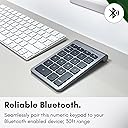
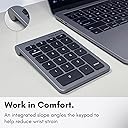
The Macally 22 Keys Bluetooth Wireless Numeric Keypad is a sleek, ergonomic accessory designed for Mac users who demand efficient, comfortable numeric data entry. Featuring 22 full-size scissor-switch keys including arrow keys, it pairs instantly via Bluetooth with up to 30 feet range and runs on a long-lasting AAA battery offering 400 hours of use. Perfectly compatible across the Apple ecosystem, its tilted design minimizes wrist strain, making it an essential productivity booster for professionals and managers alike.


| ASIN | B07K2P3BX2 |
| Antenna Location | Business, Education, Everyday Use, Personal |
| Best Sellers Rank | #60,665 in Computers & Accessories ( See Top 100 in Computers & Accessories ) #60 in Numeric Key Pads |
| Box Contents | BTNUMKEY, User Manual |
| Brand | Macally |
| Brand Name | Macally |
| Button Quantity | 35 |
| Colour | gray |
| Compatible Devices | Laptop, PC |
| Connectivity Technology | Bluetooth |
| Country of Origin | USA |
| Customer Reviews | 4.3 out of 5 stars 1,152 Reviews |
| Enclosure Material | Aluminium |
| Global Trade Identification Number | 00701107497600 |
| Hand Orientation | Ambidextrous |
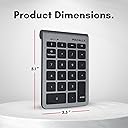
| Item Dimensions L x W x H | 13L x 8.9W x 1.7H Centimeters |
| Item Type Name | keyboard |
| Item Weight Unit of Measure | 100 g |
| Keyboard Backlighting Color Support | Single Color |
| Keyboard Description | Ergonomic |
| Keyboard Layout | QWERTY |
| Manufacturer | Macally |
| Manufacturer Part Number | BTNUMKEY22 |
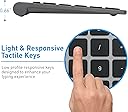
| Mechanical Keyboard Switch Model | Scissor Switch |
| Minimum Required Operating System Version | Mac OS X 10.6 Snow Leopard |
| Model Name | BTNUMKEY22 |
| Model Number | BTNUMKEY22 |
| Number of Batteries | 1 |
| Number of Keys | 35 |
| Number of Sections | 2 |
| Power Source | Battery Powered |
| Product Features | Ergonomic |
| Recommended Uses For Product | Business, Education, Everyday Use, Personal |
| Series Number | 22 |
| Special Feature | Ergonomic |
| Style Name | bluetooth number pad for laptop |
| Switch Type | Tactile |
| Theme | Productivity |
| UPC | 701107497600 |
| Warranty Description | no warranty available |
| Water Resistance Level | Not Water Resistant |
D**Z
Buen producto, cumple
Llevo mas de 1 mes con él. Funcional, cómodo. Es de plástico. No se traba y conecta bien. Usa una batería recargable (incluida). Hasta el momento ha funcionado bien
L**G
Good but cheap item
It does the job well and have not struggled with connectivity at all. Dont listen to the bad reviews, they simply havent read the instructions. The only bad thing about the keypad is that the battery needs replacing. Built in li ion battery would have been better but this does afford you longevity in the item its self as the batteries can be replaced. It is also cheaply built. It is plastic and not metal.
J**R
Great tool when using “Language Learning with Netflix“
I purchased this bluetooth keypad with a very specific goal in mind—and this turned out to be tremendously successful, truly exceeding expectations. In order to be able to watch Netflix movies with subtitles both in the original language and in English, I use the Chrome extension, “Language Learning with Netflix”. However, since this extension currently only works with Chrome and when Chrome is running on an actual computer, this means I must use HDMI output from the computer into a TV monitor. A beauty of the system, though, is the ability to move quickly back and forth, pause, and the like—which is controlled by using the up, down, left, and right arrow buttons on the computer’s keypad. Well, with this relatively inexpensive remote keypad that includes the 4 arrow keys, all can be accomplished while sitting at a comfortable viewing distance, with great ease. And because the remote is so lightweight, simply holding it in one’s hand continuously is essentially effortless. The arrow keys are extremely easy to locate just by feel, so one’s eyes never need to leave the screen. The device connected to my MacBook Pro laptop very easily. I use the on-off switch to turn it off after use to save battery life (theoretically, although I haven’t yet had to do a battery change, despite many hours of usage). And then when I switch it back on, it connects back to the computer almost instantly, with no fiddling needed on my part. As a bonus, the number keys themselves have further usefulness when using this system, since they can be used to slow down or speed up playback speed. Highly recommended product.
F**S
Conectar
Pessoal, me ajudem.. eu conectei no meu Mac, mas acabei esquecendo o dispositivo no computador. Como eu ativo o Bluetooth novamente?
M**N
Great product.
Love it.. works good and easy to set up.
Trustpilot
2 weeks ago
3 weeks ago