


๐ Upgrade your desktop with 5X 10Gbps USB power โ because speed waits for no one!
The FebSmart FS-A5-Pro is a PCIe x4 expansion card that adds five USB 3.1 GEN2 Type-A ports to desktops and workstations, delivering up to 10Gbps per port with a shared 16Gbps bandwidth. Featuring built-in self-powered technology, it supplies up to 75W total power without extra cables, supports plug-and-play on modern OSes, and includes a heat sink for reliable high-speed performance.
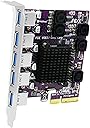


| ASIN | B08F3S1VM8 |
| Best Sellers Rank | #335 in Internal USB Port Cards |
| Brand | FebSmart |
| Compatible Devices | Personal Computer |
| Customer Reviews | 4.0 out of 5 stars 175 Reviews |
| Hardware Interface | PCIE x 4 |
| Item Type Name | PCIE X4 Interface to 5X 10Gbps USB-A Ports Expansion Card |
| Item Weight | 98 g |
| Manufacturer | FebSmart Co,.Ltd |
| Mfr Part Number | FS-A5-Pro |
| Model Number | FS-A5-Pro |
| Number of Items | 1 |
| Operating System | Windows 11, 10, 8.x, 7 (32/64), Windows Server 2008, 2012, 2012R2, 2016, 2019, 2022.Linux and MAC OS. |
| Style | FS-A5-Pro |
| Style Name | FS-A5-Pro |
| UPC | 783919286993 |
| Warranty Description | 1 Year Limited Parts Warranty. |
D**S
Fantastic USB expansion card for the price
I am moving on from my old Z87 Asus Sabertooth i7 4770K rig. It has served me well since I built it in 2014. I am putting it storage and will use it later for a plex sever. Itโs a great board, but itโs old. One of the issues for me is the board only has 4 USB 3.0 ports on the rear panel and 2 mid board that are for the case front. No USB 3.2. Back in March of this year i took care of that by buying this expansion card. It went into an unused pcie x16 slot. Iโm running windows 10 64 bit pro and my machine picked it up after I booted back up. All the ports work just fine. To test the speed I used a Samsung Bar Plus 256 GB USB 3.1 flash drive formatted to exfat. I ran winsat disk -drive from CMD. As you can see in my screen shots, the speeds are impressive. 4 of the ports hit speeds from 167 to 163 mb/s on the disk sequencial 64.0 read and around 135 on the disk sequenctial 64.0 write. The 5th port hit 159 read and 135 write. I used the same flash drive on one of the boards rear 3.0 port. That speed was 151 on the rear and 105 on the write. You can see the difference in speeds from 3.0 and 3.2. Donโt hesitate on picking up this card if you need more high speed ports and you have an appropriate available pcie slot.
O**R
For those that are stuck on the 3.1 Gen 2 vs 3.2 Gen 2 labeling well...
According to the information available they are one in the same. If you are looking for the 20Gbps rates then you need to now find a "USB 3.2 Gen 2x2" card instead of the "USB 3.2 Gen 2" (10Gbps). See image of an article frm CNET that summarizes this. Somewhere along the line in 2019 it was decided to rename the standards to "make it easier" but I don't think that was the result (yet). Hereโs how it all breaks down: * USB 3.2 Gen 1: originally known as USB 3.0, and previously renamed to USB 3.1 Gen 1. Itโs the original USB 3.0 specification, and it can transfer data at up to 5Gbps. * USB 3.2 Gen 2: Previously known as USB 3.1, and then later as USB 3.1 Gen 2. It offers speeds at up to 10Gbps. * USB 3.2 Gen 2x2: formally known as USB 3.2, itโs the newest and fastest spec, promising speeds at up to 20Gbps (by using two lanes of 10Gbps at once).
M**M
Not recognized by my 16x PCIe slot!
My motherboard, Gigabyte B660M DS3H has only one 16x slot, and two 1x slots. Of course I had to use the 16x slot. But Windows 11 can't find it, there's just no device in Device Manager. I selected to view hidden devices, but no Unknown Device or Other Device is there. The motherboard just does not find it. A USB drive lights up briefly when plugged in, but then goes dark. With any powered USB port, the light should stay on or blink. I tried to install the drivers, by the way to get them or support leave out the WWW. in their website, and the driver says no ASSMedia device not found. Thanks guys, I was hoping to get this system done today so I can install it tomorrow.
M**.
NOT USB 3.2, and NOT PCIe x4
I got this card for my backup server -- an HP DL140 G3 -- which had no USB3 ports. I have a ZFS array hooked up to this machine using several USB drives, so there would definitely be a lot of throughput to these drives. This machine has PCIe, but it's only PCIe v1.0 -- so it was important to get a card that used more PCIe lanes to make up for the older/slower PCIe bus. I went with this card specifically because both the pictures and the description indicated that it was a PCIe x4 card, and it seemed to be the cheapest PCIe x4 card out there -- x8 and x16 cards do exist, but they all seem to be much more expensive. Installation was relatively painless -- it's a Linux machine, and the LInux kernel recognized it right off the bat. It's been in the machine for almost a day now and no issues have cropped up. (Not even any warnings/device resets from the kernel!) However...immediately after installing the card, I ran a "sudo lspci -vv" on the machine to see how it identified itself (output at the bottom of this post). Two issues immediately stood out: - It identifies itself as a PCIe x2 card, not a PCIe x4 - It identifies itself as a USB 3.1 host controller, not USB 3.2. The "USB 3.1 not USB 3.2" part isn't that big of a deal to me -- since I'm not even sure the drives I have hooked up even support USB 3.2. However, the "PCIe x2 not PCIe x4" part irks me -- as that basically means that I'll only get half of the bandwidth that I expected to out of this card. And, this seems to be consistent with one of the other reviewers who installed it into his Mac and got similar data out of the System Information app. For what it is, however, it seems to be working just fine -- I am seeing an improvement over my previous PCIe x1 card. I just wish it was it had actually been an x4 card. Below is the output from lspci (cropped to just show the info for this card). Notice the "LnkCap" line shows "Speed 8GT/s, Width x2" -- which means it's capable of PCIe v3.0 speeds, but only capable of using 2 PCIe lanes. The "LnkSta" line shows "Speed 2.5GT/s (downgraded), Width x2 (ok)", which means that it's using PCIe v1.0 speeds (since that's what my machine supports), and that it's actually using 2 PCIe lanes. 10:00.0 USB controller: ASMedia Technology Inc. ASM2142 USB 3.1 Host Controller (prog-if 30 [XHCI]) Subsystem: ASMedia Technology Inc. ASM2142 USB 3.1 Host Controller Control: I/O- Mem+ BusMaster+ SpecCycle- MemWINV- VGASnoop- ParErr+ Stepping- SERR+ FastB2B- DisINTx+ Status: Cap+ 66MHz- UDF- FastB2B- ParErr- DEVSEL=fast >TAbort- <TAbort- <MAbort- >SERR- <PERR- INTx- Latency: 0, Cache Line Size: 64 bytes Interrupt: pin A routed to IRQ 16 Region 0: Memory at dfb00000 (64-bit, non-prefetchable) [size=32K] Capabilities: [50] MSI: Enable- Count=1/8 Maskable- 64bit+ Address: 0000000000000000 Data: 0000 Capabilities: [68] MSI-X: Enable+ Count=8 Masked- Vector table: BAR=0 offset=00002000 PBA: BAR=0 offset=00002080 Capabilities: [78] Power Management version 3 Flags: PMEClk- DSI- D1- D2- AuxCurrent=55mA PME(D0+,D1-,D2-,D3hot-,D3cold-) Status: D0 NoSoftRst+ PME-Enable- DSel=0 DScale=0 PME+ Capabilities: [80] Express (v2) Legacy Endpoint, MSI 00 DevCap: MaxPayload 512 bytes, PhantFunc 0, Latency L0s <64ns, L1 <2us ExtTag+ AttnBtn- AttnInd- PwrInd- RBE+ FLReset- DevCtl: CorrErr- NonFatalErr- FatalErr- UnsupReq- RlxdOrd+ ExtTag+ PhantFunc- AuxPwr- NoSnoop+ MaxPayload 128 bytes, MaxReadReq 512 bytes DevSta: CorrErr+ NonFatalErr- FatalErr- UnsupReq+ AuxPwr+ TransPend- LnkCap: Port #0, Speed 8GT/s, Width x2, ASPM L0s L1, Exit Latency L0s <2us, L1 unlimited ClockPM- Surprise- LLActRep- BwNot- ASPMOptComp+ LnkCtl: ASPM Disabled; RCB 64 bytes Disabled- CommClk+ ExtSynch- ClockPM- AutWidDis- BWInt- AutBWInt- LnkSta: Speed 2.5GT/s (downgraded), Width x2 (ok) TrErr- Train- SlotClk+ DLActive- BWMgmt- ABWMgmt- DevCap2: Completion Timeout: Not Supported, TimeoutDis-, NROPrPrP-, LTR+ 10BitTagComp-, 10BitTagReq-, OBFF Not Supported, ExtFmt-, EETLPPrefix- EmergencyPowerReduction Not Supported, EmergencyPowerReductionInit- FRS- AtomicOpsCap: 32bit- 64bit- 128bitCAS- DevCtl2: Completion Timeout: 50us to 50ms, TimeoutDis-, LTR-, OBFF Disabled AtomicOpsCtl: ReqEn- LnkCtl2: Target Link Speed: 8GT/s, EnterCompliance- SpeedDis- Transmit Margin: Normal Operating Range, EnterModifiedCompliance- ComplianceSOS- Compliance De-emphasis: -6dB LnkSta2: Current De-emphasis Level: -6dB, EqualizationComplete-, EqualizationPhase1- EqualizationPhase2-, EqualizationPhase3-, LinkEqualizationRequest- Capabilities: [100 v1] Advanced Error Reporting UESta: DLP- SDES- TLP- FCP- CmpltTO- CmpltAbrt- UnxCmplt- RxOF- MalfTLP- ECRC- UnsupReq- ACSViol- UEMsk: DLP- SDES- TLP- FCP- CmpltTO- CmpltAbrt- UnxCmplt- RxOF- MalfTLP- ECRC- UnsupReq- ACSViol- UESvrt: DLP+ SDES+ TLP- FCP+ CmpltTO- CmpltAbrt- UnxCmplt- RxOF+ MalfTLP+ ECRC- UnsupReq- ACSViol- CESta: RxErr- BadTLP- BadDLLP- Rollover- Timeout- AdvNonFatalErr- CEMsk: RxErr- BadTLP- BadDLLP- Rollover- Timeout- AdvNonFatalErr+ AERCap: First Error Pointer: 00, ECRCGenCap+ ECRCGenEn- ECRCChkCap- ECRCChkEn- MultHdrRecCap- MultHdrRecEn- TLPPfxPres- HdrLogCap- HeaderLog: 00000000 00000000 00000000 00000000 Capabilities: [200 v1] Secondary PCI Express LnkCtl3: LnkEquIntrruptEn-, PerformEqu- LaneErrStat: 0 Capabilities: [300 v1] Latency Tolerance Reporting Max snoop latency: 0ns Max no snoop latency: 0ns Kernel driver in use: xhci_hcd
N**L
Best deal on a 5-Port USB-A 3.1 PCI-E
Added to my 2012 Mac Pro with a Radeon 6950XT running on a 6900 ROM and 128GB DDR3 RAM made transfers faster, gave me more ports, and allows the option to upgrade past Big Sur. I have a spare slot, so I might buy another, though some USB-C ports, some NVME ports, or a couple ethernet ports at 5-10Gbps might be just as useful albeit more expensive than this great card.
D**Y
Out of the box linux support, but power issues
I got this for an older desktop, used from Amazon. It worked out of the box in Linux, and Windows 10. However, as I started adding devices, stability dropped. Linux kernel logs indicated it was not getting enough power and it would shut down the expansion card until a reboot (did some other weird stuff if it was before the OS was loaded). The culprit for me was a large capacity USB thumb drive. As soon as I put that in the powered hub (which is using one of the ports on the this card) my issues went away. My last 2 port 3.1 card I used previously was powered by the power supply; I think they should have done that with this card! That said, it does well with 3.1 Gen2 for 2 USB NVME external enclosures in a software RAID (no additional power), one powered external PATA drive, and a large, powered hub. Speeds are what I would expect for 3.1 Gen2.
G**G
Solid PCI express adapter card.
Card has worked flawlessly for several months now. Has no trouble operating a USB DVD burner over a 10ft cable, a 14TB Seagate external hard drive, a 10 port USB (self-powered) expansion hub (also connected via a 10ft cable), and a multi-function card reader.
F**I
speed is very fast and easy to set up
this card is very easy to set up as it does not require extra power cable. the 5 ports on the card if you look carefully that one at the bottom is faster than the other 4 ports on top. regardless this all ports are fast enough for > 200MB/s speed ( I used it to connect to 5 WD elements 14TB drives)
Trustpilot
2 days ago
1 month ago