🚀 Dual SSD Docking, Zero Hassle, All Speed!
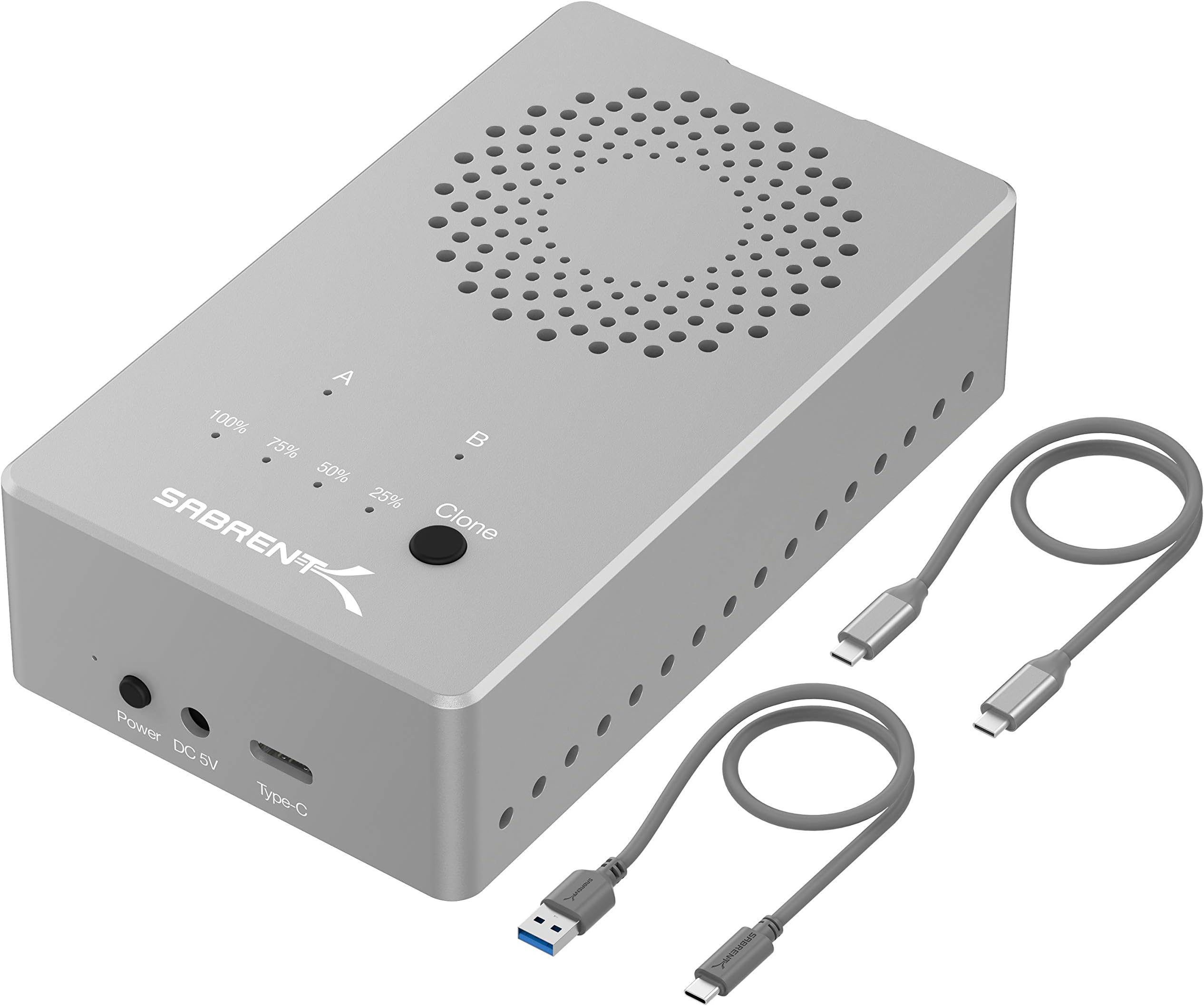
The SABRENT Tool Free USB Type-C Dual Docking Station (EC-SSD2) is a premium aluminum enclosure designed for PCIe NVMe M.2 SSDs (2230-2280). It delivers blazing 10Gbps USB 3.2 Gen 2 speeds, supports simultaneous dual-drive read/write, and features an offline cloning function that requires no PC. Its active cooling fan prevents thermal throttling, making it a reliable, tool-free solution for professionals needing fast, efficient, and portable SSD management.


| ASIN | B08S5CV7FS |
| Best Sellers Rank | #47 in Hard Drive Docking Stations |
| Brand | SABRENT |
| Built-In Media | Dual NVMe SSD enclosure. USB Type-C to USB Type-C cable. USB Type-C to USB Type-A cable. AC power adapter – 5V / 4AMP. User Manual. |
| Color | Silver |
| Compatible Devices | Laptop |
| Customer Reviews | 4.5 out of 5 stars 425 Reviews |
| Data Transfer Rate | 10000 Megabytes Per Second |
| Enclosure Material | Aluminum |
| Global Trade Identification Number | 00840025250178 |
| Hardware Interface | USB 3.2 Gen 2, USB Type C |
| Hardware Platform | Windows |
| Item Dimensions L x W x H | 5.9"L x 4.4"W x 3.7"H |
| Item Weight | 40 Grams |
| Manufacturer | SABRENT |
| Material | Aluminum |
| Memory Storage Capacity | 16 TB |
| Product Dimensions | 5.9"L x 4.4"W x 3.7"H |
| Supported Devices Quantity | 2 |
| UPC | 840025250178 |
| Warranty Description | 1 year limited |
M**.
Incredible device. Amazing build quality.
First and foremost this thing is built like a tank. It was milled from a block of aluminum and is very solid. Think of a MacBook. The only other devices I see with this build quality are Apple. It looks amazing next to my MacBook. Now for functionality. Using the offline clone function, I cloned a 512GB NvMe SSD to a 4TB NvMe SSD. It copied in under 10 minutes and the transfer was perfect. After the clone, both devices were visible on my mac. It works great as an external drive and allows me to use two SSD in one enclosure as two completely separate devices. The only negative I have for it is the fan. No doubt it keeps the device very cool but it is very loud for something that would sit on your desk all day(watch my video). It doesn't bother me as I only use this from time to time but I can see it getting annoying for daily use.
J**.
Easy, fast cloning. Pays for itself.
I picked this up to clone my 250 GB SSD to a 1 TB SSD. The factory box is roomy with plenty of padding to protect the unit. The cloner itself is small compared to the box however the top section holds the cloner (nicely padded), the bottom hold the adaptor and 2 USB cords. It doesn't get any easier; simply connect the adaptor, place the SSD’s into the correct slots, push a button, the unit does the rest. My overcrowded drive cloned in less than five minutes. I got up to pour a cup of coffee and it was done when I got back a couple minutes later. Keep in mind your cloned drive storage space’s locations, and volumes / partitions will be identical in every way to your original SSD and extra space will be an additional partition all cloning machines will do that. Easy fix is download and use a partition program; I used MiniTool Partition Wizard (free version). This program will allow you to custom setup your cloned SSD and other installed drives and its free. Quality build, solid aluminum construction with a fan; the base plate does not contact but the internal fins and near contact with the SSD’s keep the unit and SSD's cool to the touch. At 130 bucks with tax it is definitely worth the money it pays for itself in one use as most PC shops charge $100 bucks an hour. I usually charge 100-150 for a clone and PC service; time required to disassemble, clone, reassemble, set up the drives ranges anywhere from 60 – 90 minutes for most PC’s.
R**M
Offline Cloning works.
Fast cloning, works as advertised. Quality built.
J**L
Easy to use and does the job!
Got the product to clone drives for 90+ computers I am deploying. This product was super easy to use and cloned very quickly. The case allows toolless entry, and drives can be taken in and out without tools. The added benefit of being able to clone without the need for a PC or additional software is incredible and saves much time. My only critique would be the lack of space to remove the drives once installed. It uses a rubber grommet to hold them in place, and it's hard to pull it back out once pushed down. It almost needs an extra 1/4 inch of space behind the drives to allow me to grab the drive for removal.
P**N
This is a great great cloning device. The destination drive must be Larger than the source drive.
I have an 2017 HP Spectre 360 that developed problems with the USB C charging port. The problem made the laptop shut off and it would not turn back on. I bought a computer tool kit from Amazon to open the laptop so I could save the data on the 1TB M.2 NVME SSD just in case I could not get the laptop to work again. I then bought a 1TB Samsung 980 Pro PCIe 4.0 NVME M.2 drive. As it turns out the original factory installed Samsung drive was I TB to be exact 952.82 GB and the new 980 Pro was 931.50 GB and it would not work in the Sabrent cloning unit. I was already aware that the destination drive had to be larger or the same as the source dive. Ok I bought a 2BT Samsung 980 Pro. (note: these are expensive drives and I have further uses for them when my current problem is resolved.) I followed the simple Sabrent instructions for cloning I watched the light blink for about 30 sec or so and walked away. I came back about 4 to 5 minutes later and the cloning was already done. I was surprised. I connected the Sabrent to my wife's laptop and the new drive had identical directories. I called it good. For what I wanted the Sabrent was an excellent unit. The physical quality of the unit is excellent it required no tools to open or close. No tools needed to install the drives. Simple and easy. Now this drive size issue, if Sabrent finds a way around this small differences in drive size condition they will have something really special. I hade no problem with heat or fan noise. I did not fine the fan noisy at all. I have nothing to say negative it did what I wanted.
A**R
Better than expected
I cloned 2 drives, 500GB to 1TB and a 1TB to 2TB in 20 minutes. Both drives were about 3/4 full, the 500GB drive took 8 minutes and the 1TB took 12 minutes. This was using the Offline Cloning function, it was really fast and easy. The instruction manual is very clear and has photos to help the process, just follow the steps, things can go wrong if you don't. This device is solid and well built. It has very bright function lights that can be seen from any angle. The fan isn't as loud as I expected, it's about as loud as the 3rd fan speed setting on my laptop cooling pad. This can be held in your hand as the temp of the enclosure was only warm after back to back cloning's. The only negative I would give this is the placement of the external connectors and power switch but by design to keep this device as compact as it is, it is understandable. If they supplied longer USB-C cables it would help. The problem is when you connect the power and USB-C cables, the "front" is facing away because the cables connect to the front of the device. This isn't so much an issue if you're using the Offline function, as you won't have the USB-C cable connected, only the power cable. Overall great device....Fast and stays cool.
S**H
The aluminum is a nice touch
Works well to transfer files from an M.2 drive if your PC only had one slot for them. The aluminum works well for heat dissipation
S**R
Some Issues
First, this is about the EC-SSD2 dual-SSD clone device. I see other reviews here that are obviously about other devices. I can't give it a full review yet, because my initial goal has not yet been achieved; that was to upgrade a 2TB NVMe m.2 to 4TB NVMe m.2 stick. I initially plugged the new SSD into this device intending to clone onto it through the computer, however while a proper 4TB drive size was seen, all the proper identifying information of the SSD manufacturer was stripped off showing it as a Sabrent drive. This didn't allow the OEM version of Acronis True Image, included with the new SSD, to see that target device and correctly install. I then pulled the source m.2 out of the computer and placed is in slot A with the destination in slot B and tried the offline clone feature (no USB cable attached). This appeared to start as advertised, but has only fast-blinked the 25% light for the past >17 hours. There seems no guidance from the company how long this should be allowed to continue before deciding there is a problem. I see one comment on their forum that source and destination drives sizes should match, but their rep on YouTube indicated it works fine cloning to larger size and then increasing the size of the partition after... and really I suspect most individuals buy a cloner to upgrade size, rather than duplicate the same size (that is more the realm of an OEM). Rating may drop further if it fails to work as an external dock after I'm through with this upgrade attempt. It is a nice well thought-out case and tool-free install is nice, but if it can't do 50% of what it was advertised to do (which accounts for >50% of the buttons and lights on the device) then it only gets a 3. The only way it can go up is if it suddenly completes the copy (or at least advances to 50%, before my need to complete the upgrade before work tomorrow kicks in and causes me to abort the clone attempt). Source has about 1.3TB on it.
Trustpilot
1 month ago
2 months ago