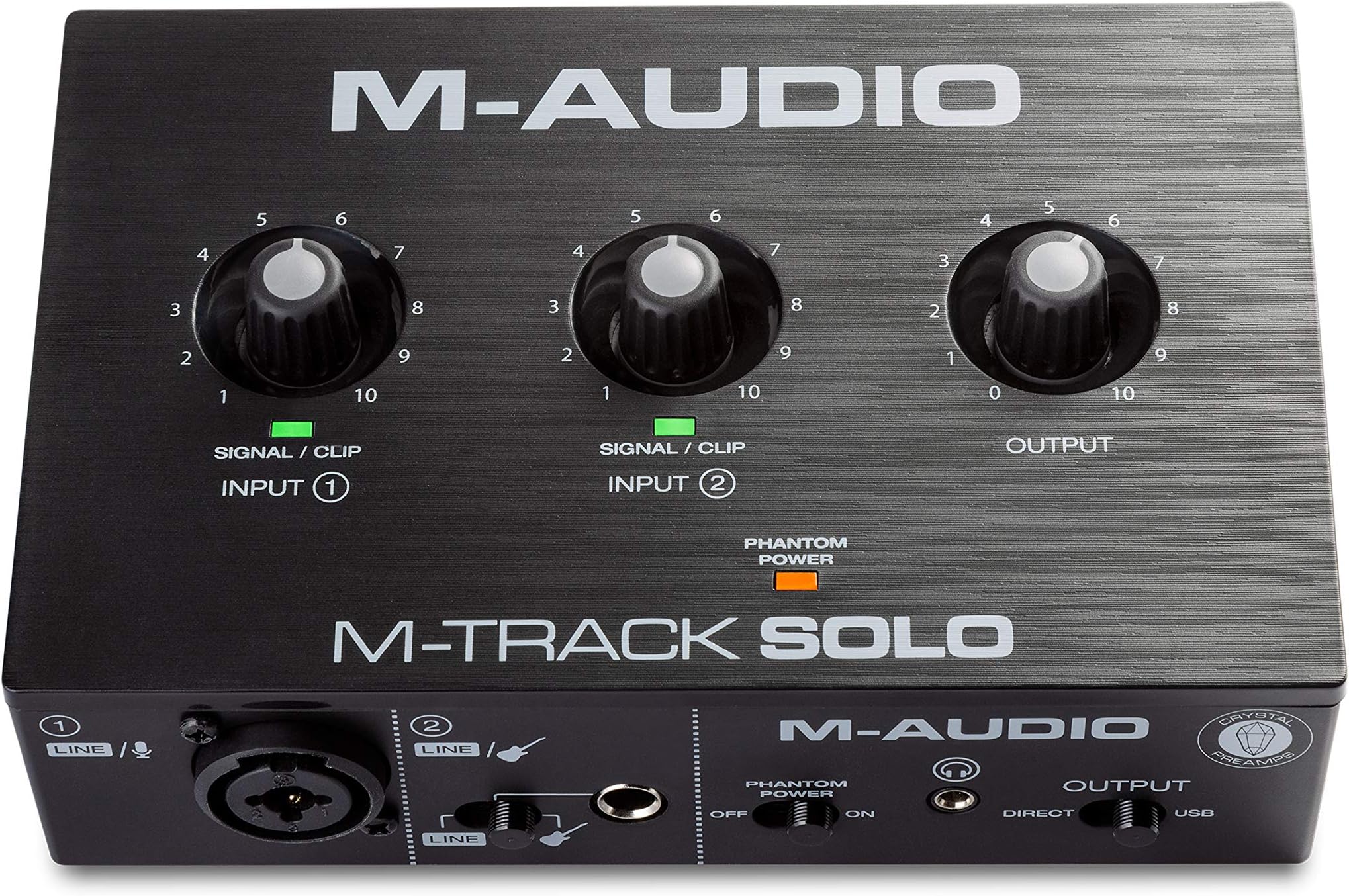
🎙️ Record Like a Pro, Wherever You Go!
The M-AUDIO M-Track Solo is a compact, USB-powered audio interface delivering 48kHz crystal-clear recording with versatile combo XLR/Line and instrument inputs. Designed for podcasters, musicians, and streamers, it offers zero-latency monitoring through headphone and RCA outputs, plus a bundled software suite including MPC Beats and ProTools First. Compatible with Mac, PC, and iOS, it’s the perfect portable solution for professional-quality audio creation on the move.


| ASIN | B08Q1NJSBQ |
| Audio Input | Mic Input Balanced XLR, Line Input Balanced 1/4" TRS, Instrument Input Unbalanced 1/4" TS |
| Best Sellers Rank | #240 in Musical Instruments ( See Top 100 in Musical Instruments ) #2 in Computer Recording Audio Interfaces |
| Brand | M-AUDIO |
| Brand Name | M-AUDIO |
| Compatible Devices | Guitar, Headphone, Keyboard, Laptop, Microphone, Personal Computer, Smartphone, Speaker, Tablet |
| Connectivity Technology | Headphone Output 1/4” TRS, Instrument Input Unbalanced 1/4" TS, Line Input Balanced 1/4" TRS, Mic Input Balanced XLR, RCA Outputs, USB Type B |
| Customer Reviews | 4.3 out of 5 stars 7,204 Reviews |
| Frequency Response | 20 KHz |
| Impedance | 1 Megaohms |
| Included Components | M-Track Solo, USB B USB A cable, Software Download Cards, User Guide, Safety and Warranty Manual |
| Item Dimensions D x W x H | 4.46"D x 6.43"W x 2.14"H |
| Item Type Name | M-Track Solo – USB Audio Interface for Recording, Streaming and Podcasting with XLR, Line and DI Inputs, Plus a Software Suite Included |
| Item Weight | 10.6 Ounces |
| Manufacturer | inMusic Brands Inc. |
| Maximum Sample Rate | 48 KHz |
| Number of Channels | 2 |
| Operating System | Windows, iOS, macOS |
| Supported Software | Ableton Live Lite, MPC Beats, Reason+ (6-month subscription) and Others |
| UPC | 694318024980 |
| Unit Count | 1.0 Count |
| Warranty Description | 1 year manufacturer. |
F**H
Fantastic cost to quality ratio
I honestly think this is great If you YouTube this it gets some hate.... But when you compare it to $200+ interfaces then naturally you're going to get more for what you pay for right? That goes without saying I'd have hoped.. I'm a signed pro musician and I used this to record some ideas I had and it did the job nicely. Yes gain needs to be a little higher but so what. I had no issues on the quality of sound at all, software included was easy to install and use, it's light weight, the headphones input is on the front which is nice so design is good, has phantom power source if you need it (I don't) It isn't the best. Obviously it's like $50...you can't complain about quality of sound engineering, tech etc if you're a musician spending $50 on an interface lmao... Be real... When you compare it to its price, it's fantastic, like I honestly feel you're getting more out of this than the money you spent on it. Legit. I own a fancy 4th Gen scarlet 2 blah blah whatever it's called, but this helped me out when I was traveling record a couple great ideas which now have some great promise in production in a studio. I'm thankful for it For beginners especially, it's ideal, learn on it, audacity etc, without breaking bank on scarlet's etc Even intermediate etc or pros who need a temp solution, it's all round great I recommend it 100%
N**N
best budget option
the term "budget option" should not dissuade you. this is a high quality interface that you will not be able to discern from several hundred or thousand dollar options. if you only need one XLR connection, this is the choice for you.
R**S
Stereo blues.
Being an electronic musician that samples and records music from consumer electronics, I needed a strong device that allowed me to capture clean audio from an aux source. I thought this would be hassle free but there was nothing in the description that the line in was mono only. So that's why only the three stars. Yes the audio coming from my computer is clean and loud. But to capture stereo I now have to use a splitter for the left and right channels which obviously are for input 1 and 2 which kills the idea of hooking a mic and a synth up to it unless I capture in mono. I didn't have the cables or plugs so that was an added $18 expense which I should get tomorrow thanks to amazon. I'm sure the included software is good but you have to register the product first, which requires reading the serial number from the bottom of the device. I find it odd that there was no QR code, but that's fine. So I downloaded the software but have yet to unzip and activate them because I make myown loops and already have two DAWS. I'm sure they are good but totally pointless for me. The six month Reason subscription seems kinda Sweet but once again, don't need it. I may revise this review if the quality is insufficient after finishing setup but I feel pretty confidant this will be a strong addition to my music making toybox. ------------------------------------------------------------ Addendum ------------------------------------------------------------ I've revised this review to include an extra star after acquiring the necessary cable to patch left and right to each input on the front from an AUX output. The signal is clean and strong and my DAW immediately picked up the two channels and panned accordingly. This is a great interface for bloggers who have a nice microphone but remember, if you want to capture in stereo you have to have those extra cables which I got for about $18 here on Amazon. The better quality cables with the braided insulation are ideal if you're a serious musician. I also forgot to mention I like the idea the unit is completely USB powered. No need to look for an open spot on your power strip.
C**S
Great product for the price
This thing is great for the price box is super heavy metal does what it’s supposed too wish it was a type c connection but can’t complain for a near $50 purchase using this on a rode pod mic and works great for it I also have a Scarlett solo 2nd gen and works the same as that
M**J
Not all 1/4" plugs are the same. This only takes a MONO signal.
I got this to be able to record/monitor my drums and listen to music at the same time and it's inexpensive. Now Im not a professional musician and drumming is not gonna be my main hobby so this seemed to check off all the boxes for me. I plugged it up and it was such a huge step up from what I had. The sound through the monitor quality was so good and latency was zero. Now I plugged up my Bluetooth adapter into the 1/4" line in with a 3.5mm to 1/4" TRS adapter and the audio was absolute garbage. Again, I'm not a pro musician, I'm just a average joe while likes to bang his drums. Thinking it was the adapter, I plugged it into another adapter to hear it from my previous mixer and it sounded just fine. Great, I got a defective unit. So I got a replacement and the same "issue" was present. I realized that I didn't do my research for this and learned that not all 1/4" plugs are built the same. Turns out this only takes MONO TS plugs not STEREO TRS plugs!! So words of wisdom from the worlds okayest drummer, if you get this and want to use a device to play music through the line in, get a 3.5mm to mono TS adapter NOT a stereo TRS adapter. Other than that lesson, it's a great interface!
A**W
Lots of little problems make this a pain to use, don't purchase.
I purchased this as my first audio interface and it was quite appealing due to its low price. I've used it for just a day but I will probably return it. Firstly, the drivers they ask you to install are piss poor and outdated. They worked for an hour before windows started going crazy and changing the sample rate and bitrate. This caused the output to crackle, lag, and be unusable. The device only works in 16 bit but if you try to change the option for both the line in and out then windows will automatically set it back to 32 bit which makes the device not work. The volume knob has a significant jump in gain near the maximum volume which makes it hard to fine tune your microphone or other devices. I get occasional pops/crackles in my audio while just using my computer. When I had the software installed, it was when I would start/stop a video or listen to a song. Without the drivers, It just randomly happens. This could be because I had the phantom power switch enabled for a bit which from other reviews can fry the device, so I wouldn't doubt I damaged it in some way. I tried to fix the driver problems by uninstalling the drivers and letting windows figure it out. This does work, but not well. It fixes some problems while introducing new ones. It fixes the windows properties so they don't change on you anymore, but after 15-20 minutes the audio device will just stop working. As in, all audio stops working and I have to unplug and replug the interface in for anything to work. You also don't get pro tools with your purchase anymore, which they advertise. Overall, don't buy this. Look at the other 1-2 star reviews as they speak the truth.
E**O
Good cable and application to have it work best.
The product is great, inputs are good. Bought this on an impulse buy and it managed to work out of the other ones I have tried.
A**M
Very good
Really, for the price, it's a good interface. For a budget-friendly device, it's not professional-grade, but it does a great job of recording. At least in my case, I use it to record my electric guitar and use distortion, overdrive, high-gain amp effects, and other things. You can get a 10ms latency with the default block size. I even have a 5ms latency on my system! That's true, by lowering the block size. I've seen a lot of people say it records very quietly, and the truth is, I don't have any problems with that. In fact, the input where my guitar is connected has the gain at 0; I haven't even turned it up. I just turn up the volume in Amplitube 5 and then add more in Reaper if I want, and it feels like a real amp. Clearly, the configurations, setup, and installation aren't for a novice, and if you're a novice, you should be very patient and read a lot. You can rely on artificial intelligence to guide you through the installation and configuration of everything. Perhaps poor user practices cause this interface to break down very quickly. Don't activate phantom power if you're not powering anything that requires it, don't turn up the input volume all the way. You can listen without using the rear outputs or the front output, just through USB via the PC's audio. I hope my interface lasts a long time.
Trustpilot
2 weeks ago
3 weeks ago