Buy anything from 5,000+ international stores. One checkout price. No surprise fees. Join 2M+ shoppers on Desertcart.
Desertcart purchases this item on your behalf and handles shipping, customs, and support to Argentina.
🚀 Unlock WiFi Everywhere — Because Buffering is So Last Year!
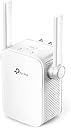
The TP-Link TL-WA855RE is a compact, dual-antenna WiFi extender delivering up to 300Mbps on the 2.4 GHz band. Compatible with a wide range of devices and operating systems, it supports easy app-based and WPS setup, plus Alexa voice control. Designed to eliminate dead zones, it’s perfect for professionals seeking reliable, high-speed connectivity throughout their home or office.


| ASIN | B0195Y0A42 |
| Antenna Location | Home |
| Antenna Type | Fixed |
| Best Sellers Rank | #8,447 in Computers ( See Top 100 in Computers ) #174 in Routers |
| Brand | TP-Link |
| Built-In Media | Laptop, Smart television, Smartphone, Tablet |
| Color | White |
| Compatible Devices | Laptop, Smart Television, Smartphone, Tablet |
| Connectivity Protocol | Wi-Fi, Ethernet |
| Connectivity Technology | Wi-Fi |
| Control Method | App |
| Controller Type | App Control |
| Coverage | Wi-Fi |
| Customer Reviews | 4.0 4.0 out of 5 stars (115,740) |
| Data Transfer Rate | 300 Megabits Per Second |
| Frequency | 2.4 GHz |
| Frequency Band Class | Single-Band |
| Global Trade Identification Number | 00845973093853, 00882492783049 |
| Is Modem Compatible | No |
| Item Dimensions L x W x H | 8L x 7.8W x 7.7H centimeters |
| Item Type Name | Wifi Extender |
| Item Weight | 0.12 Kilograms |
| LAN Port Bandwidth | 100 Mbps |
| Manufacturer | 4SMARTS |
| Maximum Upstream Data Transfer Rate | 300 Megabits Per Second |
| Mfr Part Number | TL-WA855RE |
| Model Name | TL-WA855RE |
| Model Number | TL-WA855RE V3.0 |
| Number of Antennas | 2 |
| Number of Ports | 1 |
| Operating System | Microsoft Windows 98SE, NT, 2000, XP, Vista or Windows 7, 8, 8.1, 10, Mac OS, NetWare, UNIX or Linux. |
| Other Special Features of the Product | Access Point Mode, Alexa Compatible, LED Indicator, Lightweight, Portable, WPS |
| Security Protocol | [INF] WPA, WPA2 |
| Smart Home Compatibility | Not Smart Home Compatible |
| UPC | 882492783049 845973093853 845973099305 |
| Wi-Fi Generation | 4th Generation |
| Wireless Compability | 802.11n |
A**Y
Great
Very easy to install and doing the job as expected , i was sugfering from the Internet coverage till i got it.
A**G
Very good
It's working fine and help me in big home
ت**ر
جودة عالية
M**E
After using this product, there is an improvement of Wifi signal strength. But internet is still slow. I supposed that could be due to my network issues.
M**9
الجودة ونطاق الاتصال ممتاز
H**Y
Super!! Llevo ya usándolo un buen tiempo y no he tenido temas con la señal. Super óptimo y eficaz, sin variación y muy fácil de instalar y acoplar con el router de casa.
F**0
non so se è il mio che ha dei problemi ma mi sto trovando malissimo. la configurazione senza vps con il modem telecom è da impazzire, col pc ha funzionato una singola volta per una mezz'oretta e poi ha smesso, con un galaxy s8 mai visto. il tasto reset sembra non funzionare sempre. inoltre la presa della corrente non è orientabile cosi che le antenne sono sempre rivolte in basso e in alto facendo si che la potenza del segnale vada per i vari piani invece che diffondersi nel piano. mi spiace ma pessimo acquisto anche concettualmente parlando
S**R
It's important to understand how this device is intended to work so that your expectations are properly set. An inexpensive extender of this type receives the signal from your main wifi router, and rebroadcasts the wifi data on a different signal, with its own SSID (the name for the signal you see on your cell phone when you search for a wifi signal in Settings>Wifi). This device creates that new SSID by appending _EXT to the name of your main wifi SSID. You'll often see both SSIDs; you should pick the one that will do the best for you depending on where you are in your house. Your phone might change between the two signals on its own, but you'll soon learn which signal covers best in each location in your house. Key to the operation of devices like this is that it be placed in a location that 1) allows it to receive a decent signal from the main router, and 2) covers the area of your house that is not covered well by the main router. If instead you locate the extender directly in the area with poor coverage, it will receive a poor signal from the main router just like your phone does. It won't be able to efficiently transfer data from the main router in that location. Think instead of placing the extender half-way between the main router and the area you want the extender to cover. You should experiment with different locations, bearing in mind how many walls, floors, or other obstructions lie between the extender and the main wifi router, and also between the extender and the area you wish to improve. The second important point to understand is that extenders of this type operate in a "half duplex" mode, meaning that at best, the data rate from the extender will be half of that provided by your main router. If you are already using most of the data capacity of your main wifi router to a certain device, it's unlikely that you'll be happy with the extender signal. In my case, I saw around 50 MBps from my main router when I was near the extender, and around 25 Mbps from the extender itself. This is more than enough for my casual web surfing, and youtube watching. Your results may be different. Of course, for significantly more $, you can change out your existing wifi router for two or more "mesh" routers. These routers are able to move full speed data between each other, and you can add units until you have the coverage you require. You'll see only one SSID, and your phone should move easily from unit to unit. But at this extender's price point, I got the coverage on my deck and in the corner of the family room that I needed. This item does not incorporate the fastest wi-fi specification. If your needs are more data speed intensive, you might go for a model with higher specs, for a modest increase in price. Setup was very easy. I used the PC method because I'm loath to put another app on my old 16GB cell phone. For that reason, I can't comment on the app.
Trustpilot
2 days ago
2 months ago