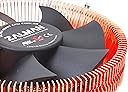
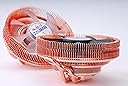
🌟 Elevate Your Cooling Game with Silent Precision!
The Zalman CNPS8900-Quiet Low Profile CPU Cooler is engineered for ultra-quiet performance and efficient cooling in compact PC builds. With a height of just 60mm, it fits perfectly in ATX and ITX cases, while its advanced PWM fan technology ensures optimal airflow and noise reduction. Compatible with a variety of Intel and AMD sockets, this cooler combines durability and performance, making it an essential upgrade for any serious PC enthusiast.


| ASIN | B0077POH8M |
| Brand | Zalman |
| Brand Name | Zalman |
| Compatible Devices | Desktop, Laptop |
| Cooling Method | Fan |
| Customer Reviews | 4.1 out of 5 stars 208 Reviews |
| Global Trade Identification Number | 05054629824849, 08809213763076 |
| Included Components | CPU Cooler, Thermal Paste, Motherboard Brackets, User Manual |
| Item Dimensions L x W x H | 4.72"L x 2.36"W x 4.72"H |
| Item Weight | 16 ounces |
| Manufacturer | Zalman |
| Material Type | Copper |
| Maximum Rotational Speed | 1500 rpm |
| Model | CNPS8900 Quiet |
| Noise Level | 25 db |
| Number of Items | 1 |
| Number of Packs | 1 |
| Part Number | CNPS8900 Quiet |
| Power Connector Type | 4-Pin |
| Product Dimensions | 4.72"L x 2.36"W x 4.72"H |
| UPC | 051738149035 611101452768 088021287549 823884202854 151903041970 079531732537 132018238776 191120071190 088020610294 163120284788 172302896411 112840367240 |
| Unit Count | 1 Count |
| Voltage | 12 volts |
| Wattage | 35 watts |
K**7
The best fan for HTPC & SFF builds!
As other reviewers state, you do have to install this cooler with the motherboard out of the case. This is a fact of life, for nearly all low-profile coolers; you save height clearance by removing the stock motherboard bracket with the fan clip holders on it, and using a backplate so you can screw the heatsink's bracket directly to the motherboard. It's also a fact of life for HTPC and SFF builds; they are always more difficult, and you have to do the build in the order specified by the case manufacturer, to fit everything into the special compact case. So normally you would start by installing your low-profile RAM onto the motherboard, then your CPU, paste, and this fan. (It's best to sit the mobo on top of some anti-static foam while you're working on it; hopefully you have some from the motherboard's box or another piece of electronics you bought.) If the mobo, memory, and CPU/fan all fit together OK, then you proceed with the build according to the case's instructions. Other reviewers have also pointed out that the included instructions have small print; however you can download the manual online and see it much bigger. (It's 2013, this is a computer part, who cares about printed instructions.) The instructions are mostly pictures, not unlike assembly instructions for international furniture. So pay really close attention to the orientation of the clip items as you add them to the backplate and fan. Also, you will have a much easier time installing this fan, with another pair of hands. It's do-able by yourself, because they include some two-sided tape to help hold the backplate in place while you install the fan. But it's much easier with a friend holding the board still, while you align the backplate and tape it on. Then your friend turns the board over, and holds the board & backplate steady for you on the work surface, while you install the CPU, paste, & fan. The rest of it's easy, especially with the included (custom?) deep, spring-loaded screws making it easier to apply even pressure to the CPU & paste as you tighten the heatsink down. If you've already built your computer and just want a clip-on fan, you might want to consider something else; but this is a really great, quiet, efficient, cooler, and well worth the extra installation effort. Once installed, it's just as effective as my older Zalman HTPC model from 5 years ago from this same line. It runs quiet under low CPU load, and doesn't make much noise under heavy load. It drops the temperature over the stock CPU cooler, by at least 10° C. This is even with the Arctic Silver still fresh; that paste has a 'curing' period of 200 hours before it achieves full cooling power, so the fan is having to work harder than it will after the curing completes. I went for this fan, over the similar CNPS8900 Extreme, because it has a lower noise rating, and because it has no distracting LED for an HTPC build. The Extreme has more cooling power, but I don't need that much, because I am using a low-wattage (65W) CPU. The heaviest tasks this computer does are watching my HDTV tuner & HD video files/streams, and maybe some day upgrading it with a Bluray player. Also I usually have *tons* of Chrome tabs open (literally up to 100 sometimes). Sometimes I stream full-screen 1080p Y*uT*be on one of those tabs, and it does this fine, even for videos that last an hour or more. It also runs HD Amazon Instant Video, and that *other* big streaming video service in HD, just fine. I expect the fan will outlive the rest of the HTPC, just like the older Zalman in my last HTPC build did. If you're trying to cram a microATX or miniITX mobo into a crowded case, the CNPS8900 Quiet is definitely the best fan to keep your CPU as cool and quiet as possible. If you need a little more cooling power, and don't mind the LED and a little bit of extra noise, go for the CNPS8900 Extreme, also available on Amazon for the same price. Either way get yourself some Arctic Silver, and this fan will be more than capable of cooling everything with a 100W or less processor. The CNPS8900 Extreme with Arctic Silver would probably cool a 125W OK, but I couldn't say that for sure.
N**~
Excellent low-profile cooler for slim builds.
After using a stock HSF for my AMD Phenom II x4 905e, I was tired of the noise instantly. I needed something quieter. After some researching, it seemed for both the money and for the category of "low profile cooler", this was king. I put this in together with a ASRock 960GC-GS FX Motherboard in a Silverstone ML04B case and it seem to fit perfectly. It still had some head room to the lid of the case (around 1/4-1/2"). The fan seems screwed in from the bottom with two screws and is on there solid. Despite looking copper, the fins are aluminum. This should help a lot with cost and weight. The base/heat pipes are copper, which is where it really counts. The mounting brackets screw on the bottom, pending Intel or AMD. The surface was pretty rough on the bottom of mine with plenty of pits and could definitely using lapping for those looking for perfection, but I installed it despite to see where it sat in performance. The install was somewhat easy, but I've also done a lot of cooler swaps with custom hardware in the past. The stock motherboard mounting system had to come off, then install their custom plate. One thing about the plate is it didn't feel very balanced against the back of the board. For my AMD setup, the instructions required 4 nuts with 4 plastic snap-in ends to retain them. It also called for a plastic center piece that I believe is causing the feel of lacking balance, as it seems a bit too tall. It didn't hit any of the components under the CPU, so I give them that. The back plate also doesn't hold to the mother board on it's own and seems to require the heatsink installed to keep in place, which is another downside to it. The CPU screws were a little awkward to put in, as the size of the heatsink makes you come at the screw head at an angle. Do not try to put the screw in at an angle or you will cross thread and cause issues! Make sure the screws go in straight, but the screw drive itself will be forced at an angle to install. After everything is tightened up, you can then put the motherboard in. I didn't use the paste that came with it (instead, I used AS Ceramique 2) Cooling wise, it works awesome. I have my motherboard setting the fan at the lowest possible settings and it has yet to get much over 45*C with my setup. At that fan setting, it's nearly inaudible. If you have the fan in your hand and manually spin it, it makes no noise, yet you can feel a bit of air being pushed through the fins. I'd say this design is solid for quiet cooling. One thing to note is this is a tight fit. With my motherboard, using standard height DDR2 ram with heat shields, it would not fit. The orientation of the heatsink was perfectly against the ram. After forcing off a the heat shield on one side of the ram stick it was hitting, I was able to get everything to fit, though the heat pipe is touching and perhaps putting a touch of pressure on the PCB of the ram stick itself. This didn't cause any issues, but it is something to note. My board supports DDR3 as well, which is a single slot over and would probably solve this issue (as long as the ram doesn't have tall heatsinks on it). All together, if you are building a silent, slim, HTPC like I was, this thing isn't going to be beat by any other air cooler at this time, especially when considering the cost. However, overclockers may feel the need to modify this heatsink for maximum cooling and the average user may have issues with fitment into their setup.
A**T
Great cooling and noise performance, finicky mounting
After properly reading the manual and therefore figuring out how to mount it the mounting went pretty smoothly, I’m going to retract some stars thanks to the hardships of screwing on the cooler with my screwdriver at a 45 degree angle. I’m personally running this cooler in the louqe ghost s1, cooling an undervolted i7-9700k at stock clock speeds of 3.6Ghz, thanks to the undervolting I dropped 15 degrees Celsius and I am now running rainbow six siege and apex legends on the highest settings at 65-70 degrees Celsius, so the cooling potential is not lacking, as for the noise i must say that it runs pretty quiet, not louder than my gpu so I can’t complain, I did not face compatibility issues with the asus rog strix z390-I mobo and Corsair vengeance lpx ram, so those are good. All in all a great cooler with a little finicky mounting but great cooling and noise performance, would recommend to anyone building in the louqe ghost s1!
R**I
Zalman does it better.
Once again, Zalman does it right. I used this on a FX 4300 95W CPU overclocked to 4.5GHz. Combined with the hands down best non-conductive thermal paste, Thermal Grizzly Kryonaut, I can't get the temps above 40C in benchmarking tests or gaming. Quiet and cool is a fantastic combination. Attractive, as all the Zalman coolers are, and cooling well beyond what it's rated for. The only thing to note, unless your RAM is well outside its radius, you need to use VLP (Very Low Profile) DDR. The downward blowing fan also does a great job of cooling those pesky VRM MOSFETs and the nearby memory. Installation is pretty easy, and best done when the motherboard is out of the case. If your case has a large enough opening that all four of the original back plate holes are exposed, you might get away with doing it in the case. Use a skinny #1 screwdriver to angle in and tighten the screws (another reason it's easier out of the case) and it only takes a couple minutes. Save your original mounting plate/hardware in case you ever want to sell the motherboard off; you're going to want to keep this beauty of a heat sink for years.
W**.
GREAT cooler for CPU *AND* the VRMs on the motherboard.
First off, it's a great cooler and the design is a good 15~18+ years old. Cools a third-gen i5 and any modest processors you throw at it. Won't cool the latest and greatest as good as some of the more expensive coolers, but for what it cost it's definitely a good value. Zalman will gladly send you a newer mounting bracket for recently released sockets if you write them - you won't hear back - but a bracket will show up within 5~8 days in the mail. This service is FOR FREE mind you, so who's to complain about that prompt service. This design cools the motherboard voltage regulation modules / components near the CPU socket, and will help the motherboard (and processor) last longer, especially in cases with restricted airflow. The mounting solution on the other hand is a bit swear-worthy. It's not impossible, but it's not perfect. Still, if you're shopping solely on cost, this is a good solution for a modest or older processor. I can't really complain, but then again I don't get these that often. If you do enough of them, you'll get the system down pat and have little to no issue mounting it quickly. Just know it might not be as nice as the more expensive brands. This cooler really doesn't make much noise with it's large fan, and doesn't have to work that hard (again, this is with a modest i5 and not an unlocked i7 or i9 or unlocked Ryzen processor). They make this model with LED's I believe, it has a clear fan, if that's what you want it's not this one. This one does NOT have the LED solution (which is usually in the fan). Still thankful I could finally buy one for a refurbished older PC build. Zalman has good service. I would buy their brand again in this price bracket. *Please be cautious that you may not be able to mount the heat-pipe solution horizontally (which is best) if you have larger VRM modules to near the keep-out zone, however you can rotate it (which may incur a 2~3c penalty on cooling, nothing major) to make it fit.
T**T
The production stamping holes are not "square" to each other.
As you would expect there are 4x mounting holes. The problem is that two on one end fit both sides of the motherboard, showing that the motherboard is in fact "square". The problem is that the other two holes were mis-stamped by probably 40-50 thousandths of an inch, so I had to VERY carefully enlarge two holes on the motherboard to compensate. This sort of fan is a big pain to install when it's made properly, but this one wasn't even close from a machinist perspective. If they had done their due diligence I would have rated this much higher. The fan is nice and quiet and clears the ram well enough.
A**R
What you should know...
I purchased this cpu cooler to go with an ASRock FM2A88M-HD+ FM2+ / FM2 AMD A88X (Bolton D4) microATX motherboard. I was looking to improve cooling and lower noise over stock cpu cooler. For the positives: Yes it is quiet, can't tell it is running with an AMD A10-6800K BE Richland 4.1GHz (4.4GHz) Socket FM2 100W Quad-Core APU. This specific APU comes with a factory milled chunk of aluminium and a smallish (loud) fan mounted on top. I am a believer in the heat pipes and big fans for quietly keeping a processor cool so it has that covered. And it comes with just the right quantity of thermal grease. A popular hardware site reveals that what comes with aftermarket coolers is good enough. They also rated highly this cooler. However... It looses a star for the installation: The caps and nuts should be made so they snap in place and stay captive of the backplate during assembly. Fortunately, some tape helped temporarily secure it to the motherboard... Fastening to the motherboard was also tricky. Another star taken away because an FM2 cpu cooler should be fully compatible with an FM2 motherboard and not encroach over other components. With the above mentioned combination, the memory stick closest to the cpu touches one heat pipe, causing the memory to overheat and shut down the PC. So no dual channel memory possible here! I used (2 x 4GB) DDR3 2133 to fully take advantage of the APU. Most memory at that speed feature heat spreaders sticking up, which does not help with the clearance issue. So yes, as advertised it is compabible with FM2 socket, just not fully compatible with all motherboards.
M**K
Nice piece of pure cooper from Zalman.
Have been always liked Zalman since LGA775. This one not an exception, despite some mounting issues. I know it is hard to make something that fit it all but installation has some tricks. First of all, support brackets mounted directly to cooper body with very small screws and it is very easy to overtight them and damage thread in soft cooler body. Good news - it fits mini ITX board (at least the one from Asrock). Second - the big cooper hat cover mounting screws and you have no access to pint them with your fingers. Using screwdriver at angle is not that easy but doable. And for the last - you will not be able to change DIMMs without removing cooler. Other than that - one of the best coolers, nice and really quiet.
A**O
El silencio
Lo instalé en una caja slim, una placa con lga775, y cabe perfectamente. El complicado de montar y, como es muy ancho, hay que tener cuidado con los componentes de alrededor de la cpu, pero una vez en funcionamiento, no te das cuenta de que está girando: es súper silencioso. Vale lo que cuesta.
M**O
Ottimo compromesso tra prestazioni e dimensione
Mi sento di dare 5 stelle a questo dissipatore nonostante ci siano alcune piccole pecche (non troppo pesanti). Lo scopo era sostituire il dissipatore stock per un i7 6700 e devo dire che le temperature sono scese di circa 12 gradi a fronte di un dimezzamento del numero di giri della ventola. Arrivo al massimo a 79 gradi di picco (su singolo core) dopo molti minuti al 100%, in una configurazione mini itx che fornisce ben poca aria, dunque sono soddisfatto. Le temperature di solito stanno un po' più basse anche in full load. Le dimensioni sono tali da entrare in un case Cooler Master Elite 130 con motherboard mini-itx ASUS z170i. Questo è forse il più grande dei dissipatori compatti ad entrarci, non ci sono modelli Noctua con le stesse prestazioni che vadano bene con quella scheda madre. In secondo luogo la silenziosità è superiore alla media, anche rispetto ad altri modelli più grandi. Rispecchia appieno le mie aspettative e dunque è consigliato. Per quanto riguarda il montaggio, è un po' laborioso e per la pasta termica è meglio ricorrere a qualcos'altro rispetto a quella nella confezione che è scomoda da applicare.
S**9
Guter Kühler, aber fummeliger Einbau
Ich habe mir den Kühler als Nachfolger für meinen Thermaltake MaxOrb gekauft, da bei dem die Plastikhalter zerbrach und der 800g Kühler auf halb-acht auf dem Board hing. Gekühlt wird ein Phenom II X4 955. Bewusst habe ich mich für dien entschieden: - geringe Einbauhöhe - leise im Betrieb - keine leuchtenden LEDs Der Einbau war alles andere als leicht, obwohl es fast zu meinem Tagesgeschäft gehört irgendwelche Hardwarekomponeten aus-/einzubauen stand mir bei dem Einbau dann doch etwas der Angstschweiß auf der Stirn. Der Kühlkörper wird derant auf das Board gepresst, dass ich Angst hatte das bricht gleich in auseinander und es macht auch den Eindruck als würde sich das Board durch die enormen Kräfte leicht verformen. Letzterens kann auch dem geschuldet sein, dass das Board auch schon paar jährchen und Umbauaktionen hintersich hat
C**I
Ottimo dissipatore low profile!
Dissipatore low profile indicato principalmente per case piccoli (Micro-ATX/Mini-ITX) funziona molto bene, l'ho messo sul mio i5-4440 e devo dire che è silenzioso e fresco, oltre che esteticamente molto carino. Consigliato a chi ha vuole occupare poco spazio nel proprio case e vuole raffreddare efficientemente la propria CPU! Non è consigliato per OC ovviamente, e ricordate che servono ram Low Profile con questo dissipatore, altrimenti rischiate che non ci stia!
T**R
Prima und leise
Hatte einen Athlon 8Core in der boxed - Version gekauft. War im Winter gerade noch erträglich. Im Sommer drehte er immer mehr auf und war einfach nervig. Durch meine PC- Gehäuse war ich gezwungen einen flachen Kühler zu verwenden. Test habe mich zu dieser Lösung geführt. Musste das MB wieder aus und einbauen, für mich kein Problem. Wenn ich jetzt zum PC gehe denke ich immer er ist aus weil nichts höre. Himmlische Ruhe.
Trustpilot
3 weeks ago
4 days ago