Buy anything from 5,000+ international stores. One checkout price. No surprise fees. Join 2M+ shoppers on Desertcart.
Desertcart purchases this item on your behalf and handles shipping, customs, and support to Argentina.
⌨️ Switch, type, conquer—your ultimate multi-device keyboard companion!
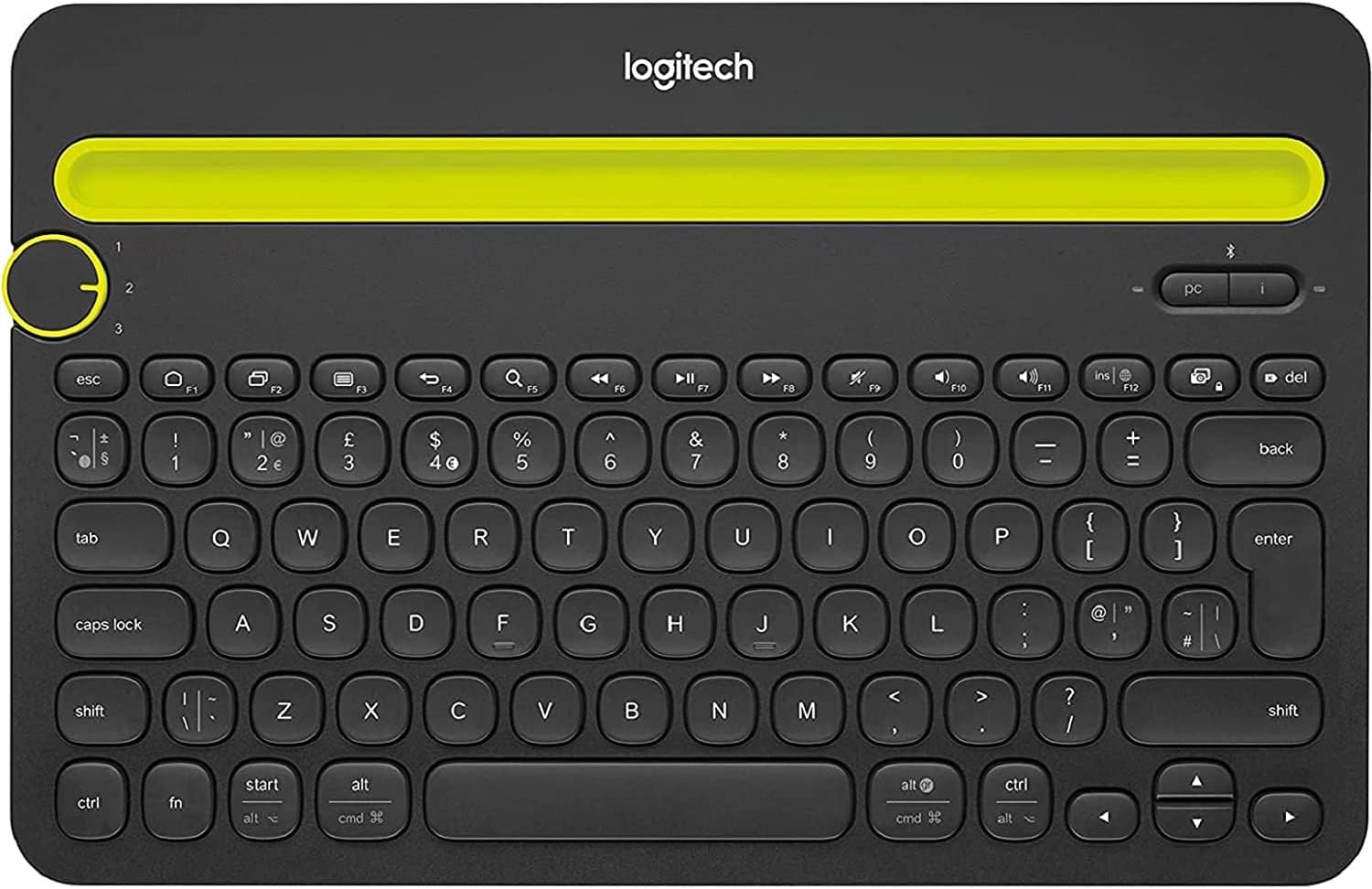
The Logitech K480 Bluetooth Multi-Device Keyboard is a versatile, spill-resistant wireless keyboard designed for professionals juggling multiple devices. It pairs with up to three Bluetooth-enabled computers, tablets, or smartphones, allowing instant switching via a dial. Its compact, ergonomic design includes a built-in cradle for phones and tablets up to 10.5mm thick, promoting comfortable typing and better posture. Lightweight yet durable, it offers long battery life and broad OS compatibility, making it the perfect productivity tool for the modern multitasker.
| ASIN | B01AKCM5YG |
| Additional Features | Bluetooth, Wireless |
| Antenna Location | Office |
| Best Sellers Rank | #1,696 in Amazon Renewed ( See Top 100 in Amazon Renewed ) #514 in Renewed Computers & Accessories #682 in Computer Keyboards |
| Brand | Logitech |
| Built-In Media | USB Cable |
| Button Quantity | 78 |
| Color | Black |
| Compatible Devices | Laptop, Smartphone, Tablet |
| Compatible Operating System Family | ChromeOS, MacOS, Windows |
| Connectivity Technology | Wireless |
| Customer Reviews | 4.3 out of 5 stars 1,695 Reviews |
| Enclosure Material | Plastic |
| Hand Orientation | Ambidextrous |
| Item Dimensions L x W x H | 11.77"L x 7.68"W x 0.79"H |
| Item Weight | 28.92 Ounces |
| Keyboard Backlighting Color Support | Single Color |
| Keyboard Description | Wireless |
| Keyboard Layout | QWERTY |
| Manufacturer | logitech |
| Mfr Part Number | LOG920006342 |
| Model Name | K480 |
| Model Number | LOG920006342 |
| Number of Batteries Required | 2 |
| Number of Keys | 104 |
| Number of Sections | 1 |
| Power Source | Battery Powered |
| Recommended Uses For Product | Office |
| Special Feature | Bluetooth, Wireless |
| Style Name | Contemporary |
| Switch Type | Membrane |
| Theme | General |
| UPC | 636123051775 |
| Unit Count | 1.0 Count |
| Warranty Description | 90 days limited warranty |
| Water Resistance Level | Water Resistant |
T**Y
Logitech Bluetooth Keyboard - K480 - Refurbished - Very Satisfied
Logitech Bluetooth Keyboard - K480 - Refurbished This keyboard is designed to pair with three different devices and switch easily between them via a three position selector switch. It works with any Windows, Android, Chrome, or iOS device capable of communicating with Bluetooth. I wanted an external keyboard because I am often finding myself working on e-mail or other simple documents on just my phone or Kindle Fire tablet and find that the built in touch keyboards are too frustrating for anything but a simple response and I was spending more time correcting the "corrections" that they make to my input. I chose this particular keyboard because Logitech makes products that I trust and because It has the ability to easily select which device to use and this can be done on the fly with all three devices open and in front of me. This review is for the refurbished model, but the only things that I saw that might suggest refurb is that it came without batteries (it takes two AAA) and there was something crossed out in pen under the battery door. Other than that, the keyboard came in a white cardboard box, perfectly wrapped in a plastic bag and looking and working perfectly. One note about the physical appearance of the keyboard. It is large and it is heavy. it is nearly the size and weight of my chromebook and that is just for the keyboard. There is a groove along the top to hold the tablet/phone is place so the overall feel when using it is as if you are working on a laptop (except without a mouse/pointing device, for which I found it useful to keep a stylus handy). I like this configuration because the size and weight make the system extremely stable and comfortable when placed in my lap while lying in bed. Size and weight would be a drawback if portability were required. For reference, the groove will perfectly fit most tablets or phones in any orientation but will not fit a device that is in a case of any substance. Setup is extremely simple. Place the batteries in the case and close the door. Select which device to assign to which position. Hold down the Connect key for either iOS or one of the other operating systems. Open your device to search for the keyboard. It then sends a code to your screen that you have to type in and the pairing is complete. There is an attractive instruction sticker attached in the space between the keyboard and the groove that gives all of the instructions that you need. I will be leaving it on my keyboard but that is personal preference. I successfully paired and tested the keyboard with a Kindle Fire HD7 tablet, an LG 5 phone, and an iPad 2. Living with this keyboard has been easy so far, as it has met my needs and expectations. I use it with mostly with the Kindle Fire and the LG G5 phone. I place the Fire in the groove (in landscape mode) and it makes a decent, if rudimentary, word processor using the WPS Office app accessible from the Docs app on the Fire. The 7" screen is relatively small, but it is bright and high resolution enough that I would rate this as easy to use for this purpose as my Chromebook. However, the Fire and my phone are always with me when I am home and I don't need to sign in to them when I want to use them, so this is actually better for me in that respect. I use an Otter Box case for my phone because I tend to be hard on phones. It protects the phone extremely well but, by design, is not easy to remove from the phone. I have to place that on a stand next to the keyboard when I want to type. So far, I have tried the keyboard on this phone with Messaging and with MS Word for Android. As with Docs on the Fire, it works well and behaves like a mini word processor. The screen on the G5 is higher resolution and brighter than on the Fire, but it is also smaller, so I find that the Fire is better for that purpose, but Word has a Mobile View option that makes the text more readable while working on it, so it works well in either orientation. Messaging works exactly as expected, with the added advantage that you type twice as fast with a keyboard than without one and you don't spend half of your time fixing what auto-correct thought you wanted to send in your message. The keys on the keyboard have a nice feel to them and work reliably, as one might expect from Logitech. They have decent tactile feedback but they are loud. I don't find that to be a problem. My only disappointment comes when deleting, using backspace. In this case, there is a small lag between when you press the key and the letter to be deleted disappears This would never be noticed if you delete one letter at a time, but it can be off-putting when trying to delete a whole word or sentence by holding the delete and letting it repeat because you will go past where you thought you might. This can be annoying enough to deduct a star, but I This appears to be a limitation that comes from the tablet rather than the keyboard, because I can select text in real time, so I give Logitech the benefit of the doubt on this. As mentioned above, I keep a stylus handy to use as a pointer when needed, so I find it is easy enough to use it to select a longer passage and delete it that way. It is the shorter items where old habits kick in and I use the delete key multiple times. I also find that selecting the text with the shift key and left arrow key works responsively and as expected, so this shouldn't be a problem. I like that the keyboard has a set of function keys along the top that give functionalities that might go unused in a mobile device because you can't remember the shortcuts for that particular system. There are : Esc F1- Home F2- Task Switcher F3- Toggle menues F4- Go back F5- Search F6- Rewind/Back F7- Play/Pause F8- Forward/Next F9- Mute Audio F10- Decrease Volume F11- Increase Volume F12- Insert/Save Screen Shot/ Lock Screen Del Some of these keys are modified by other keys, like the fn key along the bottom of the keyboard chooses screen shot or lock. I haven't explored these so I can't comment on them. All of the characters needed for daily use are present, but not the myriad special ASCII characters that we might sometimes need. It may be possible to to access them through the alt key like on a PC, but I don't know if that is built into every operating system or how to access it from here. In summary, the Certified Refurbished Logitech k480 Bluetooth keyboard has met or exceeded my expectations. The keyboard presents itself as if it were never opened or used in any way, so I would say that the refurb is n excellent way in this case to save a third of the cost. I find the k480 keyboard to be comfortable and more convenient to use in my environment than opening up a Chromebook or laptop. Having phone and tablet in front of me, I can switch between them and actually get some sort of meaningful work done from devices that were meant more for convenience than productivity. I can't stress the convenience of the three device switch enough. The switching is instant and seemless. Due to the size and weight of the keyboard, I might choose a different solution if needed this capability outside the house. At that point a laptop or Chromebook would offer better security and more flexibility.
R**M
Good keyboard, excellent choice for multiple devices, heavy
Excellent keyboard, it connected easily to two devices (one a Samsung tablet and the other a OnePlus phone). I can't comment yet on battery life as I haven't had it too long, but so far it seems fine. There's a power switch on the back so you can turn it off when not using it. The angled groove is a nice feature for holding a tablet or phone to make it almost a laptop type experience. If you have a thick case on your phone or tablet, it might be necessary to take it off, depending upon the thickness. The keys have a good feel to them. They're not especially quiet, but not overly loud either...I'd say fairly similar to what you might find on a full size mechanical keyboard. The only minor gripe I have with this unit is that it is quite heavy and thick. I suppose the reason for this might be so a large tablet doesn't tip it over when laying back in the slot. In a way, that makes sense, but it does compromise portability and weight. Definitely something to consider if you plan on carrying it around a lot. It seems the combination of a tablet and this keyboard weighs about the same as a laptop, maybe more, depending upon the laptop. I also should add that I purchased this as an Amazon Warehouse renewed item at a deeply discounted price. It arrived in good as new condition. The box was banged up a little, but the keyboard was in great shape. Definitely recommend, but keep the thickness/weight in mind.
D**D
Fantastic Convenience
I've wanted to write on my phone for a while now so a bluetooth keyboard seemed like the thing to get. Having used Logitech's keyboards in the past and (mostly) been happy with them, I went with this. I like that it has a little trough to put your phone or tablet built right in. Something you may not need if you're using this in a coffee shop and already have a stand on your phone (in which case the K380 is probably what you want), but something I desperately needed for writing in bed, on the couch, or sitting in a lounge chair in the backyard, etc. You can switch between three bluetooth devices with the dial on the left, which works really well and switches in a second or two, so this has also replaced my Logitech K800 as the living room PC keyboard. I love that keyboard and have used it for years so the fact that I've replaced it with this should tell you something. I do prefer typing on the K800, but this one definitely isn't bad, just not as good. The main thing is the smaller size, and convenience of easily switching between my phone and PC. It's also replaced my Logitech K360, which I was using for my PS4. I HATED that keyboard. The keys took way too much force to press and the keys were slippery and spaced weirdly, it was such a chore to type on. I've used other (wired) Logitech keyboards in the past and had no issue with them, but the K360 is straight up garbage. As this also had a similar design where there is empty space between the keys I was worried it would be the same thing all over again, but it wasn't. I would definitely prefer having a traditional layout with square keys that have no empty space between them, but the way it's set up here is usable and fine. If I had a complaint, that would be it. I just really feel like they went with form over function there. People have complained about the weight and that really depends what you use it for. It's about the size and weight of a large tablet. For taking around the house and out back I think it's the perfect size and weight, but I probably wouldn't carry it everywhere with me, but I also don't carry a tablet or laptop around either. I don't think they make keyboards small enough for me to carry around all the time, and if they did they would be a chore to type on and thus I wouldn't use them. If you already have a backpack or messenger bag that you carry around, I can't see this being much of a burden, as it's definitely less than 2 pounds.
D**S
Favorite Keyboard for my Iphone and iPad
Having owned this keyboard for many years now and replacing several, I can say that is the best keyboard I have used on my phone and tablet. Since I am able to switch between both devices with just a turn of the button, it makes it so easy to multitask. I also have they keyboard connected to my laptop if I want to use it. I love how this keyboard allows up to 3 devices to be connected to it through Blue tooth. There is a slot to put either your phone or tablet in while you are working and it holds the item very secure as well. My favorite part of the keyboard are the keys! They are not flat but more raised like a mechanical keyboard which is my favorite. I prefer keyboards that have nice and chunky keys to make it easier to type then the very flat ones you will find on some laptops or chrome-books. It is light weight which makes it very easy to take with you on the go. It stays charged using batteries and I only need to change mine every 4 to 6 weeks. As long as you take care of the keyboard it will last a very long time. I have owned many in black and white but had some accidents so I needed to replace them. My current one is refurbished and it still works like a dream a couple of years later. The keyboard may be on the higher end of price but it really is worth every penny. This is an item I would recommend for sure!
D**N
I was so excited to receive this keyboard and take it with me on... (updated review)
[Updated Review] Well, my replacement keyboard arrived and it works brilliantly. I have updated my star rating on this item as a result. The bluetooth was simple to setup using the included instructions and it remains connected to each of the three devices I setup for it, even when switching back and forth from one to the other. The keys are very responsive and have a good feel upon pressing and releasing. Very happy. Would recommend this keyboard to others. The replacement keyboard did not come with AAA batteries, but no bother as I have new batteries which I bought to use with the defective keyboard that this one replaced. A++ [Original Review] I was so excited to receive this keyboard and take it with me on my cross country train trip, but it refused to power on. I installed the included set of two (new?) AAA batteries, as well as two more sets of brand new Duracell batteries, which I had just purchased from the Walgreens store near me...still no power. I tried moving the power switch back and forth, then I noticed something odd when I turned the keyboard. The power switch just seemed to float there and moved left or right, depending on how I rotated the keyboard. The switch didn't seem to be connected inside of the keyboard. Well, I thought, that makes sense as to why the keyboard won't power up regardless of the batteries installed in it. I contacted Amazon to request a replacement keyboard. I hope it will arrive before my trip and that it actually works. Besides the above, the keys on the keyboard feel very good, great tactile feel when you press them. The keys are actually the same size as, if not slightly larger than, the keys on my laptop and the overall width is only slightly less wide than my laptop. I intended this keyboard to use with my Kindle Fire HDX tablet (arguably the best Kindle that Amazon has ever produced - resolution, speed/processor, storage). Sadly, I was unable to test the responsiveness of the keys and the connectivity of the keyboard to the various bluetooth devices I own. I do like the weight of the keyboard and the stiffness of the case (resistance to flexing and bending), but I know that some reviewers have said it was a bit on the heavier side and thicker than other slim keyboards, which I don't mind at all. When my replacement keyboard arrives, I hope to update this review, if it is not also defective, of course.
J**P
this keyboard arrived to me in refurbished but like new condition
First off, this keyboard arrived to me in refurbished but like new condition. It did not come with a battery (though the directions referenced removing a battery tape) so a couple bucks of the refurbished discount are essentially consumed by providing my own 2-AAA batteries. Not really a big deal, but may be worth mentioning in case you're waffling between the new and refurbished options. This keyboard meets my usual Logitech high quality expectations--I have several Logitech models and this feels as durable and reliable as any other. The device slot is rubberized to hold the phone/tablet in place nicely. If your case is much bigger than a thin TPU case, you'll probably have to disrobe your device to make it fit in the slot. I like the Bluetooth feature for not requiring a USB dongle (if you're connecting to something that has bluetooth built in, obviously this is a big plus). I am thrilled with the multi-device switch so I can pair with a few extra devices that I may occasionally want to type on (such as passwords on PS4, though I haven't tried that yet) without having to re-pair to a "primary" device later. The neon yellow rubber slot brings a lot of attention to the keyboard, not necessarily in a good way--it gives the keyboard a bit of a toy aesthetic in my opinion. Also bringing a lot of attention is the loud click of this keyboard. It's not as clicky as an IBM Model M, but loud nonetheless. Usually I like a good keyboard click--I type about 120 wpm and I find the stream of clicking to be a bit cathartic--but this is *not* a keyboard you could bring to a meeting and use without bringing attention to yourself. The biggest disappointment of this keyboard, for me, is how surprisingly heavy it is (I should've read the description, but I took for granted my experience with other Logitech keyboards). It's also quite thick--even moreso than other full-size models I have. It's not something you would tuck into your backpack for "just in case." I already carry my 15"MBP all the time, so perhaps I'm not a good candidate to judge this keyboard's "good to carry all the time" quality, because I don't "need" it for typing all the time, but I find this just too big to keep in my bag for "just in case." Now, if you don't have a laptop and are doing college papers or lots of typing for other reasons and just want something for at home, then this would be a handy keyboard to add that functionality to your phone/tablet at a really low price point. But once you add a case to this to keep it from being damaged in your bag, it's going to be both bulky and heavy. So, for portability or use in meetings for your iPad, I'd look at the Ultrathin Keyboard Folio instead (but baby it--mine got a crack in the part that holds the iPad in and now it doesn't hold the iPad in well). I do find this model K480 easier to type on than the Keyboard Folio--though the keys are quite a bit larger--and I don't get enraged when I try to press [esc] (vim habit) but hit the Home button instead. And it has a tilde~ in the "standard" location, so that's a plus over the Folio if you use the ~ often. This is also a fraction the price of the Ultrathin Keyboard Folio, so that may certainly be a factor as well.
T**N
Love this keyboard
This is a fabulous keyboard! It's real, kinda difficult to explain what I mean by real but the keys are springy and good for us typists. I dropped mine several times and eventually killed it. So, before purchasing again I reviewed options for another keyboard and even though this was several years old design/technology, I ordered this 2nd one. Still love it. It holds my devices (phone and tablet) and it supports 3 different devices, and is easy to switch between all three. Just be aware it is a thicker kind of keyboard so it does not work as a super lightweight fold-away-in-your-purse kind of thing.
K**7
Really Liking it So Far, Great Addition to Fire 10 5th Gen
To start, I am a huge fan of Logitech, their keyboards are my favorites and I have several for various devices. Why Do I Need a Keyboard for a Tablet?: If you're reading this, presumably you're already interested in a keyboard for your tablet but in case you're still on the fence, there are several things to consider when deciding between a keyboard for a tablet and simply taking a Chromebook/Netbook/Laptop. My reason for buying this was simple: I LOVE AMAZON. If I could buy produce and a car on Amazon, I'd be set for life. I use my Fire more than any other device and love it for traveling. However, I despise typing reviews or emails on a screen. Taking this keyboard with me when traveling allows me to write Yelp reviews, email, types notes, and so on with ease, while maintaining easy access to all my Amazon content. The option for typing on more than one device is also nice, though not a feature I really need. Compared to Other Options: This is the second keyboard I bought for my Fire HD 10 5th Gen. A few years ago, I bought the slim case and keyboard combo, which I hate. It always had issues connecting and the case was rather bulky. This is larger but it holds my Fire far better and I haven't had any problems connecting it. Easy of use makes up for the size. Size: I knew this was going to be thick when I ordered it but I nearly sent it back when I saw it. The Logitech keyboard/cover I have for my iPad was extremely thin, wish this was similar. However, the weight makes it feel stable and it's very easy to use it in various locations (sofa, bed, table, etc.). Since buying it, I've often used it as a stand, with the keyboard turned off. Batteries v. USB: Not having to carry an extra charging cable is wonderful. I recently stayed in a hotel with very few outlets, forcing me to prioritize charging certain devices over others. Carrying an extra battery or two is easy and allows for continues use, no matter where you are. I'll update if it becomes annoying but for now, it's a plus. Improvements: The keys are insanely loud. Think 90's keyboard loud. It's irritating at home and taking it on a plane or a quiet train... not good. I specifically wanted this for plane travel but I'm rethinking that. I'd also love to see a solar powered version. I have a solar Logitech keyboard which I love. A key protector would also be nice. I haven't had to pack it for a long trip yet but I'm hardly looking forward to doing that. I'll likely end up buying a case for it but I wish there was something slimmer. Final improvement would be to put the power button on the top, rather than on the bottom. It's easy to turn off and on but given that it uses batteries, having easier access to the power button would be nice. Overall Impression: I love it. The key noise is the only real downside. If you want a keyboard for travel and use a Fire tablet a lot, this is a great option. If you don't need near instant access to Amazon content, I'd recommend a Chromebook for travel (slimmer, screen covers keys, etc.). ETA: I just packed for a trip and was deciding between taking this combo or my Chromebook, so I weighted both. My tablet plus the keyboard came in at 2.724 lbs alone (pre case and charging cable). For comparison, my Chromebook weights 2 lbs, so that's the one I'll be using. If you really need a tablet and keyboard for travel, look into the .8 lb Logitech without the slot; it'll allow you to keep your tablet in it's case and the weight difference is important when traveling. I do love this keyboard and having been using it almost non-stop when I'm at home. However, it's just too big to travel with when flying.
S**E
Solid handy keyboard
Nice solid mac keyboard. Bluetooth works flawlessly. Keyboard feels quite solid. I tend to type with a heavy hand, so happy to have a keyboard I don't feel like I'm gonna break while I type. Battery is supposed to last for 2 years. Way better than the other non-apple wireless keyboards that claimed 90 hours-2 months. Can't confirm that's the case for this one yet, but my other logitech keyboard certainly has gone a long time on a batter, so confident this will too. Slot is handy to stick my android phone in, and can quickly switch the keyboard to the phone when I want to type there. Love it! Would certainly recommend.
V**A
Excelente producto
Excelente producto
G**O
sorpresa placetera
la ver las imagenes no creí que fuera tan como el teclado como los review decían eso fue una grata sorpresa, super facil de usar, lo compre para mi mac con procesador m1 después del fiasco de macos monterey que me dejo sin USBs, y no estan pesado como los reviews mencionan, sera mi teclado de viaje
N**U
La qualité
Va super bien, léger, conforme
P**.
Cumple con lo establecido
Buen teclado bluetooth, lo ocupo para iPhone 13 Pro(agarre sin funda y en lugar llano), en onexplayer Mini, en MacBook pro
Trustpilot
1 week ago
2 weeks ago