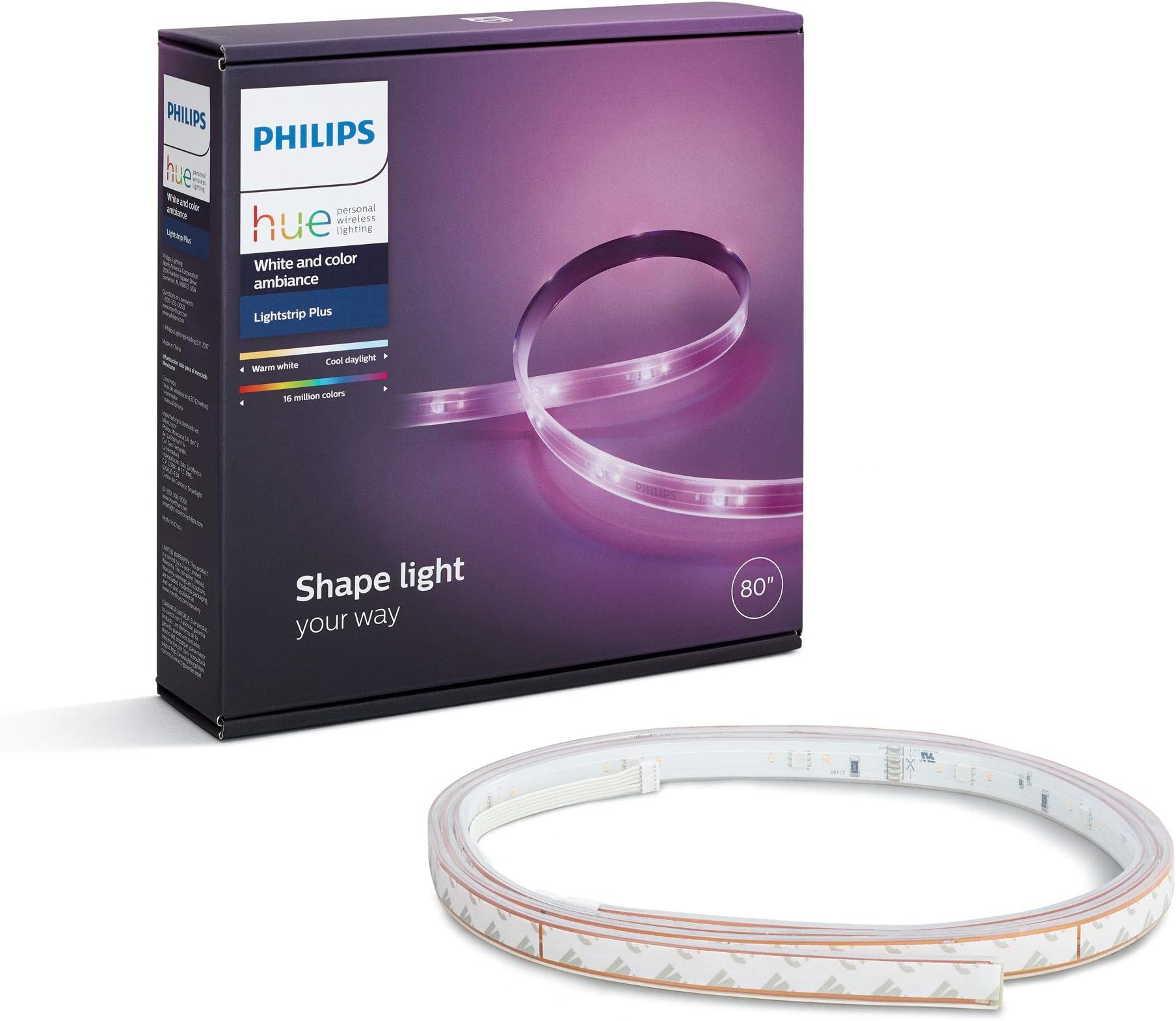
Desertcart purchases this item on your behalf and handles shipping, customs, and support to Argentina.
🌈 Light up your life — because your space deserves to be as smart as you are.
The Philips Hue White and Color Ambiance LightStrip Plus is an 80-inch dimmable LED strip that offers 16 million colors and tunable white light. Compatible with major smart home ecosystems like Alexa, Google Assistant, and Apple HomeKit, it requires the Hue Bridge for full functionality. Designed with flexible synthetic polymer, it can be cut and bent to fit any indoor space, delivering up to 1700 lumens of bright, immersive lighting. Perfect for enhancing entertainment setups or creating dynamic ambiance, it’s a premium, reliable choice for smart home enthusiasts.


| ASIN | B0167H33DU |
| Additional Features | Dimmable |
| Best Sellers Rank | #904,348 in Tools & Home Improvement ( See Top 100 in Tools & Home Improvement ) #3,749 in LED Strip Lights |
| Brand | PHILIPS |
| Brand Name | PHILIPS |
| Color | Purple |
| Connectivity Protocol | Bluetooth, Zigbee |
| Control Method | Voice |
| Controller Type | Voice Control |
| Customer Reviews | 4.5 out of 5 stars 2,765 Reviews |
| Form Factor | String Lights |
| Global Trade Identification Number | 00046677800277 |
| Included Components | lightstrip plus |
| Indoor Outdoor Usage | Indoor |
| Indoor/Outdoor Usage | Indoor |
| Item Dimensions | 5.98 x 8.94 x 2.01 inches |
| Item Length | 80 inches |
| Item Type Name | Lightstrip |
| Item Weight | 5.28 ounces |
| Light Color | White |
| Light Source Type | LED |
| Manufacturer | CQMTO |
| Manufacturer Part Number | 800276 |
| Manufacturer Warranty Description | 2 years parts and labor. |
| Material Type | Synthetic Polymer (PMMA) |
| Model Number | 800276 |
| Number of Batteries | 1 Lithium Ion batteries required. |
| Number of Items | 1 |
| Number of Light Sources | 150 |
| Occasion | Christmas |
| Power Source | Corded Electric |
| Product Style | Lightstrip Base |
| Special Feature | Dimmable |
| Theme | Indoor |
| UPC | 915005109101 046677800277 |
| Unit Count | 6.66 Feet |
| Voltage | 240 volts |
| Water Resistance Level | Not Water Resistant |
| Wattage | 20 watts |
| White Brightness | 1700 lumens |
| Wireless Communication Technology | Bluetooth, Bridge |
| hanging_pattern_layout | Linear |
N**N
High quality, amazing software. Worth the higher price tag than alternatives.
I've been loving Philips Hue lights since I got my first Bulb kit - even if they are a bit pricey. But what sets these apart from the $20 alternatives you can find on Amazon is the Hue Sync program on Windows/Mac. If your setup includes a computer at all, these can be an essential part of your smart home lighting. They can sync with music, which is super fun, but they can also sync with your TV or Monitor to bring the colors of your screen into your space and really enhance your viewing or PC gaming experience. If you're a console gamer (I also have a PS4 and a Switch), there aren't any easy ways to sync the lights to consoles, but that's a software issue which I hope Philips addresses in the future. They've made huge strides in their software over the past year alone, so I'm excited to see where they take it next. I have currently have two of these strips set up on my entertainment center. One is stuck to the back-top portion of my 65" TV, and the other is stretched alongside the top of the back of the entrainment center, so I get lighting above and below the TV. It's amazing. With any HD or 4K content, I'm immediately immersed into the viewing experience. It makes my home feel like a catered, professional experience you'd get at a fancy store. Now, for the technical bits of the review. These lights get bright. All colors are clearly visible on my white walls, even in direct sunlight. But at night, my whole place fills with light and I can change it to any color I choose, either via the mobile app or the desktop Hue Sync program. Setup is pretty straightforward. If you have a Hue Bridge, then all you need to do it plug these into a power outlet, stick them where you need to with the pre-applied 3M tape, add your light in the mobile Hue app, and check for updates. Updates can take a while, so sit back and relax for a bit once that starts. I think each one took about 30-40 minutes for me to update, since these use an extremely low-powered (but efficient and effective) WiFi connection. After that, they're ready to be used with Hue Sync and everything else. Now, if this is your first Hue product, you'll need to also get the Hue Bridge so the lights can communicate with your home WiFi network. If you want a similar setup to what I have, I recommend starting your smart home lighting with the Hue Bulb kit that comes with 3 or 4 lights, plus the bridge for free. Otherwise, you gotta spend another $50 for the bridge standalone. Again, I know these things are pricey and a lot of people say they're not worth the price tag. But again, it's the software and the build quality/company that sets these apart. The software gets better and better with each update, and Philips isn't going away any time soon. Whatever generation bulb or strip you buy now will still be supported and updated 5 years down the road. Cheaper knock-offs will probably break down or be unsupported by then. I feel like Philips is a solid company that keeps innovating the smart home lighting experience and leading the way for everyone else. That's why I don't mind spending the extra bit for a quality product.
J**S
Yes, it's expensive, but it works
I've been looking for the perfect under the cabinet lighting since the house was built six years ago and nothing has fit the bill. Everything was either too bulky to be hidden (and too ugly to be seen), had a white controller only (black granite counter tops), ETC, ETC. With the recent advent of all the voice assistants (I have Google Home) and all the associated products I decided to try a lightstrip. I wanted something sleek, so I ordered a single-gang outlet with USB power and a lightstrip from Koogeek. Went through all the setup hoops and temp hung the strip under the cabinets. It worked for a day or two before I would get the response of "Sorry, something went wrong" or "It doesn't look like the lightstrip is connected right now" Return, order something else. "Oh, you have to turn off the 5Ghz radio on your WiFi" Return, order something else. Google Home never finds the device. Return. Finally broke down and decided to order the Hue. My original mistake is that you need the Hub (or the Bridge depending on what page you're looking at, seems like they can't figure out what to call it), so I had to wait for the 2nd order to come in which was fine, my own fault. The hub is a hard wired appliance, AKA, you have to jack it in via CAT5 into your home network. Luckily I have plenty of ports. If your Router (AKA Gateway, Modem, Internet Thingy) from your ISP is WiFi only you'd be stuck. My kidding aside the process went like this. Plug in, download Hue app, login via Google account (you can create your own but not having to create yet another password was convenient and the process was seamless), press button on Hue, wait a moment, tap the hub when the app found it, plug in light strip, tap that, name it, open Google Home app, tap Hue, add it to a room and VOILA! It worked. And its stayed working. It hasn't dropped off the network, mysteriously changed colors, decided not to shut off or turn on when I'm walking down the stairs in the middle of the night. It just works. Installation was easy. The backing of the 3M double-sided tape comes off in sections so there's no peeling off the whole thing while trying not to get it stuck to the stove before you get it hung in the right place. I made two inside corners and two outside corners and a week later they are all still in place (see pic) Now for the mild bad and the slightly ugly. In the second pic you can see the WiFi receiver stuck to the wall with all the wiring to and fro. Its kind of out of the way and I managed to tuck the wires out of the way as best as possible, but they're still unsightly. They're long too, there was quite of bit of shoving behind the blank wall plate. In pic three you can see the transformer plugged into the outlet as well as my iPhone charging brick. I have to use the brick now because the Hue transformer is so large it covers up the USB ports. The fact that the Hue is powered by a big ole transformer plugged into the wall rather than via USB is the main reason I tried so hard to make something else work. I wanted this to be as sleek as possible with the smallest amount of visible crap. I'll probably decide to throw an outlet in the bottom of the cabinet to hide it more. That'll give me yet another little project before I finally install a backsplash. That's ok, this project is done and I just ordered two extensions for it and I'll have light where I want it from now on. No, it's not perfect. Yes, it's expensive. Yes, it works Get the Hue, it just works.
J**G
Gorgeous hues, easy installation
I love the Hue series of products, despite being over-priced against competing products. What you get for that price difference, however, is strong customer support and a well-designed product that controlled by a very intuitive interface app. Installation was very easy, as each section of the LED strip is backed by a 3M adhesive strip. The strips seems quite powerful, especially given that they've maintained a consistent connection to my TV despite being bent to border the TV. Make sure you clean whatever surface you are installing on first, to ensure a strong grip. After physically installing the LED strip, the strip pairs easily to your existing Hue Hub (not included in the package). Post-installation is where the fun begins, as all Philips Hue lights can be used to setup multiple "scenes" that correspond to specific moods. Each light can be controlled individually, even when grouped as a room. It makes changing colors a snap, and provides some interesting ways to create even more colors, if you know a bit about color blending. Now the advice: first, and foremost, this kit will NOT accommodate a 50" TV on it's own. I had to buy an extension for an additional $24.99 in order to properly frame my TV. If you intend to do the same, DO NOT do what some sloppy Youtubers suggest,and simply make a circle. The coverage will be incomplete and it will not give you the bordered look that you see in the photo. Secondly, make sure you're buying the right version for your application. Philips actually makes two versions of the LED strip, and one is for outdoor use only. It's far less flexible, and is NOT compatible with the indoor light strips. Additionally, though these lights are fantastic and give gorgeous color, their lifespan rating is insanely low. Expect no more than 25,000 hours of usage. Standard LED's have an expected lifespan of TWICE that, at 50,000+ hours usage. Secondly, All things considered, nothing is perfect and capitalism dominates the marketplace. I'm quite sure that if Philips wanted these lights to last longer, they could make that happen. Of course that essentially means half the product sales, so its easy to see why the lifespan on their products is so low. Putting all that aside, the Philips hue family of products are great. I've used other systems, and they're marred by poor product support and features that work intermittently. Do yourself a favor and just go with Philips. Is saving a couple bucks now worth the stress of dealing with an inferior product? Nah. Buy cheap, you buy twice.....
M**.
Kind of a pain to set up, but worth it
So here's the deal. I have three of these base light strips attached to my entertainment center. Two on the back of my 65" TV, and one on the back of the stand. I never intended for it to go this far. I was just using a cheap strip light on the back of my TV for years, and then I found myself paying a small fortune to upgrade to these bad boys. If you're reading this review and wondering whether you should invest in these strip lights, let me fill you in on what to expect. First of all, it's true what other reviewers say. The adhesive that these lights come with is just awful. It will only work if you apply the strip lights to a perfectly flat and smooth surface. If you are planning to use these lights on any surface that is curved or textured, you NEED to get a different adhesive. It's very easy to peel off the cheap adhesive on these lights and apply something else. I personally recommend a foam-based mounting tape. I tried Command velcro strips first but those didn't work well with these lights, at least not on my surface of choice: my TV. And my TV was not going to accept these lights willingly. You see, it's a curved screen which is one problem. The second is the back is textured with horizontal lines. These two things were not Philips Hue strip light friendly. Nor Command Strip friendly. The only thing that worked was a strong foam based mounting tape. Next you'll more than likely have to update the firmware for your new lights in the Philips Hue app, assuming you already have a bridge set up (because you'll need one before you can use these). And don't expect that firmware update to be quick. It's painfully slow. But you'll need to do this before the lights will change color. They will only provide white lighting until you've updated that firmware. I was shocked at how long it took because I am impatient and wanted to play with my lights right away. It took about an hour to update EACH light strip, and I have three. Which brings me to why I have three. First, because I want people to think I'm cool. Second, the strips are too short and I needed more. Third, I decided to get three full kits instead of the extensions so I could set up gradient color schemes. I just think it looks cool. I initially tried it with two base kits first, but I noticed a visible gap in lighting between the top of my TV and the stand. So the third is placed across the center back of the TV. One troubleshooting tip though that I ran into and you might too. If you bend the light strip too much, you may lose connection and the bent part may turn white while the rest of the strip is color. Just straighten the strip and it should go back to color. I have bends in mine, but had to be gentle about it. Lastly, please do not trim these unless you absolutely HAVE to. You cannot reuse what you cut off, and you won't be able to attach extensions to them if you change your mind. These lights are too expensive to go cutting them up! I have one light strip that ends about a third way on the back of my TV, but it's not noticeable from the front. So make sure you REALLY want to sacrifice part of your lights before you cut them.
P**A
Basic Introduction to LED Lighting and the Philips Hue System
I recently decided to install ‘smart home’ lighting and other devices in my home, and after some research I decided to give the Philips Hue system a try. I also have quite a few basic non-smart LED bulbs in my home. I’m very happy with the Hue system so far although it is going to take some time to fully understand all of the ways it can be varied and used. I use mine together with the Apple HomeKit system, and the integration with HomeKit has been automatic and without difficulty. There is a huge difference in the price of individual bulbs depending on what they are capable of, beginning with basic LED bulbs that don’t offer the integration with the Hue system (remote operation and programming), and continuing to bulbs that are a part of the Hue system and have features including full color control (most expensive). The Philips Hue system requires the use of a Hue hub connected to your home Wi-Fi system to connect and control Hue specific bulbs and accessories, and there are starter kits to obtain the hub together with two or four bulbs. Initially it took some time to understand the differences between the various Philips Hue bulbs, so here is a quick intro. There are five basic Philips LED bulb types (both Hue and non-Hue bulbs). ALL ARE 60W equivalent, Dimmable, E26 type (standard light bulb): - 1. (NOT Hue) 800 lumen Warm 2700K - 2. (NOT Hue) 800 lumen Daylight 5000K - 3. Hue 840 lumen Warm 2700K - 4. Hue 800 lumen White ambiance 2200-6500K - 5. Hue 800 lumen White and color ambiance 2000-6500K plus ’16 million’ colors All of the bulbs above use approximately 9-10 watts at maximum brightness There is a huge difference in prices for the 5 types listed above, from about 2-3 dollars per bulb (1 & 2 above), to 10 per bulb (3 above), 20 per bulb (4 above), and finally 40 per bulb for all the bells and whistles (5 above). I quickly learned that if I don’t need to vary the ‘warmness’ of the light in a certain room or area, then all I need is the basic LED bulb, either warm or daylight, and it doesn’t necessarily need to be a Hue bulb if I don’t need to control the bulbs from an App. The brightness can always be controlled from a LED compatible wall mounted dimmer switch or other smart home dimmer that can integrate into the smart home system. If I want lighting in a certain area or room to have the flexibility to change from warm white to bright daylight, in addition to dimming, then the White ambiance style Hue bulb works great. Finally, if I want to add special effects, varying colors and everything imaginable about the lighting, then the White and color ambiance bulbs give that capability. Starter Kits I started with this basic kit, which includes four of the White ambience bulbs plus the hub: Hue Starter Kit 4 x 800 lumen White ambiance 2200-6500K plus hub Other starter kits are available, either with two or four basic white Hue bulbs, or with two of the White and color ambiance bulbs. Lightstrips I’ve installed the Hue lightstrips under the counters in our kitchen, and they are terrific. I've also installed them under the sides of the bed in our bedroom, to provide night and ambience lighting: Hue LightStrip 1600 lumen White and color ambiance 2000-6500K plus ’16 million’ colors The lightstrips have turned out to be one of the more enjoyable parts of the system and are very easy to install. Accessories and Control Options All of the Hue products can be controlled using the App, and there is a huge amount of flexibility available in how the lights are programmed. They can be organized by room or in other ways, and controlled in groups or separately. Hue bulbs are not intended to be used with a wall mounted dimmer switch unless the dimmer is specifically intended to be used with the Hue system. Once a light is turned off using the wall switch, then it can’t be turned back on using the Hue controls (power needs to be supplied to the bulb at all times in order for the bulb to be controllable by the Hue system, even if the bulb is turned off. This is not intuitive at first and is a part of why installing these kinds of bulbs in a home requires considerable thought about how you will use them and what is most convenient for any particular situation). The Hue dimmer switch / remote is a handy accessory to have, if you want to be able to control lights without using the App: Hue Smart Dimmer Switch Hue Smart Dimmer Switch plus 1 800 lumen White ambience 220-6500K I have two of these dimmer switches and use one to control the undercounter lights in our kitchen. For those particular lights it is the only way they can be controlled all at the same time since they plug into different outlets and the outlets are not controlled by any wall switches. There is also a ‘tap switch’ available, and a motion sensor. I have not tried either of those products yet. There is a lot more that could be said about this Hue system but my intention here is only to give a quick introduction to the types of lighting available and some of the ways in which they can be used.
J**V
I've dumped a lot of money into HUE, and it has been worth it.
Overall if you can afford it, definitely worth it, but it's very easy to get hooked. (I think the house alone has about 30 now) Pros: - SDK, without the developer community I would not use HUE, the standard app offers very little, (I recommend hueDynamic (Windows) and Hue Pro (Android), I primarily use the Windows application on my desktop since I sit at on it coding away, but both are great.) and compared to the price of a fixture it's worth the few $'s. - Excellent range of the RGB spectrum - Extremely highs and lows - Flexible, high quality - Have yet to have any broken LED's - This is only the beginning (relatively new), and I am sure will only continue to get better. Cons: - Highly over priced when you break it down, but if you can spare the extra cash it is worth it - Power adapter is large and cannot change between having it plug in horizontal or vertical - The least they could do is include adapters beyond the standard power supply, i.e. converter/splitter/small extension for corners - They need to offer a more powerful tier of the bridge to reduce any latency delay. I've discussed this with HUE a few times; If they want to bring HUE to its full potential, they need to think beyond home lighting and start engineering a competitor to DMX for festivals and such. Obviously, DMX is crazy fast and wired, but the latency gap will only continue to shrink as far as the user is considered. Without the hardware the software is useless, and without the software HUE is useless. I hope they recognize this and invest more into in house development.
R**Y
Neato Keeno
I'm really digging this product! This is my first foray into P. Hue technology (I bought two light strips and a bulb) and it's a lot of fun. Side note: if this is your first buy of Philips Hue, you'll need to purchase the Bridge separately. It connects to your Wi-Fi router via ethernet, and it's the central station that connects your app to the lights. Installation is a snap, though I've seen complaints that the adhesive doesn't last. I put a strip on the back of my wooden headboard, and it looks really slick! It's staying put for now, but I'll update my review if it falls. The app is free and pretty straightforward. On these strips and specifically full-page bulbs, you can literally make the lights any color (except UV or infrared), and the range on dimness is really impressive. I'm photophobic, so I'm very pleased that you can make these so dim that you barely see it. The dimmest picture I'm posting is dimmed to 5% to give you an idea. Personally, I like the red, because it really gives off a Darth Vader theme. I recommend you try this out!
J**Y
Although pricey, the purchase is worthwhile because of the flexibility it offers
We previously purchased 2 philip hue light bulbs (those that can only adjust brightness) for our bedroom and we really liked how we can just control the lights with our google home and siri. Once we had a taste of the convenience, we decided to get this light strip for the "relatively darker" spot in our apartment that did not have any lights. For the light strip, you can adjust the brightness AND the color, which is nice because sometimes after a long day of work, you just want to change the mood of your room so you can relax a bit. Although it may seem inconvenient that the color can only be changed on the Philip Hue app (not through voice command), it does make more sense because there's so many different shades of green and you sometimes just need to explore on the palette yourself to figure out which one fits your current mood. The nice thing is that while you are adjusting colors on your app, the light does change color simultaneously so you don't have to constantly "save" the color to see the effect. Overall, it is a relatively expensive purchase but I think the price is comparable with a lot of standing lights in IKEA that illuminate the same range of space and it also comes with the flexibility to change the brightness and color.
V**R
Magnifica iluminacion, y ademas confeccionable
Esta la utilizamos debajo de los gabinetes de la cocina, da varios niveles de iluminación para noche y/o de dia incluso, solíamos tener LEDs y esta los supera por mucho, a la vez cuando es movie time la utilizamos en coordinación con HUE Go, trabaja con NEST para alertarnos sobre un siniestro en casa y con Google Home para recibir comandos verbales de encendido, apagado y/o confeccion. Agregamos un metro más y funcionó a la primera, solo plug & play
A**O
Producto Caro pero vale cada centavo
Excelente luz, la tira de 2 Metros trae su adaptador de corriente, sin embargo necesitas a fuerzas el Hue Bridge para poder controlar la luz, en total es una inversión de $2200-$2300 pesos mexicanos por la tira y el Hue bridge. sin embargo si te gustan las luces y no te importa el precio valen mucho la pena; una vez teniendo el Hue bridge ya puedes añadir más tiras de luces o cualquier otro producto de la familia Phillips Hue y se conectan a un sólo Bridge que hace la función del router.
F**N
Hue es Garantía
Philips Hue es garantía de calidad y funcionamiento, nunca he tenido ningún problema al controlar mis luces y accesorios con HomeKit y Siri, adicional a la app Home de Apple recomiendo bajar la app Hue y alguna de tu preferencia para armar escenas y combinar tonos de color, la app iConnectHue es una buena opción. Una vez que tengas tus escenas Siri controla horarios y todo a la perfección.
E**D
Excelente para Complementar...
Tenía dudas al adquirir este producto, más por las fotos y las descripciones que tiene Amazon (que son nefastas), ya que primero, pareciera que son blancos, y no, lo que te entregan son tiras de 2da genereación a color, además que la de 2 metros aunque dice "extensión" tra el conector y "cerebro" por lo que puede usarse inmediatamente. Lo único que le pongo peros es que si los pones en una zona que sean visibles las tiras, se ven los leds, pero de ahí en fuera, excelente producto.
M**A
Buen producto para automatización la casa
Facil de instalar. Responde sin problema al sistema Hue, que se conectó sin problemas al sistema de ordenes verbales de home. El brillo no es muy alto; su propósito es ambientación más que iluminación brillante.
Trustpilot
1 month ago
2 months ago