Buy anything from 5,000+ international stores. One checkout price. No surprise fees. Join 2M+ shoppers on Desertcart.
Desertcart purchases this item on your behalf and handles shipping, customs, and support to Argentina.
๐ Elevate your virtual presence with NexiGo N980P โ where clarity meets confidence!
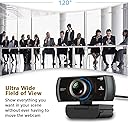
The NexiGo N980P is a professional-grade 1080p webcam delivering ultra-smooth 60FPS video with a wide 120ยฐ field of view and built-in dual noise-reduction microphones. Designed for seamless plug-and-play use across all major operating systems, it ensures crystal-clear visuals and audio for video conferencing, streaming, and remote collaboration. Its manual focus and intelligent auto-brightness adjustments guarantee sharp, true-to-life images even in low light, making it the go-to affordable choice for millennial professionals seeking to upgrade their remote work setup.


| ASIN | B08DHPBP65 |
| Antenna Location | Video conferencing, live streaming |
| Are Batteries Included | No |
| Best Sellers Rank | #131 in Webcams |
| Brand | NexiGo |
| Built-In Media | Privacy Cover, USB Cable |
| Camcorder Type | Video Camera |
| Color | black |
| Compatible Devices | Computer, Laptop, Tablet |
| Connectivity Technology | USB |
| Customer Reviews | 4.4 out of 5 stars 5,506 Reviews |
| Digital Zoom | 4 x |
| Display Resolution Maximum | 1080p Full HD |
| Effective Still Resolution | 2 MP |
| Effective Video Resolution | 1080 Pixels |
| Exposure Control Type | Automatic |
| Features | 60FPS Streaming, Built-in Privacy Cover, Manual Focus, 120ยฐ FOV, 1/4" Tripd Support, Software Support, Low-Light Correction |
| File Format | JPEG |
| Flash Memory Bus Interface Type | USB |
| Flash Memory Type | MultiMediaCard , SD |
| Flash Memory Video Speed Class | V30 |
| Focus Type | Manual Focus |
| Form Factor | Compact |
| Has Image Stabilization | No |
| Image Aspect Ratio | 16:9 |
| Image Capture Speed | 60 fps |
| Image stabilization | False |
| Item Dimensions D x W x H | 1.95"D x 3.45"W x 2.6"H |
| Item Weight | 0.2 Kilograms |
| Lens Type | Wide Angle |
| Manufacturer | NexiGo |
| Maximum Aperture | 2.1 f |
| Minimum Aperture | 2.1 Millimeters |
| Model Name | N980P |
| Model Number | N980P |
| Number of Speakers | 1 |
| Operating System | Windows XP/7/8/10/11, Mac OS 10.6 or higher, Linux 2.6.24 or higher, Chrome OS 29.0.1547 or higher, Ubuntu Version 10.04 or above |
| Photo Sensor Size | 1/2.7-inch |
| Photo Sensor Technology | CMOS |
| Screen Size | 2.7 Inches |
| Sensor Type | CMOS |
| Shooting Modes | Automatic |
| Style Name | Webcam 60FPS |
| Supported Audio Format | PCM |
| Supported Image Format | JPEG |
| UPC | 766214012481 |
| Unit Count | 1 Count |
| Video Capture Format | MJPEG |
| Video Capture Resolution | 1080p |
| Video Resolution | 1080p |
| Viewing Angle | 120 Degrees |
| Water Resistance Level | Not Water Resistant |
| White Balance Settings | Auto |
| Zoom | Digital |
M**4
Great Performance From Reasonably-Priced 1080p 60fps WebCam
Here's a webcam for work-from-home (WFH) users which does more than what it costs! This is second webcam I bought after trying out a less expensive $30 Unzano 1080p 30fps unit. Mind you the Unzano did the job and I would give it 5 stars too. However, I landed this 1080p 60fps NexiGo webcam since I was on a lookout for 60fps unit under the $100 price range. I bought this last 9/25/2020 for $69 and it has since dropped to $53 as of this writing. For starters, the quality on this camera is superb as long as you provide enough light. For web conferencing you probably want to light yourself up instead of looking like a vampire. After a lot of YouTube viewing of lighting techniques, I settled for two-point lighting with this camera - a filtered lamp behind and just a tad above and behind the camera and another soft light from lamp to my front left in same plane as first light source. I'm no stickler nor an expert with color profiles since I do not provide web content. So if ever there are any color issues, I have not observed any. My most important requirement is really clarity and response time which this unit excels in. For game streamers, I would think this is still a decent camera. I do not use OBS but I tried it out anyway and OBS recognizes the 60fps setting on this webcam. It plays well with other web conferencing software like Zoom, WebEx, MS Teams, Skype. I also tried it with Viber and Messenger with no issues. Installation was straightforward in Windows 10 and it is recognized as a standard USB device. No software needed to be installed as it is compatible with webcam Windows-provided driver. Note that this is not autofocus webcam. I only took one star away from rating because I think it was asking me to rate something that manufacturer already declared as not being able to do. You will need to manually turn the outer lens ring to focus on your most probable head position and webcam distance. Once that's set, you probably do not normally need to fiddle with it. I included an image with this review taken from the built-in webcam photo option with the webcam located 2 feet from my face and with 2-point lighting I described above. At 2 feet distance (or even nearer) built-in dual mics from Webcam do not pick up sound that well. This is not a big deal for me because I already decided to forego with this and use a lapel mic for my web conferences. I included image for my physically-configured webcam. Webcam is supported from an articulating boom arm and drops the camera just below the top of my monitor. This allows me to still see some of my desktop windows while I am in conference mode. The webcam by itself has the standard up-down-left-right flexibility so you can really fine-tune the position especially if you mount it to boom arm or any desktop stand and couple it to other tripod attachments you have. Since webcam does not have a lens cover, I scavenged some Lego parts and made myself a folding lens cover which I mounted on top of camera using some 3M adhesive tape. I also cobbled together a holder for my cardioid lapel mic which I clip just below the webcam so it does not appear in field-of-view. This configuration with webcam around 1 to 1.5 ft. from my face and with mic level set at around 85% gives me the optimum conferencing settings for both video and audio. I am currently happy with this webcam especially since it does not break the bank as other standard brand webcams like Logitech, Razer or Microsoft. I would highly recommend this webcam for WFH users who are in the market for reasonably-priced webcam that does the job.
C**L
Worth it
For the prize this thing is amazing. The quality is very good for what you are purchasing. For some applications the sizing or dimensions of the picture captured is a little cropped, but there isn't any stretched resolution or blurry images. If there is something blurry you can adjust the focus directly on the camera itself to make sure the image is stable and clear. Very easy to use and very worth it.
L**N
One Year Review - Decent webcam, probably not worth the price
I've owned this webcam for over a year now and it is still my main camera for my personal PC. Its field of view is actually really good for its size, its picture quality is good enough, its manual focus works surprisingly well, but the built in microphone is lackluster. For a 1080p camera however, the price to me seems a bit steep. For normal things like video calls or taking decent quality pictures or video, its fine. If you are attempting to portray yourself in a professional manner or setting, consider options with a higher resolution. The field of view on this webcam has really kind of surprised me. It sits on my secondary computer monitor close to the corner of my room and it can very easily see the entire room behind me. In every case if I need to have my webcam on for whatever reason and I'm anywhere in my room, it can see me. Kinda nuts for this type of webcam. It is entirely built out of plastic so I cant see it surviving much abuse so you might have to be careful handling it and ensure you have placed it in a secure location where it won't fall and get damaged. The manual focus feature on this webcam works really well from what I have seen. Since I use it as just a normal desktop webcam, I have never had to refocus it after the first use. The built in microphone, well, its a built in webcam microphone. Kind of sounds like your talking through a tin can. If you require a professional setup, do not rely on the built in microphone of this webcam. Overall I would rate this webcam a solid 7/10 with the only downsides being the microphone, build quality, and price.
M**K
The Additional Features Make It Worth It
The additional features take this video conference camera to the next level. The Pros: Dual-position preset is intuitively easy to program. Zoom in to a specific location for the first preset, press and hold the location "1" button on the remote, and it's set. Do the same for the second location you wish to set. This can be great for at-home use or business conference room use. You can make it look like you have a separate cameraman operating the camera in switching between the two views in real-time and not involving a video mixing board or post-production. Of course, you can always spend thousands of dollars and have a video production setup, but most people don't need that complexity and expense. Although the camera has built-in dual stereo mics, it also has two 3.5mm audio jacks to attach additional microphones to the back of the base. Just imagine the usefulness of this for just a minute. Imagine that you want to make a YouTube video where you are interviewing someone, and you want crystal-clear sound from wireless lapel microphones connected to the conference camera. You can do it with this camera! This option alone may be the most significant selling point, but it's so easy to overlook in the description. I'm looking forward to exploring what I can do with audio connections. The Ultra HD 4K Sony Starvis camera sensor works great as usual. Of course, optical zoom can provide better clarity at the sacrifice of low-light sensitivity. The NexiGo N990 doesn't use optical zoom, but digital 5x zoom. Digital zoom works by basically cropping the 4k image down, and as a result, the image will pixelate a bit when fully zoomed in. Still, this camera has much better clarity for everyday video conference use than most video conference cameras out there. Can you get a higher-quality camera for video conference use? Of course, but it won't be easy to beat the price of the NexiGo N990. The Cons: The software had a conflict error with Microsoft .NET Framework on initial software installation on two different computers. One computer is running a currently updated version of Windows 10 Pro, and the other computer is running a currently updated version of Windows 11 Pro. This error didn't prevent the use of the software. Simply pressing the "Continue" button allowed the software to function correctly in all options I tested on both computers. I expect NexiGo will correct this software error in a future software update. Summary: The motor control of this camera is nearly silent. The camera has different mounting options for tabletop, wall, ceiling, or attached to a tripod. Even though most people can get by using a fixed mount camera, updating to a PTZ (movable) camera gives a professional look and feel to anyone on the other end of the video call. I like that a lot. So yes, I am happy with my purchase. If you value some of the things in my review, then this camera may be what you're looking for, as it was for me.
W**E
Zoomable high quality picture with accurate skin tone colors without the need for a light ring!
I spent hundreds of dollars on webcams only to be disappointed. Ring lighting has helped but does not give me the picture quality I want. The first time I used this webcam people said "you have gotten some sun, look how tan you are!". This comment really hit home since I had not been in the sun. This camera was more true to skin tone than my other three webcams which tend to wash me out (NexiGo N940E, EMEET C980, or even my Logitech C922 Pro). It's the best quality I've experienced outside of using a DSLR camera. I've included screenshots at regular range and zoomed in for you to see the quality of the pictures. This webcam was easy to plug and play using just the basic features before needing to download the software for the advanced features. When I plugged it in, the camera seemed to wake up, and spun its head around like R2D2. At first, I thought something might be wrong, but then it settled with its lens on me ready to go to work. After using it for a day or two, I took the time to download the software and read the manual on how to use the remote. The software ended up being the same as the software I use for my NexiGo N940E, so I already had some experience using it. The remote was new though. It took me a while to figure out how to turn on the remote and use each feature. There are several reviews here that have mentioned problems with zooming in and out. I have found this works really well in the software, but once in a while can be a little glitchy on different online platforms. The remote doesn't seem compatible on certain platforms. I have a workaround I use. If I am feeling really picky about my zoom and focus points, I usually open up the software, set up my camera, and the settings remain true in the webinar platforms. The quality is so much more superior to my other cameras, I still gave it a 5-star rating overall. Pros *Works well in low light *Works well in front of a bright window *The remote gives me a lot of options *It has a lens cover *It tilts and pans *The zoom is excellent *Skin tone is spot on *Has a tripod mount Cons *Its bulky *I have to set it on something (like a stack of books or a big box) for the right placement *I haven't attached it to the wall because the IR is on the bottom of the camera - meaning the remote probably won't work with the wall mount *Might be too high a price for the average user *Learning curve needed to use the remote and camera settings *While the sound quality of the mic seems fine for the person listening to me, the audio level is too low for me sometimes. I tend to still wear a headset.
S**N
This camera works great as long as you do not need autofocus
I purchased this model to try and get away from the mess that is Logitech and their endless array of webcams, most of which have some weird fluke about them that you never find out about until you get it and then have to wade through the worst customer support in the webcam industry over there. This camera worked right out of the box and provided a beautiful 4K image on my Mac running Ventura. If you want to use it for Zoom or something where the camera is within hands reach, it's awesome. I use them for wildlife and bird nest monitoring though and this camera is useless for me as IT DOES NOT HAVE AUTOFOCUS! That's right, your read that correctly. Some company in the year 2023 is selling a 4K webcam without autofocus. Hard to believe really. Certainly not printed anywhere in this Amazon sales ad. You have to dig really deep on to their website to find out that yes, indeed this webcam doesn't have autofocus capabilities. Anyway, like I said, if you are using it within arms reach where you can actually grab the 1984 style lens with the big focus ring around it when needed, it is great. If it is in a location like an Owl box or Nest cam where you cannot get to it, it is useless.
Z**A
One hella of an upgrade!
I've been playing around with the webcam and it's one hella of an upgrade in comparison to the Nexigo N60. Overall a great camera but it may a bit overkill if you are not planning to use it a lot. Pros *The image quality is amazing *Being able to set the angles with a control *The software for the webcam is very easy to comprehend and the control can do most of those things too! *USB connection; it doesn't need to be connected directly to the pc to work properly. I use a USB tower and there's no lag nor any other problem *Wide lens!! Or well, I can see way more of my room with this new webcam than the previous one I have. And then you just adjust the zoom and angle w the control and your set. *You can mount it on the wall or ceiling and with the control, you can still make the image look good. *If you're not happy with the setting you applied it's easy to back to the default settings by pressing Home. *Mute bottom!! The controller has a mute button and also a camera-blocking function. You can use both at the same time too. The screen will just go black but the webcam will still be on. Cons *I've hopped in calls to test out the built-in mic and I've been told more than once to go back to my normal mic lol *You can't pop it on your monitor like smaller webcams, and if you just put it on your desk it will 1) give a nice view of your double chin and 2)block your view on the monitor (not by a lot but it's there). *Had to put a small floating shelf so I can set the camera there and point it to myself. This also adds the effect that I'm always looking down although I'm looking at my monitors. *On my laptop I can see a nice image, but sometimes the people you are calling won't appreciate the same quality. *Sometimes in calls, when you are already using zoom, the camera won't go up/down/left/right for whatever reason. So you have to unzoom, change the position and then zoom in again.
V**N
Good.
It was good.
๏ฟฝ**๏ฟฝ
Good quality 4K, plug & play, video camera at a respectable price.
This arrived very well packaged in a retail box and inside you get the Camera with attached USB-A cable, Remote Control exc Batteries (requires 2 x AAA), Mounting Plate, Screw & Raw Plugs, Stick-on Privacy Cover, and Instructions. There is some freely downloadable software to fine tune the cameras settings, although it will work straight out-of-the-box with Windows 10 โcameraโ software, The main reason I got this was for doing reviews like this. At the moment I use my phones camera juts to film the products and I wanted to have a go at filming me at the same time and this looked to be a good option. On the rear of the unit are two 3.5mm AUX ports for plugging in an external microphone. I have had to order a new cable for this, as both of my mics use USB-c to USB-A. The unit looks to be well made and it does come with a Sony lens, which means the picture quality should be pretty good. Either side of the lens are the mics. The camera will swivel left or right but will not rotate fully to 180-degrees. You can also raise and lower the lens. All of which is controlled via the remote. You can set up two pre-set positions, that can then be activated at the push of a button on the remote, as well as a home setting. Other remote function include muting sound, camera lens off, mic volume up/down, zoom in/out and more. Now, with the zoom function, the instructions are contradictorily. In one section it says that the resolution needs to be 1080p or less, another 2K or less. Either way, you cannot use the zoom if using 4K. Whatever resolution you are shooting at, it is going to be 30fps. I have uploaded a video with my review and the first part is shot with my phone and an external mic and then the second part is shot with this camera and the built-in mics. As my PC monitors are currently 32โ WQHD (2K), I have only watched the footage back in that resolution and am suitably impressed with it. The sound is alright and is fine for meetings, webcam stuff and the usual stuff but it wonโt hurt to add a half decent mic to the set-up - it is a 4K camera. If you are holding a meeting around a large desk, you may want to consider a decent omnidirectional or dual mic set-up I have been in and chaired many a business video conference and this quality is ideal for that and most people watching are not going to be doing so on state-of-the art 4K monitors. Particularly if you are hosting some sort of team meeting. I am no Pro, and you can spend an awful lot of money on this sort of stuff but this will do me fine. I hope you found this review & photos interesting, informative, and useful. Thanks for reading. NB. For a sizing guide, squares in photos are 1cm.
J**N
Excellent camera
We have ours covering a large conference room and the detail is top notch even at the longest distance.
P**O
Excelente para videollamadas
Excelente calidad en videollamadas y video desde el equipo, me gustaria dieran mas rango de cable
A**R
1 YEAR REVIEW.
I write reviews after at least one year of use, longevity ease of use as well as value to cost matter. - arrived in well protected packaging. - ease of setup was quick and easy. - performance has been excellent no issues to date. - has been used for both business and personal connections. - future plans for YouTube production. - have been extremely happy on reflection with both the product and the price paid.
S**R
Brilliant camera, feature packed
For years I've just used the built in camera on my laptop, but after getting a new monitor and leaving my laptop lid shut, I needed something new. Unfortunately, I spend a fair amount of time in meetings so thought I'd get something better than a bog standard camera and this fit the description. Using Sony sensor, the image quality is excellent - whilst this isn't necessary just for meetings, for those involved in streaming or some kind of recording this is a must. I can't comment on the quality of the sound as I use my own headset, however it has both a built in microphone, and an input jack to plug in an external one making this a good candidate for a conference camera. On top of that, it can be wall mounted (bracket included) and the camera can be adjusted with the included remote control so you can move it around to point in a different direction. The camera is Zoom certified so I can only assume it works properly with that however I have had some issues with it randomly not working with Teams. No idea why, but it will work on another app but not on Teams. It's not constant however and most of the time works as expected. Overall it's a great camera - perhaps not the cheapest, but if your income is generated thanks to a camera it's a bargain.
Trustpilot
1 month ago
5 days ago