Buy anything from 5,000+ international stores. One checkout price. No surprise fees. Join 2M+ shoppers on Desertcart.
Desertcart purchases this item on your behalf and handles shipping, customs, and support to Argentina.
📸 Turn nostalgia into digital gold—scan, save, and share your story today!
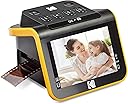
The Kodak Slide N Scan is a sleek, high-performance film and slide scanner featuring a 22MP CMOS sensor and a vibrant 5” LCD for instant preview and editing. Compatible with 135, 126, and 110 film formats, it offers fast, continuous scanning with easy-load trays and adapters. Connect via USB-C or HDMI, save directly to SD/SDHC cards (up to 32GB), and effortlessly convert your analog memories into crisp digital JPEGs. Perfect for professionals and enthusiasts aiming to preserve and showcase vintage photos with modern convenience.


| ASIN | B084NVRHYQ |
| Best Sellers Rank | #2,698 in Office Products ( See Top 100 in Office Products ) #1 in Slide & Negative Scanners |
| Brand | KODAK |
| Color Depth | 24 bpp |
| Connection Type | HDMI, USB |
| Connectivity Technology | HDMI , USB |
| Customer Reviews | 4.4 out of 5 stars 12,326 Reviews |
| Global Trade Identification Number | 00843812123013 |
| Item Dimensions D x W x H | 5.27"D x 5.35"W x 3.74"H |
| Item Type Name | KODAK SLIDE N SCAN Film and Slide Scanner with Large 5” LCD Screen |
| Item Weight | 1 Pounds |
| Manufacturer | Kodak |
| Media Type | Negatives, Slide |
| Minimum System Requirements | Windows 7 |
| Model Name | KODAK SLIDE N SCAN Film and Slide Scanner with Large 5” LCD Screen |
| Optical Sensor Technology | CMOS |
| Product Dimensions | 5.27"D x 5.35"W x 3.74"H |
| Resolution | 22 Megapixels |
| Scanner Type | Film |
| Standard Sheet Capacity | 1 |
| UPC | 843812123013 |
| Unit Count | 1.0 Count |
| Warranty Description | B084NVRHYQ |
| Wattage | 15 watts |
A**C
Perfect for family photos, good quality and fun to use
I'm so happy with this little device! As soon as it arrived I tested a 35mm color negative. It's really simple to use, as soon as you set up the scanner and slide in the negative, you can see the image immediately on the screen. It's so enjoyable and quick and the quality exceeded my expectations. You do need to buy a 32GB SD card or 32GB SDHC card. It will not work with larger GB or with SDXC cards. Setup: Plug in the USB-C/USB cable (provided) into the scanner. USB-C side goes into the scanner, and the USB side goes into to your PC or to a wall adapter. Insert the SD card in the back of the scanner (right next to the USB-C slot). Open the hinged slide holder and insert the adapter for 135mm, 126mm or 110mm depending on what film you are using, and then snap it closed again. The manual shows you how to align the adapter inside the hinged holder. If you are scanning slides you won't need an adapter, you will just need the slide holder. Insert the slide holder into the slot on the right side of the scanner. The arrow on the slide holder should be pointing toward the scanner. About an inch will still be visible, sticking out of the slot. This is where you insert the film. How to use: Press the power button (it must be plugged in to PC or wall using the USB cable to power on). Press the large OK button on the front to select film type. Use right/left arrows on the top of the machine to select film type and then click OK. Select the film size and click OK. Make sure your film is right side up, and slide the negative into the slide holder on the right side of the scanner. Smile when you see your image on the screen! You will need to adjust the film so that the image is centered on the scanner, and then press the large OK button again. Slide the film further in until you can see the next image. Press OK to scan. Once you can't push the film in any further, you can insert the next piece of film and it will push the first one through and out the left side. I found a few times where the film was curved and wouldn't go in past the first image. If this happens you can remove the slide holder from the scanner, insert the film into the holder while gently pressing down on the first image. It should slide through and you can reinsert the holder into the scanner with film already in it. It takes about 2 seconds for the image to scan. Transferring photos to your PC. You have 2 options - you can remove the SD card and insert it directly into your laptop/PC if it has a slot. If not you can connect the scanner to your PC using the USB cable (provided) while the SD card is still in the scanner. This will bring up a USB device on your PC and you can see all of the images. They are given file names based on the order you scan them. I have scanned over 1,000 images on the SD card so far. Quality: The quality of the images is better than I expected. For sure up to 8x10 prints would be high quality, I'm attaching a scanned image so you can see. Also please note in the scanned image I didn't center the negative properly. If you are moving too quickly through the images this can happen, so it's good to view the images periodically in case you need to rescan anything. Make sure you keep the film dust free, and also make sure the scanner is dust free. It comes with a cleaning brush that can be inserted into the slot where the slide holder goes to clean out dust. Do this with the soft part of the brush facing down. I didn't do this at first and some of the images ended up with some marks from the dust.
J**E
Slide digitizer
It isn’t truly a scanner in my opinion. It does more of a screen grab of the displayed slide. With that said it works well and it’s much much faster than a scan of a slide. Plus the these slides are old and not exactly the highest resolution and quality anyhow. So at this price point and with the speed it is exceeds my expectations. My wife is loving going through the old slides and has captured over 1200 images. She found it easy to use and is thrilled with results.
C**P
Quick, easy to use, screen freezes after transferring pictures to my computer.
This product was very easy and simple to use. I had a bunch of slides I got from my parents house with pictures of my dad’s two years in Italy from 1977 and it digitized them like a dream and I was able to digitize about 500 slides in a few hours. It was a fast and easy process. The scanner was very light and small and feels cheap, but works well. The quality of the pictures were really good too. I gave the product 4 stars because every time I transferred the pictures to my computer, I would have to turn off the scanner and turn it back on to keep scanning (I was scanning in batches to keep better track of the order of pictures). When I was done transferring the pictures, I’d push the film button again on the scanner and the screen would freeze up. Turning it off and then on again fixed the problem. I don’t know off it’s a product problem or a something is wrong with my specific scanner
S**K
Amazing way to preserve your memories!
Amazing tool. Takes a little bit to get used to this, but it's such an amazing process! I love seeing the image appear. I love being able to select the items I want, image by image. It was SO WORTH the investment. Rather than paying hundreds for a company to do it and receive dozens of pictures I don't want, I can control the entire process. I am so happy to have this!
D**.
Great little scanner
I purchased this for a work project, as I needed a simple, budget-friendly scanner to digitize a series of old slides. I have only used it for 35mm slides so far, but the scanner comes with attachments for film negatives as well in 3 sizes: 35mm 126 and 110 for those who had Instamatics and such back in the day. I have found the scanner to be easy to use and it does a nice job. It does not provide a ton of editing options, but one can adjust brightness and color to a certain degree-- probably enough to then make further changes with photo editing software, should one feel the need. Please note that it seems you WILL need a low-volume (I think it is less than 16GB) SD card to use the scanner, which is not included. The scanner will then transfer image files from the card to a computer, but you seem to need the card inserted for the unit to function. Not a big deal, but something you will want to be aware of. Power can come from either a computer USB port or electrical outlet, though you will need to provide your own plug unit to attach to the USB cord provided. Overall I am very happy with the scanner and will look forward to digitizing some negatives using the provided attachment.
K**A
Exactlkt what i neede at a reasonable price, great quality, durable
Bought this to digitize 120 years of family photos. Once you get use to how it works, it's a breeze to use. Can do 126 negative, 35mm negatives and slides. Scanned over 5000 slides and it never failed. Image quality was as close to a picture as you can get, was even able to lighten a few to increase viewing, colors are clear and concise. Great value if you want to scan negatives and slides. Does take a bit of time to get use to using, but then it simple.
M**.
Decent, but not spectacular
Not sure exactly what I expected at this price point, so I've tried to balance my comments accordingly. First of all, the item is very neat and well-organized. The instruction manual is very good, and the keys/logic are very straight-forward to use/learn. Basically, this is just a box with a camera phone that takes pics of your slides/negative. There's 2 resolution settings; use the high one, gives files ~3-4 MB each. Good/great: small, lightweight, easy to learn/use, seems like a decent price-point. Not so good/great: - the slide/film carriers sometimes slip out a little from the base unit, leaving edges/shadows in the scans. Took me ~1/2 dozen rolls of film (slides) to figure that out, and had to re-do a couple of them. - it doesn't handle 'curled' negatives very well (that is, curved side-to-side from sprocket edge to sprocket edge). I've used it with some 'old' stuff (but not that old), ~30-40 yrs, and the film is curled a bit. Sometimes it won't feed through the mechanism (so you have to take out the slide racks, position by hand, and re-insert). Not THAT big a deal, I suppose, but still a bit of an annoyance. - seems the curling causes it to lose a bit of focus; that is, the film carrier doesn't force the film to lie perfectly flat in the center of the scanning area. - it takes a bit of getting used to to slide slides (does that make sense?!); starting a box, easy to put in 1, then 2, then the 3rd to help push/align the 1st one, etc. The last couple can be a bit tricky tho; have to use another slide to push/align the last ones. With 2 slides in the tray, you can barely (and I mean BARELY) grasp 1 from the left and 1 from the right to pull them out (otherwise, you'll have to use another slide to push them through). One thing I didn't completely realize when I ordered is that you HAVE to have/use an SD card. Description seemed to suggest (to me) 'optional', but that's not the case. I thought I'd be able to hook to laptop and scan/save directly there, but not so. NEED an SD card (luckily I had one on hand); the item saves to the SD card, and then you have to remove from the item, insert into laptop, and copy (etc.). There is a function to transfer from the item to computer but I haven't tried that...at minimum, you'd still have to disconnect USB from the item (power) and plug into computer. Don't love that, but it's really not all that bad.
S**R
Easy to use. Good for hobby, not professional grade
For the most part it's great, but could be better. First, it would be nice if you could set your film type and it would just remember it or stay there until you change it, but you have to set it every time you turn it on, or come back from the album or do anything. Also, on all film types, it crops the image height so you don't get the full image. I would rather get a little extra and crop it down on the computer, then not be able to get the full image. It cuts about 10% off the top AND bottom so there were many pictures in portrait mode that had arms partially cut off, or heads flat topped in landscape mode, but in the negative you can clearly see them. It would be nice if it had suction cups or something to hold it firmly in the surface and a way to lock the film in place so it doesn't move while it gets scanned. I had a couple time when I pressed the scan button and either the scanner moved or the film got touched just a little and I didn't get a clear picture and I didn't realize it until later when I was on the computer, and so I had to go find that negative again.... Pain in the A$$ when I am dealing with 40 year collection of family photos and all the negatives were just in a box and not a album with contact prints or anything to organize them. It would also be nice if it could save directly to the computer so you could analyze each picture as you took it to know if you got a good scan or if there was a piece of dust or something. As is, you have to scan to the SD card, then swap the SD card to the computer. For the price, I was expecting more. It's not BAD, just not as good as I expected considering there are others that do the same that cost less then 25% what this one does.
T**Y
negative scanner
great product i can now get old photos from negatives
L**S
Muy buen escaner en su precio
Me está siendo muy útil para recuperar imágenes de hace 60 años que se encuentran en diapositivas de distintos tamaños. Es fácil de utilizar y el resultado es muy bueno sin perder de vista algunas cuestiones: - Sus 22 megapíxels obtienen todo lo que pueden de una diapositiva que como máximo medirá 3,5x2,3 cm, por lo que no podemos compararlo con los 22 Mpx de una cámara que los captura de todo lo que esté al alcance de su objetivo. - En ese sentido, al igual que la lente de una cámara ha de estar limpia para sacarle todo el partido, la diapositiva o el negativo han de encontrarse en muy buena condición para obtener todo lo que se pueda de ellos. Algunas de las mías están bastante mal y los milagros no existen aquí. - Para mejorar los resultados y subsanar las deficiencias de los negativos o diapositivas hay que utilizar un programa de procesado como es el caso de Photoshop. Si no lo manejas mucho, sólo con ponerle los niveles, el brillo y la saturación en automático ya ganan mucho y con el tampón de clonar se arreglan las posibles imperfecciones que tengan los originales. - Y, finalmente, hay que tener en cuenta que estas diapositivas o negativos se obtuvieron con cámaras que no guardaban tanta información de la imagen obtenida como las actuales. Estaban pensadas para imprimirlas posteriormente en papel de un tamaño normal, digamos 10x15 o mostrarlas con un carrusel de diapositivas. Ahora estamos pretendiendo una resolución mayor en la pantalla de un ordenador por lo que probablemente nos encontraremos con algunas imágenes que nos parecen (y posiblemente lo sean) un poco borrosas. No considero que sea culpa del escáner para nada. La calidad del aparato es muy buena y la transferencia de las imágenes al ordenador es sencilla. No se puede pedir más. Es un dispositivo que recomiendo sin dudarlo.
L**Z
Un aparato de muy buena calidad
Lo adquirí con la idea de convertir mis viejos negativos de fotografías pero no con muchas expectativas. Pero al recibirlo y probarlo comprobé que tiene una pantalla de buena visión y botones intuitivos para realizar las acciones que uno desee, al probar con mis primeros negativos, me sorprendió la facilidad de su manejo y rapidez con la que convierte mis negativos a una imagen digital de muy buena calidad. Muy satisfecho con este escáner y su funcionamiento.
C**E
Nostalgia Fun
Easy to use and good fun preserving old photos.
J**O
Scanner prático
O scanner é um produto doméstico mas funciona muito bem para recuperar aqueles negativos (ou slides) antigos. Não esperem grandes ajustes de cor mas, em compensação é muito prático.
Trustpilot
1 month ago
2 weeks ago