

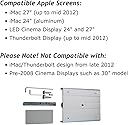
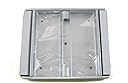
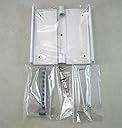

VIVO Adapter VESA Mount Kit for Apple iMac (Mid 2012 and Older Models!) LED Cinema, Apple Thunderbolt Display (STAND-V0AP)
Product ID: 1841115
STAND-V0AP Features: -Fits monitors up to 27". -Used for Apple LED Cinema Display and iMac. -For Apple Thunderbolt displays. Product Type: -Adapter plate. Color: -Silver. Number of Items Included: -1. Dimensions: Overall Height - Top to Bottom: -4 Inches. Overall Width - Side to Side: -6 Inches. Overall Depth - Front to Back: -2 Inches. Overall Product Weight: -1.5 Pounds. Review: Works well -- good substitute for the overpriced Apple mount - Worked perfectly and allowed me to mount my mid-2010 27" iMac to a VESA arm. I had some trouble getting the stand off with the instructions (you have to stick the card in to block some springs), and finally found some YouTube videos that showed someone doing it which was really helpful. Once that obstacle was out of the way, the rest was pretty easy and this kit fit perfectly and looks sturdy for much less than the overpriced Apple version of this mount. Review: Great product. Tighten center screw first, though! - This worked perfectly to attach my 27" Thunderbolt display to a Bretford mount. Installation was fairly simple. The only thing I would mention that is not clear in the instructions is this: After you install the bar to the bracket on the display with the eight torx screws and place the VESA plate on the bar, tighten the center screw that attaches the VESA plate to the mounting bar FIRST. This will pull the internal bracket out far enough that the bolt holes on the side of the VESA plate will align properly with the mounting bar.
| Manufacturer | VIvo |
| Brand | VIVO |
| Item Weight | 8 ounces |
| Product Dimensions | 2 x 6 x 4 inches |
| Item model number | STAND-V0AP-AMZ1 |
| Is Discontinued By Manufacturer | No |
| Color | Aluminum |
| Material Type | silver, aluminum |
| Number of Items | 1 |
| Manufacturer Part Number | STAND-V0AP-AMZ1 |
Z**K
Works well -- good substitute for the overpriced Apple mount
Worked perfectly and allowed me to mount my mid-2010 27" iMac to a VESA arm. I had some trouble getting the stand off with the instructions (you have to stick the card in to block some springs), and finally found some YouTube videos that showed someone doing it which was really helpful. Once that obstacle was out of the way, the rest was pretty easy and this kit fit perfectly and looks sturdy for much less than the overpriced Apple version of this mount.
A**.
Great product. Tighten center screw first, though!
This worked perfectly to attach my 27" Thunderbolt display to a Bretford mount. Installation was fairly simple. The only thing I would mention that is not clear in the instructions is this: After you install the bar to the bracket on the display with the eight torx screws and place the VESA plate on the bar, tighten the center screw that attaches the VESA plate to the mounting bar FIRST. This will pull the internal bracket out far enough that the bolt holes on the side of the VESA plate will align properly with the mounting bar.
B**Y
This is an adequate kit...
This is an adequate kit for mounting VESA mounts to Thunderbolt displays for stands. The instructions could have been more clear with the fact that the center bolt actually cinches down to allow the holes for the side holes to line up. Struggled with that for a bit. One of the holes on the attachment bar was filled with solder, so I could only attach 7 of the 8 screws. They mounts do seem to work, but be careful of the center bolt can sometimes strip and the monitor them becomes a VESA mount only monitor, no longer able to put on the original Apple stand. Good for the price as the Apple-branded kit is pretty much the same thing, but probably better quality control.
J**W
Works As Advertised
Works as advertised. Easy to remove the stand and install the mount. Instructions were very clear and all th tools were provided. I am very happy with the inital purchase and assembly.
N**S
Definitely look elsewhere. There are better options for not much more money.
Item came well packaged and seemed good on initial inspection. However, instructions lacked clear guidance on how to remove iMac stand and I had to use a video on Youtube which indicated one should lay the monitor flat and pull back the stand to give optimal access to the spring inside. Instructions also were not specific about which models needed to remove the plastic protection strips from the back plate (in my case I had to remove them). Removing the strips puts direct metal-on-metal between mount and monitor. Not safe and very likely to scratch. With these strips removed it was still very difficult to get primary bolts into the poorly machined primary bolt holes. Bolts went in crooked and were difficult to screw in.
J**N
For the most part it was easy to put together
For the most part it was easy to put together. After reading some of the reviews I knew what to expect when lining up holes. It didn't align exactly, so I just used the tool that was provided in the box and poked it through the holes in the metal bar-b to shave off any blockage. Didn't have any other problems. One they thing that's not mention is to make sure the metal bar in the imac doesn't retract back into the monitor when you take off the stand. It happened to me and it was SUCHHHH a pain to get it out again! I did email the support email and they eventually got back to me the same day, but I already solved the issue on my own. Overall, the adapter is doing it's job and my imac monitor is hanging nicely on the wall.
B**R
This works fine, but it cannot be used on the newer ...
This works fine, but it cannot be used on the newer iMac Retina displays because Apple does not allow the stand in these models to be removed. It is a bummer too because this adapter kit with the MX and LX Mount LCD Arm works great. You can get an adapter that connects to the existing stand but then that stand still hangs down from the back of your iMac so you cannot lower the computer as far....and it just gets in the way.
C**E
Nice mount, but instructions should be clarified.
Bought this mount for an Apple Thunderbolt display hoping it would be "as good as" the Apple part. It is, but with one caveat. The kit comes with three parts that hold the actual mount to the bar. The instructions just say "make sure holes are aligned" while putting in the two side bolts. They don't reference the center screw at all, but if you don't put that in first and tighten it down, you'll never, ever, ever get the side bolts in. Took me about 5 minutes wondering what I did wrong before I realized the instructions were missing a key step. It even lined up with the two metal and plastic strips still on. Recap: Nice mount. Put the center screw on the mount first, then the side screws. If you don't, you're doomed......
I**D
Easy mount
No problem mounting to my Apple thunderbolt displays.
Trustpilot
3 weeks ago
1 month ago