


🎮 Power Up Fast, Play Longer, Stay Ahead!
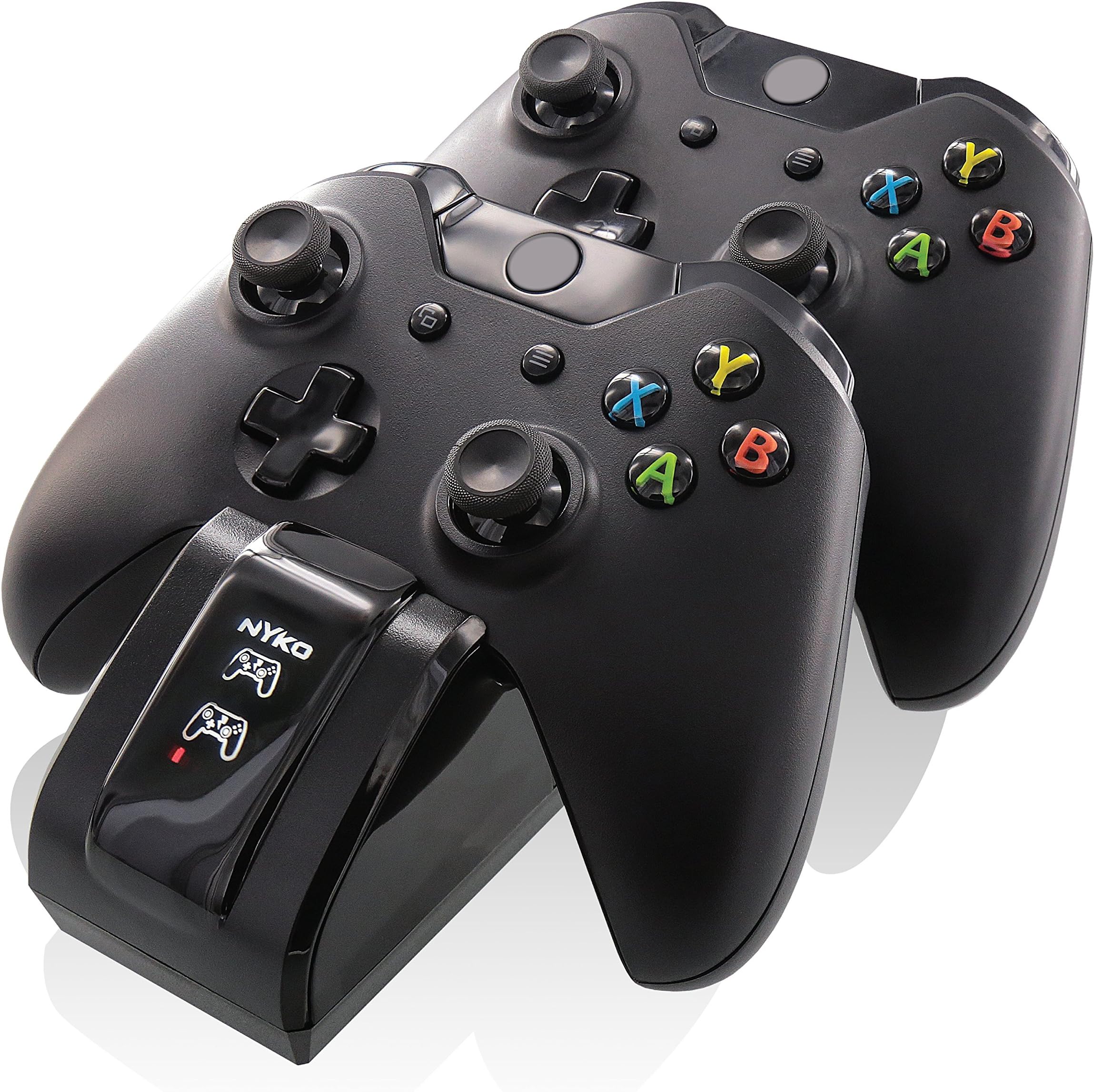
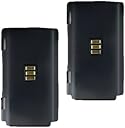
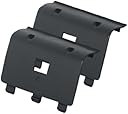
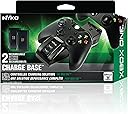
The Nyko Dual Charge Base is a high-speed charging dock designed for Xbox One and Xbox One S controllers, featuring two custom NiMH rechargeable battery packs that provide up to 25 hours of gameplay per charge. Its drop-and-charge design eliminates the need to remove batteries, while LED indicators clearly show charging status. Compact and AC powered, it fits seamlessly into entertainment setups, maintaining controller ergonomics with flush battery packs. Note: currently incompatible with Xbox One Elite controllers without modification.
| ASIN | B00FLLFJE0 |
| Additional Features | Wireless Charging |
| Best Sellers Rank | #26,434 in Video Games ( See Top 100 in Video Games ) #77 in Xbox One Chargers |
| Brand | Nyko |
| Built-In Media | Two custom rechargeable battery packs and special battery covers |
| Color | black |
| Compatible Devices | Game Consoles |
| Compatible Phone Models | Xbox |
| Connectivity Technology | wireless |
| Connector Type | wireless |
| Customer Package Type | Standard Packaging |
| Customer Reviews | 4.4 4.4 out of 5 stars (2,953) |
| Global Trade Identification Number | 00743840861003 |
| Input Voltage | 120 Volts |
| Item Weight | 14.88 ounces |
| Main Power Connector Type | 2 Pin |
| Manufacturer | Nyko |
| Mfr Part Number | 86100 |
| Model Number | 86100 |
| Mounting Type | Tabletop Mount |
| Number of Items | 2 |
| Number of Power Levels | 1 |
| Portable | No |
| Power Plug | Type A - 2 pin (North American) |
| Power Source | Corded Electric |
| Total Usb Ports | 2 |
| UPC | 052778853005 696582460433 743840861140 012304138648 617407301052 087944250784 731215338656 743840861003 780320034809 782386044471 675904009680 |
| Unit Count | 1.0 Count |
| Wattage | 10 watts |
Y**E
WARNING: Will not work for XBOX ONE ELITE Controller (at release) - battery plate cannot close
Our family owns several of these chargers for our Xbox One controllers (and the similar versions for Xbox 360 controllers, and PS4 controllers as well, yes you could say we take our gaming a bit seriously and I do hate leaky alkaline batteries!!). They work very well and so overall this is a product I give five stars and highly recommend. That is, as long as you aren't planing to use them on the NEW Xbox One Elite controller. My pair just arrived today, and while I didn't have specific plans to use the recharger unit for them (I just got the Halo Guardians Limited Edition Xbox One console and so I will be using the recharger unit for those two special controllers) I was disappointed there wasn't compatibility. However, I don't blame Nyko in the least. I'm sure Microsoft has kept those designs fairly tight under wraps, and even if manufacturers like Nyko knew about the design of the battery faceplate (or whatever the correct term would be), I'm not sure Microsoft would give free reign to 3rd party manufacturers just yet (or however that works in the business, manufacturing, and legal worlds) to start copying that battery cover design, etc. You see, the battery cover on the Xbox One Elite controller has illustrations on it, diagrams basically, illustrating how one can set your preferences for customization options. In the past, battery covers weren't embellished with designs (instructions) in general, just blank, so there wasn't any concern of a 3rd party duplicating such designs or information for a certain subset of controller like there is now for this one type of Xbox One controller. The main reason though for the incompatibility (sorry I should have mentioned this sooner) is the latching is different; the cover for the new controller still uses a 3-prong system to attach into the battery compartment/controller itself, but these latch into different locations. See the included pictures, one of the Nyko battery plate (marked with the Nyko branding), and the battery plate from the back of the new Xbox One Elite controller that I just received today. Note, this if the first time I've submitted a review and taken pics, so I'm sorry they aren't very good, and I didn't use a proper background; I will try to do better next time. It is easy to see how the Nyko controller cover latches are spaced very differently, and within the Elite controller, those locations there is now solid plastic so the battery plate cannot seat properly. Without being able to seal the battery compartment, one cannot have the properly covered battery charger in place (the rechargeable batteries themselves do fit, I did check this). I am not an electrician by any means, so there may be many things at work here as well. I tried placing the controller on the Nyko charger with the battery in place sans cover. No charging light appeared. I have suspicion the battery covers are necessary to keep the rechargeable battery from making extraneous contacts with anything else in or around the battery compartment, or at the very least, to avoid corrosive materials coming into contact with the batteries themselves (sweaty hands, oils, environmental corrosives, humidity etc), as well as physical protection from bumps and shocks. Another things to consider with this new controller are those metallic pedals on the back, designed for remapping buttons. It's very possible they are getting in the way as well, physically, especially when I attempted to place the controller on the charger with just the battery in place (no cover attached). The controller actually looks as if the overall "form" may be slightly different, which if it is (and I'm not just imagining things), that too could affect how the controller is "seated" in the charger and could make the difference between contact and failure. So many things are possible, it will be up to 3rd party companies who manufacture rechargeable units like these to adapt to accommodate the "newest and latest" on the market. I'm guessing Microsoft will be coming out with one (I haven't looked to be honest); at least that one would be guaranteed to work with the Xbox One Elite controller. Until Nyko and others specifically say they are compatible with the Elite controller, one must assume they are not (unless someone else here finds a workaround). Be aware, any "workaround" with existing products, not just Nyko, will not have the illustrations nor the slightly rubbery tactile feel (not sticky) the included battery panel has that is part of the Elite controller (the entire controller has a very special feel to the surface, I'm not sure how to describe, its not sticky, not exactly non-slip but sort of, but a little rubbery-like, and the backs of the handles are a very interesting mesh that seems like it will work nicely maintaining grip especially for those who may be prone to sweaty hands, but I haven't used it yet so I can't to speak to that). For all other purposes (any Xbox One controller that isn't the Elite) this is a wonderful recharger system. I've not had any troubles with it, and can definitely recommend without hesitation. We have several, for Xbox One, Xbox 360, and PS4, and have also given several as gifts. No complaints, and this isn't even a complaint it's a notification about a model change in an Xbox controller that now will require modifying the product to remain compatible. Congrats to anyone else who has just received their new Elite controllers. I plan to download the Xbox One app (which isn't on an App Store, I thought that was a bit misleading, it's actually on your Xbox One), and start enjoying my controller. It was during the loading batteries sequence that I noticed this little "issue" and I thought I would mention it to fellow gamers, so they would have a head's up, as well as any parents, families, etc. who might plan on buying this for the Elite controller (wait until it's said to be compatible, but it works great for all Xbox One controllers other than the Elite because that is a new controller and its design is very different). Enjoy!
E**A
Great Charging Station, Sleek and Functional. EDIT
Preliminary Review: Awesome, affordable, and easy to use. After setting it up, which was fairly easy, I plugged it in and set it to charge and it started working perfectly. From the pictures I took, you can see there is an LED controller pops up with a color. Easy to determine the battery state. A few people mentioned issues about charging it but not fully charging and getting hot. Well I haven't experienced those issues, but I can say make sure the battery is placed in correctly, or the charging contacts won't line up correctly, causing heat damage and fire hazards. See the pictures. I will update in time after serious usage. EDIT: 12/29/14, no problems whatsoever. Xbox Controllers stay charged, don't get hot, and get used heavily. Unsurprisingly, my brother plays my Xbox alot, free live since I pay for it, and free games too! So when I get home, we swap off and it goes a full day without me putting it back on the stand when I'm done. I don't know where the charge is after that of course, but its never shut off on me. I gotta say as well... the battery pack is flush. It is smooth and not bulgy, it blends well with the ergonomics of the controller itself. No heaviness or awkward bulkiness. I'd definitely recommend this to anyone in need of a charger. It charges well, it looks good, keeps things neat, and affordable. EDIT: 1/2/15, after a few extra hours of good time fun on my Xbox, due to the holiday season, I noticed my battery would die fairly quickly. After further inspection, my brother noticed that one of the prongs on the charge base was damaged. The front charger no longer charges the battery pack. A little disappointed honestly, so I had to lower the review to 3 stars. It functions and works well, but after not even a whole 2 months the base is broken. Sorry Nyko, it was a great product when it worked. I now only have 50% charging capability... thankfully we only play my Xbox one at a time. I couldn't figure out how to upload MORE pictures so I am sharing my google album, I created one with two shots of the broken prongs. I wish I could get a better picture but the flash kept ruining it and it is so dark, and I didn't feel like waiting til it was brighter out. https://plus.google.com/u/1/photos/115147083558157717223/albums/6099974858056679729 It is a safe link, if you wanna see the pictures.
D**T
I Messed Up
UPDATE: \So I blew it originally on this review..... If you care to you can read the previous review I wrote below I wont delete because I can admit my mistakes and who knows someone may learn something from it. My mistake was that I was not using the covers that attach to the back of the controller when attempting to recharge the batteries that come with this charger, yep it was USER ERROR. Now that I am using the product correctly not only does it work but it charges much quicker than my last Nyko charger, I am really impressed at the speed of the charge It does take a few seconds for the charge light to indicate a charge has begun but that is what I have come to know to be normal with this charger. All in all my original review was off base and I am updating to correct my mistake as my experience and opinion changed after I began to correctly use the charger. I have a Nyko charger for my Xbox 360 and use it with no issues or difficulties and it has been that way since day one about 3 yeaes ago when I got it. I have had nothing but issues with this Nyko charger for the Xbox 1. Only one of the docks work and that one only works when it wants to. It is difficult to find the right spot to get the remote to rest in order to get the dock to recognize that the remote is ready to be charged. I am not the most patient person in the world so when I get the remote to connect to the charger I usually am pretty frustrated with the device by this time, but guess what just because it says connected doesn't always really mean connection, sometimes the indicator light shaped like a remote that shows the remote is connected will turn on and a few seconds go by and it goes back out. When the controller is actually connected a little red light will appear under the controller looking light and then you will know you are charging, it always takes a few seconds for this light to appear so I find myself holding my breath a lot. I will say that this charger does charge the batteries much more rapidly than the charger for 360 does, batteries seem to last a little less longer though. I'm not sure if I just received a defective dock or what but these have been my issues, I actually planned to return it for a different one but was moving out of state so by the time I went to take it to the UPS the return date expired. I hope if you decide to purchase this charger you have a better experience than I have.
S**0
Don't be scared off by the bad reviews
I got my Xbox One for Christmas and had been waiting for the Energizer charging station to become available, mostly because I read the reviews of the Nyko Charge Base, especially the negative ones, in regards to the battery packs not fitting into the controller correctly. Well I'm not sure why people are having a difficult time because I can assure you that the packs fit into the controller just fine if you actually take the time to realize the correct direction to put them in. Not only does it say on the actual battery pak what goes where but you can actually see visually where the pack goes by looking at the part that overlays the internal charging pack. I got mine and opened it up, the packs were less than 25% charged but didn't take long, maybe an hour or less, until both packs were maxed out. The base works great, there are no issues in regards to clearly being able to see if the controller is charging or not as there is an actual picture of a controller that comes up when it's charging. If you know your controller is not fully charged and don't see a picture come up when you have set the controller upon the base you know it's misaligned. That's the only criticism, and it's a mild one at that, is that sometimes when you lay the controller on the base, especially if you only put down one controller on the base, you may not, at least initially, line up the charging module so that it's charging. However, note that this is minor, you simply need to verify that your charging before leaving the controller. I'm very happy with this base and am glad to have saved $10 not buying the Energizer one. It charges my controllers quickly, looks nice and the packs hold a charge for a long, long time.
T**O
Great charger
Okay, what we have here is a charging base for two Xbox one controllers. What you do is switch out normal batteries and back plate for a rechargeable Nyko battery back and Nyko's own backplate that has a spot for the battery back to make contact with the charging element. Installation was a breeze. I had this since January 25 2014 and they're still going strong. It even has an LED indicator on the base to show that it's charging and will turn off when it's done. That to me is awesome because I know when my controller is done charging and it saves energy! I sometimes have company over and when we go to my room to play games we just grab them off of the charger and play and when we're done, simply put them back. When solo playing I will play until one controller is near dead then cycle to the other controller and charge the one that is "dead". I kinda treat the batteries in these controllers like I would my phone, let them discharge then recharge them. I am just trying to get the best life possible out of them. I know I could also have went with eneloops but I like not having to worry about wasting my time opening up the controller, switching batteries out, then putting the batteries back in the charger. This product avoids those steps and it gives me a place to put my controllers so it's easier to keep track of. I would recommend this charging base highly. If anyone has any questions I will try my best to answer them Thanks and if you decide to buy this charging base, enjoy ;)!
C**S
Great setup, Great charge, Would buy again
First, let me say that it's easy to see how people mess up putting the battery pack in, and do it the wrong way. At first glance it looks like the battery pack +/- contact points should be in contact with the metal springs that are clearly marked with those symbols inside the controller. But if you look carefully, the symbols go the other way. The battery pack actually goes in with the plastic side against those springs, and the metal contact points facing the other way. But it should be obvious that you've done it wrong as soon as you try to put the cover on. The hole in the cover for the charging contact won't line up unless you put the batteries in the right way. Now, once you've got it set up, it works great. Unlike the 360 version, there isn't a big pack on the back of the controller to drop securely into a large hole on the charging station, so it is possible to set the controller down on the charger and think you've done it right even though you missed. But this isn't Nyko's fault, this is just the nature of the redesign of the Xbox One controller. Nyko has provided two nubs on the base that fit into the back cover of the controller to secure it on the base. So if you set it down and give it a wiggle, it should be obvious if you've got it on there correctly. No big deal, you just can't toss it on the base from 10 feet away like you could with the 360 version. Next, the display. I like that this one is not really bright. And once the batteries are charged and the green light has displayed for a short period of time, the display turns off completely. When on, the lights are even less distracting than the 360 version. You can still tell if this is charging from across the room, because the Nyko name and controller outline display in a soft white color on the front of the charger. The charging lights just below the outline of the controller display in red first, then orange, then green for fully charged. Those lights are really small square lights that I can't see unless I'm standing right by the charging base. No complaint from me, I like it that way. The amount of charge is definitely sufficient. I have not been able to completely kill the battery yet. And I've used the controller continuously without charging for at least 24 hours of gaming, and it was fine. The rumble motors didn't even turn off in the controller. Currently, that's the only indicator I'm aware of that shows the batteries are low. The only thing that I find lacking in this package is the option to plug the base in and charge via USB. I considered one of the other setups because of this option, but ultimately stuck with the Nyko. But I've already got so many things plugged in for my entertainment system, I wish that I could simply plug this into the back of the Xbox One if I wanted to. Again, this works great. It does it's job quietly, as it should, stays out of the way, and it does it well. I would definitely recommend this to anyone looking for a rechargeable solution for the new Xbox.
M**X
Original vs 1 month later review.
Great product. The actual charger itself is cheaper feeling than the 360 version used to be, but it works. I'm not sure why so many have issues putting the batteries in, the battery pack itself clearly states which direction to have the batteries in when you insert it. Only part that I could see confusing would be that the left side of the battery (when viewing it right side up to insert), the tab side needs to be inserted first or you would have to fight it. The battery won't fit upside down at all, which is probably where people are having problems. The cover snaps right on and both batteries worked in my controllers out of the box. When seating the controllers, they don't just fall onto the 3 electrical connections, you sort of have to either be eyeballing the controller to see that its level, or just be watching the remote icon on the front light up when it has made the connection. Not a major drawback, but compared to the 360 where I could just drop it in and it would slide home, it is a slight design flaw. As for battery life, I will edit this in a few weeks after my winter break as to how well they hold up to hours of use/ average battery life. As is, I definitely recommend them. As another note, it does use a wall charger, so be sure you have another :( open outlet spot. Additionally, whether you used it or not on the 360, the version for the One no longer has a front USB plug in. I loved having this on the 360 charger, but if you didn't use it on that one, you won't miss it here. ________________________________________________________________________________________________________________________________________________________________ ***1 month after owning and using extensively over holiday break*** Definitely be cautious of buying this if you plan any extensive gaming sessions. You're lucky to get 8 hours out of one battery fully charged. While this might be expected given it is not a lithium battery, it is just unfortunate to get such short life out of a product. For short spurts and casual gaming, no reason to not purchase this product. However, if you plan to have even the occasional longer gaming session you might want an alternative. Nyko does make a plug and play product, however, you have to have those separate batteries which would not work with this station... Also, my headset plugs directly into my TV/Xbox for power, however if you have a headset which uses your remotes power, I would expect far less hours of play than even 8. I have already ordered one of the Microsoft plug/play lithium batteries to put into one of my two controllers for my longer sessions, and will save my second Nyko battery as a backup for the other. Hope this helps anyone as there aren't a lot of long term reviews. For those wondering, my change of rating has nothing to do with installing the Nyko batteries..I have no understanding of why that is confusing to so many of the other reviewers to install.
A**R
BEAUTIFUL, SEXY, FUNCTIONAL, and STABLE!!!
No funky upside down back to back craziness or any strange double decker balancing acts! No extra wires or USB cables. No extra bulge on the controller. Just a simple, straight forward low profile cradle to set them on. Nothing to clip in, just set it down and slide it into place. Home button is still exposed to press, turning on the whole entertainment system without removing (if yours is set up as such). Red, amber, and green lights indicate charging progress. Once charging is finished, charging stops, lights go out and controllers stay there, storing beautifully. The RUB? 1) It's not inductive charging, so there are 3 small contacts that need to be exposed for it to work. Because of this, the cradle relies on ZERO extra bulk, which is of no problem at a all...UNLESS there is ANY kind of grip sleeve. Again, inductive charging could solve this problem... 2) Not sure about the battery pack life yet. The Energizer inductive charging system for the Wiimotes have crappy batteries, but are VERY easily replaced! 2 simple screws, put in your own high end batteries, and viola! Not a problem, especially after it's been discontinued. Here, no screws. There is a seam, and it LOOKS like there are simple AAAs inside, but I'm not willing to test that theory just yet. I'll probably look for spare battery packs and store them away for the long run. When will these companies clue in? Keeping a death grip on systems and patents isn't always for the best. Elon Musk and LEGO figured this out... End of rant.
P**I
Tutto ok
Prodotto okay... Davvero ottimo Come da descrizione. Arrivato nei tempi previsti dalla consegna. Unico neo è che manca l'adattatore alla per le prese italiane
D**C
Deutscher Händler liefert mit Deutschem Stecker
Vorweg: Habe beim Deutschen Händler "Optimum Equipped" bestellt. Dieser liefert auch mit Deutschem Stecker (Adapter von USA-Stecker auf Deutschen Stecker, damit er in deutsche Steckdosen passt). Gerät funktioniert automatisch sowohl mit 220V (Deutschland) als auch mit 110V (USA). Ich würde niemals bei einem japanischen, englischen oder kanadischen Händler bestellen der mehr Versandkosten berechnet als Produkt-Preis... aber das muss jeder selber wissen. :-) Die Ladestation hat Gummifüße und liegt daher ziemlich fest im Regal - kein Verrutschen oder so. Die Ladestation kommt mit internem Netzteil. Mir ist das wichtig, da ich dann über Nacht direkt beide Controller laden kann. Die beiden Akku-Packs haben hinten kleine Kontakte und die Abdeckung für die Controller haben zusätzlich ein kleines Loch/Aussparung. Dadurch muss man die Controller nur in die Ladeschale werfen und der Ladevorgang beginnt! Die Form/Gewicht des Controllers bleibt übrigens mit den Akkupacks und der Lade-Abdeckung gleich. Die Verpackung ist in Hochglanz - fast zu schade zum wegwerfen.
A**R
Exclelente cargador para controles XBOX One, tienes que tenerlo si tienes controlles XBOX!!!
Que puedo decir, yo tengo una PC gamer , mas no obstante me encanta jugar con controles, asi que con el tiempo me ice de un par de controles , uno para mi PC y otro para mi laptop con sus respectivos transmisores inalámbricos. NO obstante una constante molestia era el tener que estar remplazando las baterías cada 10 o 15 días para poder seguír jugando, además estos controles XBOX One a diferencia de los 360 NO te avisan cuando la batería se esta agotando asi que era frecuente el que me quedara sin batería en los controles a medias partidas -_-. Este aparatito es una GANGA, tiene un costo mu bajo para lo que te ofrece. Trae dos pilas recargables para dos controles las cuales se integras una única vez a los controles y luego solo tiene que dejarlo caer (con cuidado claro esta) en la base de recarga y adiós problemas de falta de batería. Funciona genial y super rápido, como en 1 hora máximo carga totalmente tu control a tope, por lo menos he llegado a jugar 10 horas continuas antes de tener que ponerlo a cargar en su base de nuevo, de aun no he determinado cuanto aguanta el control sin ser recargado ya que yo lo pongo a cargar cada 3 días y con es me basta y me sobra para mis jornadas de gaiming. La base se ve hermosa y adema solida , va a ser un adorno en donde sea que la pongas y además se ve mas firme que otras bases recargables. Si tiene contoles XBOX One ,tiene que tener este cargador, esta genial. :)
C**N
ATTENTION
Quand vous acheter ce produit : ATTENTION car pour moi la prise de courant n'es pas Francais mais Americain ! En plus les petit curseur en cuivre qui servent de connecteur ne fonctionner pas , j'ai etait obliger de les soulever un max "sans les casser " pour qu'il face contact .
A**R
Much better than using 2 AA batteries!
This is an excellent solution to constantly replacing batteries. Full charge lasts a very long time. I have never rub out of power during a gaming session. In fact, these last multiple gaming sessions. I highly recommend this product.
Trustpilot
1 day ago
1 week ago