Desertcart purchases this item on your behalf and handles shipping, customs, and support to Argentina.
🎶 Turn your tapes into timeless tunes—because vintage never goes out of style!
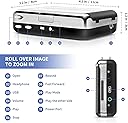
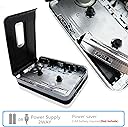
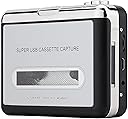
The Reshow Cassette Player is a sleek, portable device that converts analog cassette tapes into MP3 files via USB. Compatible with laptops and PCs, it doubles as a classic Walkman with 3.5mm AUX support, delivering clear stereo sound in a lightweight 100g design. The package includes conversion software and a USB power cord, making it the perfect tool to preserve and enjoy your vintage music collection in modern digital formats.
| ASIN | B018WBUJBS |
| Audio Output Mode | Stereo |
| Best Sellers Rank | 9,115 in Electronics & Photo ( See Top 100 in Electronics & Photo ) 1 in Home Audio Cassette Players |
| Brand | Reshow |
| Compatible Devices | Laptop, Personal Computer |
| Country Of Origin | China |
| Customer Reviews | 3.9 out of 5 stars 10,213 Reviews |
| Interface | USB, 3.5mm AUX |
| Interface type | USB, 3.5mm AUX |
| Item Weight | 100 Grams |
| Manufacturer | Reshow |
| Manufacturer Part Number | 1 |
| Material | Rubber |
| Maximum Supply Voltage | 5 Volts (DC) |
| Maximum supply voltage | 5 Volts (DC) |
| Minimum Supply Voltage | 5 Volts (DC) |
| Minimum supply voltage | 5 Volts (DC) |
| Model Number | Re-006 |
| Number of Channels | 2 |
| Number of Items | 1 |
| Number of channels | 2 |
| UPC | 750803024597 782890069946 782890070065 860002089232 |
| Unit Count | 1.0 count |
A**K
Amazing customer support
The first cassette player I ordered was faulty (played a bit fast) but I emailed the company to find a solution. They were so quick at responding and sent me a replacement right away. It works so well and the sound quality is great. It is easy to use and love that I can record my tapes onto my laptop. The buttons are sturdy and the whole thing fits in my pocket easily. Would highly reccomend this product especially for the price. Get to listen to all my old tapes :)
M**N
For the price this is a good machine.
For the price this is a good machine. You need to judge the sound quality with a NEW pre-recorded tape because older tapes do have they issues. I use both in this machine. I've bought two of these, the second was on a low price offer so I keep it for the future. The sound quality is good. What I would say is use some good headphone, a pair that gives good bass. The USB to power the machine works fine (take batteries out first). Transferring tape to digital also works fine. I use Quicktime to digitise tapes, it's quick and clean. I like that the door opens to one side, makes it easy to clean the tape head and rollers which I do every 4 or 5 tape plays. The two AA batteries last a good time, I use 2800mAh Rechargeables. If it helps these are the headphones I use: For travel/out and about Sony MDR-ZX110 don't let the price put you off the sound is really good. For at home use OneOdio A71 the bass is amazing and does raise the volume of the machine.
E**N
It works!
Cheap and cheerful but actually works as it says and the BEST feature is the auto reverse. To transfer a cassette is simple. (1) insert casette at the beginning of side 1 (2) Fire up Audacity (checking you have set the record device to the cassette (PnP mic or similar) (3) Check recording level - easiest way press play on cassette and record on Audacity - when satisfied level is ok stop and rewind cassette and abandon Audacity project (4) Record for real - press play on cassette and record on audacity (5) leave for duration of cassette (90 mins normally). Player will play first side then AUTOMATICALLY play second side. When time up then press stop on Audacity and stop on cassette player. (6) Then in Audacity file - export audio - mp3 (7) now you have the file exported and saved as an mp3 file you can edit the existing Audacity file to chop bits out etc if required It really is that simple. Press play - press record then go make dinner - come back save as mp3
S**E
*Update* Player completely destroyed my tape and broke within 2 weeks.
*Update* The player has broken and only 1 spindle spins. This destroyed my tape and I can no longer listen to it. This happened after less than a month of owning this device. The video shows the issue. Original review is below. Firstly, this device can run off USB power alone. Which is great. However when doing so, there is a noticeable and loud “hum”/“buzzing” noise that affects the sound of music etc. unplugging the power and running off battery is better but still not great. The auto flip mechanism activates regardless of whether the switch to enable it is on or off. Super annoying. There are also times where the sound of the player itself are just loud and it refuses to play a tape. It stops by itself. After this it works, but still odd. The player is also subject to some wow and flutter. Overall, it’s a pretty poor cassette player. I imagine it would be even worse when digitising tapes.
M**W
Works but audio is poor
I linked the tape to audacity on my PC no problem. Did a couple of test runs and it recorded with no issues. The wind and rewind buttons work but did stick once. I did however manage to transfer the songs on the tape to the PC. Now for the elephant in the room. The audio was poor. There was a lot of wow and flutter, caused by the speed variation of the tape deck and reflects the price paid for the machine. Note virtually all cassette mechanisms are the same these days. So, if you want to do a transfer of your cassette tapes to PC and want High quality this will not work and you need to find an old (2nd Hand) high-quality cassette tape machine. If you are not too bothered about quality, then this is ok for the price.
L**D
Helpful item
With the updating of old tapes to electronic Alternatives...ipod etc, this is a good way to do it. Tapes tend to wear out so this device enabled me to transfer my tapes to my PC where I could then move them on to my ipod. Easy to use once you get the hang of it. Helpful item.
S**N
Some starter hints
This player is easy to use if you have a little IT know-how. I’m using it to back up some old audio tapes (some 20-30 years old) onto CD. I’m delighted with the quality of recordings that I’m able to produce. Some reviews I read say that it picks up laptop motor noise. More modern laptops are solid state, so there’s little or no noise to pick up. Other reviews mention the cassette door is flimsy. I have no issue with it. I’m still learning, but here are a few practicalities: You need Audacity software or similar, which is free to download. Reshow comes with a CD-ROM, but you’ll get a more up-to-date version by downloading. Instructions say to plug in the player before opening Audacity and recording. Experience is that you need to wait until your laptop recognises it as a connected USB device. That can take a couple of minutes. If you don’t wait, the pop-up notification seems to create a blank in your recording. There are some handy features in Audacity that can enhance the sound quality significantly before committing it to CD. Best to google for a bit more detail. It’s worth downloading the Audacity help files. “Noise removal” allows you to select a portion of low-level hiss at the start of the cassette. You can then remove that from the entire recording without detriment to the recording. You then get true silence in the breaks in conversation or between tracks. The Audacity graphic equaliser (Graphic EQ or Equaluzation) can be used to enhance sound quality. My wife had stopped listening to her oldest cassettes because the sound was to dull. By exploring the settings, you can bring tired recordings back to life. There’s loads of guidance on the internet. Click removal - although there’s an automated click removal that allows you to adjust the sensitivity, I’ve not found a combination of settings that works well enough without degrading the recording (detecting and removing false clicks). I find listening to the recording on Audacity, stopping when there’s a click - you’ll see these as a thin vertical line - zooming right in, selecting and deleting them. Painstaking work but produces a recording of better quality than the original if you have the necessary patience and determination. That is, of course, unless you want to keep the clicks, pops and hiss for nostalgia! Audacity has an undo and redo function. Nevertheless, it’s worth saving as a new version from time to time to avoid losing your work. Up to you - you can always delete the unwanted versions when you’re done. You can add tracks that your CD player or MP3 player will recognise. This is through adding “labels” to your Audacity recording. I’ve found this creates a slight pause during CD playback, which isn’t detectable if you put them in an existing gap, i.e. not where there are any background sound effects or music. When exporting to a WAV or MP3 format to burn to CD, you need to then use the Export Multiple option. Then you get multiple tracks to burn to CD. Audacity doesn’t have a CD burn function. I use Windows Media Player to burn the exported Audacity tracks to CD. One quirk is that the files often copy across to Windows Media Player out of numerical sequence. Move them back into order before burning. The Reshow cassette player has an auto reverse function. Yes, it just seems to keep going until you stop it, so you need to keep an eye on what’s happening. Some older tapes don’t play well when reversing direction. It’s a simple thing to do - you might get better results if you record the first side, stop and flip the cassette, then record the second side with the cassette playing in the same direction. Just leave Audacity recording whilst you’re turning the cassette. It’s easy to find and delete that section later. You then have one recording to edit and no files to join. If you go for the product, I hope it works at least as well for you as it is for me. And, no, I’m not on a commission for this feedback :o)
P**R
Very helpful support
Top quality tape player this one comes with a USB cable so you can contact to power without using batteries if you want to easy to setup sound quality brilliant out of earphones or headphones and even out of a speaker I used a connection Aux cable there is a lot more different setting you do on it easy to use I like it nice to go back and my old taps again value for money
V**A
Odtwarzacz
Działa.
P**I
Ottimo acquisto
Dovevo tramutare tante vecchie audiocassette per me di grande valore in quanto avevo registrazioni di miei parenti che purtoppo ora non ci sono più, (cose vecchie di 30/40 anni che rischiavo di perdere per sempre in quanto i vecchi nastri non durano in eterno) in file mp3 sul computer per poi poterne disporre a mio piacimento. Devo dire che ero scettico che un apparecchio del genere e alla modica cifra di una ventina di euro potesse risolvermi tutto...e invece. Premetto che il registratore mi è arrivato nei tempi giusti ma senza dischetto del programma (si chiama "audacity) che bisogna installare ma che non è un problema in quanto lo si scarica facilmente dall'indirizzo che c'è scritto nella scatola. Altro piccolo problema è che le istruzioni erano solo in inglese, e per quanto facile sia usarlo se non mi fossi aiutato seguendo dei tutorial in rete avrei fatto un pò fatica. In pratica si connette il registratore al computer tramite il cavo in dotazione, si mette una audiocassetta e si spinge play, ovviamente dopo avere aperto il programmino nel quale poi basta spingere il cerchietto rosso (REC). Finita la registrazione si spinge stop nel programma del computer quindi in alto a sx in "file" si apre l' opzione "esporta file audio" e qui si può mettere il formato che si vuole, io ho scelto mp3 e si decide dove archiviarlo, più semplice eseguirlo che spiegarlo. Quando aprirete il pacco non vi spaventate per la non eccelsa qualità dei materiali, sembra un giocattolo e i tasti danno l'impressione di non avere una lunga durata ma l'apparecchio fa il suo dovere in maniera dignitosa e con poca spesa conserverete per sempre vecchie canzoni e vecchi ricordi.
星**一
あの時感じたことを思い出したいなら・・・。
47年前の文化祭と、41年前の米国旅行時のFM放送を残しておきたくてかいました。手軽につなげられるのがとてもよかったと感じています。まあ生きてるうちだけどね。
C**K
Very practical and super quality
Super product! Very satisfied!
C**N
Das Gerät war für meine Zwecke TOP
Hallo. Zuerst einmal möchte ich sagen, dass ich so gut wie keine Probleme damit hatte unter Win10 pro. Hatte mir das Programm Audacity runter geladen. Zuerst war der etwas Störrisch. Nach dem ich auf Aufnahme klickte reagierte er nicht und musste es beenden. Dann hab ich die Hörspiel Kassette (TKKG, Folge19) zuerst laufen gelassen, dann sofort wieder Audacity gestartet, auf Aufnahme geklickt und da ging es ohne Probleme. Und ich muss sagen, die Aufnahme Quallität ist Astrein. Habs auf Stereo eingestellt gehabt und genau so wurde es auch Aufgenommen. Wenn die erste Seite zuende war, müsst ihr die Kassette aber nicht umdrehen. Sondern läuft sofort, anders herum weiter. Erst wenn die zweite Seite zuende abgespielt wurde, gab es ein klack und der "Play" Button sprang nach oben. Danach, hab es bei einem hier gelesen, der es nicht wusste, wie man das als MP3 abspeichert, einfach auf "Datei-Exportieren-Exportieren nach MP3" klicken. Anschließend tut sich ein Fenster auf und dann nur noch die Aufgenommene Kassette betitteln und abspeichern. Ihr könnt auch vorher noch Tags einfügen, wie Titel, Jahr usw. Eigentlich ganz einfach. Wer ihn als Walkman benutzen möchte, da kann ich nur sagen, ihr bekommt einfach ganz "billige" Kopfhörer dazu. Wer einfach nur hören möchte, ohne jeglichen Wert auf Quallität, kann sie natürlich nutzen. Aber ihr könnt natürlich auch eure eigenen guten Kopfhörer mit 3,5 klingen Stecker dran anschließen. Ich betreibe meinem PC mit einer Soundbar, den ich mit einem 3,5 Stecker am PC angeschlossen habe. Den hab ich dann mal eben umgesteckt in den Kassetten Digitallisierer und schon konnte ich die Kassette auch über meine Soundbar hören, wer das möchte. Also ich kann, zu mindestens bei der ersten Kassette, nichts Negatives sagen. Auch was die Aufnahme Quallität angeht. Klar, wie das auch schon einige geschrieben haben, muss das Kassetten Band noch absolut in Ordnung sein. Wenn die MC, wegen mangelhaften Bandes, in nicht guter Quallität abgespielt wird, dann kann auch der Digitallisierer da nichts ändern. Eventuell in Audacity kann man vielleicht Versuchen, die Aufnahme dann noch zu Verbessern. Aber in meinem Falle war das nicht Nötig. Für mich war das Ausreichend ;-)
Trustpilot
1 month ago
3 weeks ago