
๐จ Stay cool, stay silent, stay ahead.
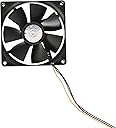
The Cooler Master Sleeve Bearing 92mm Silent Fan delivers superior cooling with a powerful 32.53 CFM airflow and ultra-quiet 21 dB noise level. Designed for desktop cases and CPU coolers, it operates efficiently at just 1.44 watts, making it an ideal upgrade for professionals seeking reliable, silent, and energy-conscious system cooling.

| ASIN | B002R9YYXG |
| Air Flow Capacity | 32.53 Cubic Feet Per Minute |
| Best Sellers Rank | #2,032 in Computer Case Fans |
| Brand | Cooler Master |
| Brand Name | Cooler Master |
| Compatible Devices | Desktop |
| Cooling Method | Air |
| Customer Reviews | 4.5 out of 5 stars 3,373 Reviews |
| Global Trade Identification Number | 04719512003145 |
| Item Part Number | R4S9S19AKGP |
| Item Weight | 100 Grams |
| Manufacturer | Cooler Master |
| Material Type | Copper |
| Maximum Rotational Speed | 2500 RPM |
| Model | R4-S9S-19AK-GP |
| Noise Level | 21 Decibels |
| Number of Items | 1 |
| Part Number | R4-S9S-19AK-GP |
| Power Connector Type | 3-Pin |
| UPC | 870423002680 |
| Unit Count | 1.0 Count |
| Warranty Description | 12 months |
| Wattage | 1.44 watts |
B**.
you can't get a better deal than this
I originally found an entry on an unnamed "deals of the day" website that had a competing site selling 2 Scythe S-FLEX (E-Series) fans for $20. I heard they (Scythe fans) were some of the best fans out there, and was about to spring for that deal... but when I realized after the added 8 dollars for shipping, it came out to be about 30 dollars... 15 bucks per fan. not so much of a bargain anymore. some fellow in that thread mentioned that if you want a real bargain, get these puppies from Amazon. Four 120mm fans for just over 10 dollars. Of course I had to take a look, and I'm glad I did. Now, when I built my computer, I bought a CoolerMaster case (CM690). This case has room for 7 case fans I believe. It came with three of these very same model fans, so I already knew from personal experience that they were very quiet and did the job. Certainly worth 3 dollars a fan, no doubt; plus I wanted to add some extra fans since I had so many available mount areas in the case and the daily temps are in the upper 90's right now. Ordered them, got exactly what you see in the picture. It's been said before, it's only 4 fans, and 12 screws for mounting. The fans are three pin. In my case, I have areas for 7 fans, but my board only has 3 headers! So I feel a lot of you are going to have to either get a couple of 3-pin splitters or something for these to use them all. The fan cords themselves are approximately 12" long. My front fan cord will not reach any of the fan headers on my motherboard, so I had to use the dreaded 4-pin molex adapter /slash/ monstrosity that turns your tidy cable management into a rat's nest. I would really recommend something like this -- http://www.amazon.com/1FT-TX3-Power-Splitter-Cable/dp/B002DY7M1G/ref=sr_1_1?ie=UTF8&s=electronics&qid=1277947201&sr=8-1 That will allow you to hook up 2 of these fans into only 1 motherboard fan header -- plus, it gives you an extra 12" of cord. With 24" of cable (including the fan's cable itself), it should reach to the darkest corners of any sized case, and will be a lot more manageable and cleaner looking than the hideous molex/4-pin adapters. So how about the noise? What can we compare it to in real life? Ok -- right now, in my case (1 foot from me, at about shoulder level) I have 6 of these fans running, plus the CPU fan. I would most closely compare the noise level to that of an air vent or air conditioner intake when your central AC is on. Just a very low, non-distracting flowing air noise. Now if I get crazy and crank them to wide open, they are a bit noiser, but really not too unbearable. I would compare 6 of them at full speed to the noise level of maybe... an electric toothbrush? This is a bit distracting, as it actually catches my attention (as said though, the case is 1 foot from me, nearly level with my shoulders/head). If you let the motherboard control the speed of the fans, they are very near silent. It sounds like maybe a newer CD-ROM drive steadily spinning a CD at idle (*not* revving up). So if you are even questioning getting this... just spring for it. They may not be super high-end wind tunnel 250CFM fans that will allow you to use your computer case as a second freezer, but they do the job, and they do it well for such a tiny amount of money. On a side note, I recommend CoolerMaster products in general... especially their cases. Sturdy and well thought-out designs. P.S. -- fan direction and airflow is sometimes a science, depending on where your mount holes are and what kind of heatsink, etc, you have. Personally, this is my config: 1 front fan pulls air into the case, over the hard drive bay area 1 back fan, obviously pushes hot air out the back 2 top mounted fans, with air flowing upwards and out of the case (my thought behind this was hot air rises, so at the top of the case is most likely going to be hot air that I want to remove from the case, not blow it back in) 2 side mounted fans (this one is tricky, as one is over the add-in card area... which I have pulling in cool air -- and the real question is: what about the fan mount right above the heatsink? I'm using the Intel stock heatsink & fan, which blows air straight up off the processor, which would be perpendicular to the side of the case. my thought here was at this mount area, have the fan blowing air *out* of the case, since hot air is going to blow off of the heatsink, into this fan, which will expel the air out the side of the case) Point is, though: When you start working with 4, 5, 6 or more fans... you're creating areas of high and low pressure, which can make the heat move differently than you might expect. Some configurations that I expected would dramatically reduce case temps in fact did the opposite and raised my temps! The only things I wish these fans had but don't are 1) shielded/covered cables. looks a lot nicer when the three yellow, red and black cables are wrapped in a black shielding. I imagine this could be done with some duct tape after you got your cables routing where you want, so it's not a big deal... and 2) maybe if the cables were a little bit longer... like maybe 18" would be great, for larger cases. It gets annoying having to reach in and unplug the side fans every time I want to take the side cover off! Other than that, this pack is the cat's pajamas.
C**M
Cool, quiet and on budget.
First thing I would like to address in this review is, if any of these fans make any noise, they are defective. You buy from Amazon for a reason. Send it back and get working ones. Amazon has great service and will not charge you a penny for DOA s. I say this because there are several negative reviews claiming that the fans make too much noise, which isn't the case in a properly working fan. Now about the fans, they are so quiet, even at full power. You can't tell your computer is on without checking to see the power LED on your rig. They are less than $4.00 per fan. These are the same fans that came with my case, a Coolermaster HAF 812. I had six fans running and not even a hiss. They offer a nice balance of speed, volume of air, and silence costing at least 3 to 4 times as much. I have been experimenting with some of the more powerful fans available in the marketplace. The highly regarded Scythe fans push more air but at the expense of making noise. They are more costly, make more noise at a high enough speed to make a difference. Compared to the Scythe fans a Glidestream 140 and a Kaze Maru PWM 120mm, each costing the same as these four fans. The Cooler Masters win both on price and effectiveness. The only thing that these fans lack is PWM. The connector is 3 pin, and not 4. If your needs don't require PWM, I highly recommend these fans to anyone who is on a budget, or who appreciates the sounds of silence.
F**R
Very nice case fans for the price.
Can't really go wrong with CoolerMaster. I have always loved their products. From power supplies to cases, heatsinks and fans, they do it right. These fans are also good and at the right price too. I needed more cooling for my HAF 912 and these just made too much sense. I already had a TT blue LED case fan on the front bottom but I still needed the side and top two fans, and this kit has been perfect for filling those holes. They aren't quite so silent though, and buzz particularly bad when mounted on the side of the HAF 912. The good thing is I needed extra fan headers so I paired these up with a Scythe Kaze Q 3.5" fan controller. I have them all turned pretty much all the way down and they still move air nicely and ARE quiet when turned down. I like the fact that the Kaze Q turned out to be 3.5" (I didn't look at the specs and was expecting 5.25") because I ended up leaving it inside the case. I was also able to switch from the TT blue's 'smartfan' controller to the Kaze Q and it has made that fan as quiet as the rest. Anyway, back to these fans, they're a great deal. If you need them to be truly 'silent' though, pair these up with a fan controller. My system is quieter AND cooler. Wow. Thanks, CoolerMaster.
A**O
Great value, quiet as described, comes with all screws, can't beat value
This item shipped fast through amazon prime, easily replaced my previously non-functional rear-internal-wall fan with one, and used an amazon 4 pin molex to four-way-split 3-pin fan adapter to compensate for a typical motherboards lack of 4 additional 3-pin fan connections, allowing 1 molex connection to power the 3 remaining fans internally, placed strategically in my case w/o screws near the CPU and GPU which with a 3.0ghz 6-core AMD phenom 2 x6 overclocked and an EVGA (NVidia) GeForce GTX 560 Ti (Fermi) 1GB 256-bit GDDR5 PCI Express 2.0 x16 card, easily heats up while gaming in a system without an advanced cooling system. One without an extra molex connector can even buy a 4 pin y splitter, provided they don't have a weak supply, and use it to gain an extra connection. However, if you have a weak power supply, you likely don't have a strong enough system to merit needing a 4 fan setup of any size, especially 120mm. But if you want a cheap way to ensure that your PC has enough ventilation, especially aiming at least one fan toward either a warm-running cpu or gpu to help ensure performance and reducing burnout risk, this is the way to do it. That, or go with the www.amazon.com/Vantec-SP-FC70-BL-Spectrum-System-Adjustable/dp/B000233ZMU/ref=pd_sim_e_1 PCI fan right below your GPU or so. ANY open PCI sized slot in the back will work, it is also powered by 4 pin molex, and only uses a PCI card slot to be held steady but is unnecessary, especially if you are trying to put it in a different type of PCI slot. The reason it uses a PCI slot in the first place is that its an area to pump air OUT of the PC through the back, so htis may really do wonders for a warm GPU with an open pci space of any sort directly underneath for immediate fanning of gpu fan heat outside rear of case right below. For the best of BOTH worlds, with one open molex connection: buy this 4 pack, buy a molex y splitter (super cheap from Amamax through Amazon for In-US-shipping rather than hong kong), a zalman multi-connector for the fans, and a vantec or other (although vantec has great reviews for its price), and get both PCI slot fanning under your GPU AND 4 120mm fans for around 30 dollars total. If this isn't good enough for you, spend a few times more on supplies and hours of labor and go for DIY internal liquid cooling projects.
A**.
Great fans for my purpose
I was looking for some quiet fans for cooling my entertainment center and this four pack seemed like a great deal. My new home theater receiver coupled with the DVR and PS3 that it shares space with really kick up the heat in my entertainment center, even though the front of it is open. I could literally feel the heat rising out of the front of it. I knew I needed to cool things off to keep my electronics working at their best. I was looking for a couple of things in fans: - Need to move a decent amount of air - Need to be quiet - must not be audible over normal ambient sound in my living room - No flashy LEDs - Fair price These fans fit the bill perfectly. The noise they create is not audible over the whirring of the hard drive in the DVR. They move plenty of air - enough to keep ambient temperature in the entertainment center barely above room temperature. The price could not be beat - four fans for under 15 bucks. I can't comment on longevity since I've only been using them for about a week. If they last me 2 years I'll gladly replace them with the same fans. For most people looking for PC case fans, I would say that these are plenty quiet. I can't imagine needing anything quieter than this. Just keep in mind if you need 4 pin connectors you'll need to buy them separately as these fans only come with the 3 pin connectors.
A**M
4 year review
Bought a pair of these back in 2017 to use as supplemental exhausts on my Corsair Air 240 case. First off, these aren't "silent". They're acceptably quiet though and do the job of moving air from the case. However, the low whirring of this pair of 80mm fans effectively drowns any fan noise from the 3 pre-installed 120mm Corsair fans, which is to say during 4 years of continuous use, the stock Corsair fans continue to run silently. Food for thought. Jumping ahead to 2021, one of the pair has entered it's end of life stage as evidenced by the by the loud grinding sound on boot and a visual inspection, it's developed a wobble which probably means the bearing has failed. Pity. The fan continues to spin though at lower RPM than its mate. To be fair, Cooler Master rates this fan's life expectancy at 35,000 hours which looks to be spot on. The other fan of the pair is still going strong with no sign of issues. I'm shopping for a replacement duo and haven't found any reason to not purchase another pair of these yet. Just sayin...
S**E
Four good fans for a great value, but terrible to install if you want them firmly seated
I really liked the price and value of these fans. They were packaged well, they arrived quickly, they came with plenty of screws for each of the four fans, but there was one serious problem with them. While they do seem to work well and are quiet, they are absolutely a terror to install. I've built computers and dealt with a lot of the mechanic aspects of dealing with parts like this, and this is one of those parts that you get to and it only causes problems. It's one of those things were it should take maybe 5 minutes, or less, to unscrew the old fan and screw in one of these new Cooler Master fans, but something is wrong with the design. I spent a good twenty minutes on installing one of these fans. The screws they supplied with the fans, which looked exactly the same as the regular screws for fans, would get to about 70% before running into any tension or resistance, which is normal for anything hardware related with screws usually, but once you get the screw about 80% in there they become a insurmountable challenge. The screws will just flat out not budge and even if you can get them to slightly go in farther it comes with the a lot stripping of the screw. I'd like to think I was just being an idiot and doing it wrong, so when I first ran into this with one screw I took it out, refitting the fan to make sure everything was as straight as can be, and did it again. Same problem at exactly the same spot. I had the same problem for all four screws and eventually just gave up after getting them all somewhere between 70-80%. I was doing this all with a manual screw driver that has been a perfect screw driver for everything else related to the maintenance/building of a computer. I thought it would be a problem to put in a side panel with the screws not being 100% firmly in place, but thankfully my tower door is fine with it and there isn't any problems with it (so far). TL:DR Fans are great and as advertised, but the installation/design is a pain in the ass and makes me worry about ever having to take off one of these new fans. I fear that just installing it one more time would strip the screw to far.
J**T
Very Quiet; Excellent Slim Fan
Review for: Cooler Master Sleeve Bearing 80mm Silent Fan for Computer Cases and CPU Coolers Like nearly all Dell computers, my old Dell T1600 PLEX file server has terrible cooling. The hard drives sit bottom-front and had no moving air exchange to cool them down - so they cooked, especially during the Summer months. This fan is nearly a perfect fit mounted under the front cover, and has helped reduce hard drive temperatures from ~150F to <110F when PLEX is churning, as measured by Speedfan and Open Hardware Monitor. Thatโs a huge difference that clearly indicates the dead air that had been suffocating the drives. Note those temps were measured in January in my cool office, so it will be interesting to see the temperatures during the Summer months. OK, since the computer had dead airspace, nearly any fan may have resolved the issue. But I wanted the fan mounted under the cover and there are only a small handful available of this size. Anyway, at only 15mm deep the narrow blades of this slim fan move a lot of air without making any noise at all. The computer sits on my desk next to me so the fan is only a couple of feet from my ears - and I canโt hear it. I like this fan so much Iโve since installed one in the front of a second computer, with similar results. I wouldnโt hesitate to buy this fan again - and I highly recommend it.
V**X
Silencioso y de gran calidad
Compre dos ventiladores para un gabinete y son muy silenciosos comparados a los genericos o de marcas mas economicos, no zumban nada y los tornillos de montaje permiten una instalacion firme sin juego para que no vibren, los recomiendo mucho ademas de que son de buen precio, son de una marca reconocida. Vienen con conector de tres pines para tarjeta madre y con un adaptador para molex de cuatro pines.
J**S
Reasonably quiet, but not exactly quiet. Very good fans for the money. All I buy.
I have bought quite a few of these fans over the years (not all from Amazon mind you). They are a good fan, at a fair price. The noise level is reasonably low for the price, but you'll still hear them if you've got 8 of them running in your PC like I do. If you want something quieter you're looking at BIG BIG MONEY per fan. These last years usually 24/7.
A**E
Great value case fans
This pack includeds 4 120mm plain black case fans. Replaced couple of older poor performing fans in my home server. I like: -Great value -Quiet operation -Headers to connect straight to motherboard not reliant on older molex plugs -Good airflow They may not be some super RGB wizzbang whatever kids are into these days but for a good price they get the job done.
A**8
El mejor pack de ventiladores
Sin molesto, caro e innecesario RGB. Funcionan perfecto. Y son baratos.
S**N
Recommended, especially if you're replacing the fans on a previous heatsink purchase.
Got the fan after the fan on my Hyper TX3 EVO died. I paid 399/- with free Prime shipping, of course. In the package, you get the following: * Mounting screws (4) * A 3 pin -> Molex converter, for alternative power arrangements. * The fan itself. The older fan on the heatsink I purchased lasted me about 3-4 years. This should outlast that by a bit after the minor improvements Cooler Master has made to it. Hits 2300 RPM when uncontrolled. Not very loud for the speed it runs at, thankfully. While this isn't a Noctua, it does the job well for the price being asked. No cons to mention.
Trustpilot
3 weeks ago
2 weeks ago