🎶 Unlock your studio’s secret weapon—affordable pro-level MIDI control at your fingertips!
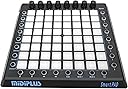
The midiplus Smartpad USB MIDI Controller is a budget-friendly, compact MIDI device featuring 25 velocity-insensitive pads, 8 encoders, and 8 buttons. Designed primarily for Ableton Live but compatible with any MIDI software, it offers flexible control with USB connectivity and LED feedback, making it ideal for millennial producers seeking versatile, portable music production gear without breaking the bank.


| ASIN | B00WU6FDNG |
| Best Sellers Rank | #111,946 in Musical Instruments ( See Top 100 in Musical Instruments ) #382 in Computer Recording MIDI Controllers |
| Color Name | Black |
| Compatible Devices | Laptop, Desktop (Mac OS), Ableton Live |
| Connector Type | USB |
| Customer Reviews | 3.8 3.8 out of 5 stars (615) |
| Date First Available | May 30, 2015 |
| Hardware Interface | USB |
| Hardware Platform | Macintosh (x86-64) |
| Instrument Key | Any |
| Is Discontinued By Manufacturer | No |
| Item Weight | 2.13 pounds |
| Item model number | Smartpad |
| Musical Style | Electronic |
| Number of Keyboard Keys | 25 |
| Product Dimensions | 9.09 x 8.5 x 0.79 inches |
| Supported Software | Ableton Live |
M**R
100% no-brainer for the money... Unless you need plug-n-play with Live, then feel free to spend 2x+ more on a "real" Launchpad.
Easy 5 stars due to insane low price. I don't use Live, so if you're hoping for a plug-n-play with Live, maybe you'll be sad.. But for a general midi controller that I can use with iPad apps, my DAW (Reaper) other hardware (etc), this thing is great! There's no way to configure or assign controls, midi note numbers, etc. in the unit so you'll most likely need to do mapping in software or with something like Bome on PC or Midiflow on iPad. But if you need want pads, plus encoders, there's basically no other option. The 8 buttons on the left will change the CC's assigned to the 8 encoders. A cool feature that's in hardware and not device dependent is when you press the rightmost button on the bottom (SET), the top-most 4 left controller types are settable and viewable as vertical light rows on the pads. In other words, you've got 4 banks of virtual "sliders." Seriously, for the money, etc. there's no way this is worth less than 4 stars. One "bug" I can't figure out is when I send midi notes BACK to the unit to light up pads (which you can do... They light up RED), when it gets a note off, the pads stay lit BLUE... Can't figure out how to turn them off... Only thing that seems to work is sending an all notes off midi message... Weird... There's gotta be some combo of midi messages that get sent by Live etc. that turn them on/off...
D**J
See review for Ableton setup
Actually a pretty good, budget, controller. It does everything I expected it to. Setup could be better explained, but once its setup, it works like it should. To set up in Ableton (windows 10) go to preferences>midi link, then in controller surface drop down select KEYPAD, input drop down select SMARTPAD, output drop down select SMARTPAD, beneath that where it says midi ports on the rows for input AND ouput (both should say smartpad) turn track and remote on for both rows. Thats the "factory" midi setup. For clip (session) mode, to launch audio clips add them to whatever column, click midi in the top right corner highlight a clip and press whichever pad you want to launch it...rinse...repeat...click midi again to exit mapping, you should now see the pads controlling the clips turn blue and red once they're triggered. Overall, I'm satisfied. It would've been great for more control over LED's and if the pads were velocity sensitive, but I knew all that before I bought it.
L**R
Buggy - Conflicts with my logitech mouse
I spent a lot of time experimenting with this unit. I was on the edge of keeping it for a scene changer in OBS, when I found out that certain combinations of keys when pressed at the same time as my mouse actually change colors on some keys in ways that aren't helping and actually conflicting with my preferred work mode. Buttons should randomly change color just because I also clicked my mouse. Clearly there are still some bugs to be worked out on this machine, both in its physical architecture and its firmware. I can understand not having velocity sensitive keys at this price point, and I like the substantial heft and seeming durability of the unit. I don't expect to have to press the keys that hard to get a reaction. I should be able to touch them gently to get a note-on and note-off, even if velocity is always 127. Midiplus needs to address these issues in order to make this a workable option: 1. Make keys more touch sensitive, even if they aren't velocity sensitive. 2. Fix the bugs. 3. Make a fully addressable mode where I can assign whatever I want to any button, dial or key. Period. 4. Firmware update required asking permission in Google Drive from the owner. This is unacceptable. Just let us download the firmware. 5. A technical video available from "midiplus.com" links to a Chinese YouTube-style website that requires you to log in to view the video. That is not acceptable. Just let us view the video. Put it on YouTube for English-Speaking audiences. Things that could make this better: 1. Give us a full spectrum of 256 colors. 2. Give us practical video examples of how to use this with existing software like MidiKey2Key, Cubase, FL Studio, and Ableton on how to set key colors. 3. Make this device more user-friendly for people using OBS or SLOBS, and show us how to use it. This device could be such a useful tool at a third the cost of an Elgato StreamDeck. Seriously. 4. Include a software bundle for use with OBS or SLOBS. For noobs, 32 example hexadecimal numbers recognized by midi: 01 02 03 04 05 06 07 08 09 0A 0B 0C 0D 0E 0F 10 11 12 13 14 15 16 17 18 19 1A 1B 1C 1D 1E 1F 20 64 color addressable keys are numbered this way: 00 01 02 03 04 05 06 07 | First Row 10 11 12 13 14 15 16 17 | Second Row 20 21 22 23 24 25 26 27 | Third Row 30 31 32 33 34 35 36 37 | Fourth 40 41 42 43 44 45 46 47 | Fifth 50 51 52 53 54 55 56 57 | Sixth 60 61 62 63 64 65 66 67 | Seventh 70 71 72 73 74 75 76 77 | Eighth There are seven colors tagged as velocity, numbers 1 ~ 127 in hexadecimal (two characters only) 01 - 10 hex | light pink (supposed to approximate white) 11 - 20 hex | orange 21 - 30 hex | teal 31 - 40 hex | magenta 41 - 50 hex | blue 51 - 60 hex | green 61 - 70 hex | red 71 - 80 hex | also same red Set key colors by this six-character by sending this midi code: XXYYZZ XX = command type , 90 = note on, 80 = note off. Typically send a note on, so "90" YY = which keypad number, for example "00" ZZ = hexadecimal color assignement = 1 ~ 80 hexadecimal Set the left column button to "vol". Set the bottom row button to "mode 1". To set the top left most key (00) color to blue (41), send this midi code to the smartpad: 900041 Using a midi test bed software, these commands sent together show the first four colors across all 64 keys. 900001 900102 900203 900304 900405 900506 900607 900708 901009 90110A 90120B 90130C 90140D 90150E 90160F 901710 902011 902112 902213 902314 902415 902516 902617 902718 903019 90311A 90321B 90331C 90341D 90351E 90361F 903720 904021 904122 904223 904324 904425 904526 904627 904728 905029 90512A 90522B 90532C 90542D 90552E 90562F 905730 906031 906132 906233 906334 906435 906536 906637 906738 907039 90713A 90723B 90733C 90743D 90753E 90763F 907740 These commands sent together show the last three colors across all 64 keys. 900041 900142 900243 900344 900445 900546 900647 900748 901049 90114A 90124B 90134C 90144D 90154E 90164F 901750 902051 902152 902253 902354 902455 902556 902657 902758 903059 90315A 90325B 90335C 90345D 90355E 90365F 903760 904061 904162 904263 904364 904465 904566 904667 904768 905069 90516A 90526B 90536C 90546D 90556E 90566F 905770 906071 906172 906273 906374 906475 906576 906677 906778 907079 90717A 90727B 90737C 90747D 90757E 90767F 907780
S**A
It's smart. And a Pad. You can also use it as cool decoration and pretend you're one of the "cool",talented people ; when in reality you just use it as a light. Fun fact: Pretending you're on a spaceship will bring you loads of fun.
K**B
I ordered the controller and it arrived in no time. Also it was great quality, so overall it was a great service and an excellent product A+++++++
I**O
Pour mon garçon, il est très satisfait et content. Merci.
G**P
All’inizio mi ero fatta un po’ scoraggiare dalla recensioni negative ma ho fatto bene a dargli fiducia~
A**.
Excelente uso en Ableton Live! Es necesario mappear todos los pads y knobs uno por uno es un poco tardado pero una vez que lo haces, es excelente y fácil de usar. Para configurar, busca en YouTube el canal oficial de MIDI PLUS ahí están los videos con instrucciones en inglés.
Trustpilot
2 weeks ago
2 months ago