Buy anything from 5,000+ international stores. One checkout price. No surprise fees. Join 2M+ shoppers on Desertcart.
Desertcart purchases this item on your behalf and handles shipping, customs, and support to Argentina.
🚀 Elevate your home WiFi game—fast, secure, everywhere.
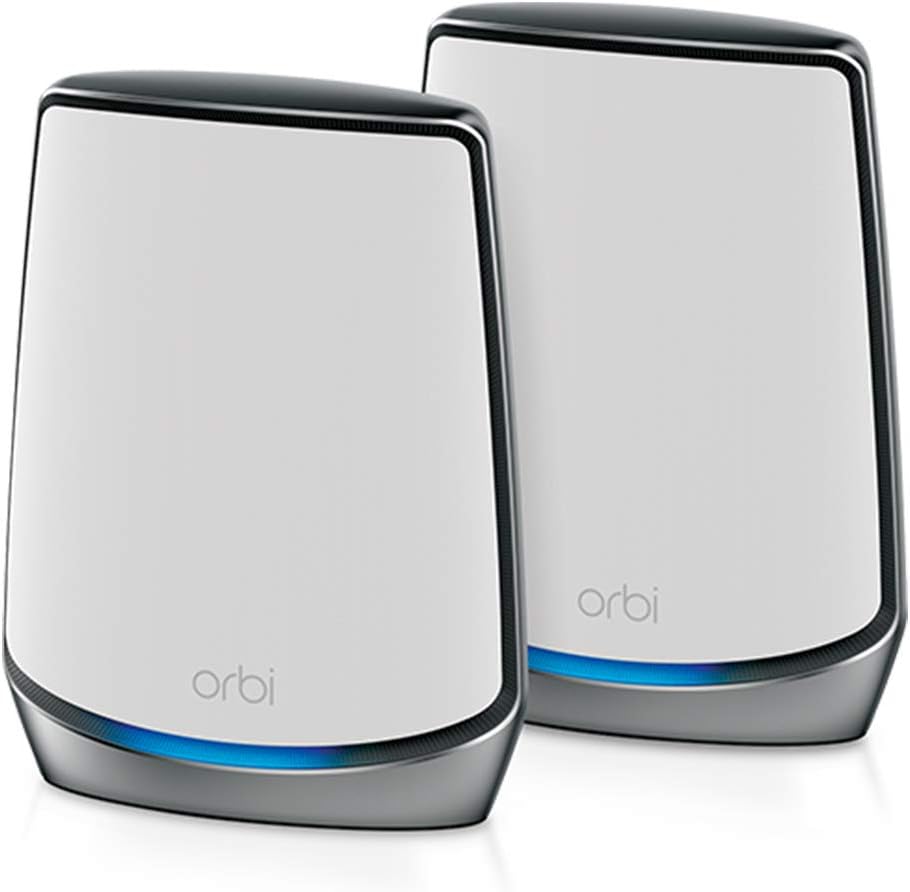
The NETGEAR Orbi RBK852 is a premium tri-band WiFi 6 mesh system delivering up to 6Gbps speeds and coverage for 5,000 sq.ft., supporting 100 devices simultaneously. It features advanced security with NETGEAR Armor, easy app-based management, and expandable satellite units to eliminate dead zones, making it ideal for large homes and demanding digital lifestyles.


| ASIN | B07WNY2WKG |
| Antenna Location | Home |
| Antenna Type | Internal |
| Best Sellers Rank | #22,778 in Electronics ( See Top 100 in Electronics ) #111 in Whole Home & Mesh Wi-Fi Systems |
| Brand | NETGEAR |
| Built-In Media | One (1) Orbi Router (RBR850) One (1) Orbi Satellite (RBS850) One (1) 2m Ethernet cable Two (2) 12V/3.5A power adapters Quick start guide |
| Color | White |
| Compatible Devices | Gaming Console, Smart Television, Smartphone, Tablet |
| Connectivity Protocol | ethernet, wi-fi |
| Connectivity Range | 5000 Square Feet |
| Connectivity Technology | Ethernet, Wi-Fi |
| Control Method | App |
| Controller Type | amazon_alexa |
| Coverage | 5000 square foot |
| Customer Reviews | 4.3 out of 5 stars 3,432 Reviews |
| Data Transfer Rate | 6 Gigabits Per Second |
| Frequency | 120 |
| Frequency Band Class | Tri-Band |
| Global Trade Identification Number | 00606449146042 |
| Has Internet Connectivity | Yes |
| Has Security Updates | Yes |
| Is Electric | Yes |
| Is Modem Compatible | Yes |
| Item Dimensions L x W x H | 7.5"L x 2.8"W x 10"H |
| Item Type Name | NETGEAR Orbi Tri-band Mesh Wifi 6 System (RBK852) |
| Item Weight | 2.86 Pounds |
| LAN Port Bandwidth | 10/100 megabits per second |
| Manufacturer | Netgear |
| Maximum Upstream Data Transfer Rate | 1000 Megabits Per Second |
| Mfr Part Number | RBK852-100NAS |
| Model Name | RBK852-100NAS |
| Model Number | AX6000 |
| Number of Antennas | 8 |
| Number of Ports | 5 |
| Operating System | NETGEAR OS |
| Other Special Features of the Product | Internet Security |
| Security Protocol | WPA2-PSK |
| Smart Home Compatibility | Smart Home Compatible |
| Special Feature | Internet Security |
| UPC | 606449146042 |
| Unit Count | 1.0 Count |
| Voltage | 120 Volts |
| Warranty Description | 1 year warranty |
| Wi-Fi Generation | WiFi 6 |
| Wireless Communication Standard | 802.11ax |
| Wireless Compability | 802.11ax |
R**J
Easy setup, great coverage, FAST connection.
I've never written a review for anything in the past but hopefully this helps add a bit of clarity around what can be expected with this router/satellite, especially given the price. After many hours of researching the RBK852 Wifi 6 router/satellite combo (the $650 version), I decided to give it a try. I was hesitant at first given the negative reviews on Amazon, but in light of the overwhelmingly positive reviews from nearly every tech site I read (with the only real 'con' listed across most sites being the price), I was banking on negative experiences being a result of either QA issues that slipped through the cracks or simple human error. That said, I'm reasonably tech savvy, so I figured/hoped I could get a good result. In the interest of full disclosure, I've only been using it for 2 days - so time will tell if what I write here remains true in the long run. I'll update this review if things turn out differently. Setup: Took about 30 min from unboxing to completion. Really straight forward using the Netgear app on my phone. In the app, your able to setup the network, change the default SSID and password. Unlike most other routers I've worked with, there is no need to configure the 2.4 ghz and 5 ghz networks separately; the router handles the broadcast of each using an identical SSID and assigns each connected device to the frequency best suited. I followed another reviewer's recommendation to setup the router with the satellite a few feet away, then moved the satellite to it's proper place. This seemed to work just fine, I don't know if I would have had an issue otherwise. I have the router in a small downstairs office and the satellite in the upstairs game room. Speeds: The farthest point in my house away from either the router or satellite is about 60 ft (in a straight line with walls/doors obstructing line of sight). At that farthest point, I average 400Mbps. In a room with the maximum number of walls between me and either the router or satellite I get around 350 Mbps. Most places in the house average 650 Mbps. If I'm in the same room as EITHER the router OR satellite, I'll get a minimum of 960 Mbps, frequently hitting over 1 Gbps. I've experienced no loss of connection moving through the house and have had no issues to speak of, whatsoever. Conclusion: If you're looking for a whole-home, high-speed wifi setup and have the money to spend, I'd definitely recommend giving this a try. I've had a few high end, "high-speed" wireless routers in the past, but nothing that comes close to the speed and coverage of the Orbi. Your experience may differ, but at the moment, I regret nothing.
K**N
Unbelievable Fast Wi-Fi 6 and easy to setup.
Easy to setup with the NetGear Orbi app from the play store, Just follow the set up. Use the default SSID and passphrase until you're completely done Then change your SSID and passphrase to what you want. Note: I had to reinstall the NetGear Orbi app because the diagram map showed red for not connected to the internet and router when I was connected. The satellite showed green. Called tech support and the tech suggested that I remove the app and reinstall After I reinstalled the app everything showed green. The web page interface shows a lot more options and a better view of your attached devices. Don't forget to change web page password. The web page allowed me to assign IP addresses to my devices. When I did noy have the TV assigned an IP address, I would sometimes get a not connected when going into HULU (pretty much everyday) I just had to cancel the error message and try again., After I assigned the TV an IP address, I never had that problem again. Note: If you have a TV with Wi-Fi 6, do not use the ethernet cable connected to your satellite. It's a slower connection, Use the Wi-Fi for your connection, I don't like the Armor because it wants you to install Bitdefender on all your devices. I like the Asus Aiprotection because it does not require any software to be install on your devices, I'm still sticking with Netgear Orbi, but I won't be subscribing for the Armor. I'm happy with my with my whole experience with the Netgear Orbi. I believe Netgear Orbi is one of the best routers out there. A bit expensive, but you get what you pay for and you are getting a quality router that will last you a long time. Especially since it can handle 100 devices,
M**Z
Expensive but delivers
So the only real cons to the Netgear Orbi is the size of the product as it is quite large and the cost. Fortunately I paid a solid sale price. Outside of that, the set up was fairly easy and the performance is top notch. Speeds deliver on my 1.2 GB internet service. Average wireless test is well over 980MB to 1.2GB from the built in speed tester on the app. Most wireless devices are limited by their own wireless limits. Example, no way the iPhone will pull 1GB, but I consistently get will over 400 MB to 500MB and it’s plenty fast for everything I need. Obviously, the more devices you add the more bandwidth is shared, but it’s dynamic to what’s being used versus idle and this particular model easily services the 40 connected devices I have including cameras and gaming systems. The tri-band or third connection dedicated to backhauling between the router and satellite is what makes the difference in streaming performance. In short, not discrete in size and pricey, but worth the money on performance an capabilities for larger homes. For something more discrete and reasonable in performance when you have less than 1GB, there are cheaper and solid performing options like EERO or Google. Still, this was worth it for home size, number of devices and performance.
J**.
Absolutely Amazing
This Orbi Mesh Wifi 6 system is the sweet spot for me when it comes to cost and performance. It is more expensive than say the Google Nest Pro Wifi and Eero Wifi systems, but is not quite as expensive as other 6e or Orbi 7 systems. The performance is absolutely stellar! The antennas packed into them are very strong. The setup was a breeze. And THEY WORKED FOR MY CENTURYLINK FIBER! The last point is a godsend as other routers have issues with Centurylink Fiber as it requires VLAN Tagging to get to communicate properly with the ONT. It was simple, but also a little tricky on getting the settings configured in the correct order so that the router stays connected while everything got changed over, but once it did it really took off! Signal strength is great. The satellite is absolutely great as well. I now have an extremely consistent and fast connection all throughout my home! Better yet it has 3 LAN ports on both the Router and Satellite to connect all of my devices that I don't need wireless! Absolutely blown away by this system and I'm glad that I decided to test it out.
M**Y
Do your self a favor and skip this
Not only will I never by another 'Orbi' nor recommend it, I will now NEVER BUY ANYTHING with a Netgear label on it EVER AGAIN. Why? Password recovery. I just spent 2 hours trying to get my app password reset after getting a new phone. Yup. 2 Hours trying to reset and recover the system. You know those security questions? Like fathers place of birth etc? The software make you set two of them - but don't worry about remembering those - because they do NOTHING for you in password recovery. Password recovery is just broken - as in DOES NOT WORK. Oh, and Factory Reset? Good luck. After two hours I finally got it working again. Problem one. It's an app interface from a smartphone ONLY. Kinda cool until you want to roll up your sleeves only to find you can't. You have NO CHOICE. App only. That sucks. Documentation was wrong, published procedures do not work - This is GARBAGE for software. The WORST. Yes I am raging - but I am full of rage. I have been working in systems for over 33 years now. I can rock Arduino, PI, docker, K8's - I am not a dope when it comes to tech. This is crap. I will say that when it is running the network it delivers is great. Fast and good coverage. Oh, and the cool network protection features? yeah, that's a 30 day trial then it's just a dumb router like any other dumb router. Unless you want to spend MORE on top of an already expensive bit of kit. Not to mention that they push Bitdefender on you and mark any device on your network as needing it if they don't have it. Pass on that bit of crap ware, but thanks for the CONSTANT reminder. I used to like Netgear - and it was a go-to for this - but never again. Just another company that is looking for a way to milk that $9.95 / mo out of you. Do yourself a favor - pass on this. I wish I had.
C**B
Installation was "awkward" - UPDATE #2
Update 23-Aug-2024: For over 20 years I’ve used Netgear routers, WiFi and LAN switches. As I recall just once I had a warranty problem with a ProSafe LAN switch that Netgear gladly replaced for free as it was under the ProSafe Lifetime Warranty. I’ve had a few AC adapters fail after years of use, and I just replaced them. My Orbi 850’s UTP ports (all of them) stopped working. Aside from the UTP ports not working, the unit seemed fine: no error message, no warning lights, I could connect to it via the Orbi app on my iPhone and via a web browser via WiFi with my laptop. The Hardware Warranty expired 6-Jul-2024. I called Netgear, selected Sales, was on hold about 15 minutes (reasonable) and Support answered. I tried to explained I needed Sales, and he insisted on troubleshooting. I did my own hardware troubleshooting; my laptop was able to connect to my ISP via a UTP port, Orbi wasn’t on any of them. I knew the hardware warranty had expired. I just wanted to see if Netgear would sell me a refurb’ed unit at a decent discount given it had only been 7 weeks out of warranty. After a few minutes, the Support Tech transferred me to Sales. And she told me the same thing, your Orbi Hardware Warranty has expired (duh.) I already knew and told the support and sales people same, yet they had a need to tell me after I told them. I was given no options aside from buying new. They didn’t care, that was clear. I felt 7 weeks was reasonable to warrant a discounted refurb’ed, not new, unit. I spent $640 (2-pack) just a year ago. Orbi is a premium product. For now, I can use my iPhone's hotspot for Internet access for my laptop, Now I have some decisions to make. Does this mean you'll have issues with Netgear's customer service? Just sharing what I experienced. Update 25-Oct-2023: I've had no issues with Orbi. I have rebooted a few times, not a big deal, and was probably related to my ISP if they did some maintenance work. When I run backups to my NAS I'm clocking close to 1Gbps wireless - not too shabby at all given my previous WiFi router would do around 180Mbps (wireless) and close to 1Gbps wired. My ISP is 100Mbps and I clock 110Mbps when I do a speed test. I did set-up the Gust Network, no issues at all. The app works well once Orbi is set-up and functioning. Overall, this meets my needs 100%. I don't game, and no kids. Amazon Prime Video has been perfect, no buffering issues like I had with my old Netgear wireless router mentioned below. I would give this 5-Stars if not for the messy, cumbersome set-up. Original 8-Jul-2023: RBR850 router (1Gbps WAN port) and 1 Sat for my 3,800 sq ft house, slab on grade, no second story. I chose the 2.5Gbps WAN rather than the 10Gbps. By the time my microwave wireless ISP offers 1Gbps (currently they offer up-to 200Mbps and soon 500Mbps) and higher it’ll be time to upgrade the Orbi plus by then 10Gbps will be standard. If you have a fibre ISP or over 1Gbps cable service, then the 10Gbps may be reasonable. Buy what you forecast for the next 3+ years and don’t over do it as at some point you will need to upgrade. Others have mentioned set-up was not easy – it was a hot mess. The only instructions for the installation - download the Orbi App and use it, no more, no less. And if you don’t have a smartphone…so sad so sorry, I guess. My ISP only requires providing the MAC address. Once called and updated I started the installation via the App. It failed over and over. I fooled around with reboots of the Orbi and my iPhone – spent an hour and some plus some "choice" language for a $600 rig. For this price, it should be flawless simple. Plus, you can spend over $1,000 if you go with the higher-end Orbi will more sats for a larger house. Bottom line, I had to call Tech Support (7:30PM MT). I was on hold for close to 30 minutes. Once connected the tech was good and walked me through alternative steps. What was needed: I had to disconnect WAN/ISP connection, reboot, connect to the Orbi default Gateway Address (192.168.1.1) via a browser (not possible while the WAN was connected, I tried before calling), then configure via a browser, no Orbi App. The App was useless for MY INSTALLATION. This doesn't mean it won't work for all, it just didn't work for me. I wasted over an hour trying to troubleshoot and then another 30 minutes on hold, and about 15-20 mins with the off-shore tech guy. Once the router and sat were up and running, the App was handy for some things however setting Reserved IP addresses for a few devices had to done via the browser. I set my devices up: DHCP space is 192.168.20->.50, Orbi Router 192.168.1.1 (gateway) to 192.168.1.9 (I used a Reserved Address of 192.168.1.2 for the Sat and space for more Sats if ever needed). 192.168.1.10-.19 are unused, no reason why, I just don’t use them. NAS is 192.168.201/202 (2 bonded 1Gbps wired ports) and the printer is 192.168.1.130, all Reserved Addresses. I don’t have that many devices, and this works well for me. Overall, I have around 13 devices connected, way below the 100 devices Orbi is designed to handle. If I had like 80 devices to connect, I'd go with the next higher up model. I do need to set-up the Guest Network 2.4g for visitors/friends – it’s easy via a browser. The defaults work well for my use, as will for the vast majority. It would have been helpful if documentation, PAPER, recommended "If this happens try 1, 2, 3..." different ways to perform the initial installation, like the tech guy did. Just saying "Use the App" with no other documentation needs to be re-thought by Netgear. Why did I buy Orbi? Overall, I have had good luck for many years w/Netgear. My 4 to 5-year-old AC4000 Nighthawk wasn't allowing use of the 100Mbps of my ISP upgrade, it was capping off at around 15-20Mbps even with the latest firmware. I use a microwave service, no cable/fibre out here in my rural area, and 100Mbps is more than enough - this was an upgrade from 30Mbps, WAY better than the 1.5Mbps DSL CenturyLink has offered for 15 years. I've used Netgear Ethernet ProSafe Unmanaged Switches in my house for going on 20 years. Excellent devices, all 1Gbps. When we built this house 15 years ago, I ran UTP to areas where I knew I wanted wired access. Now with tablets, smartphones, guests, ect, wireless is really needed. Orbi is robust enough to handle my environment. If your home is not wired, then you really need a solid wireless mesh set-up. Yes, Orbi is expensive. I read reviews of other mesh set-ups, asked my ISP what they have experienced with others (they serve rural communities in Colorado, are not a corporate thing, plus they are a small business with great engineers and service) so I decided to spend the money on Orbi. For the price, Netgear should offer 1 year of Premium Support. Typically, once you are set-up, support is rarely needed – it’s the thought that counts when buying premium equipment. One router and a satellite extender was $600, if you buy a 4 or 5 pack or the 10Gbps option it’s very pricey – I expect more for this price tier. And way better installation documentation.
P**A
Dedicated backhaul makes Orbi the best mesh available
There's a lot of other reviews slamming the RBK852 but I don't agree. This new WiFi 6 Orbi is the BEST performance mesh system out there if you can deal with the cons below and swallow the price. Pros: * Extremely simple setup. Everything is done through the mobile app and couldn't be easier. The only caveat is that for my fiber service PPPoE the mobile app just wouldn't configure for it even with the right credentials. [Pro Tip] If you get stuck in the mobile app, connect to the router with an Ethernet cable and go to orbilogin.com and you can continue to setup wizard there. * Dedicated backhaul makes all the difference. No one else has it and the difference in speeds off the satellite is absolutely noticeable. I tried the new Nest WiFi before this and speeds coming off the satellite were half of what they are with the RBK852. * Fantastic performance from WiFi 6 devices. Not a lot of WiFi 6 ready devices out there at the moment, but if you have one this is where the new Orbi really shines. * Support for more connected devices. One of the main reasons I upgraded from the previous generation Orbi RBK50 is because my house is rapidly filling with more than 20 connected devices. The old Orbi seemed like it was starting to struggle when they all ran simultaneously. No issues at all with the RBK852. * Love the Orbi smartphone app! Great design. Easy to navigate and use. Cons: * WiFi 6 routers will not make your existing WiFi 5 (ac) devices go any faster. That's just the way it is. You need WiFi 6 devices to get the *most* out of the RBK852. * Router and Satellite are physically larger than the previous generation Orbi. I managed to find less noticeable locations for them, but they're still big. Not as nice to put out in the open as the Nest WiFi. * Cost. Mesh systems should not cost this much. Netgear can justify it because their dedicated backhaul design is the best on the market, but still, ouch. * No Circle Smart Parental Controls like the previous generation RBK50. This isn't an issue for me personally, but might matter to some. There are still Access Controls features in the admin console though. * Not backwards compatible with previous generation RBK50 satellites. If you upgraded Orbi-to-Orbi like I did you might want to use your previous satellite for even more coverage, but it's not compatible.
C**N
I do this for a living and I have tried all wifi6 on market. This is number one!!!
If you have 1 to 2 GBPs (aka 1000Mbps) this is a phenomenal home mesh network. Unless you are soon to have a 1 gig network, it’s quite expensive. I have an older home with plenty of brick and plaster walls with many wireless neighbors fighting for radio apace, and these things simply destroy all the ones I’ve installed. I build networks, wired and wireless for a living and I can attest to the power of these things and the ease of setup. I actually just put these into a small business and they love it. They can transfer files at 6Gbps internally since we also updated a few of their workstations to 802.11ax Two of these cover a three story home all with every device in the 5ghz range. A total of 52 devices! The app will help you set up your devices. The browser interface will give you much more capability. I had these the day I moved to an additional fiber provider 1gb. For a few days I had two 1gb connections, so of course I aggregated the two connections just to see if and how how it would work. Wow, 1.7 GBPs was quite impressive for a a day ;) Cons: 1) they are ugly. (Moped theory though) 2) The browser interface is clunky and takes some time to get through. 3) for best results I would still use a cabled backhaul. Not necessary, but slightly better. 4) it will not play with any other routers currently out on the market. I’m sure this will change in time. 5) they are a bit pricey
L**S
Saudi Power Plug
It came with 110v POWER ADAPTER. I ordered from amazon.sa, it should be all electronic in KSA is 220v.
V**S
Fast ... but beware.
I have 4 units in a mesh system, When this works it's great. However, for the price it is disappointing. My good experiences are tempered by too many drop outs and random disconnects. Occasionally iPhones/Ipads disconnect and the wi fi has to be switched on and off to reconnect. The app is slow and clunky and not really of much help - in particular, devices connected. It often appears out of sync with reality. Also its very irritating that every time the app is opened, Netgear bug you with adverts for paid subscriptions to anti malware protection. It's a router .. not an advertising platform !! When it works it's fast - but I couldn't whole heated recommend this product.
R**Z
Excelente producto, funcionando e integrado con mi viejo RBR50 y sus RBW30
Sin ningún problema y midiendo las velocidades, se aprecia la mejora del mis equipos ya con 8 años de uso, pero que se pudieron integrar a través de cable y como AP Mode
M**D
Very poor coverage compared to the price
I originally had a basic Velop mesh system and decided to upgrade to a premium option. I chose Netgear, expecting great performance given its price and marketing. However, when I set it up in the same spot as the Velop, the units couldn't even connect to each other. Despite the large size of the device, I was willing to overlook its appearance for a superior connection. Unfortunately, this turned out to be my worst experience ever, and I felt completely ripped off. I will be replacing it with the Deco X90.
S**K
good quality, bit expensive
after trying a few other products, this is the only one that managed to cover my full 2 stories house with no gaps in any rooms.. I needed to install one router plus 3 satellites in order to maximize the coverage and cover all the wholes, but after that it's been working perfectly for more than a year. Also with as many satellites, all rooms have strong coverage with very good speeds. Only issue is it's one of the most expensive options in the market, but amazing quality and installation is super easy following the steps on their application.
Trustpilot
3 weeks ago
3 weeks ago