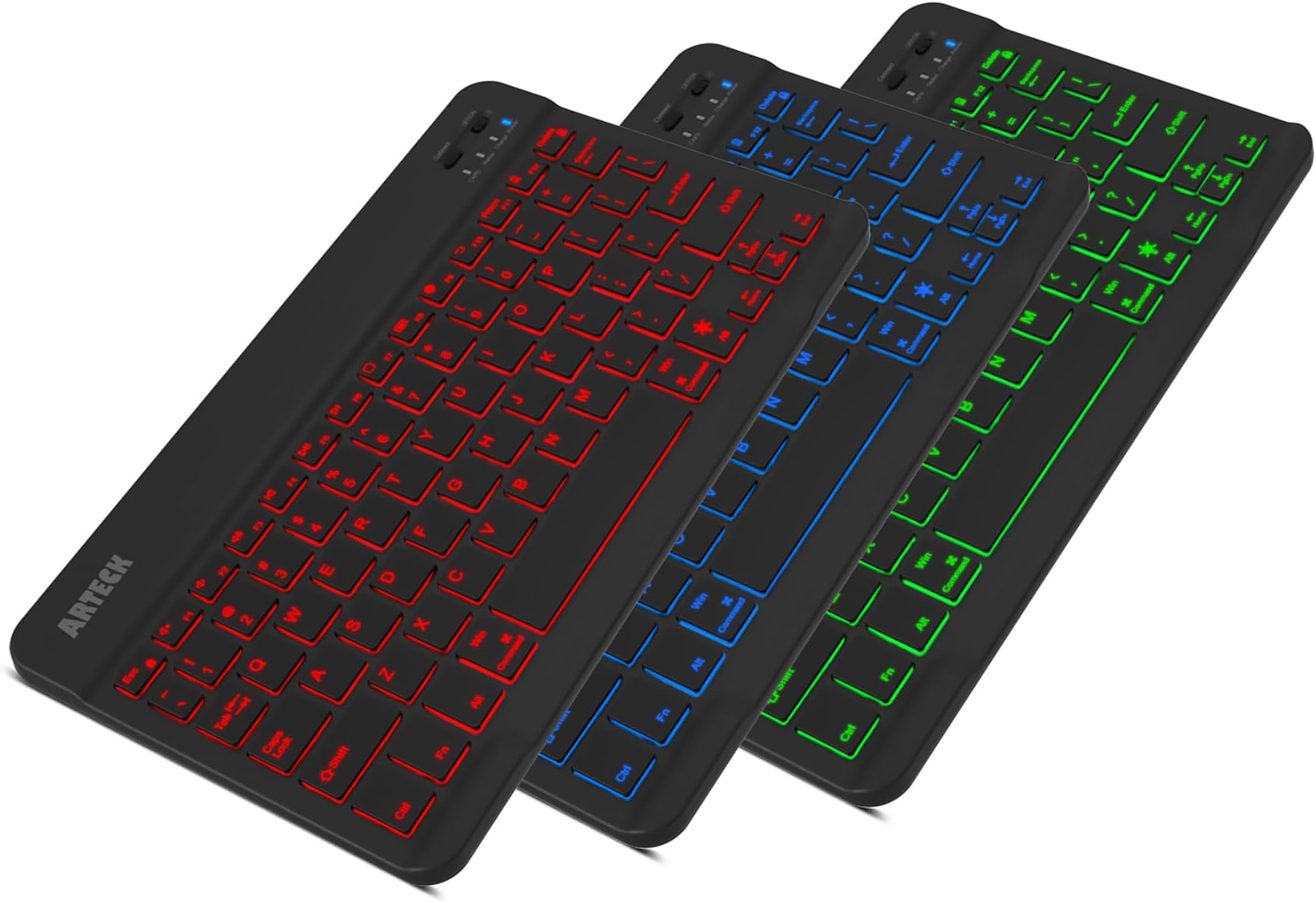
⌨️ Light up your desk, lighten your load, and level up your typing game!
The Arteck Universal Backlit Bluetooth Keyboard combines sleek portability with versatile compatibility across all major OS platforms. Featuring 7 customizable LED backlight colors, a whisper-quiet scissor-switch design, and an industry-leading 6-month rechargeable battery, it’s engineered for professionals who demand style, endurance, and seamless connectivity wherever they work.


| ASIN | B00X5P8BJO |
| Additional Features | Portable, Backlit, Recharageable, Low-Profile Key, Hotkeys and Media Keys, Lightweight |
| Antenna Location | Business, Education, Everyday Use, Multimedia, Personal, Student |
| Best Sellers Rank | #14 in Tablet Keyboards #142 in Computer Keyboards |
| Brand | Arteck |
| Built-In Media | USB Cable |
| Button Quantity | 78 |
| Color | Black |
| Compatible Devices | Laptop, Smart TV, Smartphone |
| Connectivity Technology | Bluetooth |
| Customer Reviews | 4.4 out of 5 stars 27,892 Reviews |
| Enclosure Material | Zinc Alloy, Plastic |
| Hand Orientation | Ambidextrous |
| Is Electric | Yes |
| Item Dimensions L x W x H | 9.7"L x 5.9"W x 0.24"H |
| Keyboard Backlighting Color Support | RGB |
| Keyboard Description | Wireless |
| Keyboard Layout | QWERTY |
| Manufacturer | Arteck |
| Mechanical Keyboard Switch Model | Scissor-switch |
| Model Name | HB030B |
| Model Number | HB030B |
| Number of Keys | 78 |
| Power Source | Battery Powered |
| Recommended Uses For Product | Business, Education, Everyday Use, Multimedia, Personal, Student |
| Series Number | 30 |
| Special Feature | Portable, Backlit, Recharageable, Low-Profile Key, Hotkeys and Media Keys , Lightweight |
| Style Name | Modern |
| Switch Type | Scissor-switch |
| UPC | 713382287098 |
| Unit Count | 1.0 Count |
| Warranty Description | 2 years warranty |
R**2
Great Customer Service - Keyboard DOES work with Raspberry Pi 3 Model B
If you read my previous review, ignore it. I received a defective keyboard, as the replacement works just fine as a basic keyboard for my Raspberry Pi 3 using RASPIAN PIXEL out of the box. The function keys don't appear to work out of the box on a basic PIXEL install, but that's fine; it'd be a nice bonus but certainly neither expected nor anything I'd deduct a star for. It's quite light, and pretty easy to type on for a keyboard of that size. The light does turn off after a few seconds, but it comes back on when you start using the keyboard. The delay I experienced previously, and the shutting off after a few seconds, is not present in the second one. The first one, the one with the problem, was received in a brown box. The second one, which is working fine, came in a white and grey box with a cellophane window on the front of the package. While the brown box looks nice and is evocative of quality, and the white/grey box seems cheap, the keyboards appear identical and are attractive in their own right. It looks very much like brushed black anodized aluminum, but they are actually plastic yet they don't feel flimsy nor cheaply made. The backlighting has several options, not just the three primary colors, and are very nice. At $20, I'd be pleased with the purchase for a tablet or for a home entertainment center that didn't need a mouse or touchpad. For my Raspberry Pi project, it's not quite what I need (frankly it's too easy to steal) but it does work for its basic functions on it just fine. ARTECK has fantastic customer service, which solidly placed the new keyboard in 5-star territory. They care about the product and the feedback they receive. On their own they replaced the keyboard immediately after seeing my first review without waiting for a replacement. I cannot comment on the battery life, but other keyboards I have had with this type have had battery lives measured - at a minimum - of several hours if not days, and standby batteries of months on end. I do expect the same of this keyboard even with the backlight since the backlight does turn off quickly. [Previous UPDATE: added a star for customer service. On their own, ARTECK responded with a code to replace the keyboard quickly to replace the first one I have. As soon as it arrives, I will charge it and see if it works with the Raspberry Pi. I promised to update this as soon as I know. ]
N**M
Lightweight and pairs quickly out of box
This keyboard is very light and I purchased it mainly for home use because I am a touch typist and find the virtual keyboards of my phone too slow and annoying for proper sentences. So far I have used the keyboard on my lap, in bed, and on a flat surface and have been very happy with this purchase. I had not planned to use it away from home, but it's so light and fits in so many bags that I am anxious to try it sometime soon. No cords or batteries or charging cables needed. The only "game" I have used this keyboard is online Spanish lessons like a game. I don't think bilingual typing is as easy as the Google Gboard virtual keyboard because of the diacritical marks and accents. The first time I stumbled about a bit trying to figure out how to do type in a different language more easily. I will have to make sticky notes with directions for myself because it's easy to forget, using Windows methods and I was a long-time Mac user. I think I would have preferred the Android method of long pressing keys to access symbols. It's another thing to get used to and doesn't make this keyboard a bad product at all. This keyboard paired easily with my phone out of the box. The instructions were easy to follow. I like the different backlight colors. It's a nice touch and for those that aren't touch typist's should make it easier to use in low lighting or in the dark. The "f" and "j" Keys have a little bump at the bottom so you know where to place your fingers. The function keys at the top will be they keys most difficult to see in the dark because some of those icons are very small. I do not recommend eating around this keyboard. The backlighting leaves enough of a gap under each and every keyboard that you will spend a lot of time cleaning crumbs out. If you plan to carry the keyboard about, I would keep the box it came in or get a case to protect it. It's lightweight and made in China. At this price, if it lasts the entire 2 year manufacturer's warranty period, it is a good bargain because the alternative is spending too much time trying to type on the virtual keyboard of my smartphone. That wasn't working for me. It's cordless and since already paired, just has to be turned on to use each time without hassle. I also like that I can use it on other Android devices as well as Windows and iOS if the occasion should arrise. This review was made much quicker with this keyboard and I haven't come across apps that have a problem with a physical keyboard so I guess the system takes care of that.
G**X
You get what you pay for
Context: When I bought this keyboard, I was looking for a cheap Bluetooth keyboard to use in place of my laptop's keyboard. A few keys stopped working on my laptop keyboard, but the cost to repair was too high for just a few keys. I decided it would be better to buy a Bluetooth keyboard and just carry it with the laptop to use as the primary keyboard instead. I was looking for a keyboard small enough that it wouldn't be annoying to carry with me everywhere I have to use my laptop. I also wanted the keyboard to have backlighting because I often use my laptop in the dark at night, and I didn't want to have to flip a light switch just to use my keyboard. So, I ended up buying this Arteck Bluetooth keyboard because it was the most affordable keyboard with a lot of reviews and a good rating that still had all the features I wanted. Review: I got the keyboard back in October 2024. The setup process was easy; it connected to my laptop's Bluetooth right away, and all the lights and keys on the keyboard worked as intended. Battery life was pretty decent for the ~2 hours I used it every other day. I didn't find myself ever thinking that its battery life was too short. The keyboard is very light, which makes it really easy to carry around. The material of the keyboard is just a cheap plastic that is very flexible, but it has a brushed texture that still feels nice to the touch. Everything was fine until March 2025 (4 months later), when I started to notice that the micro-USB cable was a little hard to plug into the charging port. Then, in April, I was really struggling to plug in the charger one day, and when I pushed in the charging cable, the charging port broke. I opened up the back of the keyboard to see if I could salvage the charging port enough to just get the keyboard to charge again, but the port was simply too fragile and couldn't be fixed easily. After the charging port broke, I immediately picked up another keyboard with the same features I wanted, but this time I made sure to find one that had a well-built charging port. So, I decided to buy a USB Type-C Bluetooth keyboard this time. I wouldn't recommend this keyboard if you want something that is good quality and will last you more than a couple of months, but if you are just looking for a passable, affordable option that just gets the job done for at least a little while, then go for it. TL;DR short life span due to the micro-USB charging port breaking, build quality and materials match the price
S**L
2 year use - PROS and CONS
PROS: Key spacing is totally adequate for typing Love the backlight when using it in the dark, while watching TV, while in car, at campsite, etc Battery life is excellent. Not sure how long, but if you told me it was over 30 days, I would believe it. And charges fast. And you can use it while it’s charging. Love the magnetic back. It stay stuck on my mini IPad. It does hang over, but I prefer the comfortable typing size vs the smaller keyboard. I’ve tried lots. Love the special keys capability. Keyboard is very sturdy. CONS: What? No usb-C. What? Requires 20 year old standard mini usb? ARRRRGGGHHH! Difficult to Bluetooth reconnect with multiple devices, ie Ipad, IPhone. You know how AirPods connect to whatever device is playing sound, back and forth seamlessly? Yeah, this keyboard doesn’t do that. Might take multiple times of —forget device, pair device, turn on, turn off, again These two CONS were enough to make me look to see if there was a better option. NOPE - no better option for reliability, size, price. I just ordered 4th one. Yes, I am lazy. 1 for upstairs, downstairs, travel bag, and campervan.
L**C
Nifty!
Great little keyboard with cool features like changing backlight colors to brighten your day or illuminate in darker settings! Charges fast too!
J**E
The Best Bluetooth Portable Keyboard I've Ever Used
When the Samsung Note 1 first came out, it was a big, almost cumbersome device that almost resembled more a tablet than a phone. I can't recall how I came across it, but I had my first bluetooth keyboard that was designed specifically for Android. It was awesome. I gave it away shortly after I traded in my Note for something else. Ever since I've wished I had kept it. I now have the S8+ and I thought it was high time I got another one. This keyboard is superior to my original one in every way possible. Much smaller, yet still very much full-sized. I was really blown away at how thin it turned out to be. Like crazy thin. It was ridiculously simple to pair with my phone and within less than 3 minutes of opening it up, I was using it on my phone. One of the key features which I LOVE is the ability to work best with your particular operating system, such as iOS, Android or even I believe a Windows phone (though I'm not 100% certain about this one). The light-up keys are a very nice feature that I'm sure will come in handy in dark environments. I used my keyboard extensively last night answering emails, text messages, Snapchats, and I even wrote a review here on amazon for another product I had purchased. It was all simple and unbelievably more convenient than using the Google keyboard on my phone. The truth is, a lot of what I did last night wouldn't have been done at all had I been forced to use just my phone's keyboard. I found myself LOOKING for things to respond to or write just in order to get more use out of it. Another wonderful addition is a built-in rechargeable battery. My previous keyboard used 2 AA batteries and it was a pain when they would suddenly be spent without any advance warning. As long as I'm near a charging cable, if this goes dead, I can still plug it in almost anywhere and still use. I haven't had the time to see how long it'll run on a single charge, but should that change or become noticeable one way or another, I'll make sure and come back to write an update. All in all, if you are considering a portable bluetooth keyboard, I simply cannot recommend this highly enough. Oh, I almost forgot, this keyboard does NOT fold up, so what you see when you open up the packaging is what you get--which is not an issue for me...however, if you prefer something that'll fold up to be a shade more portable, you might want to consider something else. However, for the money, you certainly cannot do any better in my opinion.
Z**Y
Things to like about this keyboard and good customer service
***Update: May 10, 2023*** The seller has contacted me again with an offer to send me an upgraded model of the keyboard I had previously. I complemented the excellent customer service in my last update several years ago and I have to reiterate that this customer service is really above and beyond what you can expect from most sellers. I will update again in a few days when I have received the new keyboard and had some time to play around with it. ***Update: March 28,2018*** As others have said, the customer service for this product is excellent. The seller contacted me to offer either a full refund or replacement keyboard. I actually opted to return the keyboard and go with a different model, the Logitech K380, but the seller said they would send me a replacement keyboard even though I had already completed a return because they wanted to fulfill the terms of the product warranty. Really can’t beat that kind of customer service. So, as I said in my original review (which you can see below), there are plenty of things to like about this keyboard. Hopefully the replacement keyboard will not develp the same problem as the first one. ***Update #2, March 12 2018*** Turns out that the arrow keys now work but a lot of other keys don't, including the a, s, d, f, l, and others. This makes the keyboard really pretty much unusable. Have again re-adjusted my rating. Will probably return this product. Not sure if for a replacement or refund. I like a lot of things about the keyboard, but if this model is not going to work reliably, then there doesn't seem to be a point in replacing it. Granted, it could be just a problem with this particular unit, but still not sure. ***Update, Mar 12, 2018*** The problem with the stuck keys seems to have resolved itself overnight. Hopefully it won't happen again. Re-adjusting my rating back up to 3 stars. I'm not adjusting it back up to the 4 stars I initially gave the keyboard, because of the problem with the stuck keys. The keyboard is still good for the price, but I'll now be looking out for further problems with the keyboard, and probably also looking for the price to drop on one of the more advanced models. ***Update Mar 11, 2018*** After using the keyboard for less than a week, several of the arrow keys are no longer working. The left and right arrow keys simply do not work at times, and at other times pressing left or right makes the cursor arrow down instead of moving in the correct direction. Also, I'm unable to execute any commands that require me to use the Voiceover modifier keys. Based on the behavior being displayed, I assume that the down arrow is stuck. I have tried disconnecting and re-pairing the device several times, including telling my phone to forget the device and paring as I would if it were the first time I was using the keyboard. I have tried both restarting my phone and shutting it down and turning it back on. I have been able to duplicate the problems on three different devices: my iPhone SE, my MacBook and my Apple TV 3. I plugged the keyboard in for a while to make sure it wasn't an issue with a low battery, but no such luck. The left arrow key began to work, but the right and down arrows still don't. I'm using the keyboard with Voiceover, so not being able to reliably use the arrow keys to move around the screen defeats a big part of the purpose of me having this keyboard. Because of this problem, I'm adjusting my rating from 4 stars to 1 star. *************** I’ve been thinking about getting a bluetooth keyboard for use with my iPhone for a while now. I’m blind and use Voiceover, so typing on the phone, even with touch typing activated, is tedious if I’m typing anything longer than a quick text message reply. Since IOS 10, it seems like the dictation feature has declined in quality, so that’s no picnic to use either. So when my partner got one of these for her birthday, I was eager to try it out and see how it works. After playing with her keyboard a few times, I decided to get one of my own. For the price, it seems well worth it so far. It’s not made of heavy-duty stuff like some of the more expensive bluetooth keyboards out there, but again, for the price, it’s good. Keep in mind when reading this review that some of it will be about general things and some of it will be specifically about using the keyboard with Voiceover in IOS. For me, there are several pros with this keyboard. First, it’s very slim and light weight. I can toss it in my messenger bag when I go out and it doesn’t increase the weight of the bag in any appreciable way, so carrying it around like that is no problem. Second is the size. A few years ago, I had one of those bluetooth keyboard cases that you can put your phone in. It came in very handy, but it was still slowish to type on. It was good for me then because I didn’t carry around a bag at the time and I could just put the case on the phone, stick it in my pocket, and go. Since I’ve gotten a service dog, I now regularly carry a bag so as to have all the necessary dog stuff with me if I need it: poop bags, paper towels, wet naps, a few treats, that sort of thing. So because I now carry this bag regularly, I wanted something bigger than a mimi bluetooth keyboard, but not a bulky one like some of the other models I’ve seen. Also, I didn’t want one of the foldable or roll-up bluetooth keyboards because they are a pain to type on. I’ve tried one out before and I felt like I had to press down harder on the keys than I would on a more solid keyboard. Because I’ve also got some arthritis starting to affect my hands, I wanted something that would feel closer to touch typing on a laptop keyboard. This keyboard is just the right size so that I can easily touch type as I would on a laptop, and the spring of the keys is very close to that of the keyboard on my MacBook. Third, it’s easy to connect initially. Flip the on/off switch, push the paring button, go to the bluetooth menu in your phone settings, select the keyboard, and you’re in business. Fourth, this keyboard not only makes it easier and more pleasant to do stuff like writing and replying to FB posts, tweeting, and word processing, but it also seems to work with several of the text adventure apps I have. It’s easier and quicker to be able to just type in commands on this keyboard than it is to have to flick around on the screen to find the link you need to activate to go a certain direction or interact with a certain object, or type out commands with the on-screen keyboard. This may lead to me doing more gaming on my phone, which may or may not be a good thing, but it’s cool that this keyboard makes the experience of doing so more pleasant. Fifth, of course, is the price. Your not going to break the bank buying this keyboard. Unless you use it on multiple devices at once and need a model that allows you to switch back and forth from controlling device A to device B to device C with only a button press, this is going to do the job for you. There are also a few cons. First, and the biggest con for me, the keyboard does not automatically remap the four keys to the left of the spacebar from the Windows layout (Ctrl > Windows key/function key > Option > Alt) to the Mac keyboard layout (Function > Ctrl > Option > Command). If you use a MacBook and you’re very used to keying in commands with the Mac keyboard layout, this may take a bit of getting used to. Instead of holding down the two middle keys as the Voiceover modifier keys, you have to hold down the key at the far left and the key twice to the right of it. It’s not the end of the world, but it makes keying in some of the Voiceover shortcuts in IOS a bit annoying because the fingering is weird. That said, you can also go into the Voiceover setting on your phone and set the Caps Lock key as your Voiceover modifier, as you might if you were using Jaws on a laptop. As far as non-Voiceover shortcuts go, most of them use only the Command key as a modifier, so it’s no different keying them in than it would be on either a Windows machine or a Mac. This would be no problem at all if there were a way built into IOS to remap the keyboard. I have read that there actually is a way to do it on an iPad but it doesn’t seem that there is any way to do it on an iPhone. Second, I’ve had trouble reconnecting the keyboard to my phone. I had to go into my bluetooth settings, tell the phone to forget the keyboard, and then pair it again. As I said earlier though, pairing is easy, so this is really a minor annoyance. I have had the keyboard only about two-and-a-half days, and this has happened to me only once, so keep that in mind as well. If it starts happening consistently, then it will be more a problem than a minor annoyance. Third, I have experienced the issue that other reviewers have written about where the keys can sometimes stick and instead of outputting a character once, the keyboard will output that character a bunch of times. As of now, it doesn’t happen enough to be much of a problem for me, and it’s simple enough to just hit Option + Backspace to erase the last word and start over at the beginning of the word. If this starts happening at a frequency where it becomes a problem, I’ll amend the review. Fourth, you are apparently supposed to be able to hit the Esc key twice to open the app switcher in IOS. This command has sporadically worked for me before on my partner’s keyboard, but has not worked on mine as of yet. Of course, if you’re using Voiceover, you can get to the app switcher by hitting Ctrl + Option + H twice quickly, but again, the fingering of the shortcut is a bit weird because the keyboard doesn’t remap to the Mac layout, so it would be more convenient to be able to just hit the Esc key twice. Again, this is really a minor annoyance in the big scheme of things. So, for my money, this keyboard is totally worth it, especially if you can’t justify spending $70 or more on one of the more advanced and durable models but you don’t want to wait who knows how long for one of them to go on sale. I hope this review has been useful both re general concerns and also for Voiceover-specific concerns. If it has, and you feel so incline, shoot me a thumbs-up on the review.
B**.
Works great, Excellent customer service, Just a few Cons
Pro's - $20 - Super light weight and at it thickest probably about 2 1/2 - 3 American Quarters in depth - Personally I use this for my Asus Netbook that runs Windows 10 and on my iPhone 5S just for the sake of testing. (The iPhone usability actually came in handy as I'm using this Keyboard right now to write my product review on through my phone. - Beautiful array of keyboard colors - Battery seems to hold a charger very wel although I can not say how long. But I can say that I've used it moderately for about 5-6 hours in one sitting playing a strategy game, so this should be good for almost anything you need to do until you're done doing what you're doing until it needs to be plugged in. Neutral - The instructions included were actually better than most products I have seen in the past with devices like this but as always I wish there were more information in regards to troubleshooting connectivity issues. Con's - The only indication of how much battery is left is when a blue battery indicator light constantly blinks letting you know that it's going to die soon. I wish when it connected to my Windows 10 device that it told you the exact percentage as I've seen with similar products. - The backlighting is excellent but to save power it turns off the lighting after 10-15 seconds when not in use. This is a minor inconvience to me as I sometimes like to play an old strategy computer game called, "Stronghold Crusaders." The mouse is mostly used but the arrows keys are needed to scroll through the game map. So you can see how this can be annoying. I don't see anywhere in the instructions on if there's a setting to change this feature. **Updated the Con about ESC key** - Manufacture was prompt in telling me after I wrote this review that pressing the "Fn+E" keys after I pair the device would solve this issue. I did as instructed and it solved my ESC button issue listed below. It's also mentioned in the instructions to do so. User error on my part. **Issue Resolved**- I haven't really tested the ESC button on other programs but I did notice that while playing that game, if I just press the ESC key, it minimizes the game and loads and Internet Explorer window. I have to press the Fn+ESC to get the Menu options I want in the game without it minimizing. - Lasty, this may be just a fluke thing with the construction of this keyboard I got but I've noticed that I have to press the, "L" key with a bit more force as compared to all the other keys. **Updating this to 5/5 because I respect a company that promptly follows up with user issues even though I wasn't complaining to them. My Con's list other than the ESC button issue still stands though. I give this a 4/5 only because of the minor Con's I have listed. Other than that this works great. I only hope this has longevity but at $20 if it works for a year I'd still be happy and recommend it. Pictures included are with backlighting on and of the size comparison to my Asus Netbook.
Trustpilot
2 weeks ago
3 weeks ago