Buy anything from 5,000+ international stores. One checkout price. No surprise fees. Join 2M+ shoppers on Desertcart.
Desertcart purchases this item on your behalf and handles shipping, customs, and support to Argentina.
๐ Upgrade Your Network, Upgrade Your Life
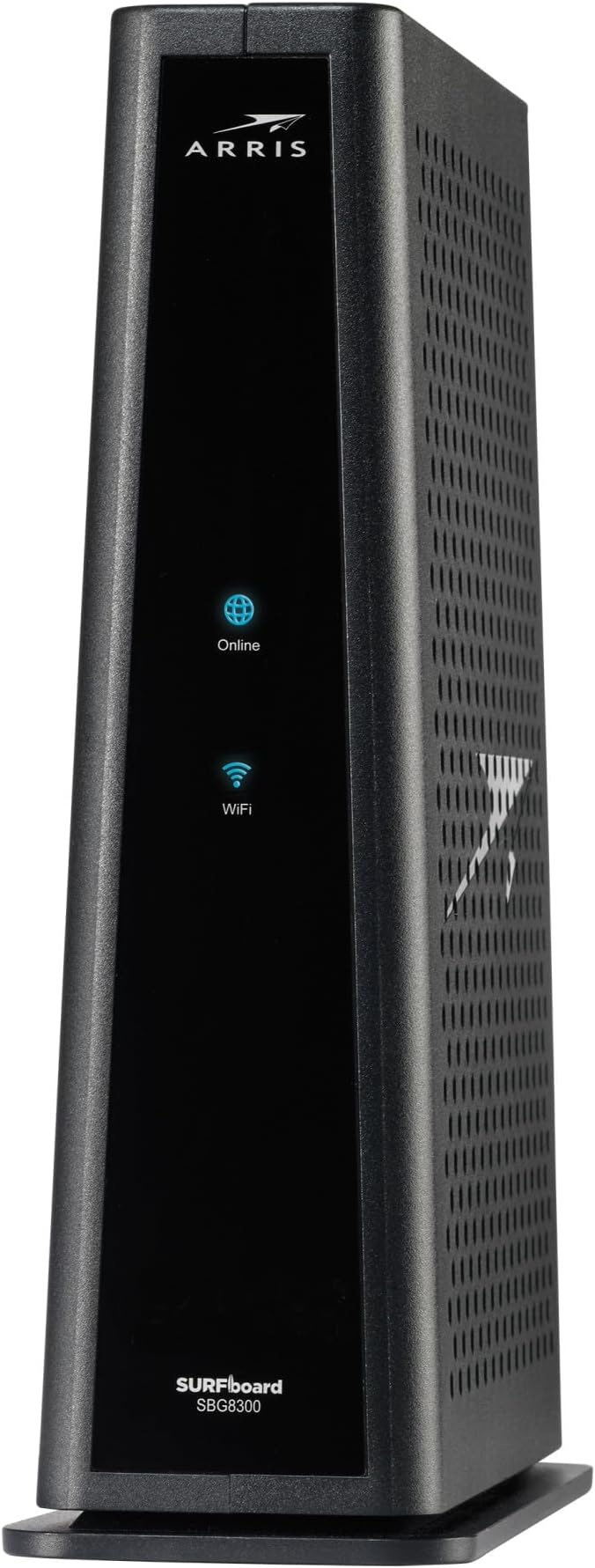
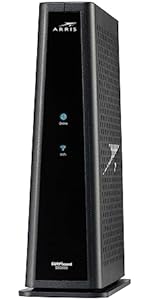
The ARRIS SBG8300 is a high-performance cable modem router combo featuring DOCSIS 3.1 technology for ultra-fast gigabit speeds and dual-band AC2350 Wi-Fi 5 coverage. Compatible with major ISPs, it offers reliable whole-home connectivity while helping users save up to $168 annually by eliminating rental fees. Trusted by over 260 million homes, this device combines cutting-edge broadband innovation with easy setup and robust performance.


| ASIN | B07M9J3XW2 |
| Antenna Location | Business, Gaming, Home |
| Antenna Type | Internal |
| Best Sellers Rank | #283 in Computers & Accessories ( See Top 100 in Computers & Accessories ) #2 in Modem Router Combos |
| Brand | ARRIS |
| Built-In Media | 2-year warranty card., Cable Modem, Power Supply, Quick-Start guide |
| Color | Black |
| Compatible Devices | Personal Computer, Smart Television, Smartphone |
| Connectivity Protocol | Ethernet, Wi-Fi |
| Connectivity Technology | Ethernet |
| Control Method | App |
| Coverage | Wi-Fi Coverage : Up to 2,800 sq ft |
| Customer Reviews | 4.1 out of 5 stars 5,070 Reviews |
| Data Transfer Rate | 2350 Megabits Per Second |
| Frequency | 5 GHz |
| Frequency Band Class | Dual-Band |
| Global Trade Identification Number | 00612572215432, 06125722154320 |
| Has Internet Connectivity | Yes |
| Is Modem Compatible | Yes |
| Item Dimensions L x W x H | 8"L x 2.87"W x 9.33"H |
| Item Type Name | Cable Modem & Wi-Fi Router |
| Item Weight | 2.8 Pounds |
| LAN Port Bandwidth | 1000 Mbps |
| Manufacturer | CommScope |
| Maximum Upstream Data Transfer Rate | 1000 Megabits Per Second |
| Mfr Part Number | SBG8300 |
| Model Name | SURFboard SBG8300 DOCSIS 3.1 |
| Model Number | SBG8300 |
| Number of Ports | 4 |
| Operating System | Linux |
| Other Special Features of the Product | LED Indicator, Parental Control |
| Router Network Type | hybrid |
| Security Protocol | WPA2-PSK |
| Special Feature | LED Indicator, Parental Control |
| UPC | 612572215432 |
| Unit Count | 1.0 Count |
| Voltage | 120 Volts (AC) |
| Warranty Description | 2 years |
| Wireless Communication Standard | 802.11ac |
| Wireless Compability | 802.11ac |
J**Y
Arris SBG8300 - Excellent Gateway, No Problems after 1 Week.
I purchased this ARRIS SBG8300 gateway new from Amazon for $177 in May 2024 to switch from AT&T DSL2+ (copper landline) to Sparklight cable internet service (100 MBps down/ 10 MBps up). I decided to purchase and own it myself, rather than pay rental fees- it should pay for itself in about one year. I wanted an established DOCSIS 3.1 design (3.1 is required by Sparklight) that could handle possible future cable bandwidth upgrades, and this gateway seemed good for that. It has 32 x 8 channels for DOCSIS 3.0 and 2 x 2 channels for DOCSIS 3.1, and can theoretically handle up to 4 Gbps download speeds, so this is probably way more gateway than I need now. The Sparklight installation tech told me that this was the first time he had encountered a new customer who provided their own gateway in my rural MS town. This turned out to be a minor problem, as he had always been given the gateways pre-configured. Initially, he was unable to get it up and running, and he had to run off to perform other installations (Uh-oh!). But the Sparklight phone support people were very good, and saw that the gateway was simply waiting for a firmware update. Apparently, firmware updates are something that only the cable company can do. Sparklight was able to push the update remotely, and I was off and running. Configuration was pretty straightforward. I should warn potential buyers that the gateway's firewall is set to WEAK by default. I decided to switch the firewall to MEDIUM, and discovered that I could no longer access the gateway configuration page directly using the http:// browser connection. After going to MEDIUM, it only allowed https:// browser connections. So, you have to go through a few extra clicks (accepting the risk, etc.) in the browser to reconnect to the gateway's configuration page. With all of the warnings, etc., it is easy to believe that your new gateway may have been hacked, so be prepared for that. Make sure that you turn off UPnP for added security unless you need that. It is also a good idea to do a port scan to make sure there are no unnecessary open ports that could present good targets for hackers. Performance has been excellent, delivering over the purchased speeds (usually, I get 110 Mbps download and 20 MBps upload via speedtest.net). I have not had a single problem after about 1 week of service, have never needed to do a reset, and the gateway seems to be running cool, just above room temperature. I think that most problems that people experience with cable modems/gateways in general are due to 1) poor line signal quality and 2) WiFi crowding/interference issues. The SBG8300 provides line quality information in the homepage, so you can troubleshoot signal issues yourself and perhaps avoid extra service fees if the problem is inside your home. I did not try the gateway configuration app for wireless devices- all of my tweaking was through a hard Ethernet connection and web browser. FYI the gateway homepage did complain about my Firefox version 126 (some warning about needing at least v 63) , but it worked OK. I guess that the only features that I wanted, but couldn't have using this gateway, are: 1) WiFi 6 - this gateway has the older WiFi 5 (802.11ac) standard . But our current wireless devices can't use WiFi 6 anyway, so no biggie. 2) No USB port on the gateway. This is very handy if you want to do network printing via USB, or set up a large USB stick as a network drive (NAS). Overall, I really like the performance of this gateway. Time will tell if the hardware is as reliable as it appears to be. ----------------------------------------------------------------------------------------------------------------------- 7/24 Update- No problems after ~ 60 days, very pleased. After doing a little more research, it turns out that there are some interesting reasons some cable modems fail. It all goes back to the original cable concept as a distribution system for ONE-WAY analog TV signals. Cable modems must both receive and send digital signals. If the DOWNLOAD line signal quality is poor, you will get disconnect/reconnect issues- everyone knows that. But the more serious issue is with the UPSTREAM signal. The cable modems will try to overcome poor line quality conditions by BOOSTING the UPLOAD signal. This leads to greater continuous heat generation inside the modem, and sometimes failure due to overheating. So, the reason some folks need to replace their cable modems regularly is due to the poor line signal quality, not necessarily the modem itself. You can fix this with a special amplifier called an active return cable modem amplifier (Amazon sells these), but the permanent fix is to get the cable company to change out the cabling and components to get a good baseline signal.
D**.
Works with Spectrum (in NC)
Read a few reviews saying this doesn't work with Spectrum. I'm not sure if Spectrum in other States might make it unusable but in my state, it works fine. It only took a few minutes BUT, I did have to call Spectrum for them to register it. I have noticed some on and off WiFi connectivity now. I don't know if it's Spectrum trying to get you to pay for their modem and their monthly fee or what. I would suggest turning off band steering. I left band steering on and I had intermittent WiFi cutting out. Another strange thing is the lights were blue when I first installed it and it was working fine. Now, after I had WiFi issues and unplugged and plugged it back in, the lights are green which is apparently the correct color. Oh well. So far it works.
K**N
The best of the best Docsis 3.1
OK, with everything being working from home these days, online shopping and bill paying, researching, news, TV, and so on, I had a real need for speed and although my ARRIS Docsis did the job at almost 100 Mbps, it was not cutting it with seven high speed computers on routers and switches and one coaxial cable at high speed from COX. I signed up for high speed at COX but was not getting it. The issue was Docsis 3.0, cannot handle the new standards. So I did all my research from high prices to renewed, and found that the new guy on the block that seems to make only a few products, mainly the Hitron CODA56 Multi-Gigabit DOCSIS 3.1 Modem | 2.5 Gbps Max modem, seemed worth looking into. It wasn't the highest price, so I was suspect a little, but do not go by price alone. So I do reviews. The reviews were outstanding. A few reviews were a little down but I now know why. This is why I think some are having problems, not with this one, but all others as well: When you are upgrading speed, the latest standards are just not important, it is vital. If you keep the older Linksys SE1500 switches and router that runs at the 10/100 speeds, which were wicked fast for the times, you will stay at that speed. So, here's my biggest tip. Make sure all your older switches connect your scanners, printers, and peripherals that do not need that much, no need to discard the switches and buy all new GB switches and routers, just use it for peripherals. Also, with APC power containers in event of power failures, any switch lines going into it need to be taken out unless you have the newest models because, as I found out the hard way, it will limit you to the older standard. You can still use the APC without the lines or buy a new APC. Now, if I haven't scared you, it is really dead simple. Take the time to get the information, most of it is given to you along with the MAC address on the label on the box itself and call your ISP, and as long as you have done all the connections to your modem, just needs to be switched on and a competent ISP person will walk you through. Ours is COX. I know this model favors Xfinity of Comcast fame, but this model works with the most major carriers I have ever seen. That being said, most all the reviews were for Xfinity. I found you also need to use a tool and make sure the cable from the ISP is securely screwed on. Well, mine is a COX ISP, so all those that would like to know, COX is the catch up company still growing like lightning all over the country and for good reasons. They do mostly direct connects. Not all this wireless 5G do anything is all that reliable I believe. Anyway, I like direct hookup to cables for reliability. You hear all about wi-fi drilling a hole in your head. I believe it. So, I use routers and connect a TP-Link with an on/off switch, not expensive, and can connect a wireless for when I need it, even a travel wireless by ethernet or USB, but I can put it off to give my home a peaceful feel without wireless running except for when needed for laptops and kids. Shut the wireless off, shut the kids off, lol. When the router is GB and switches are GB and modem is GB, you have it made. It is as simple as that. Now it would have taken me about 30 minutes with COX to upgrade but I made all these mistakes I just mentioned here. I mentioned it in the hopes you will not make the same mistakes I made. Even with my mistakes you can learn from, it took me about 3 hours to get seven computers running. As a side note, don't fret your printers, drivers, windows, or setup. It is just upgrading your speed. You can always put your old modem back if you have to but I see it as the worse thing that can happen, or most likely, is your speed doesn't change. In that case, you will have your new modem running but using the older speed. Don't panic. There is some switches or routers that are older causing the speed not to increase. For all the new first timer setups, no problem, you will have all the newest stuff. This is just tips for us older timers, lol. Also, check your plan with your ISP. It may not be the higher plan. This is the best router I have ever seen that in this online world and it should not mean a technician will have to come to your home and pay $75 an hour or more. Buy this modem. It will pay for itself in less than a year without having to rent it from your ISP monthly charge. It works, it is brand new, and not refurbished with some renewed ones from Amazon even cost more on some of the more famous models. Always look at the number sold in a month, how RECENT the reviews are, and the product itself how many ISP's they support. I am sometimes in CT and live in RI and if I move, this modem handles so many different ISP's, that it can go with me and even for remote, I will never need 2.5 GB speed when I was getting along with just 100 Mbps. Now 1 GB modem speed is all I will ever need but nice to know if I need to download or upload a huge amount of data that I can up my speed with COX to 2.5 GB. Just like the old axiom, you are as strong as the weakest link, so remember with online website and cloud stuff, you are only as fast as the server you are on when in the cloud and, of course, assuming you have a decent speed computer. I highly recommend the Hitron CODA56 Multi-Gigabit DOCSIS 3.1 Modem | 2.5 Gbps Max modem. I took the time to write this because this Hitron company is running a huge discount right now, I think 43% at this time I bought it, cheaper than most. So, for cheap, I wasn't sure I should buy it, the you get what you pay for. In this case, this is a quality item and better than the pricier ones I believe, else I would not right this review. Mostly, it is so a few of you reading this not to make my mistakes. Upgrade your routers and switches, all should run at GB speeds first. Then call your ISP and connect your MAC address. In fact, they give you the number to call and it is the only one for any price I could see that claims it can handle 2.5 GB speed for the price. Hey, it's Amazon, don't work, can send it back. I ordered this modem last night, got it today around noon time and on a Saturday! Can't beat Amazon! Hope this helps anyone thinking of buying this model, 5 stars in my book.
J**N
ARRIS Surfboard SBG8300 DOCSIS 3.1 Gigabit cable modem & WI-FI 5 and 4 Router.
It's been a few months since I activated my ARRIS Modem Wi-Fi device with Comcast, and it continues to work great. I live in a small apartment and the Wi-Fi coverage is more than I need for my one-bedroom apartment. I have different devises plugged into my modem; I can plug in up to 4 devices. My PS5 shows a download speed of around 800 MBPS and my Xbox series S shows around 1 GB download speed using a category 7 ethernet cable. As for the Wi-Fi, my smart phone is showing a download speed of around 200 MBPS and my RUKU ULTRA is also showing a download speed of around 200 MBPS. The download speed will depend on the device you're using. I have a regular RUKU, and the max download speed is around 90 MBPS. This Modem Wi-Fi device has both Wi-Fi 5 and 4. I have an older PS4, and it only picks up Wi-Fi 4. When I first plugged in my Modem Wi-Fi device to my power outlet and cable outlet, it took a little while for it to turn on. The 2 blue lights flashed for a while and then stayed on. Soon after both lights started flashing and I didn't know what was going on, so I had to thoroughly read the owner's manual and discovered it was updating the software. It would have been nice if they had added that info to their activation instruction so we would Know what's going on. Any way I waited a while for the update to finish and the blue internet light finally stayed on. I went to my Xfinity App on my smart phone, and I followed the instructions to activate my new Modem Wi-Fi device. I typed in the number on the bottom of my Modem, and I waited a little while and my internet light changed from blue to green. I now have internet. No need to call Comcast for activation. To activate the Wi-Fi, I have to download the ARRIS App to my smart phone. It is currently the blue and white App and link the App to my Modem Wi-Fi and followed the instructions to activate the Wi-Fi and the Wi-Fi light turned green. I was able to change the password and Wi-Fi name on both Wi-Fi 5 and 4 using the App. So far, it's working fine no problems. It's important that you use a category 7 ethernet cable or higher for high-speed internet. 2/24/24
J**D
Basically a Good DOCSIS 3.1 Cable Model with a Totally Useless Router
Let me start by saying I have worked in the IT industry for going on 35 years in all areas from software development to networking and systems infrastructure. I have experience configuring routers/load balancers for Fortune 500 companies that run as much as $75K each for managing worldwide global networks, so I'd say I know what I'm doing. I have been using a Motorola Arris Surfboard SBG6900 configured as an edge/perimeter device routed to an ASUS RT-AC68R router for the internal network to isolate everything except selected devices from the external network and use port forwarding on the Arris to the ASUS to expose those selected devices to the public internet as needed. Namely, a staging web server with FTP services for clients to access. It has worked FLAWLESSLY for over 5 years. Recently I upgraded my internet to achieve faster speeds with unlimited data and as a result, had to upgrade my cable modem from a DOCIS 3.0 to a DOCSIS 3.1 model. I had been so happy with the Arris 6900 that it seemed to be a no-brainer to go with the Arris 8300. This has been a frustrating and disappointing total waste of time. First off, the firmware/software version loaded onto the unit out of the box is broken. The screens where you define port forwarding settings are not even correct. They are missing fields so you cannot map external ports to internal ports. You can only specify a start and end port which is useless in terms of security, and even then, the port forward simply DOES NOT WORK. After running a few hours, the unit automatically downloads an upgraded version of the firmware/software (from SDK 7.0 to SDK 7.1) which corrects the admin screens so port forwarding can be set up properly. Even so, after configuring the port forwarding on this 8300 STILL DOES NOT WORK. I have been fighting with this thing for a week. The very first thing I did was to check with my ISP after having them activate the new modem to ensure no ports were being blocked. Of course, none were. I have performed multiple factory resets and reconfigured them from the ground up. Double, triple, and quadruple-checked my configurations, and nothing will make this POJ forward traffic according to the defined port-forwarding rules. I even bypassed the internal router and connected directly to the new unit to isolate and rule out any possible failures with other equipment, which seemed unlikely because the ONLY thing that had changed was the modem. You can't even SSH into the router itself to see what's going on with this unit, meaning you can't inspect routing tables/port mappings in any attempt to correct the problem at the OS level. Finally, I got on the phone with Arris customer support. My last experience with them was over 5 years ago and I was very satisfied. They were professional, knowledgeable, polite, and extremely helpful - no more. I explained in detail everything I had attempted, my network configuration, equipment isolation, the multiple factory resets, etc. What did they do? He listened with half an ear and then proceeded to read his troubleshooting script and ask me to do all of the things I had already done multiple times. At each step, I told him I'd already done that and that it would not work, but he kept saying 'I know you said you did it, but I have to document it.' I could barely understand the guy and he was getting on my very last nerve, but I humored him and did everything he asked. Finally, after he tried everything in his silly little script, he put me on hold for 15 minutes before coming back on the line and telling me my problem was my TEST SERVER! That didn't go down well, especially since I can hit that server from my internal network and it works fine, and not to mention everything worked fine up to the point I hooked up their new modem. Following that, I considered the possibility I had gotten a "lemon." I initiated a return/exchange with Amazon, which they fulfilled promptly, and received the new unit yesterday. The result? Exact same second verse as the first. In my research during the week I have been doing battle with this POJ, I read that Arris is aware of the fact that their admin interface for this unit does not work properly but they won't say when or even IF they will fix it. Their customer service wouldn't even consider the possibility that something may be wrong with the device. If they're going to sell a cable modem/router combo with a basically useless router, they should sell it at the price of a basic cable modem. These are NOT cheap units, but they DO SUCK. I'm returning BOTH of these POJs and will never buy another Motorola modem again. Following many recommendations I've read in the last week, I've ordered a NetGear Nighthawk cable modem/router combo. It's about $100 more expensive, but at least the reviews are good. For those who want a plug-it-in and forget-it type of unit, the SBG8300 should be fine. Internet speed, wi-fi and streaming have been good with the unit, but if you want to manage/configure your network using advanced features, forget it.
B**S
ROCK SOILD
tldr: If you rent a Xfinity router, buy this. Wifi is good, not amazing. It is just a solid workhorse. This is my second Arris springboard used on the Comcast/Xfinity cable network. Both have been rock solid up and down stream, and this one (technically) can hit 1+gbps down. I had gotten a nighthawk before this ...It was horrid. Signal would drop, uncorrectable errors, but with awesome wifi. *shrug* the wifi on the Arris is NO WHERE near as powerful as the nighthawk was, but I stay connected no matter what. With 4 people pounding the network all day, the stability of this router makes me ignore the lower wifi power/range. (I threw in a cheapo wifi router for the kids devices, so all's good)
C**S
Serious upgrade...Solid performer.
This review could be a result of the epic speeds that I am currently experiencing compared to previous. I upgraded from my 6 year old TP link 300MBPS max router. I was paying for 200MBPS with Xfinity and getting 50-60mbps with my old router and obviously with it's age I knew it was on its way out. Then after some research I found this router to be a cost effective upgrade and being I wanted to future proof my internet setup, this was a great choice. I have about 17 peripheral wifi based systems working in the house, from Rings cameras to garage openers to coffee machines and so on...this router can power it all with ease! Just make sure to connect them to the 2.4Ghz network for the peripherals, unless it's 5Ghz supported. Best of all, now I'm getting consistent speeds of 250+MBPS with the 5Ghz network and I can't believe I didn't upgrade earlier. (I know this is not super fast as most may be experiencing, but it's more than sufficient for our family) Really solid router, Surfboard Central app is basic yet intuitive with minimal tech know-how and even though I don't use the guest network, it's nice to have when needed. Also, I really appreciate the parental controls to turn and off specific devices connected to the router. My 5 year old still thinks the Internet obeys my commands...he doesn't know I'm cutting his screen time.
O**O
UPDATE: Buggy firmware (Was: Piece of useless garbage. Wifi doesn't work at all.)
[Update: 08/23/23] The two guest networks, one on 2.4GHz and one in 5GHz, no longer work. I have repeatedly recreated the guest networks and reset their passwords, but you can't log in to them and get Internet access. They used to work, but no more. Is this due to an ARRIS update or a Cox Cable update? There's no way to tell. Stay away from this garbage. [Update: 07/05/21] The cheap, Chinese wall-wart power supply that comes with this router has no RFI (radio frequency interference) filtering whatsoever. As an amateur radio operator, I have been trying to locate a massive source of RFI in my house for a long time. I finally tracked it down to the lousy power supply that comes with this router! ARRIS is clearly using the absolute cheapest components in their routers and accessories. 50 cents worth of filtering could solve a huge RFI problem. I walked down the street with one of my radios and could hear the noise coming from this power supply on 14.273 MHz at the end of my road! As a part 15 device, the power supply may not (legal terminology for "must not") cause any interference to other devices, yet it does. Terribly! [Update 05/01/21] For the first time in weeks, I needed to change the configuration of my network. I used a web browser to navigate to the router's dashboard and was met by an error message which said that accessing the dashboard from a wireless device was not permitted. Strange, since I've configured it from my laptop over WiFi literally dozens of times. I went to my desktop computer that's connected to the router by an Ethernet cable and navigated to the dashboard. I typed in the username and password and got an "Alert" pop-up that said "Operation failed". Not "incorrect password", but "Operation failed". I tried several times but always got the same error. I know with 100% certainty that the password was correct... I even cut and pasted it from a document that had the password in it. Two calls to India... I mean, to ARRIS resulted in them saying my ISP messed up a firmware update which was pushed to my router. The dashboard screen *was* different to the last time I tried to log in. Then I lost all internet connectivity. Three calls to my ISP, Cox Cable (one transferred to the wrong department, one disconnection after waiting 15 minutes on hold, third call lucky) later and I was told to factory reset the router because they could see it communicating with their back end system, but I had no internet. Of course, in their wisdom, ARRIS has removed the ability to backup and restore the router configuration from their routers, so after factory resetting it - twice, because the first attempt did not actually reset it - I had to totally reconfigure my network, with all the static IP addresses, for rewarded ports, etc. Hours later I was back up. 4 hours of work, lost. There is no guarantee that this will not happen again. But I'm able to login to the dashboard from my laptop again! This will be my last ARRIS router. [Update 04/01/21 - Not an April Fools joke!] Having reported the Port Forwarding issue to ARRIS technical support and gone through all their usual "Did you wash the windows and clean out the ashtray"-type questions, they acknowledged a problem in the GUI. I got a phone call from them today, nearly 3 weeks after initially reporting the problem, and they asked me to check the Port Forwarding page. Amazingly, the ports I had already configured now appeared in the GUI. Apparently, they fixed the issue, sent it to Cox Cable for their testing, and Cox pushed the firmware to my router. So now, Port Forwarding - in the GUI at least - works as expected. I haven't checked the actual functionality of the new port forwarding code. Will update if it doesn't work. The wifi is working properly now. The errors seemed to be caused by issues on the Cox Cable lines. After multiple calls to their technical support and after 2 Cox Cable technicians came to check the lines, a supervisor arrived and installed an amplifier in the line. I'm at the end of the line, furthest away from the Cox switch in the condo complex and my signal strength back to the switch was very low. Strange how no one could tell that before the supervisor came over and looked at the app on his cell phone which showed "Low Signal Strength" in bright red letters! Maybe no one else bothered to look? Anyway, the router is working properly now, with the exception that Cox Cable's internet service has been going down repeatedly for the last few days. Sigh. [Previous update...] I got a replacement router sent to me by Amazon. The WiFi on the replacement unit works better than the first unit, but even yesterday I came home to find my Nest thermostat complaining that it had been offline for 6 hours and it took several attempts before it would reconnect. The thermostat is 8 feet from the router. Cox cable is doing ping tracing on my account to see how often my network goes down! The Good: I'm getting 950Mbps download fairly consistently on a wired connection to the router. I'm getting 400Mbps on my laptop and Samsung G21 phone over WiFi. The Bad: Wifi outages for no apparent reason. Port forwarding suffers from this router's buggy firmware. Earlier reviews show this is nothing new, it's been going on, unfixed, by ARRIS for at least 3 years. When you use the web gateway to create a forwarded port, it disappears from the GUI and you can never see it again. You can't delete a forwarded port or see which ports have already been forwarded because the GUI won't display them! I reported it to ARRIS and got the usual "Restore it to factory defaults" followed by "It will be fixed soon". Speaking of "Restore to factory defaults", in their great wisdom, ARRIS decided to remove from ALL of their routers, the ability to backup and restore the router configuration. In the past, you could backup all of your router's configuration to a file on your computer. If support wanted you to reset the router, you could do so and, after resetting the router didn't fix their buggy firmware, you could reload the backup into the router and be none the worse for wear. Not anymore. Now you'll be spending hours redoing all the configuration after a factory reset. That was a really dumb idea, ARRIS. Would I recommend this router? I'm not sure. It seems all routers from all manufacturers have some kind of issue. It seems that most manufacturers really don't care about providing a good customer experience or fixing bugs. I increased the rating from 1-star to 3-stars because the wifi is working (most of the time) on this replacement router and the wired Ethernet speed is quite fast. ---- Previous version of this review: I got the router this afternoon and have spent 8 [update: 30 hours] hours trying to get it to work. Setup was pretty straightforward, I've had ARRIS routers before. My last one is still working fine, but I can't use it because Cox cable decided to cut my upload speed by 60% and the only way I could get it back is by upgrading to Gigablast. Now that I'm on Gigablast, my old DOCSIS3.0 won't work. I configured the router from the web portal (192.168.0.1) and set up the two wifi bands' (2.4GHz and 5GHz) SSIDs and passwords. Some of my Wifi devices are locked to 2.4GHz, but guess what? The 2.4GHz band is shown as "Internet not available". The 5GHz band worked, intermittently, but required me to delete all existing wifi connections before any device would work. Wifi range was abysmal - As in, it wouldn't go through 2 walls in my 1,200 square foot condo. I called ARRIS support who, after saying the ONLY thing we could do to test the router was to reset it (losing all my settings, because unlike my former ARISS router, this one has no way to back up your settings and restore them!!). So reset it we did. There was still no wifi on 2.4GHz after the reset, so ARISS told me the "only" thing it could be, was that Cox didn't provision the wifi section of the router! Right. I called Cox who checked and said the router was correctly provisioned. Three more calls to Cox (all disconnected at one point or other) and I was passed through to Advanced Support. They said, "If you can connect to the internet when connected to the router via an Ethernet cable [I can], and at least one device can connect to the internet when using wifi [one could], then Cox's side of the equation is working. The problem lies in the ARRIS router." To be sure it wasn't my settings that were screwing things up, I did a full factory reset - AGAIN, a process that took nearly 10 minutes. After going through just the initial set-up wizard and entering the two wifi SSIDs and passwords... I now have **NO** wifi connection to the internet at all. A Cox technician is coming to my house with a similar router to double check that it's not my wiring that's causing the problem, but we already know it's not. There is no reason why a router would work for direct Ethernet connections but not work with wifi connections, unless the router is faulty.
Trustpilot
1 month ago
1 month ago