Buy anything from 5,000+ international stores. One checkout price. No surprise fees. Join 2M+ shoppers on Desertcart.
Desertcart purchases this item on your behalf and handles shipping, customs, and support to Argentina.
💻 Elevate Your Tablet Experience!
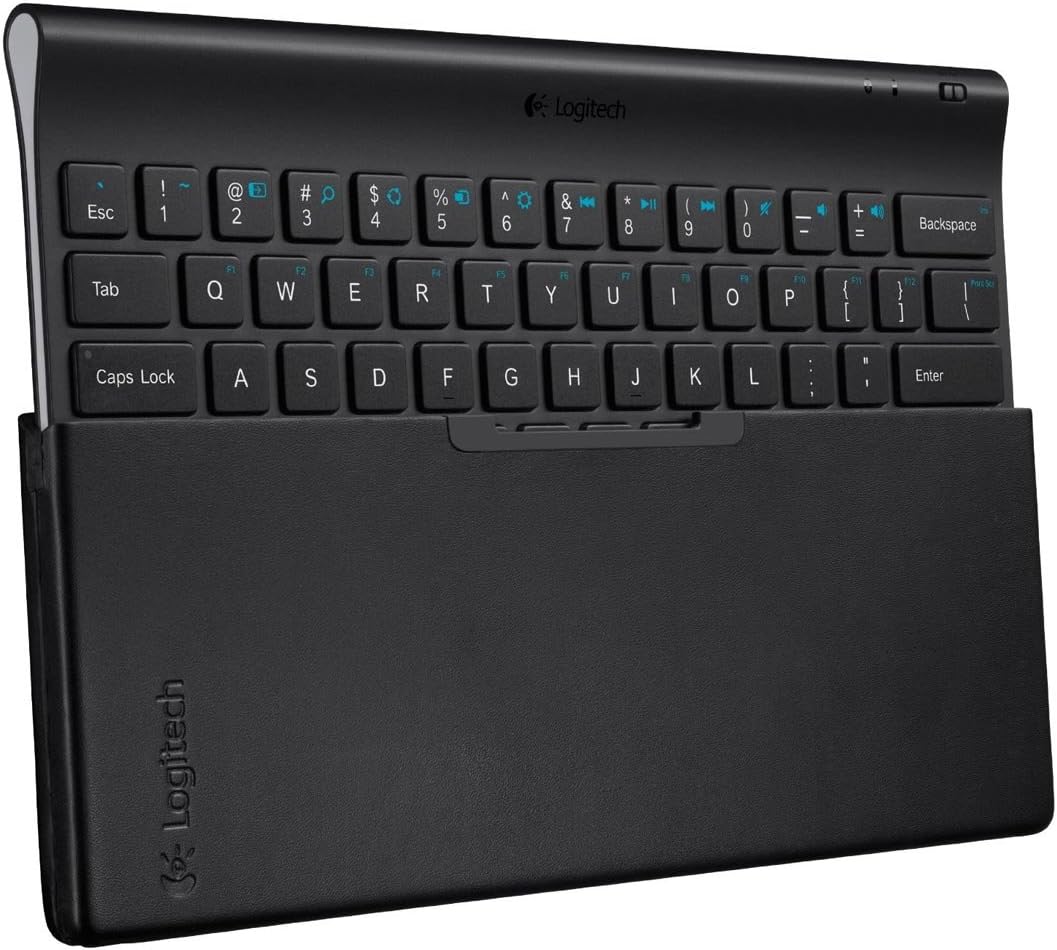
The Logitech Tablet Keyboard is a sleek, portable solution designed for Windows 8, Windows RT, and Android 3.0+ tablets. With Bluetooth connectivity, dedicated navigation keys, and a protective carrying case that doubles as a stand, this keyboard enhances your mobile productivity while ensuring comfort and convenience.
| Brand | Logitech |
| Item model number | 920-004569 |
| Hardware Platform | Tablet |
| Operating System | Android,Windows,Windows 8 |
| Item Weight | 1.4 pounds |
| Product Dimensions | 12.3 x 5.6 x 1.2 inches |
| Item Dimensions LxWxH | 12.3 x 5.6 x 1.2 inches |
| Color | Black |
| Power Source | Battery Powered |
| Batteries | 4 AAA batteries required. (included) |
| Manufacturer | Logitech |
| ASIN | B009JPBPWO |
| Is Discontinued By Manufacturer | No |
| Date First Available | June 29, 2017 |
C**Y
GREAT keyboard
I LOVE this keyboard. It's actually slightly bigger than my laptop keyboard, which I don't mind at all. I was having a hard time typing notes on the go with my Dell Venue 8 Pro tablet and with a small cheap keyboard I had previously purchased. I'm a fast typer and I needed something with good feedback and a comfortable feel. Carrying it it does not feel too big and I love the case/ stand that comes with it. Connectivity is always super fast and easy, even when it is a good distance away from the tablet. I was worried about getting one with a battery but it comes with batteries already installed (which is very nice) and doesn't feel like it drains them, so I think they'll last a long time. If they die super fast I'll update my review. To help I just make sure in between using the keyboard that I switch it off, so no big deal.I also highly recommend for anyone who buys this keyboard who then needs a carrying case to purchase the Case Logic Tablet Attaché Case Logic MLA-110 10.1-Inch Kindle Fire HD/Tablet Attaché (Black) to accompany this product. The keyboard fits absolutely perfect and both your tablet and keyboard will feel protected, which was really important to me.
M**U
Misses keys CONSTANTLY. Pretty worthless...
I really wish this worked well, and it actually is a really sleek, easy-to-use product.But it has one small issue which to me makes it completely unusable: It has a bad sensitivity threshold.You can press a key until you feel like it's "clicked" and still the key might not fire. It's not too bad, it's not like you have to punch the keys to make them work, they're ok. BUT!Keys get triggered juuuust below the height of the surrounding plastic. So if you're typing fast and press down a key on its corner, landing in the plastic, you might feel the "click" that should mean the key was fired, but in reality it wasn't.So when I'm typing fast I miss a LOT of keys, because I may hit keys on a corner or edge, my finger felt the "click" but nothing really happened.I have no idea how people can rate this keyboard so well, it's really beautiful, light and elegant, but it's a terrible keyboard in my opinion, because for such a small form factor, it should be really forgiving of bad keystrokes.I ended up just typing on the touchscreen, which on the Nexus 10 is actually not bad at all (I bought this keyboard before trying the tablet cause I thought typing on the screen would be unbearable. Turned out to be the other way around...)Not recommended. Try another brand or model, in my opinion!
H**I
Surprisingly Solid
This keyboard is very sturdy...quite a bit heavier than I expected , which pleases me. I don't care for flimsy devices and this one feels hefty. The tactile feedback is very good, although I prefer "rounded" keys to flat ones. There is ample travel in the keystrokes and the size and layout of the keys fit my typing style.I would have liked the option for a backlight on the keys, but can live without it I very much like the use of standard batteries. I have found no instances of either keybounce (multiple letters for one stroke) or missing keystrokes. The resistance of the keys is firm, which I like.Pairing was quite simple with my Nexus 7.I now can use the Nexus like the powerful little mini-computer that it is. I have the Nexus 7 in a Otter case and held in perfect viewing angle with a mobile mount (suction cup) on my desktop glass. Nothing could be more convenient, and it if I were to desire to go "portable" with this particular arrangement it would not be too much trouble: Mobile base, Neus 7 and Keyboard would all filt easily in a briefcase or small travel bag.I don't use the folding stand, because I prefer the mobile mount (also purchased from Amazon : Arkon Slim-Grip Mount Model SM517).In summary, this Bluetooth keyboard is solid, has a great feel and pairs easily. It feels like it should last a long time and there are o li-ion batteries to worry about replacing.
R**L
Excellent Tablet keyboard.
Using this keyboard now on my Samsung Galaxy Note, and it works like a dream. The keys feel solid (absolutely no feeling of clunkiness or cheapness) and it isn't loud or heavy. The size is perfect for a guy with big hands like myself, but my wife (who has smaller hands) has no problems either. Key placement is excellent. Bluetooth connected quickly and without issue, and the function keys work really well, too. The use of an "FN" key to switch input worried me at first, but it turns out to be an excellent way to switch between numbers and media functions. The lights have the sense to stay off when not in use, so the battery doesn't die very quickly.The case is an excellent idea as well; holds the keyboard well within a magnetic closure that opens up to form a stand. The stand is sturdy on knees and sturdier on a table. It holds the tablet at one of two angles, and it has rubber pads to keep it from slipping.There are just two things that give me pause: first, the software keyboard keeps coming up despite my using the hardware keyboard, which takes up a lot of screen real estate. I may be able to download an app to solve that problem, but a software component would have been nice to remove the soft keyboard from the screen when the hardware keyboard is in use. Second, the keyboard (though it supports Android devices) seems to be made with Windows in mind; some of the keys don't do anything on Android. Again, a downloadable keyboard app might solve that problem.All in all, an excellent purchase. I have no regrets.
Trustpilot
3 days ago
4 days ago