Buy anything from 5,000+ international stores. One checkout price. No surprise fees. Join 2M+ shoppers on Desertcart.
Desertcart purchases this item on your behalf and handles shipping, customs, and support to Argentina.
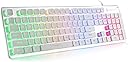
💻 Elevate Your Game with Style and Precision!
The LANGTU Membrane Gaming Keyboard combines a sleek aluminum alloy design with a vibrant 7-color LED backlight, offering both durability and aesthetic appeal. With 104 soft-touch keys and a lifespan of 10 million clicks, this keyboard is perfect for gamers and professionals alike. Its ergonomic design ensures comfort during extended use, while the water-resistant feature protects against spills. Compatible with multiple operating systems, this plug-and-play keyboard is the ultimate choice for enhancing your gaming and work experience.


| ASIN | B07QV839G5 |
| Additional Features | Lighting, Water Resistant |
| Antenna Location | Gaming, Office |
| Best Sellers Rank | #6,725 in Video Games ( See Top 100 in Video Games ) #46 in Mac Gaming Keyboards #507 in PC Gaming Keyboards |
| Brand | LANGTU |
| Built-In Media | Keycap Puller, USB Cable |
| Button Quantity | 104 |
| Color | White |
| Compatible Devices | Laptop, PC |
| Compatible Operating System Family | Linux, MacOS, Windows |
| Compatible Tablet Computer Models | AAUB P30 |
| Connectivity Technology | wired |
| Customer Reviews | 4.5 out of 5 stars 6,258 Reviews |
| Enclosure Material | Acrylonitrile Butadiene Styrene, Aluminum |
| External Testing Certification | Não aplicável |
| Hand Orientation | Ambidextrous |
| Item Dimensions L x W x H | 17.7"L x 5"W x 1.2"H |
| Item Weight | 0.7 Kilograms |
| Keyboard Backlighting Color Support | Single Color |
| Keyboard Description | Membrane |
| Keyboard Layout | QWERTY |
| Manufacturer | Shine Star Gaming |
| Model Name | L1 |
| Model Number | L1 UK |
| Number of Keys | 104 |
| Number of Sections | 2 |
| Power Source | Corded Electric |
| Recommended Uses For Product | Gaming, Office |
| Series Number | 1 |
| Special Feature | Lighting, Water Resistant |
| Style Name | Contemporary |
| Switch Type | Tactile |
| Theme | gaming |
| UPC | 751498070135 |
| Unit Count | 1.0 Count |
| Water Resistance Level | Water Resistant |
J**A
Works Perfectly for Mac!
I had a Logitech wireless keyboard for years and it finally started to fail me. It was an efficient little keyboard but I never took advantage of the wireless-ness. I use the keyboard strictly for work - I'm never sitting on my couch with a keyboard in my lap. I received this keyboard last night (1-day shipping, super fast) and after a morning working on the keyboard, I knew I needed to leave a review immediately. Aesthetically the keyboard is gorgeous. The silver panel is really sleek and modern and plays well with the reflection of the colored lights. I thought about making my own little video but really, what's the point? It looks exactly as it does in the photos as it does in person. As others have said, the keys make a nice satisfying click (I much prefer a mechanical -click- over the taps of the new flat Mac keyboards) but is not excessively loud. I also like that the keys are not printed but cut outs in the key cap which makes me believe there will be no room for smudging letters or discoloration. Initially I was a little disappointed when I realized that there were no multimedia functions on this keyboard, I used the volume control/mute buttons on the Logitech daily. After perusing this page I realized there are multimedia controls but they do not work with Mac. HOWEVER, as the copy/paste functions and other standard Mac functions DO work on this keyboard, I of course gave it a try. I'm happy to report that the FN+F2 and F3 control the volume. From what I can tell, this keyboard works as well as any other Mac keyboard. From what I can tell, there are only a couple of small issues here: 1. The keys are spread slightly further apart than a normal keyboard so they take a tiny bit of getting used to. I am an advanced typist and have had only the smallest learning curve in terms of getting used to it. 2. The spacebar is making a very small squeaking noise when tapped in a certain space. This might be able to be fixed if I pop it off and adjust it? Not sure, not a gamer and taking keys off of keyboards is not something I normally do. Otherwise, a really beautiful and functional piece of office equipment and quite a bargain too!! Highly recommend!
H**R
Very nice!
Straight out of the box this keyboard looks impressive. The fact that it lights up is probably why most people will buy it, and that is indeed impressive in its own right, but even before it lights up it looks way cooler than any standard keyboard. The metallic backboard is really shiny and the key surfaces are soft to the touch with kind of a cool futuristic font, so even before you plug in the usb cord and see it light up it's great. The main reason I was interested in this is because my current keyboard does not have any sort of backlighting, at all. I like to keep my living room relatively dim in the evening, just candles when possible, but I can't do that and type too. This keyboard solved that! I'm currently sitting in the dark but now I have an awesome colorful backlit glow that allows me to type in here too! As I've been using this over the last day or so, I've noticed two things. 1. I wish I had this at my office, because my nails always make a loud click-clack sound on my keyboard and it drives my co-workers crazy, but this keyboard is a little softer to the touch and therefore much quieter to the ear, and 2. The space key has a couple springs in it, and you can hear the springs vibrate slightly right after you touch it, every time you touch it (which is way more than you realize, once you can hear it every time). Within a minute or two I forgot all about it, but it is loud enough to be noticeable until you get used to it. I think this would be an especially cool gift for anyone who uses their keyboard in the dark; it looks great, works great, and seems durable/well made.
C**S
I can't believe how cheap this was
Because it certainly doesn't feel or look cheap. It looks higher end than it is. I've been using it for a little while, before deciding to write a review, and I love it just as much now as when I first got it. The keys are clacky, in a pleasing textile-ish kind of way, if you like that, but also not obnoxiously loud at the same time. I did notice the space bar is a bit springier sounding than the other keys like others have said, but I honestly don't even think about it when I'm using it anymore. The contrast of the white keys against the stainless is very aesthetically pleasing. I wish it had dedicated volume buttons, but I'll live. Because the keys are raised, I find it very easy to dust when cleaning--it even includes a cleaning brush to get between the keys, which I thought was a nice touch. The different light modes are fun, though I usually just keep them stationary. It just makes my work area a little more playful, and I love that because it's so me. I don't know much about gaming keyboards or what actually makes a keyboard a **gaming** keyboard, so maybe those who are more hardcore might be able to pick it apart. But I bet a kid would absolutely love this. I'm 38 and I sure do! Edit: I just sat down at my desk and realized I've been using this keyboard more than 6 months now, so I thought I'd come back to update. I still love it! It's really easy to type with, not a difficult adjustment going from my work computer to home. The clack of the keys is very satisfying for me. All the keys still work great and no letters have even begun to wear down. It cleans up really easy with a duster as well. I hope it continues to hold up so well, but honestly, even if it stopped working tomorrow, I'd probably still order it again because I like it so much!
M**N
Command Key for Keyboard Shortcuts only on left-hand side confused me for a bit!
As someone who writes a lot, I used keyboard shortcuts all the time for select all, copy an paste, and I was all set to write a review bemoaning that this keyboard did not allow for keyboard shortcuts. Then I examined my old keyboard (a simple HP got at a garage sale for $5 which lasted for years until my son spilled water on it and the keys started to stick) and a photo of a Mac keyboard and realized this keyboard only has a command key on the left hand side (WIN with a little lock symbol) whereas there is a command key on both sides of a mac and the old HP keyboard I was using with my mac. I always used the command key on the right hand side and could not figure out why keyboard shortcuts were not working on this keyboard! I felt pretty silly once I figured it out, but also thankful I wouldn't have to return this keyboard as I use shortcuts all the time. I only just got this keyboard last night, so I will update my review if things change, but these are my thoughts so far: Cons: 1. That there is only a command key on one side of the keyboard XD 2. There is no dedicated volume control button. I didn't realize how much I used that feature on my old keyboard until I went to turn down a very loud video and saw there was no volume control button. To change the volume you have to press the FN+(F2, F3, or F4 to lower, raise or mute the volume respectively.) I will have to see how much of a pain it is to get adapted to this. 3. Not all the multimedia keys work on mac. So the FN+F5 is "stop" and that does not work on iTunes or DVD player. Nor does FN+ (F1, F9, F10, F11, F12) which are (Multimedia, mail, web page/home page, my computer, and calculator respectively.) I think these commands are not compatible with Mac. But I probably wouldn't use these keys anyway, except the calculator key, so it doesn't bother me. 3. Not any quieter than my old standard keyboard. As this was one of the first ones to come up for "quiet mac keyboards" I expected it to be at least 50% quieter, but it is not at all. I wanted a quiet keyboard since I live on a converted school bus and often write while everyone is asleep. But my boyfriend says he can't hear me when I'm typing at night, which means this keyboard will work okay for me, but maybe not for everybody. Like others have said, you can hear the spring in the spacebar key, but so far this doesn't bother me. 4. When I lifted up the keyboard to clean some dust behind it, I lost everything I had written--twice. So there must be some key that I accidentally slightly pressed that ended up resetting the page somehow? I lifted it up gently a few times making sure not to touch any keys, and this did not happen. So be careful when moving the keyboard. 5. Led lights only display rainbow, which I didn't realize when I bought it, so you cannot choose only one color or a rotation of colors like on other illuminated keyboards. But the rainbow is really pretty, so this isn't a big issue for me. The lights can also be dimmed or shut off if you prefer. There is also a "breathing" mode where the lights mimic a breathing ebb and flow...I found that distracting, but it's a cool option if you're into that. Pros: 1. It's gorgeous! I love the metal and black which matches my iMac perfectly and the rainbow lights are so much fun! Probably the coolest keyboard I could ask for apart from one that looks like a typewriter, haha, but that one is on my "future anachronistic goals" list. ;) 2. They keys are really nice to use, have a good responsiveness (from a writer's perspective on a brand-new keyboard--will update if this changes.) It has a good mechanical feel.
C**N
Perfect for dual-use work and personal.
I have bought 3 of these. I am about to buy a 4th. When my son needed to replace his gaming keyboard I gave him one of these. That was 2 years ago, and he's on it all the time and the keyboard still looks new. I use mine for work and personal use with a kvm switch and it's perfect.
R**L
So nice I'm going to buy another one for work!
I have had this keyboard for over a year now and i love it! I think the way it clicks and sounds is nice, and it is not super loud like most gaming keyboards. I think I am going to buy another one to take to work with me! The colors of the lights are very cute and vibrant, it feels like it is very nice quality, and being wired is so nice so you don't have to charge it. I think it is a great value for the price.
N**E
More than likely returning because of unreliable spacebar
For the price, this is a really great keyboard. The colors are awesome and I love how they look with the metal finish and white, though some keys are difficult to see. It is fairly quiet compared to other keyboards I have used. However the spacebar on my keyboard makes this bizarre springy type noise when you press it. I looked underneath and noticed it's probably because of the springs. It is quite annoying and sometimes just moving the keyboard will replicate that sound. Otherwise no other compliants about the sound. My biggest issue and probably the reason why I will return this is the spacebar. When I got this I switched from the keyboard on my Macbook Pro to this so as usual I expected a little getting used to the feel of the keyboard, a few typos here and there, but it hasn't really been the case. It's actually the spacebar that's giving me so many issues. I'm not sure if it's just mine or how they all are. I've found that unless I press in the dead center by the light it doesn't register on the first click. When I type, if I hit the left edge (that's the side I usually hit for the space) of the spacebar it registers 2 out of 10 times. And then sometimes I'm pressing it so hard and often that it gives me a double space. It's anyone's guess what will show up. I have not had this issue with any other keys. I can't really use a keyboard without a properly working spacebar, and I can't be making so many typos. Otherwise, it's a great keyboard. It's inexpensive, colorful, relatively quiet, and wired.
N**Z
It’s cute
It works great and colors are fun and vivid
M**A
Muito bom!!!
Bom, comprei o teclado branco e é meu primeiro dia com ele mas de cara já me surpreendi com a beleza do teclado, ele é bem delicado, bem fininho, muito mais bonito que nas fotos que vi aqui e o led sai de cada tecla, não estou acostumada com teclado e achei q o barulho iria me incomodar no comeco mas as teclas são muito confortaveis! Chegou antes do prazo e lindo demais! Do jeito que eu queria 🥰
J**S
A solid keyboard!
As a disclaimer, I am NOT familiar with expensive gaming keyboards. I am a casual gamer, and also enjoy writing on my free time, so I really needed a replacement keyboard when the 'e' key on my laptop's keyboard completely stopped working. But man, this keyboard is great! I'm definitely happy with my purchase. It's clicky, receptive, and the lights are quite nice; I haven't yet played around with settings to keep them off when it's connected, as they're not at all too bothersome while I am using it. It offers really nice lighting when used in the dark, as well! I personally find the sound of typing to be at a pleasant level - not extremely quiet (probably not best if you're trying to do late-night gaming while someone else is sleeping nearby), but not horrendously loud, either. I'm not sure if I got lucky with my keyboard, as I didn't experience the issues with the spacebar as others have. So far, so good with all the buttons - even the number pad works like a charm, as much as the Windows key and F keys do. I'd recommend this keyboard for anyone who honestly just wants an affordable choice that is sturdy, nice to type on, and has lovely lighting.
R**S
Tastatur
alles prima, Artikel wie beschrieben
A**R
É LINDO, MAS NÃO É IGUAL A FOTO
esperava um teclado branco/transparente e veio um prateado com preto. é lindo ainda, mas é diferente da foto. tirando isso, é muito bom e prático - não me arrependi.
S**E
READ THIS REVIEW FOR A GUIDE TO MAKE THE SPACEBAR SILENT.
So this is my 3rd keyboard of this exact same model except now I've purchased the black one. The 1st model I had I spilled a liquid on it and ruined it. I won't mention which liquid but it wasn't just normal water, juice, alcohol or a bodily fluid. The 2nd keyboard I bought is still perfectly fine. When buying the 2nd and then the 3rd I did look for other options. I've been to stores in my region and looked online many times for the right keyboard. What that is to me is one that's full sized, is quiet and isn't mechanical. These days that's slim pickings to find a half way decent keyboard that doesn't feel and look like it's from the 2000's era. Every time I look at other options I always come back to this keyboard. The 2nd one was white, and over time the white keyboards won't stay fully white for me. Unless I tear down the keyboard and remove the plating on top etc. I probably could of done that now looking at it, but it is what it is. Plus the hassle of just doing all of that to clean something once a month is ridiculous. If you buy the white version, be warned, it's a dirt magnet and the added brush only slows it down. ---SPACEBAR GUIDE TO MAKE IT SILENT--- Although there's 1 problem with the keyboard and that's the spacebar itself. The spacebar is listed as not being silent if you scroll down enough on the ad, but I and every other person I take it didn't read that part. So for my 1st two keyboards I did the trick people have already posted here "Remove the springs" and it'll become more quiet. While that is true, it removes the tin sound, it doesn't solve the problem. Then the keyboard will sound hollow when pressed and that creates an equally annoying sound over time. So here's what you do if you want to make the spacebar more silent: Get tape. I used bandage tape since it can be molded in a sense to wrap around the springs better. Remove the springs from the spacebar. Now cut little strips in the tape and proceed to apply it on the edges of the springs. For the side of the spring that will be laying against the keyboard itself, try and make the cuts very thin. I'm talking at most the thickness of a match stick laying flat. This will take time. At least a half hour, so have YouTube up or something. The reason is because on the bottom it's hard to squeeze them on if the tape is too thick. For the top side of the spring that will lay against the spacebar key itself, you should make the cuts a little more thick. Say the size of two match sticks laying flat. This is because the top spikes that go inside of the springs are much more thin, and the added tape cushioning will help only help to make the keyboard more silent. The more you can get on here without the tape touching the spikes, the better. IMPORTANT: Make sure you're wrapping the tape around VERY tightly, and trim off any excess that you can on the inside of the spring. The reason for this is if there's even just a tiny bit of tape left over handing into the spring, it can cause the key to jam up. The tape will hook onto one of the inner rings. I was able to mostly avoid this other than once. Be sure to tweak it a little bit until the spacebar feels right for you. I do feel that it is a tiny bit more difficult to press the space bar than it was with just springs in its default state, but it's still much easier to press it than having no springs at all. The keyboard needs stability to function. The tape not only dampens the sound but, and this is only speculation that the tape could extend the lifespan of the springs. My theory behind that is that the springs themselves will break after X amount of key vibrations. The tape could possibly help dampen those vibrations and thus give the springs more life. This last part however should be taken with a grain of salt. All in all solid keyboard that has lived longer than a lot of other more expensive keyboards.
Trustpilot
2 weeks ago
1 week ago