Desertcart purchases this item on your behalf and handles shipping, customs, and support to Argentina.
๐ Elevate your PCโs storage game with speed and style!
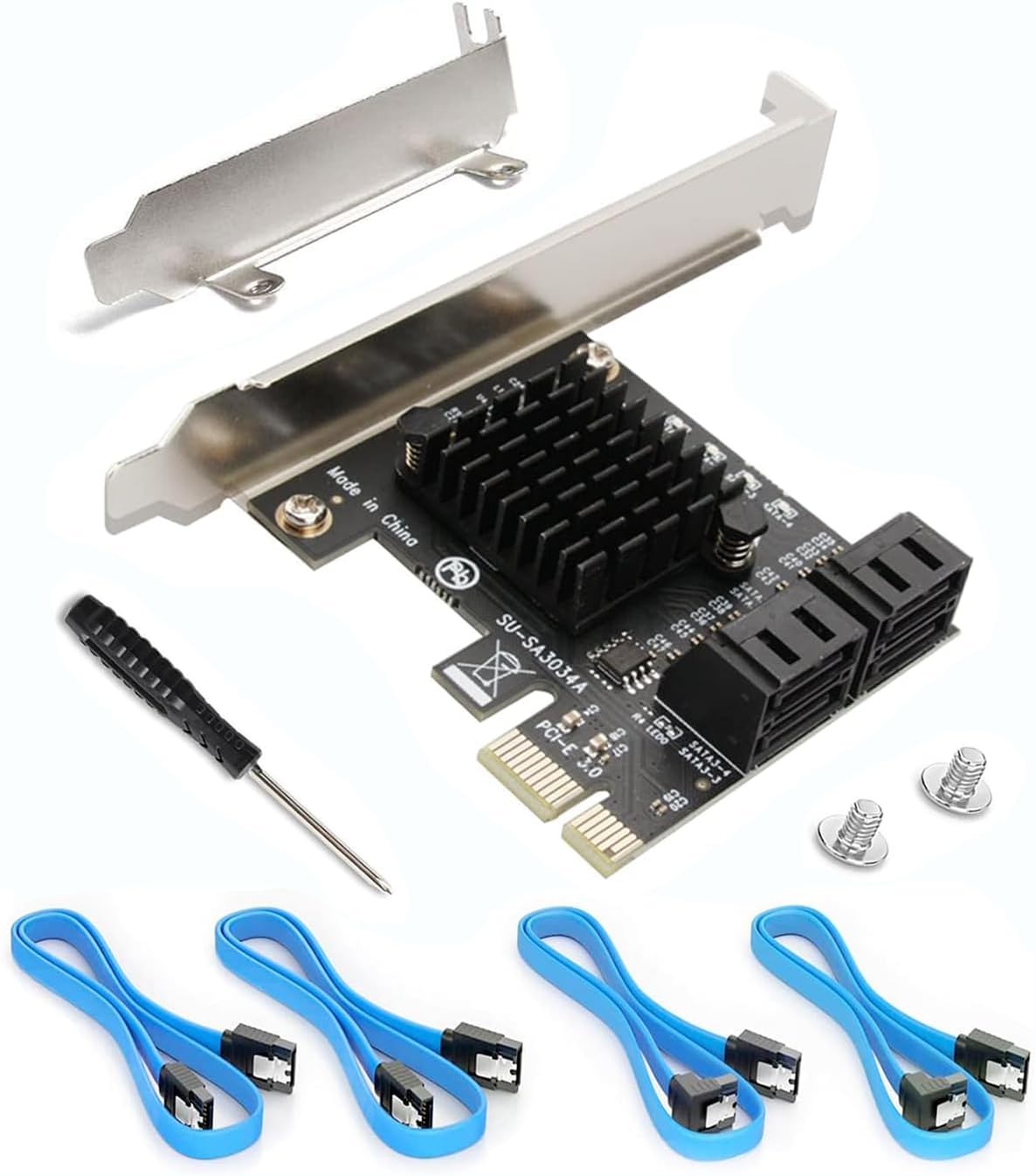
The Ziyituod SATA PCIe 3.0 expansion card offers 4 high-speed SATA 3.0 ports with included cables and a low-profile bracket, enabling users to add multiple storage devices with 6Gb/s transfer rates. Featuring the reliable Asmedia1064 chipset, it supports booting from the controller (non-RAID) and is compatible with a wide range of operating systems including Windows, Mac, Linux, and NAS environments, making it an ideal upgrade for professional and enthusiast setups.


| ASIN | B07SZDK6CZ |
| Best Sellers Rank | #1,894 in Computer Internal Components |
| Brand | Ziyituod |
| Compatible Devices | Personal Computer, Laptop |
| Customer Reviews | 4.5 out of 5 stars 934 Reviews |
| Hardware Interface | PCI, PCI Express x1, PCIE x 4 |
| Item Weight | 3.52 ounces |
| Manufacturer | Ziyituod |
| Mfr Part Number | ZYT-SA3014 |
| Model Number | ZYT-SA3014 |
| Number of Items | 1 |
| Operating System | Linux |
| Style | standard |
| Style Name | standard |
| UPC | 753594509335 |
| Unit Count | 1 Count |
E**S
Rock-Solid SATA Expansion That Just Works
Rock-Solid SATA Expansion That Just Works This PCIe SATA expansion card is one of those upgrades that instantly makes a system feel more capable. I installed it in a mid-tower build that was running out of SATA ports, and it picked up my extra SSDs and HDDs without any fuss. The included cables and low-profile bracket were a nice touchโno need to buy extras or hunt around for the right fit. Performance has been steady. Drives are recognized immediately at boot, and transfer speeds are right where they should be for SATA 3.0. Iโve even tested it as a boot device with an SSD, and it worked flawlessly, which isnโt always the case with lower-end cards. The build quality is solid, and nothing about it feels cheap or flimsy. One thing to keep in mind is that while this is non-RAID (which is exactly what I wanted), itโs purely for adding portsโdonโt expect fancy RAID management or enterprise-level features. Also, airflow in smaller cases might get tight with the extra cabling, so plan your layout. Bottom line: A reliable, straightforward way to expand SATA connectivity without headaches. For home builds or small office setups, itโs a plug-and-play solution that delivers exactly what it promises.
A**Y
Great device because it works and needs no extra drivers
I had an 8-port SATA 3.0 card. It came with drivers but didn't explain which version of the two sets of drives that came on the CD. Anyway, Windows 10 found some drivers for it and it worked for the most part. I still had an issue with the fact that all of the hard drives on this card showed up in Windows 10 as removable/portable drives, which was a pain. Each one could be ejected even though they were installed inside my PC. However, my motherboard as 10 sata ports on it and two sata controllers, which two ports on the second sata controller. Those two port also showed up as removable/portable drives, even though they are installed inside the PC. After a lot of searching on the internet for a solution, I finally found a registry mod that would allow those drives to be set to not show up as portable in Windows 10. That worked for the ports on the card, but the two ports on the motherboard didn't work. So, for those, I tried to update the BIOS in the computer. Unfortunately, after doing that, they computer would not longer boot up with the 8-port sata card installed. That lead to me getting two of these 4-port cards. My computer boots fine with these and I know have 8 extra sata drives installed in addition to the 10 sata drives on the motherboard (only 8 of these are hard drives, the other two are the boot SSD and a Blu-ray player). What I like about this one this that no driver is needed. I will install a third one today and stop using those two sata ports on the motherboard that result in the two drives showing up an portable, ejectable drives in Windows 10. For anyone having similar problems with Windows 10 Pro showing your sata drives as portable/ejectable drives, there is the solution I found on the internet: I had the same problem but only had one drive. I found this in another forum and decided to save it. If Kbird's solution does not work try navigating to HKEY_LOCAL_MACHINE\SYSTEM\ControlSet001\Services\storahci\Parameters\Device in the registry. Once you are on the Device Key, In the right hand plane, right click and create a new Multi-String Value Name the new value TreatAsInternalPort Double click the new value to edit it. In the Value Data section, start with 0 then 1 2 3 depending on how many ports you have. The trick here is they must be numbered vertically. The value data section will look like this: 0 1 2 3 4 5 6 7 8 9 10 11 The example will work for twelve ports. It is important that you add a separate line for each port. This what I 'm using on Windows 10 Pro version 1809. Also, this is a registry edit so DO NOT DO THIS if you are not comfortable doing registry edits as this kind of thing could potentially trash your computer. Backups should be made first. Obviously, someone with nearly 20 SATA devices is probably not going to be a computer rookie. :)
W**T
Truly plug and play!
Very pleased with the SATA card as it works as expected!
S**S
Good option to expand or build out a general purpose file server
Well engineered, fits nicely in a PCI-X1 slot. Has LEDs along the top edge showing which of the four SATA ports are connected. The included cables are latching-type, with two of the four right-angled for some reason. Drives with this device are mapped into the Disk Management MSC app above the on-board SATA ports. Sustained read from adapter HDD to on-board HDD is around 100Mb/sec, write is 150Mb/sec with no other traffic. This is a good option to add more general-purpose SATA ports in an otherwise port-limited machine with a spare PCI X1 slot.
A**R
Great Add-on Card for Expanding your Hard Drives!
I was originally looking for a RAID controller as I've been building up a backup server/workstation solution for my apartment. but at the time I was still shopping around. In my search I ended up coming across this little SATA 4 port expansion card for a very reasonable price. Since then I eventually picked up some LSI RAID Controller card and attempted to install the thing but ended up hitting a brick wall due to it having issues with utilizing PCI slots that happen to be allocated for GPUs. So what to do instead? I remembered the little SATA card I'd purchased first and through that bad boy in this old case. Pros - Worked without any type of drivers or software. Instant success and access to my drives. Cons - The fact that its not a RAID Controller, but I knew that from the get-go. Sometimes I'm hesitant about buying from completely unknown companies I find on Amazon, however I know everything is manufactured overseas so its very common to find absolutely unknown brands from time to time and with this, I found a nice little gem. I may end up checking out their other products because I'm sure they'll probably fill some hidden niche need i may have expansion wise or didn't even know I needed yet! If your motherboard is lacking enough SATA ports and you're tired of adding external solutions? Definitely try to this SATA add on card solution.
J**H
This thing works like a breeze. No complaints!
The installation of this Ziyituod PCIe SATA Card, 4 Port was a breeze and worked plug and play. I love it that this included 4 SATA cables and it has a separate plate for the small form factor desktop box too. I have 5 hard drives and was plannning to add 2 backup drives and a DVD drive for burning DVDs. upon installation of the "mini" card and connecting the sata drives booted uo windows 10 and the system automatically detected and installed the drives. I tried transferring a 1TB data with the 7200rpm HDD and since it was transferring the PCI-E the transfer was utterly fast. I researched and PCIe provides a faster interface speed than SATA. An SSD connected via a PCIe 3.0 x16 interface can have a link speed of 16 Gb/s. In contrast the SATA 3.0 standard only provides 6.0 Gb/s so this makes life easier and conveneient yeah! Now I can enjoy my extra hard drives and backing uo my important files. Thank you Ziyituod for this amazing product!
L**E
Works Out of the Box
Works perfectly out of the box. Started with a Windows 11 pc, then moved it to my Windows 10 home theater system. Nothing to install on either system. Also, 2 of the 4 cables have a 90 degree angle connector at one end. Very helpful in the smaller case in chose.
T**N
Plug and Play!
I used this in a machine so I could make a TrueNAS machine. I was able to plug it in and connect the drives and the machine immediately recognized all of the drives without any additional configuration. I appreciated the included SATA cables and the extra bracket in case I need to install it in a small form factor. Very pleased with this card and would absolutely buy another if the need arises.
Trustpilot
2 months ago
1 month ago