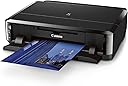
šØļø Elevate your prints, impress your world ā wireless, vibrant, and effortlessly professional.
The Canon IP7220 is a wireless color photo printer designed for light to moderate home and office use, delivering exceptional 9600 x 2400 dpi photo quality with a 5-ink tank system. It supports AirPrint for driver-free mobile printing, features automatic duplex printing, and offers unique CD/DVD direct printing capabilities. Compact yet versatile, it balances high-resolution output with eco-friendly ink replacement, making it ideal for professionals and creatives seeking premium photo prints and custom disc labeling without the bulk of multifunction devices.
| ASIN | B00AGV7TQ6 |
| Additional Printer functions | Print Only |
| Best Sellers Rank | #954,985 in Office Products ( See Top 100 in Office Products ) #280 in Desktop Photo Printers |
| Color Depth | 24 bpp |
| Compatible Cartridge | [OBTAINED FROM EXTERNAL SOURCE] |
| Compatible Devices | Printer |
| Control Method | App |
| Controller Type | Android, iOS |
| Customer Reviews | 4.0 4.0 out of 5 stars (610) |
| Date First Available | December 4, 2012 |
| Dual-sided printing | Yes |
| Duplex | Automatic |
| Global Trade Identification Number | 00013803148374 |
| Hardware Interface | USB |
| Included Components | Canon 6219b002 Pixma Ip7220 Printer |
| Ink Color | Cyan, Magenta, Yellow, Black |
| Is Discontinued By Manufacturer | No |
| Item Weight | 14.4 pounds |
| Item model number | IP7220 |
| Manufacturer | Canon USA Inc. |
| Max Copy Speed (Black & White) | 15 ppm |
| Max Input Sheet Capacity | 300 |
| Max copy resolution black-white | 9600 dpi |
| Max copy resolution color | up to 9600 x 2400 dpi |
| Maximum Black and White Print Resolution | 9600 dpi |
| Maximum Color Print Resolution | 9600 x 2400 dpi |
| Maximum Media Size | 8.5 x 14 inch |
| Memory Storage Capacity | 64 MB |
| Model Series | IP |
| Number of Trays | 1 |
| Output sheet capacity | 250 |
| Power Consumption | 24 Watts |
| Print media | Paper (plain) |
| Printer Ink Type | Canon inkjet |
| Product Dimensions | 14.5 x 17.8 x 5.1 inches |
| Scanner Type | document |
| Sheet Size | 4 inch x 6 Inches, 5 inch x 7 Inches, 8 inch x 10 Inches, 8.5 inch x 11 Inches |
| Specific Uses For Product | Home, Office |
| Supported Media Sizes | 4 x 6 inches |
| Total USB Ports | 1 |
| UPC | 640206620123 013803148374 801201165716 642125228978 |
| Warranty Type | limited warranty |
| Wattage | 24 watts |
L**N
Absolutely love this printer!
It's very hard to find a decent single use printer nowadays. Almost all of them are multifunction, but since I already have a B&W laser S/C/F I was only looking for a good quality photo printer. After searching around I saw very good reviews of this printer and decided to buy it. First impression: It is flat, wide and deep. So as some over reviewers have stated it can take up a bit of desk space, but the design is perfect to put in a shelf/cubbyhole. Let me try to explain a bit better. If you just set this thing on a table top it's going to eat up a lot of space. However, all the paper and maintenance access is on the front of the printer so this would be perfect to have a shelf over it and stack things above it. I have a printer stand that has a wide 'paper slot' under the top for storage that this would probably fit perfectly in. Because it's wireless you can put it anywhere in your room and don't have to worry about any cables but the power cord. I wouldn't stack anything directly on top of it because the maintenance access door flips up and needs about 6 inches of clearance, but unless you are doing a LOT of printing you won't have to get into it all that often. Print Quality: As long as the image quality is good, the print quality is amazing. I have a few phone photos that are not the best but they still came out pretty decent all things considered. I'm no photo snob so I can't give a 'professional' opinion. But for a mom wanting to have cheap photos of her family at a moment's notice, this is perfect. I've made some amazing photos that are now hanging framed on my walls right next to my professionally done photos and you can't tell the difference. Wireless Printing: Setup requires you to use a USB port once unless you have a wireless router that supports WPS setups. Mine does not. However after initial setup you can disconnect it and not have to worry about it again. I've printed using Picasa 3 and it's been perfect. It even has some nice options, though if you try to do borderless printing on normal paper it yells at you a lot. The only reason why I tried was because I had a pdf for a color poster for my daughter. Turned out pretty well too. I did just try printing from my iPhone 4s, but using the default photo app gives you no options and it image didn't size to the paper I had selected nor gave me any option for zoom/crop to fit. There might be other photo print apps that do this better than the native print app though. My only problem is that I don't keep the printer stocked with photo paper so it seems rather pointless to print directly from my phone. I find it much better to print from my computer and have access to the full range of printer settings and editing options. One complaint I saw all over the main canon website was the lack of rear paper feed. Honestly I saw this as a bonus instead of a drawback, but then all the people who were complaining sounded like they were businesses doing a lot of heavy duty printing. This is not that kind of printer. My belief is that this is aimed at light business or home use. People that are only really printing one to a handful of photos at a time. Recommendations are to only print one page at a time, but I have done up to 5 with no problems. Some complained of paper jams but it makes me wonder if they had the alignment guides setup properly. Unlike most printers, you don't shove the paper all the way to the back of the tray wall. There is actually a gap in the back. Set the front guide and align your paper to IT rather than the back of the tray. You also need to only put a few photo papers in at at time, especially with glossy paper as they have a tendency to stick together. One thing to beware of is that the trays feed from the bottom, upside down, and reversed. Very odd. If your photo paper doesn't have text on the back of the paper this can lead to some confusion as to the direction the paper needs to go in. Thankfully there are pictures on the paper trays to help remind you. Some people have stated that the ink runs out fast, but I've been printing a bit and haven't even used half of the ink. If you're doing a LOT of color printing my guess is that you could run out quick, but for normal household use I find the regular cartridges lasting ok. Of course this could also be due to the fact that unless I'm doing photos or something that requires color printing I use my laser for all my other printing needs. There are XL cartridges available but I don't foresee a need for me to get any. Another complaint I saw was about the alignment being off but I think that person had a defective device as everything has been lining up perfectly for me. As of yet I haven't tried the duplex printing nor the printable disk feature so I can't comment on them at this time. Recommendation: If you are going to be printing more than a handful of photos at one time I'd suggest getting something more heavy duty than the ip7220. If you're someone who's only looking for something to print standard 4x6 photos from their camera or phone, I'd suggest a printer more like the Selphy Compact line. If, however, you're right in the middle of that and want something with the flexibility to print on different paper sizes and styles then this is the printer for you. I think it's perfect for light to moderate home and business use.
T**F
Outstanding Printer for the Cost
Introduction For what you pay, this is quite simply an outstanding printer! I was creating a DVD set of a web series for a friend (and one for myself), and printed a whopping 16 discs back-to-back over the period of several hours. The quality looks every bit as good as a professionally-done disc and the printer trucked along well for a couple hours of continuous use out of the box. The people leaving one star reviews are, quite frankly, fools who are incapable of reading or following instructions, or who are so entitled they expect gold for the price of pyrite. Now, is it perfect? No. It is certainly not plug-and-play and it took about a half hour to get it up and running. I do fear the ink cartridges will wear down fast, but this isn't a printer designed for daily use (that's what my HP all-in-one is for). All that being said, if you have the basic adult ability to follow instructions, setup is not difficult. It's a step-by-step process. Noise Yes, it's a little noisy, and the process for printing discs does feel a little bit flimsy (in that I'm concerned about eventual physical breakage), but that could well just be my own paranoia. So far there hasn't been a single problem. Instruction Manual Some reviewers below have claimed there are "no useful instructions." Again, these are people that lack the basic skills to read--there is a full online manual which walked me completely through the process of disc printing. It's also 100% searchable and not an ugly PDF like so many vendors are using today. Overall, it's an outstanding manual/help file/guide. Setup Again, this is not a plug-and-play printer. It took a good half-hour to get it set up and running, including the several-minute-long process of aligning the print heads, so be prepared to put in the time. If you have a WPS router, there is a quick setup to connect to wifi. If you don't, you'll need to temporarily connect your printer to your computer via a USB cable. The folks who have complained that it doesn't connect to the network, I strongly suspect don't follow instructions. You do NOT connect the USB cable until the online setup instructions TELL YOU TO DO SO. Jumping the gun will skew your setup. I have little patience, however, for people that cannot follow basic instructions--a skill we all learned in kindergarten. If you're capable of following a step-by-step process, you'll have no issues. Disc Printing Talking of disc printing, there are a few areas in the software interface that could be improved. The Image Garden software is fairly full-featured, but first, could use a blank template from the start. Second, it could do with the ability to move images on your disc. As it stands, to create a blank disk using only your own photo is a very basic seven-step process that I was able to figure out after less than 5 minutes of clicking options: 1. Choose the art you wish to use. 2. Select the "New Art" tab, and then "Disc Art." 3. Just click "OK" when the select template list comes up. 4. Choose "Background" and check the "Photograph" box. Click "Ok." 5. Select "Layout" and choose the blank disc with text (the first one). The template you had will now vanish and you'll have a blank disc with 3 text boxes. 6. Drag your photo from the top bar onto the disc. 7. Profit. A tip about creating graphics: you can do so in just about any imaging program you like (I actually use an ancient version of Paint Shop Pro, though I have a current Photoshop as well), and import them right into Image Garden by navigating to your images folder on your computer. The key is to make sure your graphic is either a circle or a square. Image Garden will size it automatically to cover the disc. You will see "INSERT TEXT HERE" on the design screen; if you do not insert any text, the "INSERT TEXT HERE" will not print on the discs. It's just a place holder. When printing the discs, again, it's a step-by-step process and the software walks you through it. Don't insert the tray before you're told to do so. The online manual warns that you could mess up the device if you do--the in-software instructions are a bit less gloom-and-doom (they warn that the disc will simply be ejected if you put it in early). I suspect the latter is the truth and the former, a CYA on Canon's part. The Good, The Bad, and the Ugly For these relatively minor things--the lack of plug-and-play, the concern about durability, small ink cartridges, and lack of a basic blank disc template on the intro screen of Image Garden, I'm not giving it 5-stars. The cost of ink could potentially be a concern; I haven't looked, yet. That being said, I paid $69 for this printer here on Amazon, and even at the $99 MSRP, for the ability to print photo-quality discs and 6x9 photos, for such versatility, this is a solid device. You need to take the cost into account, and if this printer lasts a year, I'll have gotten my money out of it. Hell, for 16 discs I've already almost done so. Not to mention, at $69, if the ink cartridges are too expensive, I'll just drop it off at the local thrift shop (and take a tax deduction) and buy a new printer when the time comes. In short, People should quit whining. In the end, this is an outstanding printer for the cost, if you are looking for a second printer that's for custom use (photos and discs), and not an everyday-use device. Highly recommended. If you're looking for an everyday printer, the HP OfficeJet 8600 series (which I also own) is an outstanding all-in-one printer that delivers crisp, high-quality results (even on 8x5x11 photo paper) at a good price. I find great utility in owning both printers. [EDIT] After having checked, the ink for this printer only costs about $55 for all five cartridges together--just over half of what it costs to put ink in my HP OfficeJet. The reviewers below complaining about the cost of ink are also suffering from a high level of entitlement.
A**K
GREAT.
A**A
No tiene buena calidad de impresión, la tinta se acaba muy pronto, tarda mucho en imprimir. No es un buen producto.
J**S
el articulo que me mandaron estaba descompuesto del cabezal, no lo quise enviar para regresarlo, solo me quedo una mala experiencia comprar en AMAZON
Trustpilot
2 months ago
2 weeks ago