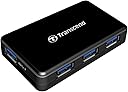
⚡ Power up your productivity with Transcend’s sleek USB 3.0 hub!
The Transcend USB 3.0 4-Port Hub TS-HUB3K is a compact, aluminum-encased device that expands a single USB 3.0 port into four, including a dedicated 2A fast charging port. Supporting up to 5Gbps data transfer and USB Battery Charging v1.2, it’s compatible across Windows, Mac, Linux, and Raspberry Pi, making it the perfect accessory for professionals seeking efficient connectivity and rapid device charging on the go.


| ASIN | B005D69QD8 |
| Additional Features | Fast Charging |
| Best Sellers Rank | #17,284 in Computers & Accessories ( See Top 100 in Computers & Accessories ) #28 in Computer Networking Hubs |
| Brand | Transcend |
| Built-In Media | Comes with 3 USB 3.0 ports and 1 fast charging port |
| Color | Black |
| Compatible Devices | Gaming Consoles, Laptops, Mouse, Tablets, USB Flash Drives |
| Customer Reviews | 4.1 out of 5 stars 672 Reviews |
| Data Transfer Rate | 5000 Megabits Per Second |
| Enclosure Material | Aluminum |
| Global Trade Identification Number | 00760557820796 |
| Hardware Interface | USB 3.0 |
| Item Dimensions L x W x H | 3.09"L x 1.95"W x 0.59"H |
| Item Height | 1.95 inches |
| Item Weight | 0.1 Pounds |
| Manufacturer | Transcend Information |
| Number of Ports | 4 |
| Operating System | Linux, Mac, Windows |
| Special Feature | Fast Charging |
| Total USB Ports | 4 |
| Total Usb Ports | 4 |
| UPC | 803983009400 132017708812 021111525817 760557820796 |
| Warranty Description | 2 year limited warranty |
S**D
ATTENTION ALL RASPBERRY PI USERS!!! THIS IS THE 1!
100% Compatible with Raspberry PI 2. Will power the Pi and anything attached to it. I like the fact that it is usb 3... if I need it for something other than Pi or if Pi gets an upgrade...its ready! NOTE: If you try to power the pi and the hub separately: If you power on the hub 1st the Pi will not boot. If you boot the Pi 1st or power the Pi off the hub everything works as you would expect. If you do not have a USB to Micro Usb cable it would be a good idea to get one. Also the hub is slightly smaller than the Pi the 2 fit nicely together.
M**X
Powerful USB 3.0 Hub
This thing is great. It has 4 USB 3.0 slots for your devices. Another one is on the back for connecting to your computer. This has lots of power. I am able to charge my Kindle Fire, Galaxy S3, and run my external HDD at the same time. The USB 3.0 cable that is supposed to run to your computer is pretty short. About 1.5-2ft, so I ended up swapping it out with another one I had. This thing will work without the included power adapter, but it will only be able to run off the power from your computer. I was wondering why it wasn't charging even though I could see my devices, it turned out the power fell out of the back. I would definitely recommend this product.
S**N
Good quality.
Powers a Raspberry PI which is what I bought it for! Works great, still have it months later.
J**Z
Fast hub, Great looking - supplied cable too short!
Just what I needing for my desktop setup. I only have 2-USB 3.0 ports on the back of my tower, so I use this to supplement my need for additional 3.0 ports. The port on the side is supposed to be a "powered" usb port, however it would not charge my iPad for some reason. Haven't tried anything else. All 4 ports are 3.0 speeds (tested). NOTE: THIS COMES WITH A SHORT USB3 CABLE! So you may what to buy a longer cable.
A**.
Great little hub
Have had this hub for 5 months and can say it is serving me quite well on my Mac. Has three regular USB 3.0 connections and 1 Super Speed (fast charging) connection. I use the Super Speed for charging iPod, iPhone and iPad mini. Sometimes the computer will argue that the device is not being charged, but I look at the device and it shows the charging symbol and does indeed charge at a reasonable rate. I am using it powered and have used all four at the same time-no problems. One port is dedicated to an external drive (time machine), and the other three are used intermittently. I have noticed that once in a great while, probably because of the external drive, that it has lost connection. But it does not happen frequently and I think that it might be that the drive, in an Anker enclosure (which is great), might be going into hibernation or something. Again, happens maybe once a month if that. The fit of the connections is suburb, very secure. It is nicely sized (small) and the ports light up with a soft blue LED when a connection is active. Transfer speeds seem comparable to plugging directly into computer USB slots i.e. Fast!
G**D
Barely works with USB 3 flash drives
This was one of my most frustrating purchases ever. The first hub worked fine with USB 2 flash drives, hard drives, and a scanner. However, it wouldn't recognize any of the USB 3 flash drives I tried. The light on the hub wouldn't illuminate to indicate a connection, and the drive would never show up on the computer. I tried different cables between the hub and the computer, tried the USB 3 flash drives on different computers, and so on. When I didn't use the hub, everything worked fine. As I was just beyond the return period, I contacted Transcend. I went through some troubleshooting steps with them and tried a firmware update they suggested. Nothing helped, and they concluded I had a bad hub. I went through the RMA process. It took nearly a month from the day I contacted Transcend support, went through their troubleshooting steps and returned the bad hub, to the day I received a replacement hub. The replacement hub was also faulty! This time, the drives showed up on the computer and the hub lit up to show a connection. I was able to copy data from USB 3 flash drives (Mushkin and Patriot brands) without a problem. However, I could not copy data to those drives when connected to the hub. The copy process would never complete and it would hang. Formatting one of the drives failed to finish when connected to the hub, when I was making sure the flash drive wasn't bad. I concluded that I had received two bad hubs in a row. I was fed up and contacted Amazon on the off chance that they could help me. I did not want to go through another RMA with Transcend and I didn't want another replacement, as these hubs are obviously shoddy. I just wanted my money back. I am very appreciative that Amazon understood my frustration and allowed me to return the faulty replacement, despite being outside the standard return period. I had done all I could with Transcend, and I got two faulty products in a row. I have no problem with Transcend's support, but I cannot recommend this USB 3 hub based on my experience. It seems every single USB 3 hub on the market has a notable number of bad reviews. I don't know why no one has succeeded in making a reliable USB 3 hub.
M**D
Unfortunate that it can't operate without using the DC power adapter.
It's OK but it's unfortunate that it can't operate without using the DC power adapter. I wish someone would have mentioned that.. I tried several USB flash drives and most of them don't show up at all unless you connect the external power adapter. One out of three of my USB flash drives was detected. The one that worked only ran at USB 1.0 speeds though and it said to connect a USB 2.0 hub to get max speed (that's a funny message for a USB 3.0 hub). After connecting the power adapter then it worked as specified. I have some other USB hubs that work fine for most things using power from the computer USB ports directly. A USB 2.0 hub from Dlink works fine that way and a new USB 3.0 hub from Plugable can do it too. On this one, the hub itself gets detected but then it can't power other USB devices without plugging in the external power cord. So, it's ok as long as you remember to bring the power adapter cord along.
M**S
Awesome hub.
Awesome hub. I work Ironman events leading a team of 8 to 10 photographers shooting anywhere from 50k to 100k images during an event on anywhere between 30 and 50 flash cards. Being able to plug in 4 card readers to get all those images onto my hard drive quickly is ESSENTIAL. This hub makes it happen. And, when you plug in 4 card readers/cards it doesn't take any longer to download all 4 than it would a single card because the bottleneck is not the USB 3 port.
Trustpilot
1 week ago
1 day ago