Buy anything from 5,000+ international stores. One checkout price. No surprise fees. Join 2M+ shoppers on Desertcart.
Desertcart purchases this item on your behalf and handles shipping, customs, and support to Argentina.
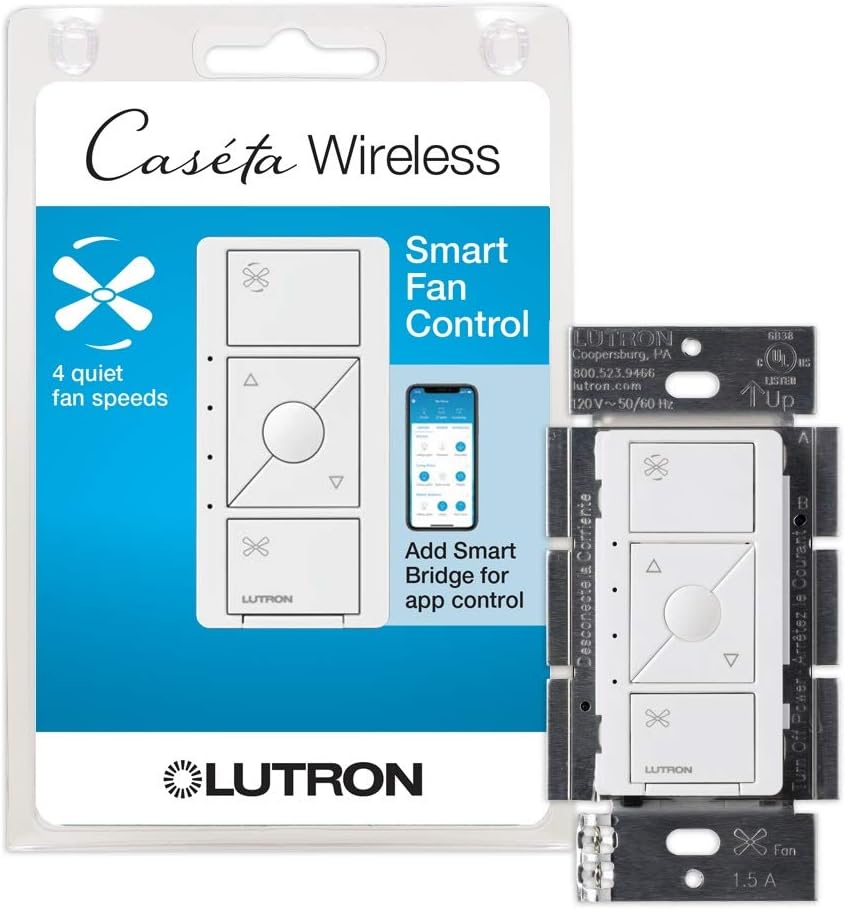
๐ฌ๏ธ Elevate your comfortโsmart fan control that keeps you cool and connected.
The Lutron Caseta Smart Fan Speed Control Switch offers 4-speed fan control plus off, replacing traditional pull chains with smart, wall-mounted convenience. Compatible with major smart home ecosystems (Alexa, Google, Apple HomeKit) via the Caseta Smart Hub, it enables voice, app, and remote control. Easy to install in single-pole or 3-way setups without rewiring, it supports most 3-speed AC motor ceiling fans, delivering reliable, customizable comfort for tech-savvy homeowners.


| ASIN | B07N1GXM38 |
| Actuator Type | Push Button |
| Best Sellers Rank | #15,354 in Tools & Home Improvement ( See Top 100 in Tools & Home Improvement ) #64 in Electrical Light Switches |
| Brand | Lutron |
| Brand Name | Lutron |
| Circuit Type | 3-way |
| Color | White |
| Compatible Devices | Amazon Alexa, Apple Home, Google Assistant, Ring, Serena shades, Sonos |
| Connectivity Protocol | Wi-Fi, homeplug |
| Connector Type | Hard Wired |
| Contact Material | Metal |
| Control Method | Voice |
| Control Type | Speed and On/Off |
| Controller Type | Amazon Alexa |
| Current Rating | 1.5 Amps |
| Customer Reviews | 4.7 out of 5 stars 1,942 Reviews |
| Global Trade Identification Number | 00784276260794 |
| Included Components | (1) Caseta Wireless Smart Fan Speed Control |
| International Protection Rating | IP00 |
| Item Dimensions | 2.25 x 3.38 x 4.5 inches |
| Item Type Name | for Pull Chain Fans, Works w/ Alexa, Apple Homekit, Google Home (Hub Required), 1.5A Single-Pole, Neutral Required, |
| Lower Temperature Rating | 32 Degrees Fahrenheit |
| Manufacturer | Lutron |
| Model | PD-FSQN-WH |
| Mounting Type | Wall Mount |
| Number of Items | 1 |
| Number of Positions | 4 |
| Operating Voltage | 120 Volts |
| Operation Mode | ON-OFF, Speed Switch |
| Part Number | PD-FSQN-WH-R |
| Smart Home Compatibility | Smart Home Compatible |
| Terminal | Spst |
| UPC | 784276260794 |
| Unit Count | 1.0 Count |
| Upper Temperature Rating | 104 Degrees Fahrenheit |
| Wattage | 180 watts |
E**H
A Great Fan Control with Smart Home Capabilities
IMO, this wall fan control from Lutron is the best you can get for your pull chain 3 speed AC motor ceiling fans that are wired already to a wall switch or rotary dial and are wired separately from the lights (if your ceiling fan has lights). That is exactly how several rooms in my home are wired (1 switch for the fan light and 1 switch for the fan motor). I previously had a rotary 3 speed fan control that I replaced with the Lutron Caseta Fan control. Now I get 4 fan speeds and smart home control of my ceiling fans. Features & Pros: + Control. 4 fan speeds that you can control at the switch and with your smart home devices (phone, voice, etc). + Reliable. The Lutron Caseta system has never failed me. Most ceiling fan companies want you to install their receiver modules in the canopy and use their remotes, but that can present several cons -- you could lose the remote, you have to change out the batteries, and you could get interference to where the remote responds poorly or not at all. A hardwired wall switch makes more sense and won't confuse people when you just simply want to turn the fan on. Lutron tech support is also great. They stand by their products. + Easy to install. Just confirm you have neutral wires in your electrical boxes and follow the instructions. + Compatibility. This works with many brands of ceiling fans. I have Hunter brand fans and they work great. Even if your ceiling fan has a receiver and remote, you may be able to just not install the receiver and hardwire the fan. The important part is that the ceiling fan is a 3 speed fan with an AC motor.
M**Y
There is no better home light dimmer on the market
I have been using Lutron Cosetta in wall and plug type dimmers for over 10 years now. The only unit that ever failed was one that I damaged by having a shorted wire on a chandelier. I have these dimmers all through my house, and everyone has worked with out an error. I did purchase Ketta pro which has worked seamlessly with Amazon Alexa for at least the last five or six years. Then I paired the Quetta hub with the habitat and have seen even not the slightest problem. The only reason I use Hubitat is that the motion sensors and other switches are far less expensive and work just as well as well as features that the Casetta does not have, and I did not expect them to. Anyone doing their own smart home system would be doing themselves a favor to go with Casetta for light dimmers. Yes, they are the most expensive, but you do get what you pay, for. I have tried a couple of less expensive dimmers, and they were either difficult to operate, or temperament, or were unreliable. Those that have had trouble with LEDs not turning off when the Casetta was off, did not understand how power supplies and loads can differ on dimmers of this type. When I remodeled my kitchen, I had to buy more expensive model of the Casetta because of the power supplies I chose for my undercabinet and floor lighting. For those who have in wall Casetta dimmers that donโt shut the LED lights off completely. There is a device from Zoos that solves the problem by supplying a capacity load to make the dimmer shut off completely. Itโs not a fault of the dimmer design. I have seen the problem with even high-end commercial dimmers. The bottom line if you want reliability quality and assured operation, go with this. If you do it right, you wonโt be sorry.
D**S
Works With Alexa, Apple Home; But No External Remote Like Lutron Dimmers
I recently installed this for our master bedroom ceiling fan. It also has a light on it but fortunately they were already wired separately. As others have pointed out, this cannot control the fan and light. I've never known one to do that. If you only have one switch for both the fan and light, the easiest solution is a wireless remote control unit that you install into the base of the fan. It's really the easiest option. But if your house is wired for each, then this is the best unit on the market. Plenty of speeds. You can even work the combo of manual speeds on the fan with the ones in this one and you could have up to 12 speeds. For example, at night I use the lowest option on both and the fan barely turns. I can then turn the Lutron on high and the fan turns at its normal low speed. Unlike some have pointed out, I use an iPhone, Apple Home, and Alexa. I Don't have any problem using the device on any of them, including the Lutron app. The only thing that got me lost was in the Alexa voice control. I didn't remember the label for it so it was hard for me to figure all that out. But I was able to get it all working without and technical hitch. Through my Alexa thermostat though, I can't control in-between settings--just off and on. I also would like to use a pico remote like I have for the fan lights but I don't think one is available. But in the apps themselves on the iPhone, I have full control and a variety of speeds in all off the Home, Alexa, and Lutron apps. I know my wife loves it. When she's cold she can stay under the covers to turn off the fan. I have also scheduled scenes that turn on the fan as needed depending on the time of day. Lots of flexibility and control.
D**N
Lutron is replacing all my wall fixture automation
Homekit is my go to automation. Good, bad or ugly, that's what I picked. I've been working on and developing Apple based software since the 80's so I wanted to support Homekit. I started out with Wemo light switches, dimmers, wall outlets and a GE z-way fan control. Over the course of the last couple of years of trying to make things work I incorporated Raspberry Pis running Homebridge as well as RaZberry with UZB attachments, different upgraded versions of the Wemo wall switch, Wemo dimmers and even changing routers and overhauling my network. Changing routers was the last straw - it broke several of my switches and I can not get them connected to my network to save my soul. Enter Lutron. I decided to change out one of panels of switches with Lutron so see the outcome. I was chasing an On/Off switch, a dimmer and a fan switch. Luton made all three. I bought a starter kit that had a base hub and an on/off switch, I added a dimmer and a fan switch. I set up the base hub without any issues and quickly added all three switches. I was able to install all the switches myself and replace a remaining Raspberry Pi running the Z-Wave.Me software to control my fan. Not only make things easier but implied the automation setup. No Glitches. No problems. No loss automation items in Homekit. Much better compatibility. I'll be replacing every one of my switches with Lutron over the next few weeks.
A**G
Smart fan control from the company with the best residential smart switches
So glad that lutron finally released these. I have about 15 caseta light switches throughout and ordered two of the fan switches as soon as they were available. Setup was easy. It adds four fan speeds, low/med/med-hi/high. Also works well with my Alexa. Only comment is that the center "favorite preset" button seems a little useless. On light switches it's great because you can set it to anywhere between 1 and 100%, but on a fan switch with only 4 speed options, it seems a little unnecessary. Update after a week of having these: still very happy with them. I can say "Alexa set the ceiling fan to high" and it works flawlessly. The 4 fan speeds are a little different than the 3 speeds I had before on a traditional fan speed switch. I'd say if the old 3 speed switch was 0%/33%/67%/100%, this one is 0/25/50/75/100. The "low" is very slow, but still enough to move a little air around. I mostly use the "medium" and "high" settings. I also have a pico scene remote by the bedside where the "goodnight" setting automatically turns the light off and the fan on. As another reviewer said, keep in mind you must have separate wiring for the fan and the light. This will not work if you only have one live wire going to your fan/light combo. I have caseta switches on both and they work flawlessly. Another reviewer commented on the switch using a screw terminal for the live wire instead of a stranded wire coming out of the switch which has been typical for Caseta, but that didn't bother me at all.
P**N
Works extremely well
Couldnโt be more happy with the Lutron stuff. Itโs been Rock Solid since Iโve switched over. This is some of the best home. Smart switches on the market.
G**T
This Fan Switch Blew Me Away
I installed these switches in all of my bedrooms. These are a game changer. They are somewhat easy to install, you need to know where your neutral wire is. I fried a few of these by connecting the wires incorrectly. The neutral wire is in most modern homes (built after 1985) and is usually in a big bundle of white wires that are tucked away in the switch box. As I eluded too, be very careful when hooking theses up. If you wire them incorrectly you will burn them out and then they are totally useless at that point. Then you will need to buy another one. This switch can be paired with a light controlling switch if the fan has a light kit on it. I am not sure that it will work on the newer fans that are only controlled by a remote control. If you are going from traditional light switches to this one, you may also want to consider getting a new cover plate. Traditional switches uses a toggle cover plate and this one uses a rocker cover plate. If you are a person irritated by the slightest light while you are sleeping, just be aware that the switch displays very dim green LED lights when the light is off (barely visible at night with lights off) and a much brighter one when the light is on. It becomes a slight issue when you have the fan going, while the lights are off and you are sleeping. The light is very noticeable. This switch integrates seamlessly with Alexa (Lutron skill). Unlike the light switch, the fan does not have a remote control available. It takes a bit to learn the commands to use Alexa. You need to know the name of the fan you are trying to control such as "Master Bedroom Fan" and then the percent you desire the light's intensity to be such as "Half" or "Full". I really like these switches. They are awesome, they are amazing. Hence, why I have them in all of my bedrooms. I really cannot envision a world where I would not have them now. Theses devices are the highlight of my smart home and I highly recommend them.
V**H
Lutron Caseta Smart Fan Speed Control Switch
You can manually select one of the four speeds to run your ceiling fan OR you can add this Lutron Caseta Smart Fan Speed Control Switch to Apple HomeKit and the then slide the slider run the fan at any percentage you want. Lutron has simply made a great device to use. The wiring was not hard, wire the green to ground first, then just wire the black hot wire (power) to the screw terminal, and the wire the white to the white wire for neutral, and then wire the hot lead wire going to the fan. It is that simple. Then add it to HomeKit.
T**Y
The Best Caseta Switch for Ceiling Fans with some misgivings
Prior to these Caseta Fan switches the only way to control a Fan with Caseta was to use the On/Off Switch which worked but didn't give you speed control This Caseta Fan switch gives you three speed control of your fan, Low, Medium and High. The fan control switch works great with the Lutron App and Alexa Voice control however it is not currently supported by Alarm.com. I was disappointed to find this out after I had upgraded my Fan On/Off switches to the new Fan Control Speed Switches. For some strange reason Alarm.com recognizes the Lutron Caseta On/Off switches and Caseta Dimmers but not the fan switch which is disappointing. One can always hope they will integrate the Caseta fan switch with a future update but who knows. Overall this Caseta Fan switch works great and is a big improvement over the Standard Caseta On/Off Switch. If you're using the Caseta App exclusively or Alexa voice control you'll be fine ... if you're integrating this switch with another platform such as Alarm.com it will not work at this time (Dec 2020).
A**Y
Me llego incompleto mi producto, solo me llego 1 de los 2 que pague
Me llego incompleto mi producto
C**H
Do your homework and this should work with your Ceiling Fan as suggested by Lutron
I saw a few complaints about this controller not working with their fan. For me, I purchased Hunter's 59264 Contemporary Modern 52", and this worked perfectly once hooked up. It turns a relatively cheap fan into a smart fan with google/alexa integration and for me I have it scheduled to turn on change speeds based on time-of-day. It does have limitations based on your fan model, so make sure your ceiling fan follows the below limitations before buying everything: โข The fans motor is AC (NOT DC), and draws no more than 1.5Amps โข Make sure that the fan is pull string operated (remote controlled units will likely not work but you might be able to bypass it with some additional work) โข Make sure when you set the fan up for the first time that both the ceiling fan is set to it's highest setting. Once you have this, the lutron controller can do it's job without any issue. For me I unscrewed the pull string and secured it within the housing of the ceiling fan (once I set it to it's highest setting).
N**K
Simple to configure
Simple to configure and very convenient. Programmable to turn on and off . Ideal for when you are on vacation or coming home late
J**E
Good quality, as usual
Works very well, reliable like all of the other Caseta products I have been using for the past eight years. Reasonably easy to install. Much better than the clunky after market remote that it replaced.
Trustpilot
2 days ago
2 months ago