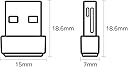
🚀 Upgrade your WiFi game with the nano powerhouse that fits in your pocket!
The TP-Link Archer T2U Nano is a sleek, ultra-compact USB WiFi adapter delivering dual-band AC600 wireless speeds up to 600 Mbps. Compatible with a wide range of Windows and Mac OS systems, it offers robust security protocols and easy plug-and-play setup, making it the perfect travel-friendly upgrade to boost your laptop or desktop connectivity without the bulk.


| ASIN | B07KRCW6LZ |
| Best Sellers Rank | 376 in Computers & Accessories ( See Top 100 in Computers & Accessories ) 4 in USB Computer Network Adapters |
| Box Contents | Nano Wi-Fi USB Adapter |
| Brand | TP-Link |
| Brand Name | TP-Link |
| Color | Black |
| Colour | Black |
| Compatible Devices | Laptop |
| Compatible Operating System Family | Windows |
| Compatible devices | Laptop |
| Customer Reviews | 4.3 out of 5 stars 24,389 Reviews |
| Data Link Protocol | USB |
| Data Transfer Rate | 633 Megabits Per Second |
| Data link protocol | USB |
| EU Spare Part Availability Duration | 1 Years |
| External Testing Certification | ANATEL: 13781903177 |
| Global Trade Identification Number | 06935364099978 |
| Hardware Interface | USB |
| Hardware interface | USB |
| Item Dimensions L x W x H | 16L x 7W x 19H millimetres |
| Item Type Name | TP-LINK Archer T2U Nano WLAN Adapter USB 2.0 600Mbit/s |
| Item Weight | 0.35 Ounces |
| Manufacturer | TP-Link |
| Manufacturer Part Number | Archer T2U Nano |
| Minimum Required Operating System Version | Windows 10 |
| Model Number | ARCHER T2U NANO |
| Number of Items | 1 |
| Number of Packs | 1 |
| Product dimensions | 16L x 7W x 19H millimetres |
| Unit Count | 1.0 count |
J**L
Easy, works as described
Easy to use and works as described. The included driver disk install easy even on older versions of windows.
J**Y
Impressive Hugh Improvement in Speed
Here is my experience having used it for less than 24-hours. My laptop is fairly old properly over 4-years old it’s a Toshiba Satellite L50D-C-150 with an AMD A8-6410 processor, 8GB DDR3 RAM and a Kingston 128GB SSD running 64-bit Windows 10 Home edition. I use this laptop for banking, writing letters, accounts, kids homework etc. nothing really strenuous. It serves me perfectly for the time being but might upgrade within the next 12-months.. My broadband provider was BT with up to 60Mb fibre however I’ve recently moved to Virgin Media 200Mb. To measure my broadband speed I use speedtest.net amongst other sites and averaged 40Mb with both BT and Virgin, this never bothered me before as I knew my laptop was old hence didn’t expect much and with BT maxing out at 50Mb on my mobile (Galaxy S20), felt I wasn’t missing out on much. Since moving to Virgin I wanted to utilise the full speed and mulled over purchasing this for some time I finally took the plunge and ordered it on 26th Aug 2021. Delivery As a prime member next day delivery is always nice, however this was same day by 10pm which was super good. Installation The dongle was plug and play with Windows 10 finding the drivers instantly and setting it up within seconds. It does come with a CD and instructions, neither were required in my case plus my laptop doesn’t have a CD drive. Testing Fyi - The old network card built into the laptop was a Broadcom 802.11n and my laptop is 3 meters from the router in the same room. I carried out 3 speed tests on both connections (Broadcom and TP-Link) at 9:30pm on 26/08 followed by 3 more at 10am on 27/08 and finally 3 more at 2pm on 27/08, below is the average rounded up. Broadcom: Ping 16ms | Download 32mbps | Upload 21Mbps TP-Link: Ping 17ms | Download 134mbps | Upload 21Mbps Another test I did was to move a 1.93Gb file from the laptop to my NAS and back; Broadcom – move to NAS: 4.80MB/s (8 minutes) TP-Link – move to NAS: 7.05MB/s (4 minutes) Broadcom – move to Laptop: 5.10MB/s (9 minutes) TP-Link – move to Laptop: 6.00MB/s (5 minutes) Well I’m pleased with that, I never expected the full 200Mb and maybe I’m doing something wrong to not achieve that but this will suffice. I’m already finding website loading better, connection to my NAS is improved and YouTube videos don’t stutter.
D**H
Surprisingly effective - recommended despite initial problems
The dongle is for a second, non-networked desktop located away from my router. I plugged it into the rear of the desktop and the reception was poor and intermittent. On-line suggestions were for an extension cable mounted away from the floor and computer. I had a 2-metre one and it was successful. Reception is fine. It was easy to set up, once the cause of the problem was known. The dongle is cheap, and looks it, but it works fine now. It would have been five star had the cable not been required. Recommended with the caveat of budgeting for the extension cable.
C**#
Very useful
When the laptop wifi seemed slow, this fixed the problem. It is so small, but very satisfying.
G**E
AC600 Wi-Fi dongle. Fast, long-range, cockpit-ready. Built for rigs, streams, and mobile setups.
Type: Dual-band USB Wi-Fi dongle Bands: 2.4GHz (up to 200 Mbps) + 5GHz (up to 433 Mbps) Antenna: 5dBi high-gain, adjustable Interface: USB 2.0/3.0 Compatibility: Windows 11/10/8.1/8/7/XP, Mac OS X 10.9–10.14 Use Case: Desktop rigs, mobile setups, site cabins, AV streaming, festival Wi-Fi boosts 💥 Why It Deserves Big Compliments This dongle is a proper plug-and-play upgrade. The dual-band support lets you switch between 2.4GHz for range and 5GHz for speed—perfect for streaming, gaming, or remote work. The 5dBi high-gain antenna is the standout feature: it locks onto signals better than compact dongles and reduces dead zones, especially in larger rooms or site cabins 2 . Setup is clean—Windows 10/11 auto-installs, and older systems can grab drivers from TP-Link’s site. It’s lightweight, portable, and ideal for rigs that need a fast, stable connection without internal Wi-Fi cards. ✅ Big Win Dual-band AC600 speeds—up to 433 Mbps on 5GHz High-gain antenna—better range and fewer dropouts Plug-and-play setup—no faff for most systems Compact and portable—easy to stash or travel with Secure WPA/WPA2 encryption—protects your connection Amazon’s Choice badge + 40,000+ ratings ⚠️ Minor Trade-Offs Mac support limited to OS X 10.14 and below No Wi-Fi 6 support—best for casual use, not heavy-duty gaming Bulky with antenna attached—may block nearby USB ports Realtek chipset may cause rare disconnections on some systems No Bluetooth—Wi-Fi only 🧍♂️ Personal Verdict Used this in a site cabin and AV rig—held signal, streamed clean, and stayed cool. For around £13, it’s a proper dongle that adds speed, reach, and cockpit-grade control to any desktop or mobile setup. If you want reliable Wi-Fi without the faff, this one’s a winner.
M**N
TP Link Archer T2U Nano WiFi Dongle
Very happy with this TP Link Archer T2U nano WiFi Dongle which have put in USB at the back of my desktop computer following the loss of Internet following move of router re digital phone and worked once plugged in but did use the CD to set it up. The QR code did not work
F**X
Doesn't stay connected and speeds are horrendously slow
I have a desktop PC that I used to hardwire, but since moving house I didn't want to bother and instead, wanted the convenience of connecting wirelessly to my router. I get speeds over 1.5gbps down/115mbps up, but this adapter only managed to achieve around 5mbps down/up. This was even when my phone in the same room was getting around 750mbps! And for some reason, the adapter just constantly disconnected, despite having the correct drivers and testing several different USB ports. Just terrible to be honest. I returned and bought a more expensive one with an extender.
C**H
Such a connection boost
I've got an old PCI wini card and was struggling to hit 40Mbps, so I ordered this dongle and within a minute was hitting 245Mbps. The only thing I didn't understand is why it has a DVD-ROM with the dongle when barely any computers world wide use a optical drive any more, it's plug and play with drivers on the site incase you need them. Well worth getting if you have a slow connection like I did
A**S
It works well.
Gets the job done, and it's tiny.
A**R
I underestimated this product
I was skeptical at first, but then I had to spend a month overseas so I brought my laptop (that had a faulty wireless chip). Out of curiosity I played Diablo 4 to see if the connection would stutter. The connection was really stable, relatively fast with little to no lag experienced!
D**.
Günstiger WLAN Stick, der gut funktioniert
Den W-Lan Stick von TP-Link habe ich gekauft, um einen veralteten Notebook mit Internet zu versorgen, da dieser mit den neuen Verschlüsselungsstandards meines Routers (FRITZ!Box 6660 Cable) nicht mehr klarkommt. Unter Windows 10 musste der Stick lediglich angeschlossen werden. Dieser wurde sofort erkannt und installiert, sodass eine Verbindung mit meinem neuen Router möglich war. Die Verbindung ist bis jetzt stabil und schnell. Daher kann ich das Produkt uneingeschränkt empfehlen.
S**C
No delivery
You saved my life . It works on windows tan. Thankyou xx
M**1
وايرلس
تمام ويعمل 👍🏾
Trustpilot
2 weeks ago
2 weeks ago