Buy anything from 5,000+ international stores. One checkout price. No surprise fees. Join 2M+ shoppers on Desertcart.
Desertcart purchases this item on your behalf and handles shipping, customs, and support to Argentina.
๐ Compact power, triple screens, endless possibilities!
The BOSGAME Mini PC N95 is a sleek, ultra-efficient mini computer powered by Intel's 12th Gen Alder Lake N95 processor with a low 6W TDP. It supports triple 4K 60Hz displays via dual HDMI and Type-C ports, making it ideal for multitasking professionals and creatives. Equipped with 16GB DDR4 RAM and a 512GB NVMe SSD, it delivers fast, reliable performance for office, education, and media applications. With versatile connectivity including WiFi5, Bluetooth 5.0, multiple USB ports, and Linux/Windows compatibility, itโs a certified, quiet powerhouse designed for modern workspaces and entertainment setups.


| ASIN | B0CPLT3HFH |
| Additional Features | Education, HOME Service, HTPC, Homeassistant, Linux |
| Aspect Ratio | 16:10, 16:9, 4:3 |
| Best Sellers Rank | #7,016 in Computers & Accessories ( See Top 100 in Computers & Accessories ) #259 in Mini Computers |
| Brand | BOSGAME |
| Built-In Media | 36W 12V 3A Power Adapter *1, HDMI *1, N95 Mini PC *1, User Manul *1, VESA Mount & Screws *1 |
| CPU Model Number | intel Alder lake N95 |
| Cache Memory Installed Size | 16 GB |
| Color | Black |
| Connectivity Technology | Ethernet, HDMI, LAN, USB |
| Cooling Method | Air |
| Customer Reviews | 4.3 4.3 out of 5 stars (262) |
| Display Resolution Maximum | 3840x2160 Pixels |
| Display Type | LCD |
| Graphics Card Interface | Integrated |
| Graphics Card Ram | 1 GB |
| Graphics Coprocessor | Intel UHD Graphics |
| Graphics Description | Integrated |
| Graphics Ram Type | SODIMM |
| Hard Disk Description | SSD |
| Hard Disk Interface | PCIE x 2 |
| Hardware Interface | 3.5mm Audio, PCI Express x1, USB 3.2 Gen 2 |
| Human-Interface Input | Buttons, Keyboard, Mouse |
| Keyboard Description | Wired, Standard Keyboard |
| Keyboard Layout | QWERTY |
| Manufacturer | BOSGAME |
| Memory Slots Available | 1 |
| Memory Storage Capacity | 16 GB |
| Model Name | E3 |
| Model Number | E3 |
| Native Resolution | 3840 x 2160 |
| Number of Component Outputs | 3 |
| Operating System | Linux, Support Windows and Linux, Ubuntu |
| Personal Computer Design Type | Mini PC |
| Power Consumption | 36 Watts |
| Power Plug Type | Type B - 3 pin (North American) |
| Processor Brand | Intel |
| Processor Count | 4 |
| Processor Series | Celeron |
| Processor Socket | FCBGA1264 |
| Processor Speed | 3.4 GHz |
| RAM Memory Installed | 16 GB |
| RAM Memory Technology | DDR4 |
| RAM Type | SODIMM |
| Ram Memory Maximum Size | 16 GB |
| Resolution | 3840 x 2160 |
| Screen Size | 75 Inches |
| Specific Uses For Product | Business, Education, Everyday Use |
| Specification Met | HDMI, WiFi 5, 16GB DDR4 RAM, 512GB SSD |
| Style Name | Modern |
| Total Expansion Slots Quantity | 2 |
| Total Number of HDMI Ports | 2 |
| Total Usb Ports | 4 |
| Video Output | HDMI |
| Video Output Interface | HDMI |
| Video Processor | Intel |
| Warranty Description | 1 years |
| Wireless Compability | 2.4 GHz Radio Frequency, 5 GHz Radio Frequency, 802.11a/b/g/n/ac |
| Wireless Network Technology | Wi-Fi |
| Wireless Technology | Bluetooth, Wi-Fi |
G**R
Can't beat the specs for the price - no usb-C DisplayPort
This is a good little machine. Normally, I run Macs, but now and again I need a Windows machine for testing (I'm a developer). It's no powerhouse, but it runs Windows 11 just fine - I've used it for web development with VSCode and two screens and it handles that duty quite easily. Only issue is the USB-C port doesn't handle DisplayPort, so I cant use my RayNeo glasses with it.
N**U
Great value in a small package.
Love it! It is exactly what I wanted. I did not need a powerhouse, just something to run Windows 11. I mainly use a Mac or Linux to do my work, but, occassionally, I need a PC. It cam with 16GB of RAM and a 512GB NVMe. It even came with a small adapter cable for installing an SSD into the lid of the case. It also came with Windows 11 Pro preinstalled. What a great value and is perfect for my needs.
L**A
Small but completely capable
We purchased this mini pc to replace our 12 year old Windows 10 desktop. This Bosgame mini had Windows 11 pre installed. I have a basic knowledge when it comes to computer set up but the process of setting up this mini was fairly easy. Now since it is a mini, you will need to purchase or connect it to a monitor you have sitting around. We purchased new high definition monitor for less than $80 and it serves our needs. Itโs my understanding this mini works well for gamers but that is something I have no interest in. My wife is the primary user of the mini and she is very happy with the fast response of this mini. Now we have only had the mini up and running for a few weeks so we canโt comment on itโs long term use. That being said we are completely satisfied with this product purchase and recommend it if your in need of replacing and old outdated pc.
A**N
Can be difficult to get boot every time
This is a good clean pc that works well as a home office computer and maybe as game, but I don't game! It runs fast and is very nice to use. I like the port arrangement with hdmi's and usb C's on the back since most of that wiring is not temporary. The front usb A 3's are great for removable devices. As I said it sometimes doesn't bring the hdmi monitors on when you boot. When it fails, I press the power and hold till it shuts down. On the next start it always boots correctly. When I had only one monitor it was more of an issue but with two HDMI's it seems to favor the one on the back right as the primary. It may be trying to start using one of the usb monitor ports but it did this even before I had a dock and hub attached to the C ports on back. Will have to look in the bios to see if it can be set to HDMI as default to eliminate the problem, but having to force stop and restart is not so bad. It is hands down faster than my old P3 and P5 desktop machines. (several years old). The extra NVMe port is used for expansion, it takes a 42mm long stick. You should put a sink on it as well. Had difficulty finding a sink that had grooves across the stick instead of long ways. The 80mm has cross slits for air flow. The fan does move air there and long wise slots would block flow to the 80mm. Very happy the 1 star knock is for the boot issues. Otherwise, it is perfect for me.
M**C
Amazing Mini PC!
I wanted a mini PC I can hook up to a couple of television sets for multimedia purposes. On one television ironic constant stream of videos and on the second one I run a photo slideshow. This little PC does it flawlessly. No buffering. No problems. I wanted the AMD processor. Thatโs why I chose this mini pc. So glad I did!
G**Y
BOSGAME Won't Honor Warranty on Defective Item Because they don't make this model anymore
I bought this Bosgame mini PC and, to be fair, the first six months were lovely. Smooth performance, quiet operation, not a complaint in sight. Then the fan gave up on life and decided six months of service was quite enough, thank you. No big deal โ stuff breaks, thatโs what warranties are for. So I reached out to Bosgame expecting a repair or replacement. Hereโs where the plot twist comes in. Bosgame informed me that because they no longer sell this exact model, they: โ Canโt replace it โ Canโt repair it โ Canโt offer a similar model โ๏ธ Can offer meโฆ absolutely nothing ๐ Yes โ according to Bosgame logic, once a product disappears from their shelves, so does your warranty. Poof! Gone! Like it never existed so they told me to contact Amazon which doesn't sell it- it was sold thru Bosgame Direct. Itโs like buying a fridge, the compressor failing, and the manufacturer saying: โWe donโt make that fridge anymore, so just eat your groceries really fast.โ I asked if maybe โ possibly โ they could replace it with something comparable? Apparently that idea wandered too close to corporate heresy. So here I sit: โข One mini PC with a dead fan โข A warranty that evaporated because the calendar flipped โข And a customer-service story Iโll be telling for years Bottom line: If you want a PC that comes with Schrรถdingerโs Warranty โ technically there, but useless when opened โ Bosgame is your brand. Otherwise, choose something from a company that still remembers you exist after checkout.
K**9
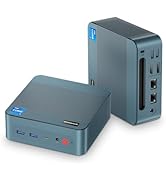
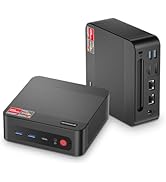
This small computer in a lightweight plastic box has vent holes on four sides and a decorative cross-hatch pattern on top. The bottom has four rubber feet and two screw holes matching the included metal mounting plate (for the back of a monitor). A lighted red rubber power button is located on one face, which I would consider the front. That side also sports two USB A ports, one USB C port, and a 3.5 mm headphone jack. The rear face has a coaxial power input (for the included wall adapter labelled 12V, 3A), two USB A ports, two HDMI ports, and a 2.5 gigabit Ethernet port. While all the USB A ports have blue tabs, the ones on the front are depicted as 5 Gbps on an Amazon product image, and the rear ones are shown as 10 Gbps. The Type-C port on the front is said to handle 4K@60 Hz video (found to be true with my Sony TV). This Bosgame E3 PC is a rare Intel N150 machine featuring a Type-C port and no dedicated USB 2.0 ports. I like being able to plug in my devices without fussing over the color and speed rating of USB ports. Pressing the Delete key before or during the Bosgame logo appearance enters the AMI BIOS (Aptio Setup). F1, F8, and F12 are ignored. The one-key access eliminates confusion over which key to press. Setup screens confirmed the presence of an Intel N150 CPU, 16 GB of RAM, and a HighRel 512 GB NVMe SSD. The BIOS refers to the USB C port as a Thunderbolt port. I found my Lenovo and generic docks supported USB peripherals, gigabit Ethernet, and 4K HDMI. Furthermore, power from either dock allowed the PC to run without the coaxial wall adapter. Getting power from a dock potentially reduces cable clutter, but hanging the dock off the front is clumsy if you make that a permanent arrangement. I wish the unit could have Type-C on both front and back, but I have yet to see any mini PC in this class like that. Windows 11 Pro came waiting for a user to set the language, choose a keyboard layout, and sign in with a Microsoft account. I went for a local account by pressing Shift-F10 and executing "start ms-cxh:localonly". A digital license activated automatically when I connected to the Internet later. All subsystems in the computer were operational. I only saw software from a standard Windows 11 Pro installation. Virus scans by Microsoft Defender, Avast, and Malwarebytes found no malware. The computer booted various live Linux ISOs from USB keys. Debian Live Testing (2025-05-04), Fedora Workstation 42.1.1, Kubuntu 25.04, and Ubuntu 24.04.2 ran well on monitors and a TV. I heard sound on headphones and HDMI displays. Linux Mint 22.1 was the outlier, not recognizing the Alder Lake audio-video hardware so the desktop started at 800x600 resolution with no HDMI audio. The headphone jack and my USB devices still worked as audio outputs. Installing Linux Mint alongside Windows, and upgrading the kernel, to package linux-image-oem-24.04b (kernel 6.11.0) for new hardware, corrected the AV issue. When I installed Windows 11 Pro from scratch using an ISO (downloaded the same week), the setup assistant requested a wifi password since Ethernet was not detected. I was able to press Shift+F10, execute "oobe\bypassnro", reboot, continue without Internet, and create a local account. A web search for "Intel network adapter driver for Windows 11" led me to install a "wired" driver from an Intel site, after which the Ethernet port came alive. A Bluetooth scan on my fresh Windows 11 Pro installation did not find clients. I located an rtl8822ce driver from the Realtek site. Unfortunately, that driver also turned up nothing when scanning. Bosgame, to their credit, provides 11 drivers (modestly updated and customized) on their web site for the E3 and other models based on the Alder Lake chipset. Search the web for "Bosgame driver downloads". The BT RTL8822 driver for the E3 driver immediately found Bluetooth clients. After fixing the wired Ethernet and Bluetooth problems, Windows Device Manager and Sound Settings still showed no HDMI audio device. To my chagrin, Intel's advice on their Smart Sound Technology driver is to obtain it from the PC manufacturer: Intel does not offer an HD audio driver download. After I installed the Bosgame version of that driver, HDMI audio was enabled right away. The Alder Lake chipset is four years old, yet some subsystems in the E3 are useless without driver customizations by Bosgame. Of course, the mini PC is delivered with all drivers preinstalled. However, if Bosgame shuts down or withdraws support, Microsoft drivers alone will not make all the E3 hardware operational, not now and likely not in the future. Ironically, Linux supports all the hardware in the Bosgame E3 with no third-party or OEM downloads whatsoever, today and in the foreseeable future. (The Linux Mint kernel upgrade mentioned earlier is in a vetted Ubuntu repo already configured for Mint). Of course, hunting around for bespoke Windows drivers is normal for a lot of brand new PCs, so some people are okay with that. YouTube video at standard 1920x1080 resolution was smooth as butter on Windows 11 Pro and Linux. Videos stepped up to 3840x2160 on Windows were watchable, but simply moving the mouse around caused perceptible stuttering. Linux was slightly jittery at 2560x1440 and noticeably dropping frames at 3840x2160. This box is perfectly fine for office apps at 4K, but stick with HD for the best video playback. The plastic case was never hot, just gently warm after hours of use. The CPU was pegged at 100% according to Windows Task Manager even for YouTube in an Edge window. For a corresponding test in Linux, Gnome System Monitor showed the CPU utilization was around 40%. Linux apparently has CPU cycles to spare for tasks beyond video, which is great for getting work done. Besides that, the 6 watts Thermal Design Power of the N150 in this box (15W total power) has merit for consuming dramatically less energy than older PCs, laptops, and Chromebooks. The low electricity requirement of this x86_64 system is a benefit in itself. This system is not meant for games and content creation. However, it is a full hardware platform for office applications, network access, music listening, and HD video playback. Windows 11 Pro has a digital license ready to go, or you can install Linux for greater efficiency and longevity without dependence on PC vendor drivers. Whichever your choice, the Bosgame E3 is a good value as an energy-saving desktop.
S**8
Purchased to use at my workplace and after a month plus of use, we couldn't be happier. I Velcroed the mini PC to the back of my monitor which made for a nice little DIY AIO PC... Added a second SSD (for backups), a Bluetooth keyboard/mouse combo set, a small 4-port USB 3.1 hub attached to the bottom monitor lip, a mini USB stereo speaker bar. Now we have a setup that looks quite decent, is very compact, and gets the job done. The Windows 11 Pro setup was a breeze having us up and running in no time. The Intel 12Th Alder Lake Processor CPU has no problems keeping pace with my needs whatsoever, the 512GB SSD provides ample storage, no issues with multi-tasking thanks to the 16GB of DDR4 RAM. For me fan noise has essentially been non-existent. We are finding the ports (USB, HDMI, RJ45, audio jack) to be more than adequate for a PC of this stature... USB ports are easily expandable with the use of a USB hub as we've already done. I consider my use-case to be fairly basic - emails, web browsing, printing, server access, dealing with Word, Excel, PDF, files/docs, photos including some light photo editing, 4K video playback via files from phones, drone's GoPro, 4K YouTube playback, etc - so far this mini PC has handled everything I've thrown at it w/o even breaking a sweat. Now the question begs... Could I have purchased a pre-built AIO for cheaper than the $404 I spent (monitor not included)? Yeah I suppose we could have yet it surely wouldn't have been equipped with Windows 11 Pro more likely Home, a smaller SSD, and half the RAM. And we would have missed out on all the fun we had configuring/assembling our DIY AIO PC LOL. Definitely highly recommended!
A**R
This mini pc is amazing! I'm not sure why there are so many negative reviews, it boots up and shuts down almost instantly, is quick as anything for general PC work and even plays older and lower spec games with no problems. The only thing I can't comment on is longevity as I've only had it a week so far. The other slight oddities are that the front USB ports are upside down (USB stick must be inserted with use light facing down) and the audio jack in the front is kind of a pain as you have a cable running out the front if your speakers use that jack. Otherwise, super impressed with it, if you aren't a gamer or video editor it could easily replace an old desktop/laptop. It's also almost totally silent if you aren't using intensive apps on it, after having fairly loud towers for many years the silence is most welcome. Wouldn't heistate to recommend this machine, it's a lot of bang for the buck and even more so if you get it on sale.
H**8
It's really quiet and fast my parents loves it So far so good
S**N
I already have 2x BOSGAME B100 Mini PCs (with the N100 CPU) and they have been great. One is doing solid duty as an Umbrel node running home networking apps, a Bitcoin node, and other utilities. The other is a convenient extra secure machine when I need something air-gapped with nothing installed (you can remove the network card and boot Tails linux from USB). They are not super powerful but have plenty to get the job done if you don't run a Windows Desktop and the N100/N150 CPUs support hardware media transcoding so they are good as a media server (running Plex, or Jellyfin). They are ultra low-power and only consume a couple of dollars electricity in a whole year. The E3 is a slightly upgraded version with an N150 CPU (slightly higher boost clock speed) and includes a proper NVMe drive. I grabbed one because the way chip prices are going it may not be easy to find a decent low-cost home server in the immediate future. I've found the brand has been reliable and am quite tempted by their AMD 395+ Strix Halo model, which is in a different price category entirely.
Trustpilot
1 month ago
3 days ago