We remain fully operational. Our teams are working around the clock to ensure your deliveries continue safely.

Descargar la aplicación


Servicios al cliente
Sobre nosotros
Copyright © 2025 Desertcart Holdings Limited
Descargar la aplicación



Buy anything from 5,000+ international stores. One checkout price. No surprise fees. Join 2M+ shoppers on Desertcart.
Desertcart purchases this item on your behalf and handles shipping, customs, and support to Argentina.
⚡ Upgrade your MacBook’s heart — speed meets precision!
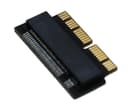
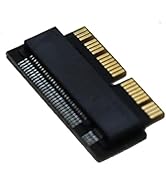
The Sintech NGFF M.2 NVMe SSD Adapter Card is a precision-engineered upgrade solution for MacBook Air (2013-2016) and MacBook Pro (Late 2013-2015). It supports a wide range of high-performance NVMe SSDs, enabling users to dramatically boost storage speed and capacity. With a plug-and-play design and comprehensive installation guide, it offers a seamless upgrade path trusted by thousands of professionals seeking to extend their Mac’s lifespan with cutting-edge SSD technology.




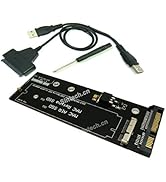


| ASIN | B07FYY3H5F |
| Best Sellers Rank | #11 in Computer Memory Card Adapters |
| Brand | Sintech |
| Color | BLACK |
| Compatible Devices | Laptop |
| Connector Type | 2013-2017 MACBOOK AIR SSD CONNECTOR |
| Customer Reviews | 4.6 4.6 out of 5 stars (2,947) |
| Finish | Black |
| Item Dimensions | 1 x 0.04 x 0.01 inches |
| Item Weight | 10 Grams |
| Manufacturer | SIntech Electronic |
| Model Number | ST-NGFF2013 |
| Number of Items | 1 |
| Number of Ports | 1 |
| Package Quantity | 1 |
| Power Plug Type | No Plug |
| Specific Uses For Product | backup |
| UPC | 701017254034 |
| Unit Count | 1 Count |
| Warranty Description | 3 MONTHS |
T**E
Upgraded iMac17,1 27" 5k with 1TB EVO Plus - Perfect fit and function (Install tips below..)
I could not be happier. Using this adapter, fit and alignment for a NVME SSD installed in a late 2012 iMac 27" 5k are absolutely perfect. The drive itself is functioning beautifully, and with a RAM upgrade at the same time, this has to be the most noticeable computer upgrade I've done. Thanks to this awesome, high quality, reasonably priced little adapter, I was able to choose the SSD I prefer, instead of being stuck with an overpriced unit from Out of Their Mind Computing. While I can only confirm for my model mac, I do believe you can well trust the manufacturer's claims for compatibility with this adapter. Excellent product, worthy of its many word of mouth recommendations, found in forums across the net. I did not have to upgrade the firmware on the 970 EVO Plus. Also, I did not have to use a MacOS installer disk. With the SSD in an enclosure (Plugable brand,) I booted into Internet Recovery by holding CMD + OPT + R while cold booting the computer. Used Disk Utility to format the SSD with APFS (whoops, just realized I forgot to over provision,) then chose to install MacOS, and selected the SSD as the target drive. After install, the computer booted from the SSD, and prompted me to restore files from one of three sources. I chose to use my Time Machine backup. Files, apps, etc. restored without issue, and I shut down the Mac. I tore down the Mac and found the drive bay/slot on the back of the logic board. The SSD clicked reassuringly into the quality adapter, which in turn, clicked nicely into the drive bay on the logic board. I immediately eyeballed the alignment with the screw hole. Absolutely perfect, and I mean perfect. After reassembling, the computer booted up from the SSD without issue, presenting me with my familiar setup, but now with startling speed, and snappiness. Boot time must be 1/6th the time of booting from the stock 1TB HDD system disk. Everything is astonishingly quicker. Wow. Not sure I would have done this upgrade if I could not choose the drive I wanted, so thanks a heap to the makers of the adapter. If you are using this in a similar iMac 27", be sure to get true OEM adhesive for reassembling the screen. You can find it on Ebay from seller tecknic-lee. Avoid all others, including OWC and ifixit. There are too many sad stories of screens falling and breaking, anywhere between one week, and 9 months after the reinstall. In only one case did I read of OWC taking responsibility, and making the user whole again. Even if they did it in every case, nobody wants to go through that. These were folks that properly prepped and applied the adhesive. The problem is that the adhesive strips are too thin. The good stuff has thin foam core, and does not stretch, just like the factory stuff you cut through to disassemble. Cheers
M**A
Compatible with Samsung 990 EVO Plus SSD
Worked great with a Samsung 990 EVO Plus SSD. Was able to upgrade my old Macbook air successfully.
D**S
Brought My MacBook Pro Back to Life!
The Sintech NGFF M.2 NVMe SSD adapter is an absolute game-changer. I used it to upgrade my MacBook Pro with a modern NVMe SSD, and the performance boost was incredible—faster boot times, quicker file transfers, and overall snappier performance. Installation was straightforward, and the adapter fit perfectly inside the laptop. The build quality is solid, and it works flawlessly without any compatibility issues. I also appreciate that it allows me to use high-capacity, affordable M.2 drives instead of expensive proprietary Apple SSDs. If you want to extend the life of your older MacBook Pro and give it a serious speed boost, this adapter is a must-have. Highly recommended!
A**X
Works with trash can Mac Pro
Installed this on my 2013 mac pro (trashcan) and it worked as intended.
R**O
1 week and no weird problems!
This little adapter saved me 50 bucks and doubled my memory and speed. I needed a replacement SSD after Apple only charged me $1500 to repair my water damaged A1398 15' Macbook but failed to replace the SSD which died about 5 months out. The OEM outdated AHCI PCIe with the proprietary Apple connection was MORE expensive and had half the storage while being slower than the newer NVME m.2 970 EVO from Samsung. I bought this little adapter for my MID 2014 MacBook Pro and booted into a USB installation media. I formatted the EVO to GUID and HFS+ then simply installed Mojave on it. Booted up 100% fine. I did some extensive research on this model because any model from 2013-Early 2015 had a hibernation issue that did not boot the drive in time. This sometimes causes Kernel Panics or simply a black screen when waking up a sleeping laptop. Now, Initially I did not have this problem but about 3 days in when my laptop was hibernating overnight I did get a black screen. I knew I would have to change the pmset settings so I went ahead and changed the standby mode to 0 from 1. I am 3 days out from that and have not had a single issue. The computer has been closed overnight and wakes up just fine. I have not noticed any extensive battery drainage when the laptop is closed, maybe 1-3% overnight but nothing crazy. Finally, I did notice an overall larger battery drain because the 970 EVO draws more power. It is not significant enough for me since I am always near a charger but I have noticed a faster battery drain. I also use iStat Pro which allows me to change my fans speeds so I am running an average of 2900rpm vs the stock 2100rpm. This may be contributing to the faster battery drain, but I have it set to this to reduce the heat that the new drive seems to be putting out. I have managed to maintain all temps to a reasonably low temperature during regular use. Overall, I bought a replacement 500GB 970 EVO for my 512GB Apple SSD. The original SSD died on me so I don't have benchmark data but I assume it to be in the 700MB/s read and write. The new 970 EVO outputs a good 1330MB/s write and 1550MB/s read. The original 512GB SSD is about 450 dollars for an outdated technology that is about half the speed. The 500GB 970 EVO is about 120 dollars plus 13 for an adapter. Only drawbacks is hibernation which to me, I don't even notice the difference since I set the standby to 0. If anyone is interested in any more information please message me and i'll try to find the answer.
Q**R
Not perfect fit but not really an issue as it works just fine.
M**N
Den enda som funkar direkt. Värd varenda krona
E**L
No he tenido problemas graves hasta la fecha, por eso le puse 5 estrellas porque no se si los pequeños problemas que he tenido se deben al modelo de SSD que elegí o al adaptador: Yo lo empareje a un MP510 de corsair de 250 GB y una Macbook Pro early 2015. Pros: * Es estable. * Me permitio ejecutar bootcamp a pesar de que he leido comentarios de que no se puede, quizas se deba al ssd que elijas y no al adaptador como tal. * Tambien he leido que segun no se puede hibernar o cerrar la tapa pero yo lo hago e inclusive he dejado la mac con la tapa cerrada un dia o dos y sigue exactamente igual como la deje. Contras: * La rapidez es aceptable aunque varia un poco, a veces dice que tengo cierta velocidad a veces va un poco mas lento pero nunca tanto como para que se atore la pc o lo notes. * Lo he tenido durante meses yo diria que como un año y en contadas ocaciones (como 3 o 4) se me ha reiniciado de la nada la macbook, desconozco si quizas esto es por el ssd.
M**N
It works well with my MacBook Pro A1502
M**I
Arrivato con una settimana di anticipo sul previsto (ringrazio la Sintech tedesca), ha risolto il problema di compatibilità con i nuovi SSD Nvme di ultima generazione. Avevo già sostituito nel mio Mac Pro late 2013 (quello cilindrico) l'SSD Apple da 256 GB con un SAmsung 970 EVO da 512 con un adattatore "economico" ed aveva funzionato senza problemi. Ma quando ho avuto necessità di mettere un SSD da 2 TB non c'è stato verso. Nè con un Samsung 990 PRo, nè con un Crucial P3 più lento, sperando che fosse più compatibile. Ormai deciso a rinunciare, ho voluto provare questo adattatore della Sintech, da tutti ben considerato e BAM, il MAC ha visto il Crucial ed è partito regolarmente, anzicchè andare in protezione come faceva prima. Funziona persino il risveglio da stop, che prima mandava in crash il Mac. Meglio di così non si può. E' meglio spendere qualcosa in più ed evitare un sacco di perdite di tempo.
Trustpilot
Hace 2 semanas
Hace 2 meses