
Descargar la aplicación


Servicios al cliente
Sobre nosotros
Copyright © 2025 Desertcart Holdings Limited
Descargar la aplicación





🔌 Upgrade your smart home game with effortless multi-switch mastery!
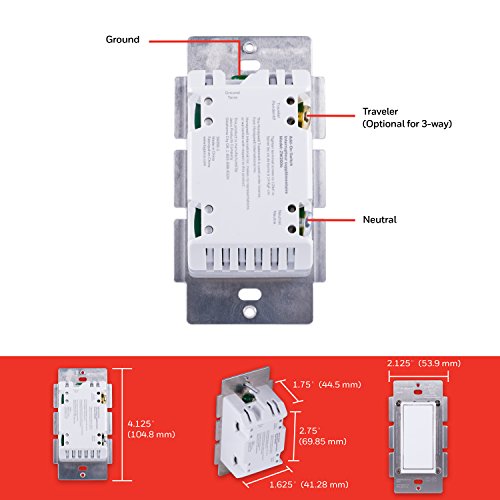
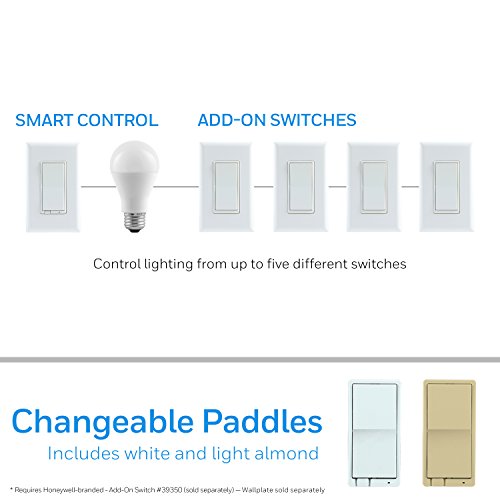
The UltraPro Add-On Switch 39350 features patent-pending QuickFit and SimpleWire technologies that reduce installation complexity and housing depth by 20%. Designed for multi-switch setups, it supports 15A current and operates on both 120VAC and 277VAC systems. Compatible with Z-Wave and ZigBee protocols, it links up to five switches for seamless wireless control when paired with a primary smart switch or dimmer, making it a versatile and reliable choice for modern home automation.


| ASIN | B07B3J9QJV |
| Actuator Type | Push Button |
| Batteries Included? | No |
| Batteries Required? | No |
| Best Sellers Rank | #451,497 in Tools & Home Improvement ( See Top 100 in Tools & Home Improvement ) #132 in Ceiling Fan Wall Controls |
| Brand | UltraPro |
| Circuit Type | 5-way |
| Color | White |
| Compatible Devices | UltraPro, Jasco, Enbrighten, Honeywell |
| Connectivity Protocol | Z-Wave, ZigBee |
| Connector Type | Clamp |
| Contact Material | Metal |
| Contact Type | Normally Open |
| Control Method | App |
| Control Type | remote |
| Controller Type | SmartThings, Wink, HomeSeer, Vera, Nexia, Ring, Trane, Honeywell, Harmony Home Hub Extender, Fibaro, Vivint, ADT |
| Current Rating | 15 Amps |
| Customer Reviews | 4.5 4.5 out of 5 stars (2,190) |
| Date First Available | February 26, 2018 |
| Included Components | switch |
| International Protection Rating | IP00 |
| Is Discontinued By Manufacturer | No |
| Item Package Quantity | 1 |
| Item Weight | 1.6 ounces |
| Item dimensions L x W x H | 1.75 x 1.63 x 4.12 inches |
| Item model number | 39350 |
| Lower Temperature Rating | 32 Degrees Fahrenheit |
| Manufacturer | Jasco Products Company, LLC |
| Mounting Type | Surface Mount |
| Number of Items | 1 |
| Number of Positions | 1 |
| Operating Voltage | 120 Volts (AC) |
| Operation Mode | ON-ON-OFF |
| Part Number | 39350 |
| Product Dimensions | 1.75 x 1.63 x 4.12 inches |
| Size | 1 Pack |
| Smart Home Compatibility | Smart Home Compatible |
| Style | Add-On Switch |
| Terminal | Screw |
| UPC | 030878393508 |
| Unit Count | 1.0 Count |
| Upper Temperature Rating | 104 Degrees Fahrenheit |
| Warranty Description | 2-year limited |
| Wattage | 100 watts |
S**E
Easy & well thought out installation! Works with Qyolsys alarm panels.
I wanted to update and upgrade my alarm system and home automation. Found these and they are much more reasonable in price then what the alarm companies are selling or recommending. My only grip was when you have to do a 3-way set up, you still need 2 switches to do it. Some other manufacturers allow you to use a standard paddle switch and just have one z-wave switch. Not a big deal, but a way of giving the consumer more bang for the buck. I ended up replacing 14 switches throughout the house. The Qyolsys Panel 4 learned all of them without a hiccup! Everything is working flawlessly through the app and manually. I like that the blue light can be programmed to be on when the switch is not in use and works as a night indicator at the same time. They look great, even when located next to a standard paddle switch. If you are comfortable installing or changing out an electrical switch, you'll find these a breeze. One thing that stood out is the double inlets for each wire. It really makes it easy when doing multiple switches next to one another. You can bring the wire into the first inlet and use the second one as an outlet to feed the switch next to it. I would recommend these to anyone wanting to get into home automation! Hope to see some z-wave wall outlets in the future as well!
B**V
It works as it should, well, almost
I bought this switch in addition to the GE Zwave switch - because I wanted to see which one is better - only to realize both look identical and without the GE logo on the other, its difficult to tell them apart! Then I found out, both are manufactured by JASCO!! So from quality perspective this switch is no different from the GE Switch review. Some of these will be exact replica of my other review. Packaging It came in a box with a user manual, extra paddle and white jumper wire. The manual has a lot of instructions and you should read it if you are new to electrical installations. If you havent done wiring before, I recommend you call a professional electrician. Wiring This is a 'self-learning' device which figures out which line is LIVE and NEUTRAL by itself. So dont get confused if the device says Line/Neutral on both poles. I have read other users had difficulty to get it work, so I followed the pole placements from the Gen-1: bottom pole as LIVE and top pole as NEUTRAL. Wiring is soooo easy! Im not an electrician but I have changed a lot of switches in my old house in the last 4 years. This was THE easiest way to plug+tighten a pole and a romex. Loosen the screw, push the exposed copper (1/2 inch long) inside, tighten the screw. If you have multiple switches next to each other (in my case 5 of them, 3 are ZWave) its very easy to keep the LIVE line common as you can do jumper from one to another. Startup There isnt much you need to do get these switches working. If you have wired them properly, as soon as the power switched on, you should see the blue LED come on! I was able to switch on and off right away. Didnt require any reboot/reset or anything. ZWave Integration This is one area where the Honeywell switch gave me grief and 1 sleepless night. I installed both the GE and this one together and side by side. First evening it just wont get detected by my Nortek ZWave stick. I almost ripped it off and sent it back. Next day morning I watched few videos and read Reddit comments and found out, you need to RESET this switch! So with the switch LED glowing, click the up paddle and down paddle very quickly 3 times. If you did it right, the LED will flash for few times. NOW its reset and ready. Now get "ADD Node" on Home assistant and click the up paddle. You should be able to see this switch after you heal the network. Phew! Signal Strength Its actually pretty good. Considering the fact I have 2 more ZWave switches right next to this one. No interference and works well. I will monitor this switch as time goes and update this review if anything changes. If it doesnt, 5 star is my rating!
J**.
Easy install and set-up and super cool to use
I'm hooked on these now. I pair them up with my Wink 2 hub and they work flawlessly. I had trouble pairing up my second of these the day I installed it, but the next morning it paired quickly and easily. I also experienced some WiFi interference with my Sonos playbar after I installed my second switch and had to jump thru some hoops to rectify that (with Sonos), but everything is working perfectly now. So far I've installed these for my front and back porches, and I know now that I'll add a few more in the house before it's all over. They also have a somewhat large box in the back so MAKE SURE you measure your gang box before you buy, taking in consideration all the wiring inside. You can buy extra deep gang boxes at Home Depot if you want to go that far. These are only good for single (1 pole) switches, and you have to splice a 14g neutral (white) wire into the back of it for it to work. The included wire seems to be made of aluminum braid, so I used my own solid copper wire instead. I'm not an electrician and maybe aluminum is fine for a neutral wire, but I'm not taking the chance. It's super cool to be able to turn your lights on and off from bed or from a thousand miles away.
J**E
EXCELENTE CUMPLE MUY BIEN MIS EXPECTATIVAS
V**E
Works so well, easy to install and very good quality. I have three so far and work very well with Smartthings.
I**W
I've got about 30 Leviton zwave switches but thought I'd try this because it is about 1/2 the price. The differences aren't very noticeable. The Leviton switch is a bit smoother and has a nicer click in my opinion but most people wouldn't notice. These have a blue light vs green and you can turn it off if you don't like it. The unit doesn't have loose wires that you need to connect. I'm not a fan of those. And you can either wrap the wire around a screw (traditional) or quick connect up to 2 wires per terminal (keep the wires straight and push them into a hole in the unit). Quick connect requires manual tightening but I prefer this as the self locking ones never release the wire in my experience. Very well thought out. Connected with Samsung Smarthings by scanning the QR code on the unit. So remember to do this before you screw on the backplate. Note: you can't add by looking up model/manufacturer like I did for my Leviton switches. You need the QR code. This will be my goto switch going forward as the quality seems on par with others but at 1/2 the price.
A**R
When matched with their primary z-wave switch, these work brilliantly. And they only require two wires, whereas the old three-way switch they replace required three. Some minor rewiring required in all of my cases, but easy to do, and no concerns after install. These feel good, and the main switch reacts instantly to input from this one.
A**E
I ordered a few dimmers and switches from this brand, they are made by Jasco, same mother brand as GE and Enbrighten. They are super simple, up-down like the usual switches, so guests don't get confused with odd looking smart switches. Good value for money, the whole house has them and been working flawlessly for months now. I had no trouble with them going offline, they are reliable contrary to other zigbee devices I own. I believe they are from the z-wave 500 series (latest on market is 800 series) but for what they are supposed to do - turn on/off or dim a switch - it's alright with me !
Trustpilot
Hace 2 semanas
Hace 3 semanas