We remain fully operational. Our teams are working around the clock to ensure your deliveries continue safely.

Descargar la aplicación


Servicios al cliente
Sobre nosotros
Copyright © 2025 Desertcart Holdings Limited
Descargar la aplicación
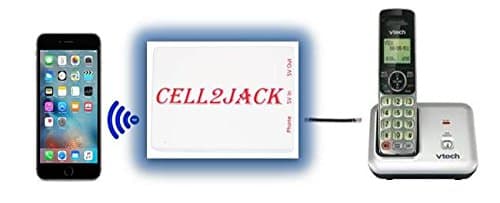
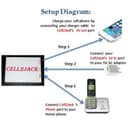

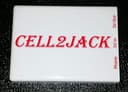
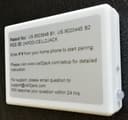

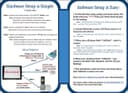
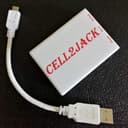
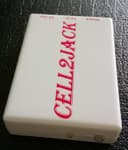
Buy Cell2Jack - Cellphone to Home Phone Adapter - Avoid Harmful Cell Signal Radiation. Make and Receive Cell Phone Call on Your landline Phone Free: Phone Charms - desertcart.com ✓ FREE DELIVERY possible on eligible purchases Review: LOVE LOVE LOVE - Love this thing! When my cable company more than tripled the rate for my VoIP line, I decided to port it over to my cell phone, since everybody had my home # and only a select few had my fairly new cell #. This was a simple setup as long as you watch the video - I found the guide they sent with the unit to be unclear. Once connected, it works great! I have a Uniden set of 3 cordless handsets and connected the Cell2Jack to the Uniden main base station. Now I can answer calls to my cell phone on any of the Uniden handsets located throughout my home. There's a momentary delay between the call coming into my cell phone before ringing the Uniden handsets - and I also found that I have to give it a couple of seconds after I pick up the handset before my caller can hear me. I've also noticed that while checking my cellular carrier's voicemail messages from one of my Uniden handsets, the carrier's system did not recognize any keypad entries. I found a work-around: I could use my cellphone's keypad to hit "1" to listen to a message, for example, in order for the keypad's tones to be recognized. In one of the other review's I read here, the customer indicated that he was unable to use his home phone with Cell2Jack on conference calls - I'm wondering if it's the same issue, because dialing into a conference bridge requires entering a conference code, etc. - he might want to try using they keypad on his cell phone while using his home handset on the conference call. Despite these minor quirks, it is super convenient to be able to pick up the phone in my kitchen to answer a call, rather than either running to wherever I left my cell phone, or worse, having to carry it on my person even in my own home! Review: It really works well! - Looked all over for a way to "hook-up" my cell phone to a small multi-line phone in the home office. Originally thought I wanted something that I could take from the headphone jack to an rj-11 (there aren't any), but the logic of the blue tooth interface becomes apparent when you grab your phone and go, and then come back later with it in your pocket, and you are seamlessly hooked back up without thinking about it. I can now work at my desk and use my desk phone (with wireless headset & lifter) and get my business, home and cell lines all on my 4 line phone. Only draw back is that the Caller ID only sends the phone #, but not the name through to the desk phone - but for $29 who can really complain. Also, when I emailed a question (about the #ID) to customer service on a Sunday afternoon they were back to me in 10 minutes. Could not have been easier to setup and audio quality is great. Thinking of getting a second one and transferring my copper line to an old cell phone sitting in the drawer and saving $50 a month.


| Customer Reviews | 4.0 out of 5 stars 472 Reviews |
L**Y
LOVE LOVE LOVE
Love this thing! When my cable company more than tripled the rate for my VoIP line, I decided to port it over to my cell phone, since everybody had my home # and only a select few had my fairly new cell #. This was a simple setup as long as you watch the video - I found the guide they sent with the unit to be unclear. Once connected, it works great! I have a Uniden set of 3 cordless handsets and connected the Cell2Jack to the Uniden main base station. Now I can answer calls to my cell phone on any of the Uniden handsets located throughout my home. There's a momentary delay between the call coming into my cell phone before ringing the Uniden handsets - and I also found that I have to give it a couple of seconds after I pick up the handset before my caller can hear me. I've also noticed that while checking my cellular carrier's voicemail messages from one of my Uniden handsets, the carrier's system did not recognize any keypad entries. I found a work-around: I could use my cellphone's keypad to hit "1" to listen to a message, for example, in order for the keypad's tones to be recognized. In one of the other review's I read here, the customer indicated that he was unable to use his home phone with Cell2Jack on conference calls - I'm wondering if it's the same issue, because dialing into a conference bridge requires entering a conference code, etc. - he might want to try using they keypad on his cell phone while using his home handset on the conference call. Despite these minor quirks, it is super convenient to be able to pick up the phone in my kitchen to answer a call, rather than either running to wherever I left my cell phone, or worse, having to carry it on my person even in my own home!
R**B
It really works well!
Looked all over for a way to "hook-up" my cell phone to a small multi-line phone in the home office. Originally thought I wanted something that I could take from the headphone jack to an rj-11 (there aren't any), but the logic of the blue tooth interface becomes apparent when you grab your phone and go, and then come back later with it in your pocket, and you are seamlessly hooked back up without thinking about it. I can now work at my desk and use my desk phone (with wireless headset & lifter) and get my business, home and cell lines all on my 4 line phone. Only draw back is that the Caller ID only sends the phone #, but not the name through to the desk phone - but for $29 who can really complain. Also, when I emailed a question (about the #ID) to customer service on a Sunday afternoon they were back to me in 10 minutes. Could not have been easier to setup and audio quality is great. Thinking of getting a second one and transferring my copper line to an old cell phone sitting in the drawer and saving $50 a month.
S**V
Simple setup to rid of echo/noise
The heartbreak, the unnecessary complex setup are caused by the techno names and wordings. In fact, very simple to adjust, to rid of echo and strange noise. You just have to do a physical, mechanical push button volume adjustment on the linked cell phone; the buttons are on its edge/side. It is NOT the 'media volume', nor the 'Bluetooth volume' per se. All these techno names are confusing. Treat the Cell2Jack adapter as a Bluetooth earphone, on adjusting sound magnitude, then you are on the right track. The procedure: 1. Set up, test and assure functionality. (Don't worry about poor sound for now). 2. Use another cellphone and call the linked cellphone. Answer with the 'landline' phone. Must be functional first. (Forget echo, noise, etc. for now). 3. On the linked cellphone, on its edge/side, push the up/down VOLUME BUTTONS, to vary the linked cellphone sound magnitude. Prefer 2-person job, the caller and answer party should be isolated/far apart to avoid sound feedback/echo. Ready to fine tune? 4. Step One: Do not talk, total silence. Push volume button (on the RECEIVING cellphone), down enough until no strange noise on the CALLING cellphone. 5. Step Two: The CALLER now talks, but with 2-second silence in between sentences. The CALLER listens for echo on the CALLING cell phone. 6. Continue adjust, push the volume buttons on the RECEIVING cellphone until nearly/no echo yet loud enough on the **CALLING** cellphone. 7. This is --THE-- correct setting on the linked cell phone. Remember/write down the volume setting. 8. Done! (It is much simpler than it seems.) My setting is 1/4 (yes, way below 1/2 volume). This setting is too low for cell-to-cell talks though. If the linked cellphone volume were changed (like, for normal cell-to-cell), remember to re-adjust. Tech: Either the audio output to the Cell2Jack is too high, or the Cell2Jack pre-amplification is too high. It over drives the linked cell phone. This over driven, grossly distorted, digital signal transmits to the calling cellphone. Worse, the too-high analog sound is digitized. When digitizing over-driven input, strange analog noise results, may also create echo too. This is what the caller hears. Noise is amplified too high. The high spikes of noise are now digitized above bit 0, creating strange background sound on the caller side. Lower the amplification, or attenuate it, with minimize noise output, having a quiet noise floor. In TV, tape recorder, VCR, etc., we have AGC (Automatic Gain Control) ahead of the input of critical system which cannot be over-driven (e.g., driving the tape recording head, or hard drive read/write head). AGC will automatically, dynamically, adjust its gain, for good sensitivity yet not over driving. This could be implemented on the adapter by physical circuit or by software. It is not possible to externally attenuate at the phone line input of the Cell2Jack (say, by a potentiometer/resistor divider). The phone signal includes voice as well as high-Voltage ring signal ... all on the same phone wires.
R**S
Can't be used for more than one wall phone that is powered by the line
The Cell2Jack allows you to make calls and receive calls from your landline style phone using your cell phone when they are paired by Bluetooth. To pair the device with your cell phone, you dial #*# on your land line phone and you will hear "Pairing". Then you open the Bluetooth settings on your phone and see the "Cell2Jack" device and select it and it pairs. Lights on the Cell2Jack blink when pairing and go solid once paired. The package doesn't come with much more documentation than how to pair. Undocumented options like dialing 51# from the landline phone to enable caller ID and and 50# to disable. You can also press * on the landline phone to say voice commands such as "play music" which will then play music on your cell phone. I had contacted customer support via email about the caller id feature and a response was given they would get back to me in 24 hours. Actually, they responded within 1 hour and gave me answers and suggestions about another issue I had. They followed up if my issue was resolved 2 days later. So i can't complain about their customer service at all. The device is compact and is powered by USB so you could plug it into a computer or a wall power module. I plugged it into my laptop (which is always on) so it reduced the number of power cords going to my wall outlet. My main problem with the Cell2Jack is that it is designed only to power one wall phone ringer. I found out about this from customer support. You should be able to have as many cordless phones as you want since the ringer is powered by the phone's battery but if you have wall phones where the ringer needs to be powered by the line, it will only power one of those. On a positive side, even though it would not ring the wall phones, it did provide dial tone and calling capabilities through out the house and in an outbuilding which involved hundreds of feet of wiring. It also has a long delay from when the cellphone rings and when the landline phone finally rings and a delay again when the caller id displays. These delays make it so that if you wait to see the caller id on the landline phone, the cell phone may send to voice mail.
K**N
Great Product with Great Support
This device really works as advertised. It allows me to use a cell phone as my home phone system. This is going to really reduce my home phone cost by quit a bit. The support provided by this company is outstanding. I experienced a problem that their support team tried to help me to resolve the issue. When I could not resolve the issue they replaced my unit at no cost. When I got the replacement unit I discovered that the problem was one that I had caused. The replacement unit is working fine thanks to the excellent support that I received. I recommend this product from this seller 110%.
J**F
Awesome idea, extremely poor reality
I really wanted this to work how I expect it to work, but after. Days of trying it’s actually quite poor if a solution. Problem #1 the landline will not ring, I was assured this was just because it’s an older hardware version and just needs updated. And yes the phone works, has battery’s in it and is plugged into the wall, the cord is short and plugged directly between the two, More on this in later problems. Problem #2, Quality is rather poor, something seems off in how this drives the phone line, it picks up back ground noise and adjusting the iPhone gives me good volume in some calls but quite in others or vary over modulated in others. Problem #3 it won’t pass DTMF tones, so when you call and in email there fix is to just use the cellphone when you need to enter numbers in calls. Problem #4 it won’t update!!! I’ve spent legitimately days on end because one attempt is over 6 hours, and every single time it stops at 1% supports answer is just try again, I’ve given up... It’s an awesome idea for a product and I’m hopeful I just got a dud, but at this point I can’t recommend anyone try to use this.
L**L
Excellent Buy.
So I had some old wireless landline phones lying around and I was told about the Cell2Jack and I said to myself, Why Not give it a try. I am so glade I did. This thing works great. Easy hook up (In Minutes) and great range from Cell2jack to my Cell Phone. Now I just leave my cell in my bedroom when I get home and don't have to go running to it when I get a call. I hooked it up to my wireless landline phone that has another phone linked to it. So now I have 3 phones all together. It's great. I could not be happier with my purchase.
K**.
Fantastic Customer Service, but Couldn't Get It To Work Properly
I am giving this review 2 stars because I couldn't get the Cell2Jack Adapter to work properly in my home, but it wasn't for lack of trying. We recently got rid of our landline service and ported our home number onto a cell phone. I purchased the Cell2Jack product based on its good reviews. I set it up and it connected right away, but for some reason, when I receive an incoming phone call, both the cell phone and my wireless phone would ring once and then go silent. This was an issue because I bought the adapter to get my old wireless phones to ring upstairs when we weren't near the "house" cell phone. I contacted the seller's customer service and they were fantastic. They were very quick to reply and they verified that I had everything set up properly. They even knew the wireless phone system I have (Panasonic KX-TGE260), saying that the Cell2Jack works perfectly with it. They recommended that I exchange the unit for a new one. I did that and unfortunately, I have the same issue with the new unit. So there must be something with my Panasonic Wireless Phones that are causing the ring issue. UPDATE: After another month of using the replacement product (knowing that my phone stops ringing after one ring), I noticed that people who try to call, tend to call multiple times in a row. That seemed odd, so I called the line myself and found out that when the phone stops ringing, it also puts the caller in silence. I don't know if it's auto-answering even though I am not picking up a handset, but anyone that calls gets 1 ring then silence. Now I know why people are calling back multiple times in a row - they are getting cut off without the ability to leave a voicemail. Callers are not able to get to either the cell phone's voicemail nor the answering machine built into my Panasonic base station. I did end up returning both the original and replacement units, since they just wouldn't work for me. However, I'd like to reiterate that when I was working with the Seller's Customer Service, it was great - five stars. I just wish I was able to get the product to work properly for me. I don't want to disparage you from trying this product yourself, but if you run into a similar situation as I did, be aware that your callers are likely being cut off and I wasn't able to correct the problem even with the help of the seller.
Trustpilot
Hace 2 semanas
Hace 3 semanas