🎯 Master your media universe with SofaBaton U2 — the only remote you’ll ever need!
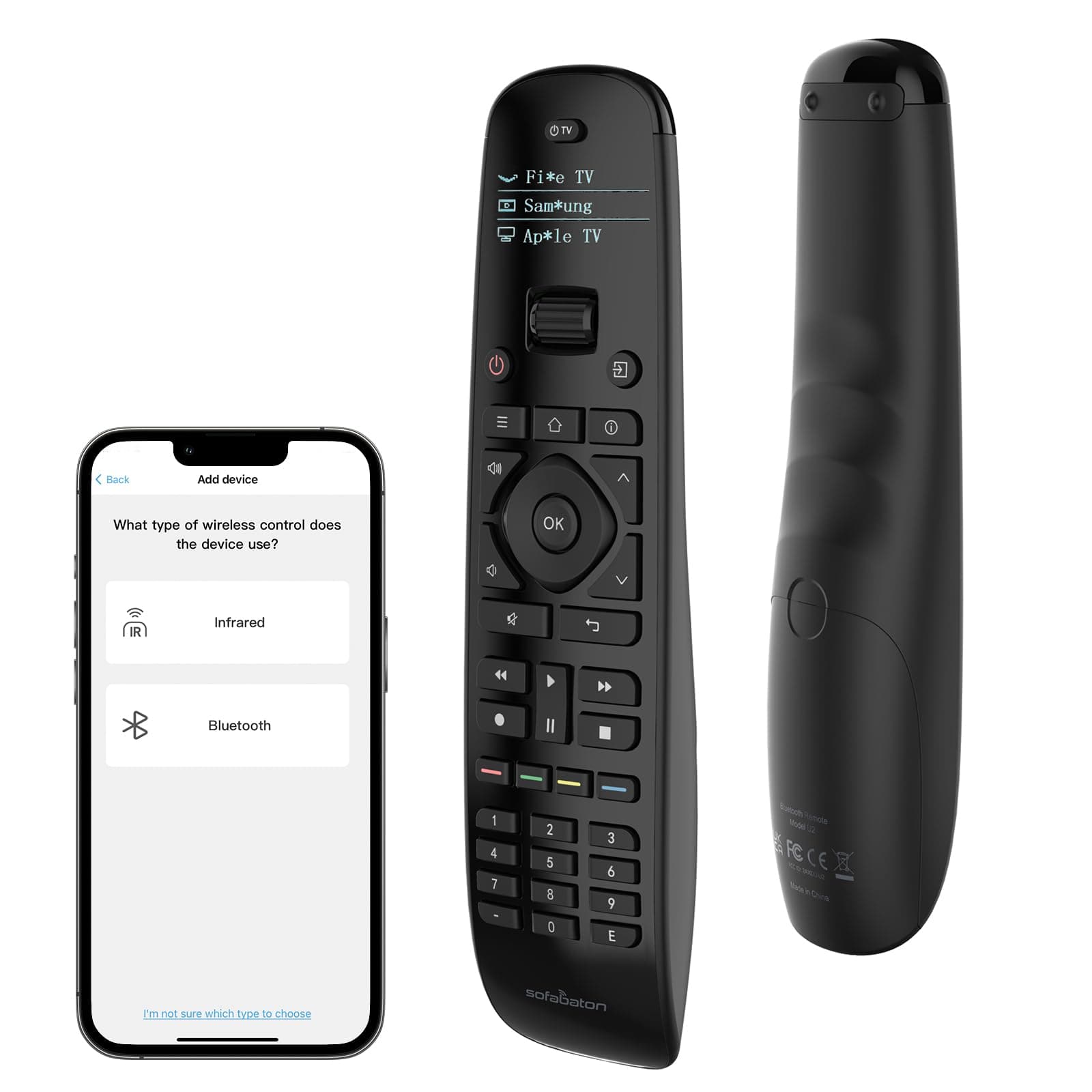
The SofaBaton U2 Universal Remote consolidates control of up to 15 devices into one ergonomic, backlit remote featuring an upgraded scroll wheel and raise-to-wake OLED display. Compatible with over 500,000 devices from 6,000+ brands, it offers powerful custom macros, app-based programming, and enhanced infrared range up to 35 feet. Ideal for professionals seeking streamlined, smart home entertainment management with responsive customer support.


| ASIN | B0DRP8MJ87 |
| Additional Features | Backlit, Digital Display, Ergonomic, Pre Programmed, Universal |
| Battery Type | AAA Alkaline |
| Best Sellers Rank | #6,694 in Electronics ( See Top 100 in Electronics ) #367 in Remote Controls (Electronics) |
| Brand | SofaBaton |
| Color | Black |
| Compatible Devices | DVD/Blu-ray Player, Home Theater, Projector, Set Top Box, Television |
| Connectivity Technology | Bluetooth, Infrared |
| Controller Type | Button Control |
| Customer Reviews | 3.6 out of 5 stars 1,336 Reviews |
| Item Weight | 0.31 Kilograms |
| Manufacturer | SofaBaton |
| Max Number of Supported Devices | 15 |
| Maximum Number of Supported Devices | 15 |
| Maximum Range | 35 Feet |
| Model Name | SofaBaton U2 Universal Remote |
| Model Number | U2 |
| Number of Batteries | 2 AAA batteries required. (included) |
| Special Feature | Backlit, Digital Display, Ergonomic, Pre Programmed , Universal |
| UPC | 741421609891 |
| Warranty Description | 1 Year |
J**I
Very capable remote that does exactly what I needed
This remote is exactly what I needed. My Sony Bravia TV remote stopped supporting my TiVo. I used the app to program this remote for both the TV and the TiVo and then was able to assign simple macros to switch between the GoogleTV and the HDMI port for the TiVo and then change the “mode” of the remote. Finally I tweaked a few buttons to map to the TV while in TiVo mode. It’s perfect all around. My use was fairly straightforward but you can do fairly complex things with this remote - any button can be reconfigured to another button from any other remote in the database or any remote you can “learn” from. It also supports Bluetooth, but I didn’t try using the remote with Bluetooth to the TV. The app worked easily on my iPhone - aid say my whole setup was less than 30 minutes to finish.
M**G
Well, It Works But You Might Tear Your Hair Out During Setup
This is a quite long but I think worth reading (or skip to the bottom): The Good: I was able to setup 6 devices: 2 TVs (Vizio, Hisense), 2 different DVR cable boxes (Arris, only took 1 setup to control both! Yea!), a soundbar (TCL Alto 8+ 3.1.2) and an Amazon Fire Stick. The device is easy to hold, the backlit OLED display turns on when you pickup or move the remote, and the button pressing has a nice feel. You will need to download their app (Android or iPhone) to setup the remote. The scroll wheel is a quick and effective way to switch devices on the remote. You can setup macros to make multiple things happen (like turning on more than one device with a single button) but I don't have any need for that and haven't tried it. EDIT: I have used the macro function and it does work. However, you may need to play around with the timing between your macro button "presses" to get it to work right. The Bad: setting up those 6 devices took me nearly three frustrating hours. The included instructions are pathetically short on information and the website doesn't help. They do have a support forum but I haven't used it. The first issue was how to open the battery compartment! Shouldn't that be a no-brainer? But it's actually tricky and difficult to do. Once that's accomplished, download and install the app, and get to the programming. There's several ways to install devices but even when you get a match with their database, you run into the issue of matching the buttons on the original device remote control to the U1 remote. And, unfortunately, even with 35 buttons and a 4-way switch, you might need to do a lot of individual button programming. For instance, for my DVRs, I needed to figure out a way to access recorded programs, the listings, a "live" button, and the back and next and skip forwards and skip back buttons, none of which are on the U1 nor mapped automatically to other buttons. This means that it'll take some usage time with the U1 even to remember how you map such buttons. Ditto for my soundbar. Sometimes you need to get creative because the U1 says that you successfully mapped a button but it didn't and you'll need to try mapping a different button for that function. I recommend that you add your devices in the order of most-used to least-used for ease of using the U1. There doesn't seem to be any way to reorder the device once you've added them (either on the U1 or with the app. EDIT: yes, you can reorder your devices in the app by pressing on the device and then moving it up or down the list. Also, you may have trouble finding the right product match in their database. This happened with my Arris DVR cable box. Although the database showed my product model, it didn't work. Multiple tries kept failing. Finally, I tried a similar but slightly different model number in their database and that did the trick. However, on the good side, you can email them with your missing product and they'll add it to the database and get back to you within 3 days. One internet commenter said that they heard back within a day. UPDATE: YES! THEIR PRODUCT SUPPORT ***DOES*** WORK AND THEY UPDATED MY SPECIFIC DVR CABLE BOX CODE. I tried their support phone (no hours listed anywhere) and it merely led to a generic phone answering system that doesn't identify it as being Sofabaton nor provide customer service hours. Bottom line: 1) It works! 2) Setup is a PITA. It will really help if you are a little tech-savvy, a problem solver, and have some patience. 3) Support is good via email. 4) There's a learning curve to using it if you need to map buttons yourself. EDIT: on my original device, it often took two button presses to make it do a function (like skip forward) and sometimes it would act like multiple button presses happened with a single push. So Sofabaton sent me a replacement unit (thank you to Sofabaton for the customer support--they really do try). Well, there's no way to "clone" the replacement, so I had to go through the entire process again of programming the remote. And there are issues: on this replacement, the LCD screen doesn't come on when you pick up the remote, you have to give it a hard shake or press a button. That's minor. The bigger issue is that there are still "missed" and "doubled" button presses and that's very frustrating. I don't know, I'm going to stick with my "4 Stars" overall but barely. As they say, your mileage may vary.
S**H
Great Concept - Poor Execution
Interested in this product? Know the facts before you buy (see below) This review is not based on a single use (I purchased 3 of them and all of them perform the same), and is also based on 2 years of use. GOOD: - Has the ability to run multiple devices from a single remote - The configuration of this product is fairly easy BAD: - The IR (infrared) sensor has a very short range and requires the "PERFECT" angle from remote IR sensor to device IR sensor. If you are used to changing the volume while standing off to the side of your TV, you will not get that luxury with this remote. If you are used to changing the volume while in bed, you're getting your ass up and standing in front of the TV. - Multi-taps! This is by far the most annoying behavior of this remote. When pressing the select button you might select the option highlighted on screen, or you may end up 4 selections in. If you click on a category to see your options, half the time it starts a show at random because it multi-taps, so just by clicking category [x] the remote has taken you to the options, chosen the 1st option and pressed play in a single click. Don't even try to type in the on screen key board. Trying to search "Comedy" may get you "Commmm" or "Comm" and when you go to delete the extra "m" now you might have "Com" (if you're lucky) or "Co" or "C" and sometimes it deletes them all and you have to type it all again. - Unresponsive, the remote may take 3 - 5 clicks before it starts recognizing you are trying to use it. Maybe it's because you were not standing in the perfect spot in the room with the remote at exactly 3.58746 feet from the ground and an angle of 32.6587456 degrees to the IR sensor of the receiving device and you just farted so the dust particles are in the air obstructing the view. Or maybe it's because the company did not hire anyone to perform Quality Control. But these are CRAP!
D**T
Impressive capability without complexity
As a former harmony enthusiast, when that company was eaten by Logitech and failed to update their product, I was pretty pessimistic about the future of universal remotes. For years, I just went back to having multiple remotes and with the advent of HDMI control. It wasn’t that bad however, whenever I wanted to change the settings of the picture or sound, which I do quite a bit, I was back to remote flipping. I honestly didn’t think a general universal remote could come close to what Harmony did so. I waited and waited. And then came the ultra expensive options (yikes). I knew that as good as those were, the amount of time would take to program them and set them up was going to be exhausting. I started to see positive reviews on sofa batons U1 so when the U2 came out, I still waited but eventually I just picked one up. With the improved back lighting and standard AA batteries, I knew they were on the right track. It only took me one session to get everything set up. My initial thought was “no activities”!? But I realized there was macros, and you could assign any button to any device Overriding any function on a set of custom remotes, which is honestly better in some ways and, more important, simpler. It’s really up to you to decide how you want to use things. One thing I will recommend is Define one button cross all devices (I use the input button) to use as a “fix it button” that will reapply the proper inputs and your preferred sound mode in case things get messed up or don’t complete. I was able to do that and many more things, even with the simpler architecture of the SofaBaton. As far as device button database is exhaustive, but fairly easy to search and find your devices as long as you know the model numbers. The remote supports infrared, unfortunately many devices nowadays use some form of RF and this just isn’t supported also with Bluetooth now becoming a standard in remote control that can make things a little bit difficult. So it will depend on how many of your devices use traditional infrared control, but I was able to get Apple TV working with Bluetooth and all my other devices through infrared very well As far as improvements, it would be nice to back up not only your device buttons, but your macros and everything but at least they have a backup function in case you need to reset the remote. But without the macros being saved, it seems kind of half solution. The only other improvement I could think of would be Support for a wider range, remote control like the aforementioned RF remotes and more than one blue Ray remote. That’s probably a bit too much to ask for and such as a simple device. But as far as infrared controls, it really seems complete and I couldn’t think of any major improvements.
P**N
I REALLY wanted to like this remote!!!!
I've had Logitech Harmony remotes for years, and when my Harmony Companion (with hub) died, I needed a replacement. The Sofabaton seemed about the only choice out there. I can't believe that someone hasn't picked up and created a real replacement for the Harmony remotes. Anyway, after much searching, the Sofabaton was the only viable replacement, so I purchased it. The Good: * It feels good in the hand. * It does work, after quite a bit of learning. * It's at a good price point. * The Sofabaton support is fast and good. The Not So Good: * There is literally NO documentation. Yes, a little sheet does come packaged with it, buy it is VERY LIGHT in instructions. So, I went online for their PDF manual, and.... it's just as light. They do suggest several YouTube videos, but it's not sufficient. I'm a techie, and it was still a challenge. It needs a step by step guide, to first add your components, then go into programming the remote. Once I learned the system, it was easy to get around, but it needs FULL DOCUMENTATION! If not on paper, then at least as a PDF on their website. * The buttons "CLICK" as you press them. That's the most irritating thing. The Harmony remote that I've had is totally silent. This was probably the issue that had me return it. * No ONE PRESS to go from DISH (or cable if you have it) to the Smart TV function. You use the scroll to change from one or the other, and that remaps the keyboard. For me, Pressing DISH gave me the remote buttons for my DISH Hopper, then I programmed another button to go to my LG Smart TV section. Going back to TV and DISH, just the reverse. With the Harmony, one button does it all. It should never have to be a two button process. If I were you, I'd give it a try. It's the only thing out there. I really needed my Harmony back, so I found a used one on Ebay that's in perfect condition, for $91.00 with shipping. The prices for these discontinued models are all over the board, on Amazon and Ebay. But, when I reprogrammed this replacement, I had forgotten how incredible Logitech was (and is) when you program it. Just amazing! In 5 minutes, I had it fully up and running and the process is almost automatic! Just need your model numbers and inputs and the app does the rest. Please someone... some company, make a true Harmony replacement!
F**S
Best Piece of Junk Replacement for Logitech Harmony 900
Now that Logitech is no longer making their Harmony universal remotes, the entire remaining universal remote market is made up of relative junk. That said, the SofaBaton U2 is certainly the best of the junk remotes remaining on the market. But if you are expecting it to be even a shadow of the high-end Harmony remotes, such as the Harmony 900, you are in for a serious disappointment. That said, considering the total lack of a decent universal remote on the market today, I don't regret having bought the U2. It IS the best piece of junk universal remote, remaining on the market. It's just sad to see technology moving backwards. The only positive thing about the U2 is that the phone-based app for programming it is somewhat better than the computer-based Harmony app. On the other hand, since the U2 is not nearly as capable as the the Harmony remote, the U2 app has much less work to do than the harmony app. But the moderately better app is a plus. The U2 app is also up-to-date, which is one of the reasons I had to switch away from the Harmony 900. When you get a new piece of gear, you have to re-program your universal remote and without a functioning app or a very old computer that will run the older app, you are out of luck. So, not only is the U2 phone-based app slightly better than the Harmony computer-based app, but it is up-to-date and works on modern phones. But that's where better abruptly comes to an end, with the U2. Now let's get to the negatives. The U2 is very little more than a basic "dumb" universal remote. By "dumb", I mean the mass of universal remotes that have no real programming capability whatsoever. By "very little more", I mean that it has re-assignable keys and some macros. But that's it. To use computers as a comparison, the Harmony remote would be a super computer, to the MSDOS PC of the U2, while the dumb remotes would compare to a Commodore 64. With the U2, you have to make sure that the remote is set to the correct device, before pressing any buttons. The only real cross-over that it allows is volume. For example, you can set the volume to be controlled by your amplifier, while the remote is set to AppleTV or FireStick. But that device setting is exactly that - a DEVICE setting. It is not the "ACTIVITY" setting of the Harmony remote. You can't just press one button that turns on your TV, tells the amplifier to switch to AppleTV, turns on your AppleTV, and adjusts the volume on the amp, to match the volume necessary for that device. Instead, to do what one button did on the Harmony, I have to perform the following sequence on the U2: 1) Press the TV power button on the remote. 2) Scroll the scroll wheel to AppleTV. 3) Press the number key (macro) that sets the receiver to AppleTV and adjusts the volume. 5) Press the button to power on the AppleTV Sure, I can do those things easily. But I had to spend some time showing my wife how to use the new remote. It's also a major disappointment to see technology move backwards. With the Harmony 900, all of the above actions were performed with a single button press and every time I chose a different activity, the controls changed automatically. Play, FF, and REW automatically matched the activity. I didn't have to rotate the scroll wheel to match the device. The Harmony remote just knew what buttons should be active, for the activity that was chosen. Although there are macros on the U2, there are no dedicated macro buttons. That turns out to not be a problem for me, but if you use the number buttons on the remote, it could be an issue. I just use the number keys as macros. Also, it appears that the U2 goes through batteries a little faster than I would think reasonable. It's just a kludgy downgrade from the Harmony remote. It offers far better features than the remaining junk remotes on the market. But then the first IBM PC offered a lot more than the Commodore 64. But would you want to go back to a PC with an 8080 processor and 64k of memory, running MSDOS? That's the difference we're talking about. SofaBaton could do so much more. But they have apparently chosen to make a remote that is just a little better than anything currently on the market. If Logitech were to get back into the market with something like the Harmont 900, I suspect that SoaBaton would lose most of their business. But with the Harmony line no longer being produced, the U2, being the best piece of junk universal remote available is all it takes to sell a lot of junk. Don't get me wrong. Buy it. Just don't expect a lot from it. As for me, I'll continue to limp by with mine. But I'm keeping my eyes open for a capable and functional fully programmable universal remote. The moment one comes available, the U2 goes in the garbage.
J**S
Super Easy Setup
The remote itself has all the buttons you would expect on a universal remote, and delivers signals without any trouble, even to devices that are not your typical A/V components. It has a scroll wheel to change between any number of devices (I have not reached a limit yet), and, while there is a known issue with certain batches of these remotes where the wheel does not work as expected (it's a very noticeable control issue when it happens), the company is very quick to respond to and correct the issue. You can even submit the report directly through the app. Speaking of the app, it is amazingly easy to use. Initial setup is a simple pair of the remote (the app walks you through this), and then adding a new device is as easy as searching a database by brand and model #. For advanced needs, you can modify any of the buttons in a device profile, and can learn any (or all) buttons directly from existing remotes. In addition, you can reassign buttons on one profile using functions from another profile. So if you want your media player to control your TV power, just reassign it! Same goes for audio pass-through. You don't need to choose a specific device for all audio control, just reassign the buttons to what volume up/down/mute/etc. you want. (Pro tip: You can't reassign buttons from a bluetooth profile to an IR one--HOWEVER, you *can* learn buttons from a bluetooth remote into an IR profile) The remote even has macros, although I have not used that functionality yet, so I can't speak to how it behaves, although I suspect it is also a very well-designed feature, based on the rest of the remote. Very well done, SofaBaton, you have made a long-term customer for all of my remote needs.
T**N
Really good universal remote
I got this remote since Logitech isn't making remotes anymore, which was disappointing to see not a lot of options out there. I decided to try this one out to see how it was. It is actually pretty good. The programming is my favorite part with it, it was really easy to use the app and find my devices, I like how it also has custom options that some people have added as well. It is really easy to swap buttons and add macros. I use it for a cable box and a fire tv, both have functioned perfectly. I noticed it has a majority of devices compatible to use like the harmony remotes. My only two complaints are the way it goes into standby, you have to move it to wake it up every time for the first press to register or simply press it twice on the first go to click. I wish that it could save battery just with the screen off but still register first button press like any other universal remote. The other complaint is battery life, the battery life isn't very long. Of course that will depend on how much you use it, move it around...as to whether it will last a little longer. I use rechargeables now on the remote and it helps not waste batteries. It seems the remote needs full green for it to work perfectly. Once the battery goes almost to yellow it won't register buttons correctly, the distance is shortened etc....so I recommend rechargeable batteries with this.
Trustpilot
Hace 2 semanas
Hace 1 semana