We remain fully operational. Our teams are working around the clock to ensure your deliveries continue safely.

Descargar la aplicación


Servicios al cliente
Sobre nosotros
Copyright © 2025 Desertcart Holdings Limited
Descargar la aplicación

Buy anything from 5,000+ international stores. One checkout price. No surprise fees. Join 2M+ shoppers on Desertcart.
Desertcart purchases this item on your behalf and handles shipping, customs, and support to Argentina.
🎮 Elevate your handheld gaming setup—dock, charge, and dominate in 4K clarity!
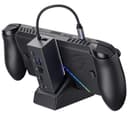
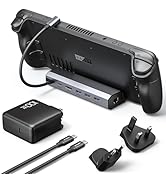
The JSAUX 6-in-1 Docking Station is engineered for handheld gaming pros using ROG Ally X (2025), Steam Deck, Legion Go, and similar devices. It delivers crisp 4K@120Hz HDMI output, ultra-fast Gigabit Ethernet, multiple USB 3.2 Gen 1 ports, and robust 100W charging. Its modular design offers both docked and portable use, enhanced by customizable aesthetics and stable silicone padding. Perfect for transforming your handheld into a powerhouse desktop gaming rig.








| ASIN | B0DBLP2438 |
| Best Sellers Rank | #1,628 in Electronics ( See Top 100 in Electronics ) #15 in Laptop Docking Stations |
| Brand | JSAUX |
| Color | Black |
| Compatible Devices | ROG Xbox Ally X (2025) , ROG Xbox Ally (2025), ROG Ally X, ROG Ally, Steam Deck, Legion Go, Legion Go S |
| Customer Reviews | 4.3 4.3 out of 5 stars (755) |
| Hardware Interface | Ethernet, HDMI, USB 3.0 Type A, USB 3.0 Type C, USB Docking Station, USB Type C |
| Item Dimensions L x W x H | 3.35"L x 1.93"W x 4.92"H |
| Item Weight | 0.27 Kilograms |
| Manufacturer | Shenzhen Wuyishi Technology Co.,Ltd |
| Number of Ports | 6 |
| Total Number of HDMI Ports | 1 |
| Total Usb Ports | 4 |
| Wattage | 100 watts |
D**1
If you need a dock, check this out.
It has a great box to keep all the pieces in while I travel. I use the OG Ally with it and it holds it well and provides enough connection options for what I need which is Mouse and Keyboard. It is also simple to setup just two pieces but the work well together and are small form factor on the table as well.
T**L
Perfect dock for the ASUS ROG Xbox Ally
Works flawlessly!
M**Y
A dock finally works for me!
Before this purchase, I've only ever gotten one HDMI input/output device to work consistently on my LCD Deck, and it was a VAVA hub (awkward, no stand). I'm happy to report that with a bit of tinkering, this one worked for me! As many have said, the dock has a serious lack of sturdiness, with the base being quite narrow and easy to tip over + the two parts can easily be detached when the console *isn't* on the base. I'd compliment this since it can be good for travel and ventilation, but on the other hand it's obviously made like this to be accessible to more types of handheld PCs at once and can easily tip over and hurt your device if it falls in just the right way (even when plugged in or on sturdy ground). You may want a case, but definitely care for the screen, maybe cover it up with the cover included with the JSAUX or Dbrand modcases or apply a protective screen. Also, a plus for including a card slot to customize. After plugging it in the dock's video output it should be responsive in ~4 sec. If not, try playing with your decks display settings and try again -- it may glitch out or not display initially, but that even happens with the official dock. I have used it with a SD card reader and dongles, no issues so far... besides the USB slots being very close. One of my dongles is old and big (white Targus pictured) and that one can't fit well with a normal USB next to it :( Fortunately, you can just use a USB adapter. Apparently you should be able to charge the Deck and appears to do that in gaming mode, but it sometimes doesn't show that way in Desktop mode (not "discharging" but instead "not charging" so there may not be enough power for mine). If you turn off the deck or put it in sleep it definitely charges (plug the cord into the bottom most USB-C with the lightning picture). Troubleshooting: When I first got my picture to display, certain games didn't work properly and I couldn't understand why. At first, games wouldn't launch at all when docked, which usually has to do with resolution or refresh rate, so that was my hint (I ended up starting the game in handheld mode and replugging it in when booting). After messing with settings and testing a few games I had an issue with Wobbledogs, which only worked until logging into a profile. While in any profile, any input whatsoever (directly from the Deck or from a mouse or external controller) would result in the HDMI connection severing completely. In case anyone else has a similar issue, this is what I set my LG Ultragear to in Gamemode: ✅ Gamescope resolution set at 1280x720@60 (my 1440p native monitor always becomes a black screen w/ any 2650x1440 options) ✅Automatically scale on ✅HDMI CEC on ✅Magnifier was 150% ✅Max game resolution set to 2560x1440 ✅External display safe mode on ✅HDR was on Afterward, there were still rare occasional glitches (vertical line across the screen that shows briefly in desktop mode) but no glitches stayed for long. I also feel the need to tell those who don't know about JSAUX's notices: there may be a pamphlet in the box that mentions optional firmware updates... but firmwares on their website were delisted and are no longer an option due to community feedback (took me like 30 minutes to find that info but it's just on the general FAQ option at the bottom of their website lol). I mention this because at first my Deck/dock weren't cooperating at all and I had hope after reading that pamphlet that I would be able to fix the situation. Overall, my advice is to just keep playing around with the resolution and refresh rate, especially on LG monitors which historically had issues).
A**M
Great dock fits Xbox ROG Ally X
This dock is PERFECT! I had originally bought the official 100w ROG charging dock, but man that thing is garbage. But this dock is fantastic; it fits the Xbox ROG Ally X beautifully, it can be disassembled for easy packing to take on trips, has Ethernet and an extra USB-C, and is just simple plug and play. It also goes up to 4K 120fps vs the officially ROG charging dock only does up to 4K 60fps. Get this with the 100w Anker charger and call it a day, you can thank me later.
A**T
Good untill it broke from light use... BUT Got a new one sent right away
worked well, I believe it worked as it was supposed to. got it July 2025 dont use it very much and i was just sitting here and it suddenly disconnected. after an hour of trying to get it to work because i thought it was my portable monitor I realized my rog ally x was not charging as docked or my keybord being connected to it. it was the dock, just suddenly no more. for anyone wondering i take good care of my things, i dont toss them around, drop them, use them when it is too hot, ect..... sent a few emails back and forth on April 9th and a new one showed up at my door on April 11th. 8 months later from my original order my dock broke from normal use and they still sent me a new one. yes it sucks but it happens, some units of a product are faulty but when the seller knows that and sends a new one that's 5 stars to me. I'll update if anything happens to this one. today is April 11th 2026.
L**E
Does not charge as well as promised, but plug and play docking is good.
TL;DR: If you play low-intensity games, shorter gaming sessions, or just want to watch a movie or stream TV from desktop mode, you'll probably be fine with this, but it's not for heavy duty gamers. EDIT Sep 16th 2025: JSAUX reached out and offered me a refund. The dock component does work and I have still been able to use it for lightweight games with adequate charging, so I declined the refund. That part of the product is rock solid and JSAUX has been a good quality product for me in the past until this one item. For this reason, I have opted to raise my 2-star review to a 3-star. A company willing to stand by their product and refund displeased customers without being asked to do so is worth an extra star. I'll be looking to them when I'm ready to upgrade to a more long-term docking solution in the future. REVIEW It works and plays to the TV with super easy plug and play, but was this thing supposed to come with a charger to supply extra power? It absolutely does not charge my Steam Deck while playing high graphics and power games. That's fine if I'm only playing for an hour or two, but I will not be having marathon sessions on the TV with this dock. I don't know anything about watts this or performance that, but this thing is not charging as it claims. I know the end result of that is my battery dying mid-session. I also have major concerns about stability since it has two pieces that don't even latch together. One swipe of the dog's tail and the deck is hitting the, well, deck. (EDIT: I went back and looked for this silicone mat the listing images mention and never found it in the packaging.) For now it's worth 2 stars because it does put the game on the TV, but the charging promise was the main reason I picked this one. I'll stick with it since it was cheap and I don't really play on the deck that much right now. When I finally get some of the new games that are coming out over the next year, I'm splurging on something that actually powers my device as promised.
C**.
Best accessory for Legion Go S
It’s the best thing ever for my Legion go S. I stream to my 4k tv with no issues! It’s very durable and the speed is instant with no delays. I play games from my handheld pc without any issues
G**Y
Made for ROG Xbox Ally X. The docking is really fast and reliable also. Highly recommended!
ر**ي
السلام عليكم ورحمة الله وبركاته انا جربت المنتج الصراحه ممتاز في النت و الكهرباء
R**A
Atendeu bem, funciona perfeitamente
H**Y
Super bra docking station och bra prisklass
A**R
Absolutely perfect for the ROG Xbox Ally. Works like a dream. I power it with a 200W Anker USB-C dock. It goes into an HDMI splitter so I can still use my NUC, and I have a Bluetooth keyboard and mouse which can pair to multiple devices. I prefer using a keyboard and mouse on some games so it’s perfect. Would definitely recommend.
Trustpilot
Hace 2 semanas
Hace 3 semanas