We remain fully operational. Our teams are working around the clock to ensure your deliveries continue safely.

Descargar la aplicación


Servicios al cliente
Sobre nosotros
Copyright © 2025 Desertcart Holdings Limited
Descargar la aplicación


Buy anything from 5,000+ international stores. One checkout price. No surprise fees. Join 2M+ shoppers on Desertcart.
Desertcart purchases this item on your behalf and handles shipping, customs, and support to Argentina.
🚀 Upgrade your desktop to gigabit greatness — don’t get left buffering!
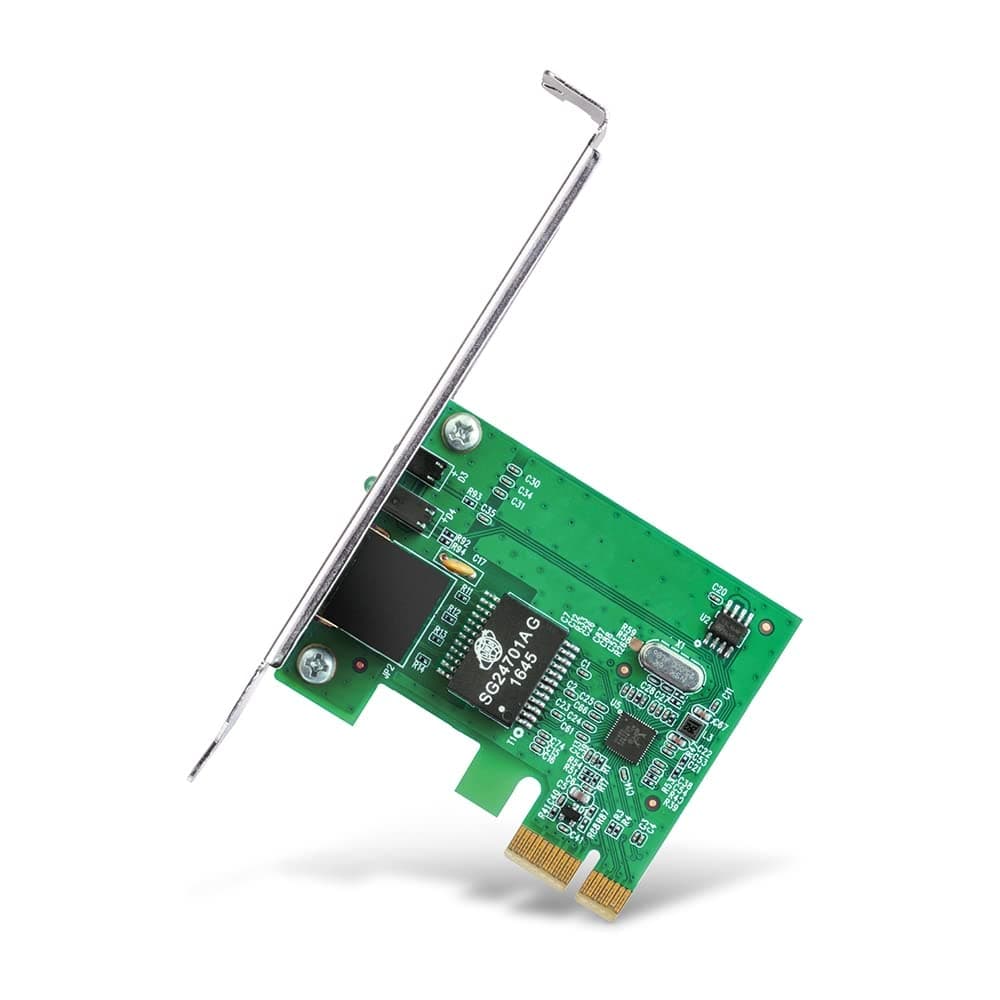
The TP-LINK TG-3468 is a high-performance 32-bit PCI Express network adapter delivering true gigabit Ethernet speeds (10/100/1000 Mbps) with IEEE 802.3X flow control for stable, lag-free connections. Compatible with a broad range of Windows OS versions, it installs effortlessly into any PCIe slot, offering a compact, durable design backed by a 3-year warranty. Ideal for professionals seeking reliable, high-speed wired networking to power streaming, gaming, and large data transfers.


| ASIN | B003CFATNI |
| Best Sellers Rank | #1,199 in Computers & Accessories ( See Top 100 in Computers & Accessories ) #4 in Graphics Cards |
| Box Contents | TP-Link Gigabit PCI Express Network Adapter |
| Brand | TP-Link |
| Brand Name | TP-Link |
| Color | Green |
| Colour | Green |
| Compatible Devices | Smartphone |
| Compatible Operating System Family | Windows |
| Country of Origin | India |
| Customer Reviews | 4.4 out of 5 stars 13,842 Reviews |
| Data Link Protocol | IEEE 802.11g , IEEE 802.11n |
| Data Transfer Rate | 10000 Megabits Per Second |
| EU Spare Part Availability Duration | 1 Years |
| External Testing Certification | FCC, CE, RoHS, BSMI, VCCI |
| Global Trade Identification Number | 06935364001049 |
| Hardware Interface | Ethernet |
| Importer Contact Information | TP-Link India Private Limited Office No.1, Tower 2, Level 2, Raiaskaran Tech Park, Andheri Kurla Road, M.V Road, Andheri East-400072 Contact: Toll Free 1800-209-4168, [email protected] |
| Item Dimensions L x W x H | 16L x 2.8W x 13.5H Centimeters |
| Item Part Number | TG-3468 |
| Item Type Name | Adapter |
| Item Weight Unit of Measure | 0.22 Pounds |
| Manufacturer | TP-Link, TP-Link Systems Inc. 10 Mauchly, Irvine, CA 92618, USA or TP-Link India Private Limited Office No.1, Tower 2, Level 2, Raiaskaran Tech Park, Andheri Kurla Road, M.V Road, Andheri East-400072 |
| Manufacturer Contact Information | TP-Link Systems Inc. 10 Mauchly, Irvine, CA 92618, USA or TP-Link India Private Limited Office No.1, Tower 2, Level 2, Raiaskaran Tech Park, Andheri Kurla Road, M.V Road, Andheri East-400072 |
| Manufacturer Part Number | PCI-E |
| Minimum Required Operating System Version | Windows 7 |
| Model Number | TG-3468 |
| Packer Contact Information | Vivaan Electronics Technology PVT LTD. Plot No.573, Sector 8, IMT Manesar, Gurgaon 122051, Haryana, India |
| Product Dimensions | 16L x 2.8W x 13.5H Centimeters |
| UPC | 767531764145 840460604796 |
| Unit Count | 1 Count |
P**H
⭐⭐⭐⭐⭐ Reliable and Affordable Gigabit Networking Solution
I recently upgraded my desktop’s networking capabilities with the TP-LINK TG-3468 Gigabit PCI Express Network Adapter, and it has exceeded my expectations. This adapter offers a significant boost in network performance and stability. Here’s why I highly recommend it: Highlights: Seamless Installation: The installation process was straightforward. I simply inserted the card into an available PCI Express slot on my motherboard and secured it. The provided instructions were clear, making the process quick and hassle-free. My system recognized the card immediately without any issues. Outstanding Performance: This network adapter delivers on its promise of gigabit speeds. I’ve noticed a substantial improvement in my network connection. Downloads are faster, streaming is smoother, and large file transfers between my home server and PC are significantly quicker. It's a game-changer for anyone needing reliable, high-speed network connectivity. Broad Compatibility: The TP-LINK TG-3468 is compatible with a wide range of operating systems, including Windows and Linux. I’m using it with Windows 10, and it worked perfectly right out of the box. The versatility ensures it’s a great fit for various setups. Stable and Consistent Connection: Since installing the adapter, I haven’t experienced any drops or interruptions in my network connection. It provides a stable and consistent link, which is crucial for online gaming, video conferencing, and other bandwidth-intensive activities. Compact and Durable Design: The adapter is compact and doesn’t take up much space inside the case, leaving plenty of room for other components. It also feels sturdy and well-made, with a solid build quality that gives confidence in its long-term durability. Affordable Price: This network adapter offers exceptional value for its price. It provides gigabit performance at a fraction of the cost of more expensive models, making it an excellent choice for budget-conscious users looking to upgrade their network capabilities. Considerations: Driver Installation: While many users won’t need to install drivers manually, it’s worth noting that for some older operating systems or specific setups, you might need to download the drivers from TP-LINK’s website. This is a minor step, and the drivers are readily available online. Not for Wi-Fi: This is a wired Ethernet adapter, so it won’t provide wireless connectivity. If you’re looking to add or improve Wi-Fi capabilities, you’ll need a different type of network card or a USB Wi-Fi adapter. Final Thoughts: The TP-LINK TG-3468 Gigabit PCI Express Network Adapter is an excellent upgrade for anyone looking to enhance their desktop’s network performance. It combines easy installation, robust performance, and great value into a single package. Whether you’re upgrading an older system or building a new one, this adapter is a reliable choice for achieving fast and stable wired network connectivity. Highly recommended for its performance, ease of use, and affordability!
A**N
A DETAILED DISCUSSION AND FACTS YOU NEED TO KNOW ABOUT TP-Link TG-3468 Gigabit PCI Express Network Adapter
First of all I want to say is that the product is AWESOME. Secondly, the delivery was on time (actually it came before the expected delivery date).Go Go Amazon. Now lets come to the question, why I needed this? Well, recently a THUNDERSTORM hit our locality and my Desktop PC was affected by this lightning resulting LAN port malfunctioning in the CPU. My Wifi router malfunctioned too (I gave that to service center later). I called my ISP and they told me that my LAN port was fried and I had to buy a new one.So, I went to local shop and bought a USB-to-LAN adapter for Rs.350. It worked OK at first then I faced problems- my internet speed was limited to 750 Kbps (my ISP provides upto 12 Mbps), the internet connection was not stable, my PC lagged sometimes. So, I googled it and found compatibility issues saying "USB ports are not meant to act as LAN ports". Thus I went to the 'Mecca' of electronic components and parts of Kolkata, Chandni Chowk for PCI LAN card. Interestingly I couldn't find it there (searched for two consecutive days). So, after gathering some infos about my motherboard, PCI and PCI Express, 10/100/1000 Mbps I ordered TP-Link TG-3468 Gigabit PCI Express Network Adapter on Amazon for Rs.750. It came in a very nice packaging with 3 YEARS WARRANTY on the box. In the box there was this LAN card, Driver installation disk and User manual. I installed the card in my PCI Express slot, switched on the PC and BAAM!! There it is. I DIDN'T even HAVE TO INSTALL THE DRIVER SOFTWARE. My onboard Realtek PCIe GbE driver software was compatible with this device. I connected my ethernet RJ45 cable to it and the internet just works fine now as it was before. Now I get the expected internet speed as specified by my ISP, the network is stable and my Desktop PC is running fine as it is new. I am happy with this product. Now some things you need to know before you buy-- 1. This is a PCI EXPRESS LAN card. So check if your motherboard has PCI EXPRESS slot. It should be written as PCIEX4(in my case) or PCIEX16 (generally graphics card is installed in this slot) or PCIEX8 or PCIEX1 or PCIe. If it is written only PCI then this LAN card is not compatible. 2. It works on any PCI Express slot regardless of its version. 3. Don't panic about the fact that your motherboard's PCIEx slot is longer than the gold connectors in the LAN card (in the picture). The length of the slot doesn't matter. It just fits fine. 4. There are 3 LEDs indicating network speed. 10 Mbps LED, 100 Mbps LED and 1000 Mbps LED. According to your internet connection the LED will blink (100 Mbps LED in my case) 5. Comes with 3 Years Warranty. 6. Consult you Internet Service Provider (ISP) before buying. Hope this review helps everyone.
T**E
Network Adapter great replacement for the old
Gigabit PCI Express Network Adapter has a 1.0Gbps connection. You definitely install this to upgrade your network system if you are like me whose mobo doesn't support a gigabit connection. Otherway it's useful if your inbuilt LAN port stopped working. Overall pretty easy to install, with no need for any driver and stuff. Pretty durable and small so will fit in most of the cases out there. Network speed and Latency are the same as the old one. No lag spikes or connection drops so far. I will update the review if found anything.
W**U
Another great product from TP-Link, and another satisfied customer
A great product from TP-Link. Why I bought this: When my previous LAN Adapter was destroyed by lightning, we bought a USB LAN adapter from Amazon (not from TP Link). That product featured frequent disconnections, and gave only ~ 6 Mbps while our ethernet speed was 100 Mbps. So we discarded that product and bought this TP-Link TG-3468 Gigabit PCI Express Network Adapter from Amazon. And it seems we took the correct decision this time! Installation: Our Asus motherboard did not have an x1 PCIe slot, but that doesn't matter because this one can be easily fitted on an x4 slot. After switching on the PC (Windows 7 Professional 32-bit), the device driver installation failed. So I inserted the CD and followed the instructions given on the manual. The manual has very detailed instructions with pictures, so even beginners will face no problem. Once the driver was installed, we put in the static IP configuration (Network and Sharing Centre -> Change adapter settings -> Right click on "Realtek PCIe GbE Family Controller" -> Properties -> IP v4/v6 (whichever applicable) -> Put in IP configuration). Now the device was ready. Note: It is not mandatory to put the static IP. We had to put it because our ISP has configured the network such that the IP cannot be automatically determined. Speed: As mentioned previously, we have a 100 Mbps link speed, and a speed test using Ookla website said that the speed was 50 Mbps. Not the promised speed, but I doubt we ever had 100 Mbps. Performance: Very good so far. I set up a hosted network on the PC (i.e. created a WiFi hotspot), connected my laptop to it, and used it for over 5 hours. No disconnections or any other problems. Overall, satisfied with the product.
ग**य
Best upgrade for my old motherboard
Does the job what it claims. Got seal packed box. Worked on Windows 10 without any need of Drivers (I got v4.0 hardware). I have an old Motherboard where Ethernet port is have 100Mbps Limit while i recently got a 300Mbps connection and want to utilize it so upgrade the system with this little pcie Gigacard. Though my PCIex1 port is of version 1.0 so i was unsure whether i will work or not. But it is working on par with on board Gigaport of another system. Also a Bonus point is that it is having 3 years of warranty and not just 1 year. So it's best to buy if you are looking for PCIE Gigaport.
U**R
Excellent GB card
Connectivity is good comparable with all robust design
D**A
Computer
Easy installation, good speed
B**S
Best of Home server local network
If you have a Home server running on old hardware or have an old motherboard with 100Mbps limited network speed and you wanted to create a local media network/server then this is the device you should be having. It can transfer data with up to 1Gb/s over a local server/network. I won't recommend this if you have your internet speed below 100Mb/s. It won't increase your internet speed. But yes, if you have an Internet connection with more than 100Mb/s speed [NOTE: Internet speed depends on many factors] and you have old hardware, that is limiting you to use more than 100Mb/s of your connection, then this device can help.
Trustpilot
Hace 2 meses
Hace 3 semanas