We remain fully operational. Our teams are working around the clock to ensure your deliveries continue safely.

Descargar la aplicación


Servicios al cliente
Sobre nosotros
Copyright © 2025 Desertcart Holdings Limited
Descargar la aplicación
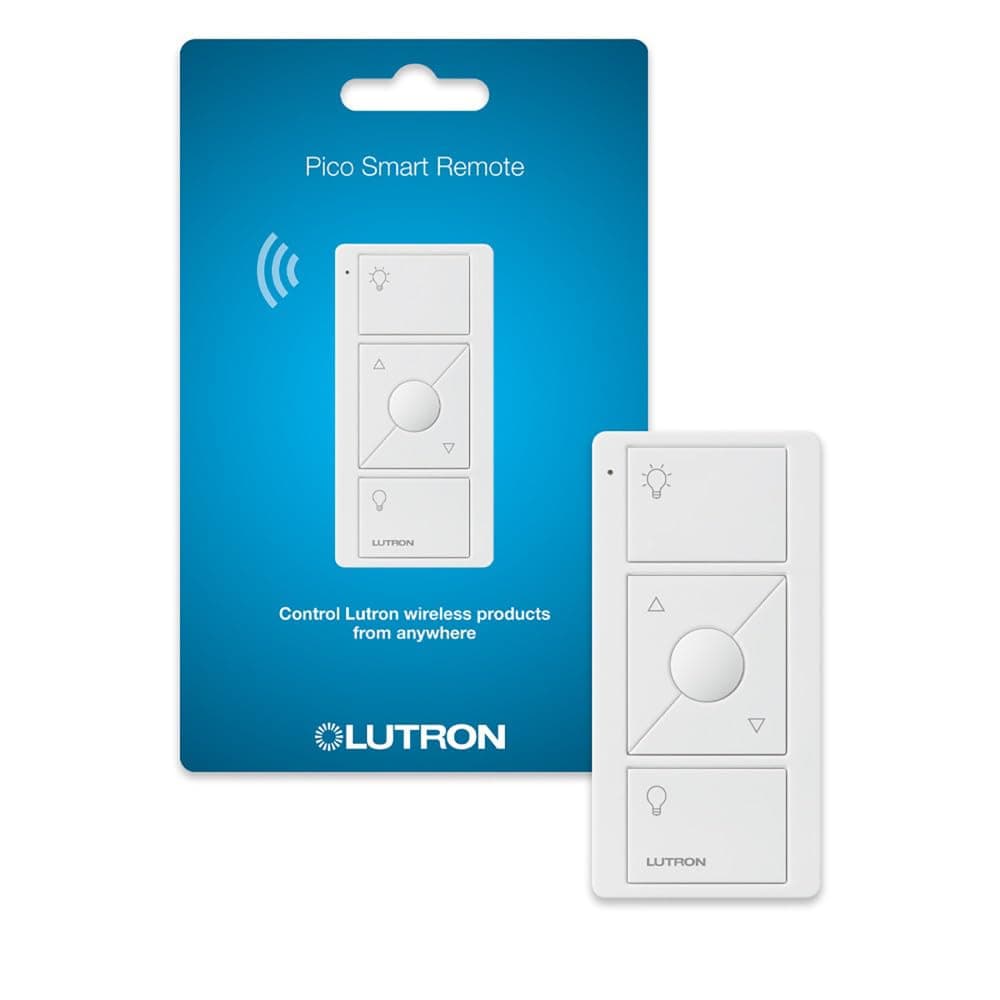
💡 Light up your space, your way — anytime, anywhere.
The Lutron Pico Remote PJ2-3BRL-WH-L01R is a versatile 3-button wireless dimmer remote designed for Lutron Caseta smart lighting systems. It offers intuitive on/off and dimming control from anywhere in the room, supports multiple mounting options, and boasts a remarkable 10-year battery life. Compatible with smart home platforms like Home Assistant, it delivers a seamless, cost-effective upgrade to traditional wired lighting controls.


| ASIN | B00KLAXFQ0 |
| Actuator Type | Push Button |
| Best Sellers Rank | #9,698 in Tools & Home Improvement ( See Top 100 in Tools & Home Improvement ) #24 in Dimmer Switches |
| Brand | Lutron |
| Brand Name | Lutron |
| Circuit Type | 3-way |
| Color | White |
| Connectivity Protocol | Wi-Fi |
| Connector Type | Plug-in,wireless |
| Contact Material | Brass |
| Contact Type | Normally Closed |
| Control Method | Remote |
| Controller Type | Remote |
| Current Rating | 4 Amps |
| Customer Reviews | 4.8 out of 5 stars 2,558 Reviews |
| Global Trade Identification Number | 00784276072120 |
| Included Components | (1) Wireless Pico remote |
| International Protection Rating | IP30 |
| Item Dimensions | 3.88 x 0.5 x 5.75 inches |
| Item Type Name | Pico Remote |
| Item Weight | 0.01 Pounds |
| Lower Temperature Rating | 32 Degrees Fahrenheit |
| Manufacturer | Lutron |
| Material Type | Plastic |
| Model | PJ2-3BRL-WH-L01R |
| Mounting Type | Surface Mount |
| Number of Items | 1 |
| Number of Positions | 2 |
| Operating Voltage | 120 Volts |
| Operation Mode | Off |
| Specification Met | cULus |
| Switch Type | Dimmer Switch |
| Terminal | Screw |
| UPC | 784276072120 |
| Unit Count | 1.0 Count |
| Upper Temperature Rating | 104 Degrees Fahrenheit |
M**E
Saves Electrical Wiring Costs and Labor
Recently remodeled master bedroom, and original wiring plan involved much more extensive and expensive work to install 3-way switches at bedroom entrance and above each night stand, to control overhead and reading lights, as well as lamps on a credenza. These worked perfectly. Pico remotes can be easily programmed to control individual or multiple lights/plugs at the same time. Multiple remotes also can control the same lights/plugs such as having a set of remotes for each side of the bed. For the two bedside reading lights I ordered Pico remotes with an illuminated center buttons. The dimmer also works perfectly with my Philips GU-10 LED bulbs in the ceiling's recessed fixtures -- these bulbs get warmer as you dim them. I also recommend buying the weighted bases to hold the remotes -- in my configuration, I have three remotes on each bedside, which fit neatly together in these angled bases - they come in single, double and triple models. These stands also protects the remotes from getting wet if you knock over a glass of water during the night, and keeps our cat from batting them off the nightstand. My only issue was that I accidentally programmed one of the remotes to turn on and off more than one lamp, and Lutron's customer forum is a bit kludgy to navigate. Some of the suggestions didn't work for my Caseta / Pico remote combo, but another customer reported that he spoke with a live Lutron agent and these steps worked: 1) On the lower off button on the Pico remote, quickly tap 4 times and hold down the button on the 5th press until the solid green light comes on. Then again quickly tap the lower button 4 times. 2) The above worked perfectly to reset the Pico remote, and I was easily able to reprogram it by holding down the off button on the wall switch until it flashes, and then holding down the off button on the Pico remote until it flashes and synchs with the switch.
A**R
Great product from Lutron and works well with Home Assistant
Can't go wrong with anything Lutron. I'm using these within Home Assistant for controlling Sonos speakers, lights, fans, etc.
S**T
Flexible: Allows Use With or Without a Home Automation Hub
I am using this in conjunction with a Lutron Caseta wall dimmer switch and a Wink hub. The downside to these products is that they have a proprietary wireless system (not Z-wave or Zigbee). That though is also an advantage because they will work with or without a home automation system in operation (or after you sell and take your home automation hub with you). It you do use this with a Wink though, pair the Pico remote through Wink, not using the directions provided by Lutron. You can use this remote anywhere on a wall or just loose, or in a box where a 3 or 4 way slave switch used to reside (or actually even where the 3 or 4 way switch resided). They sell a separate piece of plastic for mounting in a box, which really should be included in the package for the remote. If you do install it in a box, dealing with the existing wiring is pretty simple--you just connect all the wires together with a large wire nut (except any common wire (unlikely) or a ground). I would suggest though taking a picture of the existing switch wiring, and tag the wires as necessary so that you can easily reverse the process if you remove the Lutron switch. As to the remote, it is actually a bit nicer than the wireless switch I paired it with because the middle button can be set to turn on to a remembered brightness level, where the on button remains full bright. Other than that, this product works as well as any wired slave switch--assuming distance is not too great. As to distance, for use with a Wink system it would be distance to the Wink hub. For use without a hub it would be distance to the wired switch. I did not test out distance, but I have not had any issues with them being on a different floor than my hub, but they are virtually right below the hub, so the distance is not great. Anyway, I generally do not like proprietary systems, but here it actually does provide some benefit.
E**E
Excellent with Apple HomeKit and the power company
I use the Lutron Castea system in conjunction with Apple HomeKit. They integrate seamlessly and easily while the combination allows a multitude of features. In addition, the Casseta Homebase network frees-up bandwidth on the 2.4Ghz band of my WiFi mesh network that would otherwise be taken-up by smart switches from any of the other vendors such as Kasa. Our four-story 3000sq.ft. townhouse functions nicely with a single Homebase connected via Ethernet to a Deco mesh node on the second floor. At first, I glossed over such features as adding remote switches and programming scenes via the Caseta app. Now I find they add tremendously to my home. For example, I have a Pico on the dining room table that adjusts all the lighting in and near the dining room for an evening meal with one touch. Same for the home theater; same for our primary bedroom at bedtime. I added a pico in the hallway using just a double gang faceplate on an existing single gang switch without any wiring at all. Now I can initiate the primary bedroom evening lighting scene - or turn on all the bedroom lights full strength - before I enter the room. There is even a pico with a built-in nightlight. If you have outdoor temporary lights, perhaps for the holidays, there are weatherproof outdoor switches you can program. All our permanent outdoor lighting is on the Caseta network for security and, of course, you can program switches for when a room is occupied via HomeKit. We also use the system for electrostatic air cleaners that help to keep our home dust and allergen free, turning them off when people are around and running them in vacant areas at night and when no one is home. As a bonus, energy bills have diminished a bit despite living in data center land. Take that AI.
M**S
FANTASTIC. Only one minor gripe.
So fantastic when you want to have a switch but you don't have, or can't have wiring. This is a far better than a three way because it's less wiring, and most important, you can control the dimmer from both ends. If I have any gripe, and it's minor, it's the aesthetic of this switch. I don't love it and the buttons are a definitely a tad crowded on the switch face. I use the new Diva Smart dimmer as my main switch with which it pairs and I wish the Pico looked like a normal switch just as the Diva itself does. I wouldn't be surprised if it happens in a future release and when it does, I'll replace it. With all that said, the Pico is a godsend. It has allowed us to place switches where we have no wiring and that is a massive bonus. The value is excellent!
K**M
Perfect
Excellent second remote. Easy to program and flawless operation. Good value. All the same functionality as the one that came with the dimmer.
E**E
Regressive battery access issue nearly ruins it for me
This system of switches and remotes is pretty nice on many counts. However, that the remotes are designed without intentional battery access is bizarrely regressive. And if that wasn't weird enough, Lutron seems to believe that the lifespan claim of a *whole line* of batteries--that they themselves did not manufacture--allows them to just avoid accepting responsibility for anything that might be going on with one of their devices. That is some wild thinking there. I foresee a lot of complaints down the road for Lutron. Which is why I am bit concerned about getting into their smart products ecosystem when they lack long term thinking. I'll give four stars because so far the other devices have been easy to install and everything connects to the network smoothly.
J**S
Really Good
Among the many smart home remotes I’ve used, this is easily the best and the best value (except…). I’ve used many z-wave and zigbee remotes, and the Pico is better than all. If the specs are to be believed (with Lutron my experience is that the specs are conservative), the battery life is by far the best. The catch? If you want other colors or labels you need to pay (e.g. black doubles the price). Of course the competition generally doesn’t offer other colors or labels, so…. Note that I’m using these with Home Assistant, which eliminates the limitations imposed by Caseta.
Trustpilot
Hace 4 días
Hace 3 semanas