
Descargar la aplicación


Servicios al cliente
Sobre nosotros
Copyright © 2025 Desertcart Holdings Limited
Descargar la aplicación

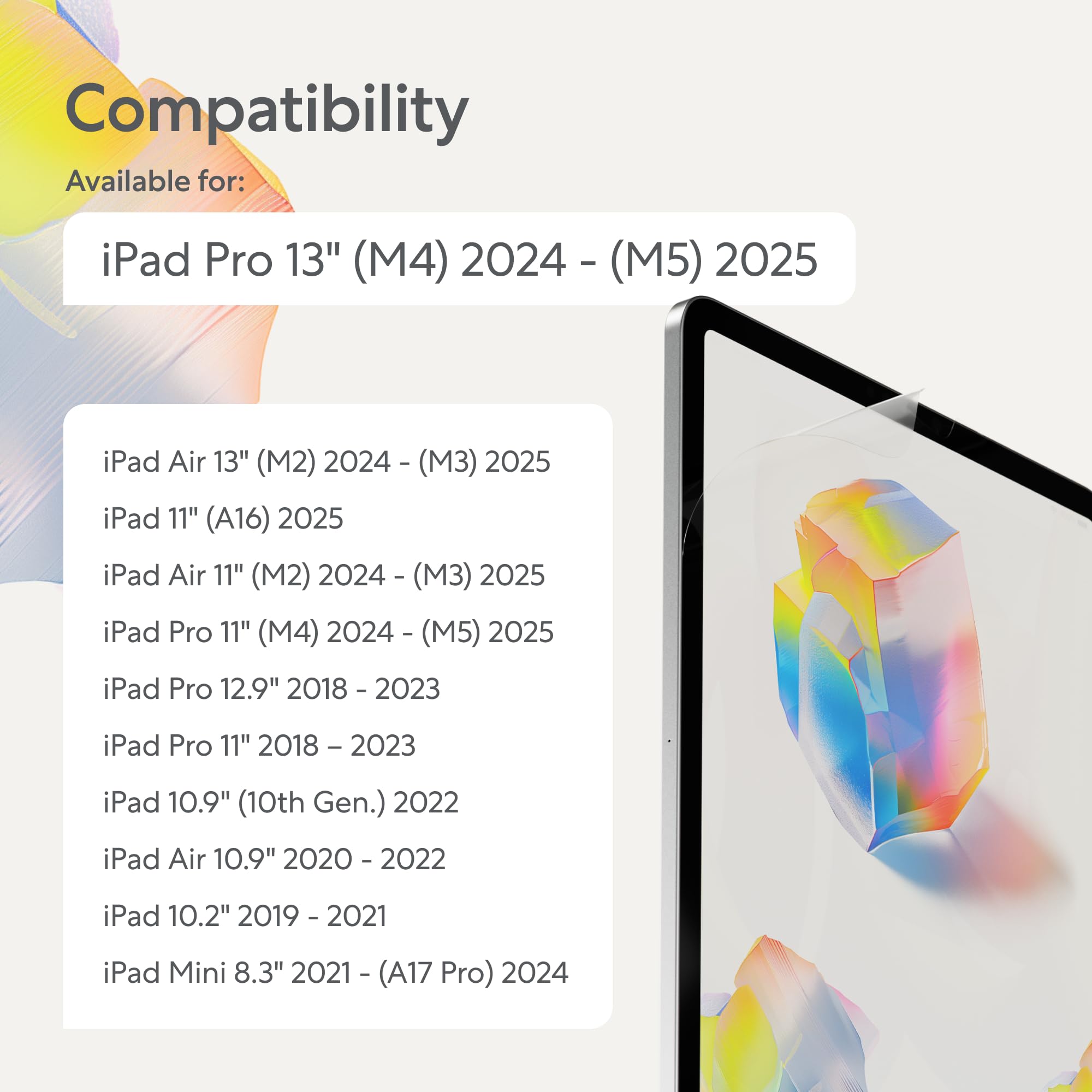


✍️ Elevate your iPad experience—write, draw, and protect like never before!
The Paperlike 2.1 Screen Protector (2-pack) for iPad Pro 13” (2024/25) delivers a premium paper-like texture using advanced Nanodots technology, enhancing precision for creatives. It offers durable scratch and smudge resistance while maintaining vibrant screen clarity. Ultra-thin at 0.095mm, it’s optimized for Apple Pencil responsiveness and tip longevity. The package includes two protectors and tools for easy, bubble-free installation, making it a must-have for professionals seeking a natural writing experience on their iPad.


| ASIN | B0D4B1JBH1 |
| Best Sellers Rank | #56 in Tablet Screen Protectors |
| Brand | Paperlike |
| Brand Name | Paperlike |
| Clarity | 0.95 |
| Compatible Devices | Tablet, iPad Pro 13” (M5 2025 / M4 2024) |
| Compatible Phone Models | iPad Pro 13” (M5 2025 / M4 2024) |
| Customer Reviews | 4.0 out of 5 stars 7,204 Reviews |
| Finish Type | Matte |
| Global Trade Identification Number | 04260470090475 |
| Included Components | Paperlike 2.1 |
| Item Dimensions L x W | 11"L x 2"W |
| Item Hardness | 2H |
| Item Weight | 30 Grams |
| Manufacturer | Paperlike |
| Manufacturer Contact Information | Paperlike GmbH, Ballindamm 3, 20095 Hamburg, GER. +49 174 501874747, [email protected] |
| Material | Polyethylene Terephthalate |
| Model Name | Paperlike 2.1 |
| Model Number | PL2A-13-24 |
| Number of Items | 2 |
| Product Dimensions | 11"L x 2"W |
| Screen Size | 13 Inches |
| Screen Surface Description | Matte |
| Special Features | High Definition Clarity |
| Unit Count | 2.0 Count |
| Warranty Description | Legal warranty |
| Water Resistance Level | Water Repellent |
R**9
Installation is a bliss (when you order from paperlike)
I was really looking forward to writing on my iPad and feeling like I was writing on paper. The reviews, for those few, who can get it on,are great, so I took the bullet. I wasted 40$ and 2 paperlike protectors. First steps of the installation are easy enough, like any other protector. But once you go to remove "2" aka "paperlike side" you are done, the whole thing comes off, paperlike and "foil" I took my time, was not in a rush, watched the video 3x before attempting it on my own. The paperlike came off both times. It's not worth it if you can't get it installed. You waste money, energy and end up with the same glass screen to started with. I wish I could have gotten it on, but the other reviews are right. Installation is hard, and may be 1/3 of them work out for a great experience. So disappointed UPDATE: I updated from 1 star to 5 stars. This is why... 1. Customer service is amazing, they contacted me after my initial review and sent me a replacement for free. It arrived in 2-3 days, so fast and efficient at no extra cost. 2. I realized it's not paperlike's fault. It comes down to storage/Amazon/heat. I believe the first one I got from Amazon wasn't stored properly and the two films were practically melted together, so they came off together. The paperlike I got from the company itself was a bliss of an installation. I followed the same steps as before, but ran into absolutely zero issues. 3. It really feels like you are writing on paper! And also like you are flipping real pages in a way? It has a different feel when scrolling through pages (left/right) that's similar to paper ..you just have to try it, hard to explain lol Only con is the slight opacity it brings to the screen. About 5-10% opacity, but Ill get used to it cause the trade off it's absolutely worth it. Biggest lesson here, order directly from paperlike, follow the video and you'll have no issues ...and if you do, they got your back ;)
R**L
Updated -- installation tip
My original review is below. I had a hard time with installation due to dust and air bubbles. I complained that there was no tool included to remove air bubbles, so when I was trying to eliminate them by pressing them out with my fingers, the sticky side of the protector was exposed to the air too long and I ended up getting a lot of dust particles. Paperlike read my review and sent me a replacement protector and also advised me to use something like a credit card to press out the bubbles. And they explained that they do not include a tool in order to reduce waste since most people will have a card / ID of some sort. I totally support this. I used a card to install the replacement screen and it worked like a charm. The protector is perfect now. I'm not sure why my first one was scuffing, but so far I'm not seeing that problem with the replacement. --- Original review: The first screen I installed had so many bubbles in it and seemed to draw in lint from the environment, had to discard. I install screen protectors regularly. With these, you have to lay them down really fast or you end up with lint. But installing fast means you don't have the opportunity to press or the air bubbles and no tool is provided for this purpose. I installed the 2nd screen more to my satisfaction but I'm finding that it scuffs easily despite me storing my ipad in a laptop sleeve and the scuffs don't come off with cleaning. They are not scuffs caused by my Apple Pencil. I have no idea what they are, but I store my other iPad the same way and have never experienced this. I have another iPad for work and I installed a cheaper matte screen protector from an "off" brand and it has none of these problems. I went with the "nicer" protector for my personal iPad, but I feel like I wasted my money on this and will just have to buy another set of cheaper matte protectors. Can't seem to get any customer support since I've "used" these by installing them. Not a fan of wasting $45 plus the cost of protectors that I know will work. Goes to show that marketing efforts don't always equal quality.
A**R
READ ME IF YOU’RE INDECISIVE
Okay, so where do I start. I thought people were exaggerating when they said this was difficult to put on. BELIEVE ME, it is. Honestly, I’m usually good at stuff like this, and I’m a pretty particular about the details. First off I wasn’t expecting the top layer “sticker” to be sticker than the actual portion that adheres to the iPad. This is what caused it to peel up, lose its positron and gather some particles under. I tried to reposition it, and in the process the screen protector folded in on itself and caused a kink so I was forced to make the second one work. So, I gave it another go, and this time the underside adhesive that covers the bottom portion of the screen protector was the difficult one to pull off. That again made me lose the positioning of the guide stickers and when I finally got the bottom layer off, I was back at square one putting on the screen protector by eye with my hands. I was kind of forced to do this since I was afraid of another kink and I’d lose my second chance at it. Finally, I went ahead and put it on, but man, there were SO MANY dust particles underneath the screen protector. At this point, I’m just going to live with it, and honestly, I don’t know if it’s worth it. Goofing my hand across the screens “feels” like paper I guess. I want to like it but damn, that application was a pain in the ass. My advice, if you’re not comfortable putting these on, DONT TRY IT. Maybe get something easier to apply. I might try and get a refund idk, lowkey feels annoying at this point. Which is why I left a 1 star. The packaging gets a 5 star tho. It was really put together and neat, but maybe they need to spend a little more time reengineering the adhesive structure. Seems to be off balance somewhere.
C**Y
Need to be ultra careful installing the the reward for success is there… Amazing customer service!
Update: My original in-edited review is below but I wanted to update based on an amazing customer experience. Clearly my initial effort was challenged and my sincere appreciation to the Paperlike team who reached out and offered to refund my purchase or assist getting me a new screen, some kind guidance, and another attempt. My goal was never to get a refund so my thanks for the team working with me to overcome my shortcomings. The good news is I had no issues the second go around and love the screen. It’s amazingly nice. Great feel. Quality galore and clearly best in class solution. Far cheaper than going with an Apple NanoTexture iPad. Is it a challenging install, yes. Is it prone to user error, yes but the amazing support can’t be overlooked and changed my mind for the positive. I will continue to caution and encourage you to be very methodical installing. Follow the directions and clean, clean, clean as you install. Don’t rush. I honestly have some ownership to take on from the challenges of my earlier review. Original: Not sure I can justify the cost here and honestly if I didn't have issues with the first install and challenges on the second go around I would probably have returned this. It's a premium product that is VERY susceptible to "user error" on the install that I question the value.... quickly, as at @ $20+ a pop the results can and are painful. I follow the directions and instructions to the letter and the first go I ended up pulling the whole thing off when trying to use the applied sticker tab for the foil side. Once I realized trying to reapply it was just a disaster. User error??? ok, I'll take the blame for not paying attention to pealing off the foil layer. Please dont make my mistake. The screen itself doesn't adhere like you think it should and peeling the top protective layer you are at risk of pulling the whole thing off... On to the second and avoiding the previous issue it went on fairly well however I ended up with a strand or something just under and edge and I cleaned it like crazy prior so I honestly question whether it was there on the screen out of the box but how do you prove that... Anyway had to lift at a corner gentle to dust sticker remove it and put back. What you will find is once lifted its almost impossible to get it perfect ever again. Its on, its working but the installation experience was horrible imo. I have seen at least on phones alignment cases that make installation a far better experience and for the cost of this you would think the installation would be a focus and its not. Sorry. Sure the issue may be my fault but I didn't just slap it on and followed the directions and I suspect I am not alone so I suggest my challenges and warning are valid. Be crazy methodical installing for any chance. Again, at this price the pain of failure is high and unforgiving. The screen itself has been nice. Its not a high grain, rough, feel but you to get the paper feel so good on that. Like most paper feel screens its matte and it creates a frost feel on the screen vs protected. Its noticeable and if you are not prepared for this you may think its cloudy, milky and not great. Not the end I hoped for and likely my last time a protector like this. I haven't seen Apple's new Nano Textured Screen but I at least now understand the value in its added cost. If you need a paper like screen I have no doubt this is the best just find a clean room and have ultra patience as you work on installing it to save yourself my pain.
M**S
Great texture, impossible to apply without bubbles!! :(
UPDATE: Costumer service has been amazing. They quickly sent replacements, and the new one they sent me went on perfectly the first time (maybe from the first several times I tried to apply it from last time) but this is a must have for anyone using your iPad for procreate or morpholio for work. The texture is amazing, I love the somewhat anti glare, and their costumer service really did save this costumer. Very happy with my purchase! (First few photos are with my first two attempts, last ones are the flawless install from the most recent attempt) The feel of the screen is great, the only and most important thing is the application. I used BOTH sheets of my protectors hoping I would have a different outcome but didn’t. So there goes $45. I applied it like the video given in the instructions, I tried multiple times (it’s easy to take off and reapply) but at that point you get more fibers sticking to the sheet. I’m overall very upset as I just got a new iPad Pro and was hoping this would be magical, it’s quit the opposite and took me 30+ minutes of frustration. I would have rather bought a knockoff with the full frame installation kit for half the price. I will be reaching out to customer service.
A**.
Good Product, Great Customer Service
We recently upgraded our older iPads which had Paperlike screen protectors on them, and went to get a new set. The product themselves serve their purpose, to create a matte, paper-like surface for your apple pencil/stylus to mimic the feeling of writing on paper as well as protecting the glass. A typical matte screen protector. The aspect that sets Paperlike apart from others is their customer service. You see, even as screen protection application veterans, my partner and I still had issues installing the screen protector on their iPad. Each package comes with 2 protectors. We followed the application instructions, but our first attempt ended up with scuff marks from using a credit card to get rid of the bubbles. Our second attempt didn’t align well because we couldn’t get the guide stickers to stick! I reached out to paperlike, and they responded so quickly! We explained our issue to them, and they happily offered to send a replacement set. It came within 24 hours of us reaching out. I don’t think I’ve ever had such a great customer experience. I’m glad we gave their products a second chance. Turns out we got a lemon package to begin with, but were much more successful with the second package. Unless someone comes out with an airtight, vacuum sealed screen protector application system alongside their protector product, I’ll continue to buy these for my iPads.
R**A
Feels nice, impossible to do without dust
I purchased this item because I hate how slippery my iPad screen is when I try to draw. The Paperlike absolutely improves the screen for a better drawing/writing experience. However, process by which you apply the Paperlike makes it nearly impossible to get it on the iPad without dust and debris underneath. The two-pack is not cheap, and I had hoped it would last me a while. I applied the first screen protector as instructed, meticulously removing every speck of dust. The sticky dust removers leave smears/residue on the screen, which then prompted me to again rub with a microfiber cloth, followed by the dust remover. I even ensured my central air was turned off, but due to the time it takes to peel the inner layer off and apply the protector, there was dust underneath, causing bubbles. I removed this and applied the second, trying to be faster, but ended with the same result. I love the feeling of the Paperlike and have been using it on my iPad, but the application process has to be more streamlined if you want any hope of getting it on without dust. I feel like I wasted money trying to get it on right. I’ll just have to put up with it for now.
J**M
In-depth Feedback on Paperlike 2.1
I wanted to take a moment to express my sincere appreciation and satisfaction with the Paperlike 2.1 product. First and foremost, I must commend you on the exceptional quality of the Paperlike 2.1. From the moment I received it, I was impressed by the attention to detail and the level of craftsmanship evident in its design. The materials used feel premium and durable, giving me confidence in its longevity. One of the standout features of the Paperlike 2.1 is undoubtedly its texture. The matte surface mimics the feel of real paper remarkably well, providing a tactile experience that enhances my productivity and creativity. Whether I'm taking notes, sketching, or reading, the Paperlike 2.1 truly elevates the user experience by offering a natural and comfortable surface to work on. Moreover, I am thoroughly impressed by the improvement in clarity and visibility that the Paperlike 2.1 offers. The anti-glare properties effectively reduce reflections and glare, even in brightly lit environments, making it easier for me to focus on my work without any distractions. Additionally, the enhanced transparency ensures that the vibrant colors of my device's display shine through, resulting in a visually pleasing experience. I also appreciate the meticulous attention paid to the installation process. The included installation kit and clear instructions made it effortless for me to apply the Paperlike 2.1 to my device without any air bubbles or misalignments. This level of thoughtfulness and consideration for the customer experience is truly commendable and sets you apart from other manufacturers. Furthermore, I would like to commend your customer service team for their professionalism and responsiveness. On the rare occasion when I encountered an issue with my order, they promptly addressed my concerns and ensured that I was completely satisfied with the resolution. Such dedication to customer satisfaction is truly admirable and has undoubtedly contributed to my continued loyalty to your brand. In conclusion, I cannot speak highly enough of the Paperlike 2.1. It has exceeded my expectations in every aspect, from its superior quality and tactile feel to its exceptional clarity and ease of installation. It has become an indispensable tool in my daily workflow, enabling me to unleash my creativity and productivity like never before. Thank you once again for producing such an outstanding product!
Trustpilot
Hace 3 semanas
Hace 2 semanas