We remain fully operational. Our teams are working around the clock to ensure your deliveries continue safely.

Descargar la aplicación


Servicios al cliente
Sobre nosotros
Copyright © 2025 Desertcart Holdings Limited
Descargar la aplicación
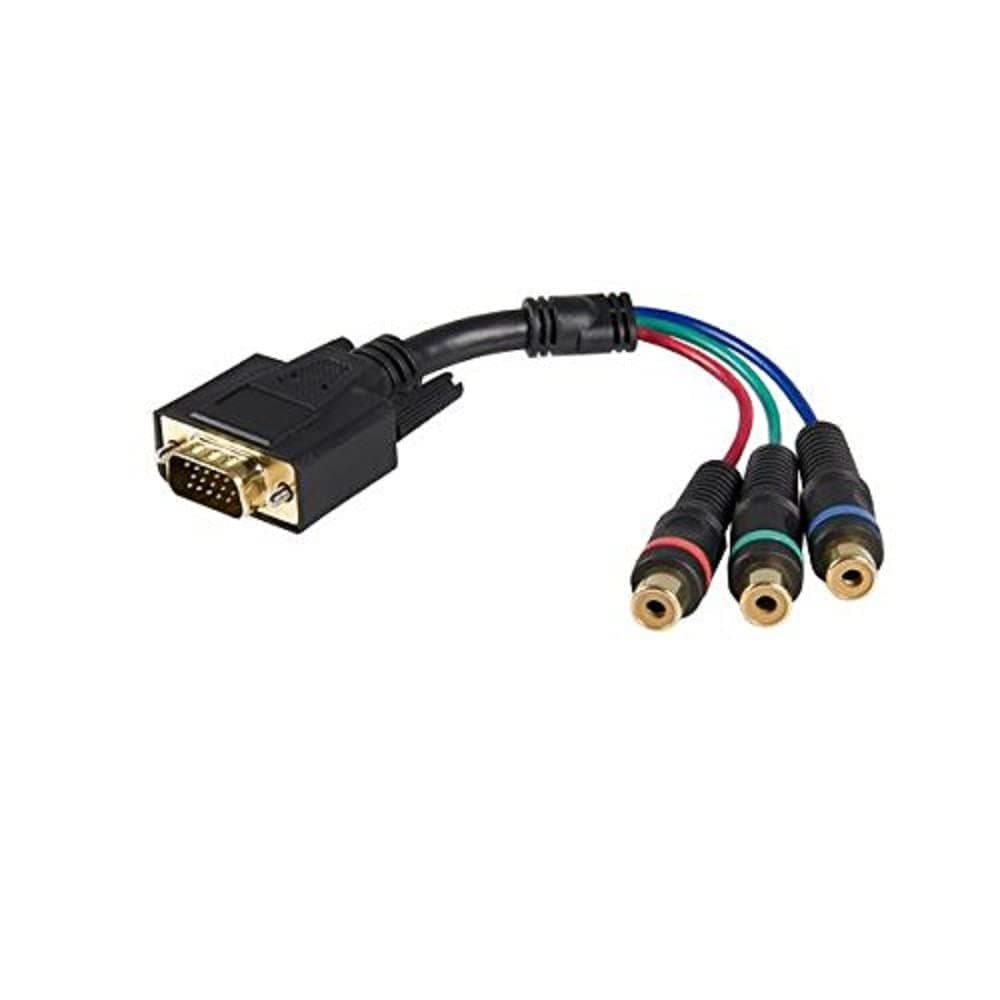
🔗 Connect the past to your present with zero fuss!
The StarTech.com 6-inch VGA to RCA cable adapter enables professionals to connect VGA outputs to component video inputs with a compact, durable design. Featuring plug-and-play installation and compatibility with YPbPr signals on supported monitors, it’s ideal for legacy AV setups and home theater integration. Backed by a lifetime warranty, this adapter ensures reliable, hassle-free connectivity for discerning users.

| ASIN | B00213KFHW |
| Best Sellers Rank | #2,945 in Audio & Video Connectors & Adapters |
| Brand Name | StarTech.com |
| Cable Type | Component, Composite, VGA |
| Color | Multi Color |
| Compatible Devices | Monitor |
| Compatible Phone Models | No Compatible Phone Models |
| Connector Gender | Male-to-Female |
| Connector Type | RCA, VGA |
| Customer Package Type | Standard Packaging |
| Customer Reviews | 4.0 4.0 out of 5 stars (284) |
| Data Transfer Rate | 6 Gigabits Per Second |
| Indoor Outdoor Usage | Indoor, Outdoor |
| Item Shape | Round |
| Item Weight | 0.09 Pounds |
| Manufacturer | Startech.com |
| Model | HD15CPNTMF |
| Model Name | HD15CPNTMF |
| Number of Items | 1 |
| Number of Pins | 15 |
| Other Special Features of the Product | Data Transfer |
| Recommended Uses For Product | transferring data |
| UPC | 065030832588 |
| Unit Count | 1 Count |
| Warranty Description | Lifetime warranty |
G**N
Works great if you know how to use it. Read this to avoid GREEN IMAGE issue
This product does NOT convert the video signal - it simply allows you to connect your component video output to a VGA input. A PC monitor will THINK it is receiving a regular RGB signal but you will be sending it a YPbPr signal, causing a GREENish image like what the other 2 reviewers complained about. On the other hand, if you are using this with home theater equipment and NOT a PC Monitor it will probably work fine. But to use this with a PC monitor, such as connecting your Xbox to your computer monitor, you require one of two things: 1. A "Component to VGA CONVERTER" (Not this product). Connect it like so: Xbox Component Cables-->Component to VGA Converter-->Monitor VGA port. or 2. A "Component to VGA Adapter" (Yes, this product) and a monitor that natively supports component video (YPbPr) signal as input via the VGA port, such as a Sync on Green (SoG) monitor or one that specifically supports YPbPr input. Additionally, you may have to change an option in the monitor's menu. When I clicked auto-adjust on my monitor it automatically changed the settings, but I am able to change it myself (for MY monitor, Dell U2412M, the option was called "Color Input Format"). Again, with either of these setups, you will be able to view a component video signal through your PC monitor. As for the product itself, it is of solid build quality and works great.
C**N
I have turned the brightness and contrast up to 100 and other inputs (HDMI and DVI) all look fine, however this VGA adapter make
Works Very well with my Dell Monitor. I have my Wii and Original Xbox hooked up and it works as intended as long as you are able to change the color from RGB to YPbPr. The Reason why I am not giving 5 Stars is because the image is very dark. I have turned the brightness and contrast up to 100 and other inputs (HDMI and DVI) all look fine, however this VGA adapter makes it very dark. I hooked my computer up to the monitor via VGA and that brightness was fine which leads me to believe that it is this adapter. So while it works very well as intended the picture is just too dark for me to really enjoy it. EDIT- I tested this on another one of my monitors and the colors were perfectly fine, it has something to do with the monitor I am testing it on. I am giving this a 5 Star review as it does and works exactly as mentioned
N**N
Works with caveats
It works well, but I sometimes have to re-seat it to get the signal to display correctly when turning on the projector.
S**H
Defective item
I order this item in order to hook up both a PS2 and a Wii with component cables to a TV with only 1 component input. At first I was looking at a component AV switch but did not want to pay $30-50 for a large box with 3 or 4 hook ups that would require another remote to operate. So I purchased this because I thought my TV was able to switch PC input from RGB to YPbPr, but when I went to set it up my TV didn't have that option, but I did find out that the PS2 can be switched from YPbPr to RGB. I also purchased a male 3.5mm stereo plug to female RCA stereo adapter. But when I hooked up the PS2 with it still on YPbPr, the TV said no input but had audio, rather than having a green tinged image which would have been normal. I switched the PS2 over to the component input and switched it to RGB and hooked it back up with the breakout cable, the TV still said no signal, with audio. Tried it out on another TV and same problem and both TVs work with a PC hooked up through VGA. I returned the item for a replacement and will hopefully change my review once the new one arrives. PS. As it has been mentioned this does not convert a YPbPr (component) signal to a RGB (VGA) signal. It simply splits a 15 pin D-sub (VGA) connector to 3 female RCA connectors, color coded for component video. Either your monitor (or TV) must be able to switch the input to YPbPr or your device must be able to switch output to RGB. A PS2 can switch output to RGB but PS3 and Wii can't.
K**5
Works perfectly as long as your device supports YUV colorspace.
After wading through the positive and negative reviews, I decided this was the cable I needed for my home theater system and went for it. And, lo and behold, it works great with my ViewSonic PJD7820HD projector (which I also bought on Amazon). I used this to convert the Wii's component to VGA, as this projector doesn't support direct component in. The projector automatically switched to the appropriate color space and all was well. IF YOUR MONITOR, PROJECTOR, OR OTHERWISE SUPPORTS NATIVE YUV COLOR SPACE, THIS SHOULD WORK. IF IT ONLY SUPPORTS RGB (which likely means it won't have any option you can see or change), THEN YOUR IMAGE WILL BE DISCOLORED TO THE POINT OF UNUSABILITY. If you have no idea what I'm talking about, do some research first: Look in your display's instruction manual, see what other people have said, or -something- first. If you still have no idea what I'm talking about, don't risk it and go for a slightly more expensive "converter" (INSTEAD of this "adapter") which will also convert your signal to RGB color space which should work on whatever you've got.
T**T
Didn't work for me
It works, I guess... but it didn't work for me. I saw many other reviews of people using this to connect their old consoles to monitors/TVs but... guess i'm unlucky with this one. Goal was to use this to bypass the processing delay on the HDMI & Component used on my HDTV. The TV has no "Game" mode and VGA has no signal processing at all. I tried my TV and two monitors. Only one of the monitors was able to detect a signal, and with that I only got a very green tint. Will have to try either PS2 to HDMI then HDMI to VGA or get a box that converts YPbPr to VGA. JUST TO BE CLEAR: The product itself probably does what it was designed to do (VGA > Comp) but didn't work for me the other way around (Comp > VGA)
D**L
For reason not best know my fairly new Sharp tv does not have component in, just HDMI, to get best out of my Wii (got to get my fix of Mario Kart and Mario Galaxy) I've always used component, and now I can thanks to this. Seems to be of good build quality, and the picture quality isnt diminished
J**N
Funciona con MiSTer FPGA (lo probe con un MiSTer Pi con MiSTer A/V Pro v9.2) solo hay que configurar el archivo .ini vga_mode=ypbpr vga_sog=1 espero le sirva.
A**X
Atende o esperado
B**K
This adapter does exactly what it says it does: take the component output (YCbCr) that comes from a VGA port and provide RCA jacks for devices that only take component cable inputs via RCA. You will still need a male-male component cable to connect this cable to your display device. As long as you are outputting a component signal via a VGA port and then using this cable to provide that component signal to a display that has component inputs but not VGA inputs, it will work exactly as expected. It will not convert a VGA signal to component, or a component signal to VGA. It merely takes the VGA pins that output a component signal and routes them to RCA component jacks for connection with a display devices that requires component inputs via RCA connectors. It does this extremely well. I see no loss in quality. However, you need to be absolutely sure that your output device can provide component over VGA. Do not expect this to convert a VGA signal to component. Personally, I am using this cable to take the component output from the VGA port on an analogue I/O board for a MiSTer FPGA system and input that into a Retrotink-2X's component input. It performs this task very well.
S**E
I love this cable ! We use it to get a 1080i signal from our ps3 (with component cable) to our ms502 BenQ projector using the VGA input . We first used s-video (because BenQ ms502 is analog meaning no HDMI without a converter ) for ps3 but it was fuzzy so I ordered this and now our picture is way clearer !!! I've ordered another one so we can have 1080i out of our cable box ( hd box with component cables ) . Such a difference !!!!! I had read poor views about these cables in the past but when I did the research most people who had trouble thought it was a converter . IT'S NOT. It's a simple cable that should of come with ms502 BenQ analog projector . It's perfect ! Thank you breakout cable !!
Trustpilot
Hace 3 semanas
Hace 2 semanas