We remain fully operational. Our teams are working around the clock to ensure your deliveries continue safely.

Descargar la aplicación


Servicios al cliente
Sobre nosotros
Copyright © 2025 Desertcart Holdings Limited
Descargar la aplicación
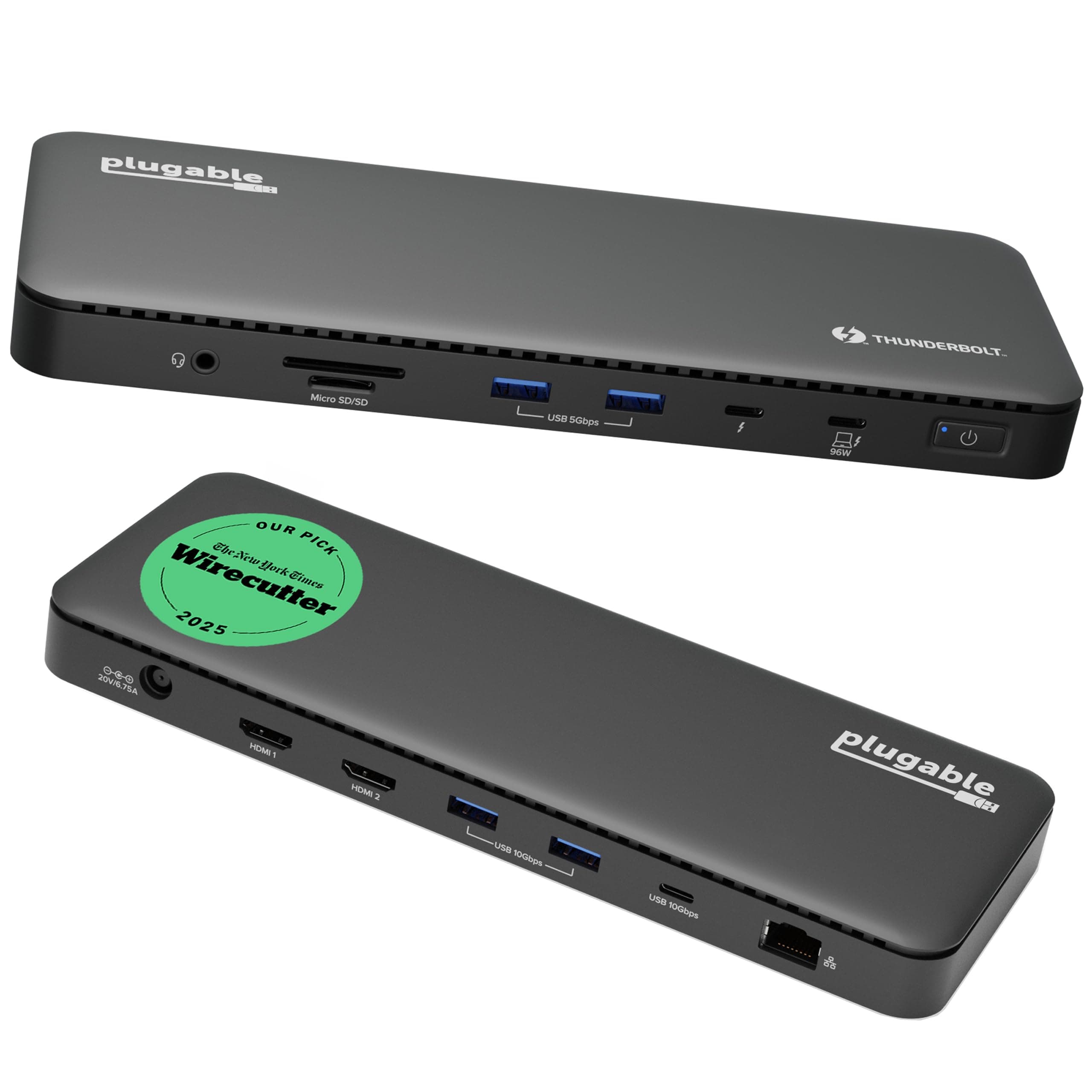
⚡ Power, speed, and future-proof visuals — dock like a pro!
The Plugable Thunderbolt 4 Dock (TBT4-UD5) is a premium, Intel Evo-certified docking station delivering 40Gbps Thunderbolt 4 speeds, 100W laptop charging, and versatile connectivity with 13 ports including dual 4K or single 8K HDMI outputs. Designed for professionals using Windows or Mac, it ensures stable, high-bandwidth performance with comprehensive device compatibility and award-winning reliability.
























| ASIN | B0CNTTVVN6 |
| Best Sellers Rank | #1,851 in Electronics ( See Top 100 in Electronics ) #25 in Laptop Docking Stations |
| Brand | Plugable |
| Color | Black |
| Compatible Devices | Windows 11 Thunderbolt 4 hosts and Thunderbolt 4 Macs with macOS 11+ including, M5 / M4 MacBook Pro and MacBook Air, M1 Pro/Max, M2 Pro/Max, M3 Pro/Max, or base M3 (with clamshell mode required for dual displays), HP Omnibook / EliteBook / DragonFly / ProBook / Spectre x360 series, Dell Pro Max / Plus / XPS / Latitude / Inspiron, Lenovo ThinkPad / IdeaPad / Yoga , Framework (Intel Processors), Mic… |
| Customer Reviews | 4.3 4.3 out of 5 stars (438) |
| Global Trade Identification Number | 00819927013174 |
| Hardware Interface | Thunderbolt |
| Item Dimensions L x W x H | 8.9"L x 3.3"W x 0.9"H |
| Item Weight | 2.4 Pounds |
| Manufacturer | Plugable |
| Number of Ports | 13 |
| Total Number of HDMI Ports | 2 |
| Total Usb Ports | 6 |
| UPC | 819927013174 |
| Unit Count | 1.0 Count |
| Warranty Description | 2 Year Limited Parts and Labor |
| Wattage | 96.00 |
J**H
From USB-C Hub to Thunderbolt 4 Dock – Huge Difference!
Review of Plugable Thunderbolt 4 Dock (TBT4-UD5) I bought this dock to replace a simple USB-C hub for my MacBook Pro — and the upgrade has been a game-changer. Before researching, I honestly didn’t know the difference between a USB-C hub and a Thunderbolt dock. I just thought both gave me extra ports. Now I understand why Thunderbolt docks cost more: they deliver full Thunderbolt speed, power delivery, and rock-solid reliability. Here’s what I’ve noticed since switching: Blazing-fast storage: My external Lexar SSD now runs at full Thunderbolt speed (with the right cable). File transfers are noticeably faster. Instant display wake-up: With my old hub, I had to mash the Return key and wait for my monitor to wake. With this dock, my external display wakes instantly. Future-proof video outputs: It supports dual 4K monitors or a single 8K monitor. I don’t own one yet, but it’s nice to know I’m ready for the future. Reliable Ethernet: The built-in 1 Gbps Ethernet port keeps my internet connection fast and stable. Plenty of ports: I get 4 USB-A ports (2x 5 Gbps + 2x 10 Gbps), a 10 Gbps USB-C port, and another Thunderbolt 4 port (40 Gbps). I can plug in all my external SSDs and hard drives — they mount instantly with no lag. Strong power delivery: The dock charges my MacBook Pro at 95 W and keeps it near 100% even under load. Extra convenience: The audio in/out jack works perfectly for my monitor speakers or a headset mic for voiceovers. The built-in microSD/SD reader let me ditch my old card reader and free up desk space. Overall, this dock feels solid, performs flawlessly, and keeps my MacBook and peripherals running fast and reliably. It’s not cheap, but the stability, speed, and convenience make it worth every penny.
D**I
Fantastic Thunderbolt 4 Dock — Rock‑Solid Performance and Outstanding Support
The Plugable TBT4‑UD5 has been one of the best Thunderbolt docks I’ve used. It delivers stable, high‑bandwidth performance with my dual 4K ASUS ROG Strix monitors and handles demanding workloads (AutoCAD, Blender, gaming) without breaking a sweat. One of the biggest advantages is that the HDMI ports provide native GPU output without DisplayLink, which means no compression, no lag, and no weird artifacts — a huge plus for anyone who needs accurate, high‑quality video. I did run into an intermittent monitor flicker early on, and Plugable’s support team was exceptional. Evan walked me through detailed diagnostics, reviewed logs I sent, and ultimately arranged a warranty replacement. The new dock has been flawless. Great hardware, excellent performance, and truly top‑tier customer support. Highly recommended.
P**.
Effective for Dual Monitors
Worked as advertised - Allows me to use my laptop plus 2 dual monitors via HDMI ports. Great set up and this fit the bill to make sure it worked properly as separate monitors instead of acting as identical duplicate monitors (my issue before I bought this).
W**E
Working well
Executive summary: I am a happy customer and I think this is a good product. Update to review: After I left the below review, Plugable's support team reached out to me. We were in the process of doing some troubleshooting and my next task was to install and run a diagnostic tool. There is a sensitive data concern (work laptop) so I am hesitant to download the tool. The hub seemed to reset earlier this week (not sure if it was something the hub did or if Windows might have done an update that impacted it). Since then it has been working perfectly. Plugable's support team was good to work with. I have never been certain whether this was a problem with the hub or the laptop. But since it is working now and I am confident in their support team, I am changing this to five stars. Original review: I am using this hub to run two monitors (while also using laptop display, so total of three screens) and a USB camera. Initially I was impressed - setup was easy and it somehow guessed the position of my monitors (one portrait and one landscape) so well that the mouse moved flawlessly from screen to screen. Since then...not so much. Every day it's a gamble. It inconsistently assigns the ID, so most days I have to go into Display Settings, swap the positioning, redo the portrait/landscape settings, and adjust the layout. Today my USB camera won't work. I have downloaded current drivers for the monitors and removed all old monitor settings, but cannot get the hub to consistently assign the monitor IDs. Sometimes I can cycle the power on it a couple times until it guesses the monitor assignments correctly. Sometimes after a sleep/wake on the laptop, the hub will only recognize one monitor. Rebooting the laptop solves that one. While I realize this could be a problem on the laptop end, it is a brand new Lenovo ThinkPad and I've had no other trouble with it. Two stars, since once the daily irritation is passed, it does work well for the rest of the day.
J**L
Broken after 3 months
Update: the HDMI ports have both stopped working after less than three months. I have confirmed this with a second laptop. This is now an expensive USB hub. This works perfectly in my setup, although I discovered after I bought this that my laptop doesn't support Thunderbolt so I can't run both of my external monitors through this dock. Not the dock's fault of course. The dock doesn't seem to get notably hot in use though I'm not stressing it particularly with just one monitor that's not even 4K. My biggest gripe is that the uplink port - to connect the dock to the laptop - is on the *front*. This is stupid design. The front ports should only be for things that need to be plugged/unplugged frequently, so as to minimize cable clutter. In Plugable's defense this is very common among smaller, more portable docking stations, but there's enough room on the back for the uplink, so I'm taking away a star for this. Speaking of portability, the dock itself is reasonably compact but the power brick is bulky and heavy. I wouldn't really consider this a good option for a mobile setup.
D**S
Buen producto
H**K
Plugable TBT4-UD5 Thunderbolt 4 Dock. Got a new laptop with two ThunderBolt4 (TB4, aka. USB4) ports. So, went hunting for a dock to take full advantage. The field is very limited though, and this one seems the best, better even than the "big brother" of it from Plugable. This was the only dock I found that had another Thunderbolt port (on the front, even) for peripherals. As well as a pair of 5gbs USB3 ports on front, and several 10gbs ports on the rear. This is a great dock and is working well here. My only(!) complaint is the dumb front-mounted port for the laptop cable. Lots of other docks make the same mistake, dunno why? It belongs at the REAR, guys!! Otherwise all quite good! There's a white version that is sometimes lower priced: B0FGFW5FVD and also the Kensington AD2010T4 dock appears to be exactly the same thing as this one. EDIT: More than a year on, and it's going strong here and I'm exceptionally pleased with it. No issues. Loving the extra TB4 jack on the front, for backups to external NVMe drives. Solved the front-mounted laptop cable issue with a right-angled TB4 cable that easily routes to the rear and keeps things tidy. Note that I use this almost exclusively with Kubuntu Linux 24.04 on the laptop. Everything works very well with no fuss. Added a photo, with a KVM switch sitting on top.
B**N
Works great. We now purchased five of them for our little office. Had a small interaction with their service department prompt courteous and great follow-up. Highly recommend this product does what it says makes it easy to operate multiple screens for the laptop
R**O
Excelente! Llego antes de lo esperado, pero lo que mas me gusto, es que era exactamente lo que estaba buscando. Funcionó a la perfección con mi Macbook Pro 16 M4 Max! Excelente producto MUY recomendable!
J**B
Works great with my M1 work mac and M4 personal mac. I've had no persistent issues. Every now and then my mac won't display on my monitor when I plug into the dock, but I just need to plug the cable in and out - which honestly, is really good from my typically experience using docks.
Trustpilot
Hace 2 meses
Hace 1 mes