We remain fully operational. Our teams are working around the clock to ensure your deliveries continue safely.

Descargar la aplicación


Servicios al cliente
Sobre nosotros
Copyright © 2025 Desertcart Holdings Limited
Descargar la aplicación
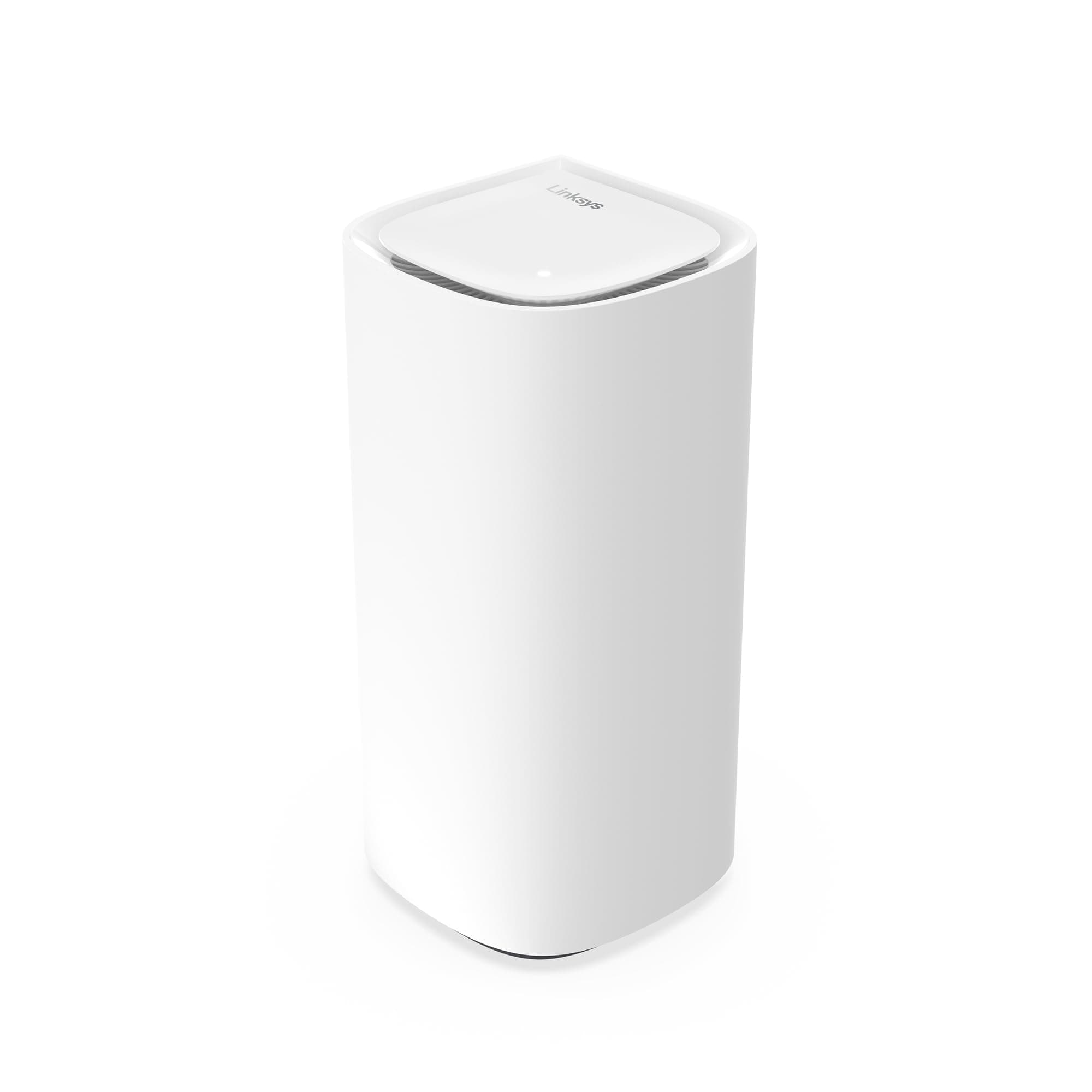
🚀 Elevate your home network to pro-level speed and coverage — because buffering is so last decade!
The Linksys Velop Pro WiFi 6E Mesh System MX6201-KE is a cutting-edge mesh router delivering ultra-fast 5.4 Gbps speeds over the new 6 GHz band, powered by Cognitive Mesh technology for intelligent network optimization. Designed for whole-home coverage up to 3,000 sq. ft. and supporting over 200 devices, it ensures seamless connectivity with easy app-based setup, robust WPA3 security, and continuous firmware updates. Ideal for modern homes craving reliable, high-performance WiFi with future-proof tech.


| ASIN | B0C86JF9XM |
| Antenna Location | Gaming, Home |
| Antenna Type | Internal |
| Best Sellers Rank | 6,137 in Computers & Accessories ( See Top 100 in Computers & Accessories ) 26 in Whole Home & Mesh Wi-Fi Systems |
| Box Contents | WiFi 6E Mesh System |
| Brand | Linksys |
| Brand Name | Linksys |
| Colour | White |
| Compatible Devices | Laptop, Personal Computer, Smart Television, Tablet |
| Compatible devices | Laptop, Personal Computer, Smart Television, Tablet |
| Connectivity Protocol | Wi-Fi |
| Connectivity Range | 275 Square Metres |
| Connectivity Technology | Ethernet, Wi-Fi |
| Control Method | App |
| Controller Type | App Control |
| Coverage | up to 275 m² |
| Customer Reviews | 3.5 out of 5 stars 288 Reviews |
| Data Transfer Rate | 600 Megabits Per Second |
| EU Spare Part Availability Duration | 3 Years |
| Frequency | 6 GHz |
| Frequency Band Class | Quad-Band |
| Frequency band class | Quad-Band |
| Has Internet Connectivity | Yes |
| Has Security Updates | Yes |
| Is Modem Compatible | Yes |
| Item Dimensions L x W x H | 9.5L x 9.5W x 19.4H centimetres |
| Item Weight | 1.48 Kilograms |
| LAN Port Bandwidth | 1000 Mbps |
| Manufacturer | Linksys |
| Manufacturer Part Number | MX6201-KE |
| Maximum Upstream Data Transfer Rate | 600 Megabits Per Second |
| Model Name | MX6201 |
| Model Number | MX6201-KE |
| Model name | MX6201 |
| Number of Antennas | 1 |
| Number of Ports | 2 |
| Operating System | RouterOS |
| Other Special Features of the Product | Parental Control |
| RAM Memory Installed | 64 GB |
| Router Network Type | mesh |
| Security Protocol | WPA3 |
| Special feature | Parental Control |
| UPC | 745883856626 |
| Wi-Fi Generation | Wi-Fi 6 |
| Wireless Compability | 5 GHz Radio Frequency, 802.11ax |
| Wireless communication standard | 5 GHz Radio Frequency , 802.11ax |
N**9
A non Vine opinion - Works great
Before I start I will say that nothing will improve the broadband speed to your house other than obtaining a faster internet service. If you are limited to an ADSL service then really chances are whatever router box that was provided by the service provider is as good as it will get in term of broadband speed. What these devices can do it ensure the wifi network speed inside your house operates quickly and minimises dead spots where the wifi signal is weak. If you have ever looked at your phone an date wifi signal has one bar and the internet does not work it is in a "dead spot" I do not think these devices have an inbuilt ADSL modem so if you have ADSL broadband you will still need your current box to provide the connection to the internet. If you have Fibre then you can connect the Fibre modem straight into one of the Linksys devices. = Why get the Linksys Velop Pro WiFi 6E Mesh System then?= The main use is to replace your existing router with one of the units and place the other unit elsewhere in your house. They are not the smallest devices but the smallish towers are aesthetically neutral. They don't have multiple external antennas and with only two network ports on them and a power cable they are not going too have numerous cables attached to them. = Setting up the devices = This was relatively painless. You just need to make sure you have your existing broadband logon details and any specific settings you provided needs. They require an app available from apple/android stores and when they are first turned on they have a special wifi network you connect to to allow them to be set up. It pretty much holds your hand through the process. Just make sure you are next to two power outlets as You will be asked to turn on the second device so it can be set up and paired. Eventually you will create the wifi network for your house and the app will explain that you will be disconnected from the current setup wifi network and to reconnect to the one you just created. One both devices are set up you can switch of the second device and relocate dit to where you want it. Job Done. The app allows you to check the signal strength between the units so look for a stong signal between the two if you can. = The Wifi Network = No complaints with signal strength etc though be aware that passing through walls etc weakens it. Dont expect miracles and any device faces this challenge. The Linksys has three Wifi bands it uses 2.4,5,6 Ghz which wifi speed favouring the 5 + 6 bands. If your devices supports 6 or 6E wifi you will find your devices errs towards the best signal. For a modern device this will all happen automatically. = Whats Mesh = Essentially both devices create one wifi network in your house and as you move out of range of one device it swaps over to the other device to maintain a strong wifi signal on your device. You can if you want connect both Mesh devices together via a LAN cable. This helps avoid issues if the distance between the devices, or the physical barriers between them otherwise results in a weak connection. Using mesh you could also place another device in the middle point. My top tip. If you are buying a new house are gutting a place out. Put in a cabled network with network ports on the walls in rooms (Like phone sockets). It's not that common but will ensure your house is best set up for internet connectivity.
P**5
Absolutely shocking support from Linksys
This MX6203 system was delivered in the 25th September and it worked flawlessly for 10 days and my thought was that this was a great system. Easy to set up and working as expected and Smart home items working flawlessly. On day 10 the network started being slow and smart home devices not responding or constantly saying "updating" and not reachable, Restarted the router and this seemed to work for about an hour, Devices then started to disconnect and a message appear suggesting the password was incorrect for the network. Bearing in mid no config updated had been made and devices had been working perfectly for 10 days this was starting to be a little concerning. I have tried to contact Linksys support but their web chat just fails to connect and their online help is non existent. They have a reddit link but that has this issue known for a long time with people posting there with this error for the last 2 years and some setting to try and help resolve the issue. I have tried the fixes for now and it seems to have resolved the issues but for how long remains to be seen. If I was looking for a new router I would avoid this at all costs knowing this now and I do have the option to return the item up to 24th October so this may still happen if the issue returns. For now its a very poor 1 star review
M**R
Good system, easy setup, daisy chaining could be better
The units are well packaged, discrete, and easy to setup. The good: - Units look good. They are small and light. - System set up via the app is simple, but you need to place the units close but if they are too close multiple units don’t detect easily. - The app enables you to manage the network remotely which is helpful when you the family say it needs a reboot. App is very robust, works very well. - Reliability of the network is okay, I find the system needs a reboot every 2-4 weeks and sometimes a hard power cycle at the unit is needed to get everything working okay. We heavily use the network with 2 adults working and 2 children streaming/ gaming. - Reliability is better than my previous system (BT WholeHome WiFi Premium), my old system needed a hard factory reset every 6-9 months and this hasn’t happened with the Linksys Units. The bad: - Sometimes the app reports failure to add nodes but the unit light is white (ie working). A unit power cycle needed to get the app/ system working and reporting correctly. - Coverage: The units don’t seem to daisy chain very effectively in my 4-bed Victorian house, I had to buy more units to make them work for the full house without dropping signal or slow speeds. The most distant node kept trying to connect to the main unit rather than the intermediate unit. - Speed seems to work best horizontally, with speed drop offs on the fist floor and loft. - Casing feels a bit cheap, but only when you are holding the units. The ugly: - It’s expensive, especially with me needing 5 nodes to get acceptable signal in the house. - Add on subscriptions, I haven’t signed up for these but after spending so much money I felt annoyed by being asked to subscribe for extra security.
S**C
Works fine but….
Set up was simple enough. I live with in a standard mid terrace 3 bed and signal strength is good. I have a 1GB download speed and getting good rates on my IPhone etc. what lets this system down is how you interact with it via the iPhone and web page. It’s slow, clunky and you feel like your doing admin. Use and functionality of the system feels like I’m using a web page during the dial up modem years. To sum up, whilst it’s up and running it does it job well but if anything needs to be changed or fixed it’s going to be a chore and a headache. Would I buy this with the information I know now. Probably not, I would pay a bit more and get a more user friendly option.
R**0
Excellent product and excellent service from linksys
I was upgrading from Google nest WiFi which struggled to penetrate the brick walls in my house and led to painfully slow WiFi when my phone refused to switch between the closest WiFi points. Also having had the latest phone with 6e i wanted something that was going to be future proof. There weren't many reviews around in the UK site so i scoured US sites and ready others experience of the device and it did fill me with hope. What can i say other this lives up to expectations. The main router and nodes were set up easily enough. One node didn't connect properly and had to reset it and do it again but after that it was relatively plain sailing. One observation i had was that the parental controls are not great unless you are prepared to subscribe to their subscription service. I got round this by setting my own dns settings to 1.1.1.1. However, the android app suggests that one click save browsing is being introduced soon, and this was verified by the help desk. I did have one problem with the Internet. I have samsung soundbar, tv and projector but i couldn't get them to see each other. After trying a few things like testing the router i decided to phone the helpline. As this is the latest flagship router, i had to have my case diverted to the dedicated helpline and received a can within 30 minutes. They helped me sort the issue out by changing some of the channels on the router and after doing that it sorted it and my devices saw one another and i could listen to sound via WiFi without any problem.
S**H
Great Mesh system but better when brought on sale!
Can’t complain as the item does what it says on the box and does not sideshare your data usage to some offsite location. Connection between nodes is strong and can help extend wifi range in larger areas or even smaller areas with compact spaces (like mine). The app works really well and 90% of what you might want to access is available, with the missing 10% being those options either unavailable to network professionals or restricted (such as the inability to name guest devices while connected to the network?!). The only thing to look out for is that if you are using a device that heavily requires stable connection, you might want to keep it near one of the nodes as permanently as possible, as once you move around it will automatically connect to the nearest node, and this can cause a little dropout. Particularly noticeable if you are using a gaming device, but in fairness it only lasts about 2 seconds and then reconnects itself. If you are playing competitively then it would be wise not to move around during these sessions. Otherwise it’s a great Mesh set up and I picked up the two pack version for a heavy discount during Black Friday, but expect to see similar pricing for January sales and other promotions throughout the year.
J**L
Extremely frustrating
In a nutshell: if you are used to use your phone for setting up/controlling almost everything and all you need is to cover your living space with Wi-Fi this would probably suit you. If you are halfway technical and have a precise idea of what you are trying to achieve with this, you might be in troubles. I’m working as a software implementation engineer from home. My broadband router is in one corner of the house downstairs, my office is upstairs in the opposite corner of the house. Wi-Fi is possible but reception is between 1-2 bars out of 4. I used to have an old setup of netgear Wi-Fi repeaters to connect to my broadband router. The setup worked fine; I had the same speeds in my office as on my broadband router (30Mbps-ish download, 5 Mbps-ish upload). In preparation of Full fibre being deployed in my area, I was looking for a WI-Fi Mesh solution which would be capable to deal with the speed (1Gbps). After reading through tests and reviews I decided to give Linksys a go, by far not the cheapest but also not the most expensive solution. Setting up the system was a nightmare! I have no words for the thing called APP to be used for setting up the nodes. Sitting surrounded by 3 nods, the broadband router, staring at a little screen saying “no nodes were found, please try again”. After resetting the nodes I don’t know how often, finally it managed to setup the router (the node connected to the broadband router via ethernet cable). Then it tries to connect the remaining 2 nodes…. And after several minutes asks you to reset the router and nodes. You think “but that would reset the router I just managed to configure”, and you are right, it starts the whole process over again. I ended up spending almost 2 hours with someone from support on the phone, in the end we managed to setup the system by connecting an older laptop with ethernet cable to the nodes. I should have taken screenshot of what we did….. At least, the system was working. From my broadband router to the router node A next to it (connected via very short ethernet cable) to node B upstairs in the room above the broadband router to node C closer to my office. For whatever reason, node C always connects to the router node A downstairs with only 2 bars of reception rather than to node B which is much, much closer (sitting in my office, my phone was connected to node B with 3 bars). Next to the broadband router downstairs I have 900 Mbps down and upload, in my office 250 Mbps. I tried to place the nodes in different ways, even placing node C as far away as I can having only 1 bar reception with the router node, it still connects to the router node rather than node B. Apparently there is no way to force a node to connect to a particular node. Comme on Linksys, how hard can it be? We are 1 quarter into the 21st century, time to catch up! I read that after some time the nodes would connect in the most efficient order, I’ve been waiting for 3 months for this to happen. I then did what I should have done in the beginning: drill a hole through the ceiling and use an ethernet cable to connect my workstation directly to the broadband router. The cable conduit doesn’t look as bad as I had thought and finally, I have full speed. Call me old school, but cable is still the way to go. I still wanted to use the Linksys system for the Mesh Wi-Fi. I decided to connect node B and node B via cable, now that I have drilled the hole. Troubleshooting guide on the Linksys webpage says “Connect an ethernet cable to the child node and connect the other end of the cable to the parent node. The nodes will automatically switch to a wired connection.” – no they do NOT! Tried different ports, rebooted, nothing to do, it only connects via Wi-Fi. And yes, I tested the ethernet cable, it is working. The troubleshooting guide mentions to go into the router administration CA router Setup to add the node as wired child node. Not working either. And that’s it, I’m done trying to get this work, my Wi-Fi stays as it is at 250 Mbps. This is the first and definitely the last Linksys product I will ever buy.
M**N
Big speed improvement on Macbook M4 over Wifi6e
I'm using a Macbook Pro M4 with Wifi 6e and replacing my MX4200 with the MX6201 moved my Wifi internet speeds from 200mbps to 823mbps on a 900mbps fibre - Awesome results for £99
Trustpilot
Hace 1 mes
Hace 1 semana